Spring AI Alibaba Admin: A Deep Dive into the Java Visual AI Workflow Platform

Spring AI Alibaba Admin brings Dify-style visual AI workflow orchestration to the Java ecosystem.
Spring AI Alibaba Admin is a visual AI workflow orchestration platform for Java developers, comparable to Dify. Built on a DAG-based Graph framework, it supports drag-and-drop node editing, Dify workflow migration, multi-model integration, code export, and OpenTelemetry-based observability. This article covers its core features and practical local deployment tips including disabling RocketMQ dependencies.
What Is Spring AI Alibaba Admin
As the AI agent ecosystem evolves rapidly, lowering the barrier to workflow development has become a central focus for major frameworks. In recent years, workflow orchestration platforms like LangGraph and Dify have risen quickly, with their core value lying in abstracting complex LLM call chains into visual node graphs. Based on a DAG (Directed Acyclic Graph) model, they encapsulate LLM calls, tool usage, and conditional branching as draggable nodes, dramatically reducing the barrier to building AI applications. In the Python ecosystem, Dify has won over a large developer base thanks to its visual workflow orchestration. In the Java ecosystem, the Admin module released by the Spring AI Alibaba team is a significant answer to that same need.
In short, Spring AI Alibaba Admin provides a visual AI workflow development platform that lets developers build AI applications by dragging and connecting nodes — much like Dify. Spring AI Alibaba itself is an enterprise-grade extension of the Spring AI framework released by Alibaba, deeply integrated with Alibaba Cloud AI services (such as Tongyi Qianwen and the Bailian platform). Its underlying Graph framework draws on LangGraph's design philosophy, using state machines and directed graphs as core abstractions, modeling each processing step in a workflow as a node and the data flow between nodes as edges. Unlike traditional pure-code development, Admin tightly couples visual orchestration with the underlying Graph framework, significantly improving development efficiency.
What's especially noteworthy is that the platform doesn't just offer a visual development experience — it also has built-in distributed tracing and observability capabilities. In AI applications, observability is particularly critical. Because LLM calls are non-deterministic, tracing needs to record each call's prompt input, token usage, response latency, and model output to support debugging and cost optimization. Spring AI Alibaba Admin's observability is built on the OpenTelemetry standard and is fully integrated with the Spring AI Alibaba and Alibaba Cloud ecosystems, forming a complete loop from development to operational monitoring.
Key Features at a Glance
Visual Workflow Orchestration
The standout feature of Spring AI Alibaba Admin is its visual development approach. After entering the console, developers can create an Agent or Workflow, then freely add and connect nodes on the workflow canvas. Take a simple LLM Q&A flow as an example: starting from a Start node, add a large model node with a system prompt (e.g., "You are a storyteller from One Thousand and One Nights"), connect it to an output node, and run a debug session with one click.
In practice, the overall response speed is smooth, output quality is on par with similar platforms, and execution is fast. For teams accustomed to the Java stack, this significantly reduces the migration cost of adopting AI workflow capabilities.
Dify to Graph Migration
Admin also provides a Dify to Graph conversion feature, enabling teams to quickly migrate existing Dify workflows to the Spring AI Alibaba platform — and vice versa. The underlying mechanism works as follows: Dify stores workflow definitions in YAML/JSON format, describing node types, parameter configurations, and connections. Spring AI Alibaba parses this DSL (Domain-Specific Language) and maps it to the native node definitions of its own Graph framework, enabling cross-platform workflow asset migration. Teams can switch technology stacks without redesigning their business logic. For teams that have built up substantial workflow assets on Dify but want to return to the Java ecosystem, this feature is highly compelling.
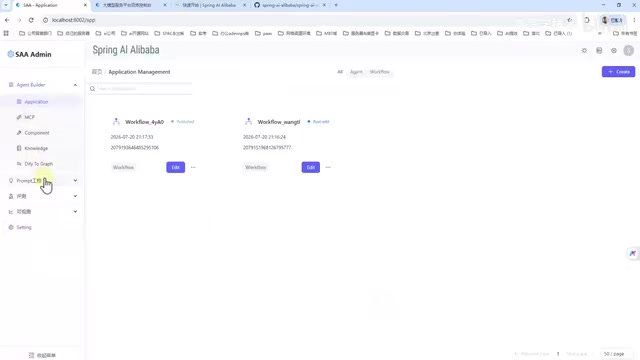
Multi-Model Platform Support and Code Export
On the configuration side, Admin supports connecting to a wide range of mainstream large model platforms. The demo uses Alibaba's Bailian platform, but the configurable options are quite extensive. The platform also supports:
- Code export: Export visual workflows as runnable code
- Custom node development: Meet individualized business requirements
- Rich built-in nodes: Cover common workflow scenarios
The combination of "visual orchestration + exportable code + custom extensibility" strikes a balance between the efficiency of low-code development and the flexibility demands of professional developers.
Local Environment Setup: Pitfalls and How to Avoid Them
The features are impressive, but the setup process has quite a few gotchas worth knowing. The following is based on version 1.1.2. The project is divided into two main parts: frontend (front) and backend.
Frontend Deployment
Frontend deployment is relatively straightforward. After downloading the front directory, run pnpm install to install dependencies, then start the main entry point.
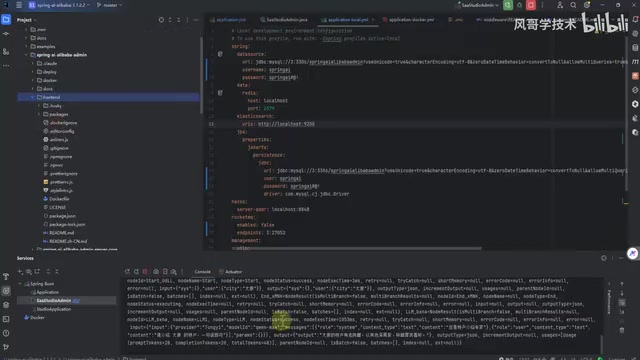
One key point: you need to modify the frontend port configuration to match the backend service (in the demo, the frontend is configured to point to port 80). It's recommended to deploy the frontend independently rather than starting it as part of the overall project — the latter triggers automatic compilation, making startup extremely slow. Once deployed independently, simply connect it to the backend. Default username and password can be found in the official documentation.
Backend Deployment and Middleware Dependencies
The backend is where the real complexity lies, and where most of the pitfalls are. First, watch out for port conflicts: the backend defaults to port 8080, which conflicts with the frontend. Be sure to change the backend to port 80 so both frontend and backend communicate on port 80.
Next, pay attention to middleware dependencies. The documentation lists a long list of components, but not all of them are required for a local development environment:
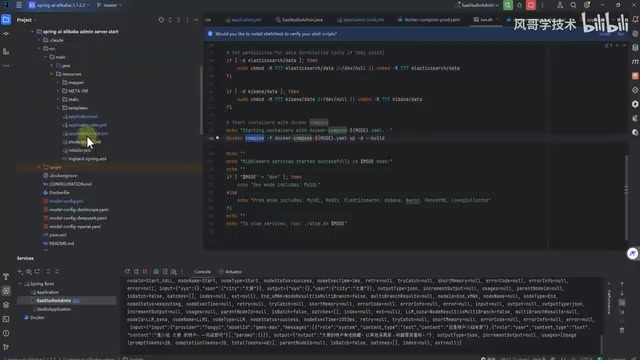
Required components:
- MySQL: After setup, import and execute the corresponding SQL scripts (Data Source)
- Redis: Start locally; used for caching and other functions
Optional components (can be skipped locally):
- Elasticsearch (ES): Not required
- Nacos: Can be skipped locally
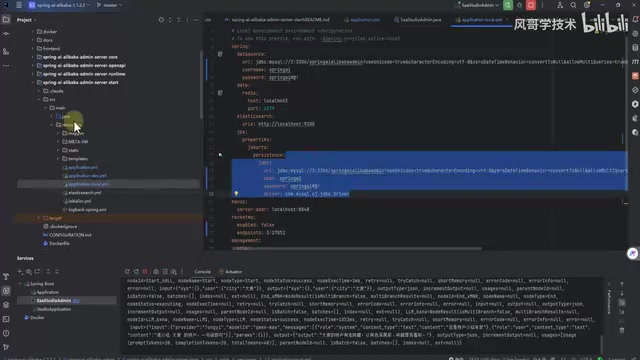
Also, make sure to specify local mode in the startup configuration. The project provides both dev and local configuration sets. For local development, use local mode and fill in the correct database and Redis connection details.
Critical Fix: Disabling the Hard RocketMQ Dependency
This is a pitfall that requires a code change. RocketMQ is Alibaba's open-source distributed message queue middleware, commonly used in production Spring applications for async task decoupling and event-driven architectures. Spring AI Alibaba Admin introduces it in production primarily for async workflow task scheduling and result callbacks. However, for local development and validation, this hard dependency significantly increases environment setup costs.
By default, Redis cannot start properly. You need to make a small adjustment to the RocketMQ-related code, changing the corresponding configuration to force mode to suppress the mandatory dependency on RocketMQ and other middleware — otherwise the application will continuously throw errors on startup.
For a local demo, there's absolutely no need to spin up a heap of middleware just to run a Hello World. Removing non-essential dependencies like RocketMQ is the key step to fast local validation.
Production Deployment
For production environments, the project provides a Docker version. Run the startup command in the corresponding directory and it will launch with MySQL and other necessary middleware already bundled — a relatively painless deployment experience.
Summary and Outlook
The release of Spring AI Alibaba Admin fills an important gap in the Java ecosystem: visual AI workflow orchestration. Its value is reflected across three dimensions:
- Lower barrier to entry: Visual orchestration combined with Dify migration support lets teams get up to speed quickly
- Ecosystem integration: Deep integration with Spring AI Alibaba and the Alibaba Cloud ecosystem, including observability capabilities based on the OpenTelemetry standard
- Flexible extensibility: Code export and custom nodes balance low-code efficiency with professional development needs
That said, based on the actual setup experience, the current version still has room to improve in terms of deployment convenience — port conflicts, heavy middleware dependencies, and the need to manually disable RocketMQ are all friction points that aren't beginner-friendly. But as a rapidly iterating open-source project, its growth potential is worth watching. For teams deeply invested in the Java stack who want to introduce AI workflow capabilities, Spring AI Alibaba Admin is definitely a choice worth exploring.
Key Takeaways
Related articles

Apple Finally Launches a Touchscreen MacBook, But Touch Isn't the Point
Apple launches its first touchscreen MacBook Pro, but touch isn't the core selling point. The Vergecast digs into why Apple did it now, what macOS interaction changes were made, how touch-optimized apps actually feel, and the real challenges around pricing and the product line.

Agentic Engineering with Claude Code and Android CLI
Google's Android team shares how to do agentic engineering with Claude Code and Android CLI: build the right environment, keep context around 150K tokens, inject info precisely via hooks and skills, and use layered verification loops to raise benchmark pass rates from 22% to 90%.

XR Accessibility Design in Practice: Alchemy Labs' Rules for Inclusive Spatial Experiences
Alchemy Labs UX lead Jasmine Cano shares practical XR accessibility design lessons: strategies for four disability types, small-body mode, snap turning, environmental read-aloud, beam stabilization, and more.