Spring AI Getting Started Tutorial: Environment Setup, Version Requirements & Core Concepts Explained

Spring AI framework getting started guide: core concepts, environment requirements, and quick setup
This article introduces Spring AI, an AI application development framework in the Spring ecosystem, covering its core positioning (unified abstraction shielding differences between AI providers), main capabilities (Chat Completion, Embedding, Text to Image, Audio Transcription, Multimodal Processing), version requirements (Spring Boot 3.4.x+, JDK 17+), environment setup methods, and explanations of core concepts including Model, Prompt, Token, and Embedding.
Introduction
Spring AI is a framework within the Spring ecosystem specifically designed for AI application development, bringing Spring's signature simplicity and elegance to the world of large model application development. For Java developers, this means you can build AI-powered applications using the familiar Spring approach. This article starts from the official documentation and walks you through Spring AI's core positioning, environment requirements, and key concepts, helping you avoid common pitfalls and get started efficiently.
What is Spring AI?
Official Positioning and Core Capabilities
Spring AI is an AI application development framework officially launched by Spring, positioned as the infrastructure for "AI engineering." You can find it in the Projects list on the spring.io website, which confirms its status as an official member of the Spring ecosystem.
Background: Why Do We Need a Framework Like Spring AI?
Before Spring AI existed, Java developers faced severe fragmentation when integrating large model services. OpenAI, Anthropic, Alibaba Cloud Tongyi, Baidu Wenxin, and other major providers all offered their own Java SDKs, but with vastly different interface designs — some based on HTTP client wrappers, others providing reactive streaming interfaces, and still others using synchronous blocking calls. Once developers needed to switch model providers, it often meant extensive business code rewrites. Spring AI draws on the "interface-oriented programming, shielding underlying differences" design philosophy of mature sub-projects like Spring Data and Spring Security. By defining unified core abstraction interfaces such as
ChatModelandEmbeddingModel, it completely decouples upper-layer business code from specific model implementations. This design not only reduces the learning curve but also provides architectural support for enterprises to conduct A/B testing, cost optimization, and disaster recovery switching between different models.
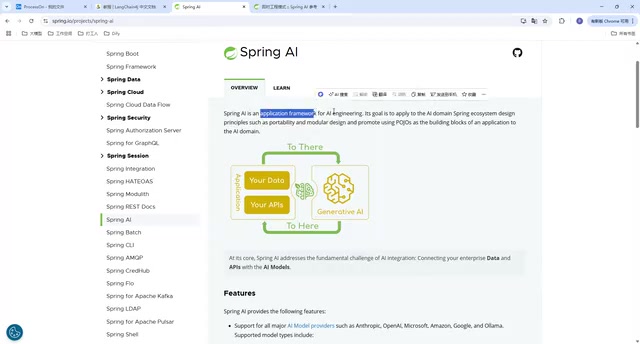
Based on the official introduction, Spring AI provides rich AI capability abstractions, primarily including the following major features:
- Chat Completion: Conversational interaction with large language models — this is the most core and commonly used feature
- Embedding: Converting text into vector representations for semantic search, RAG, and other scenarios
- Text to Image: Calling image generation models to generate images from text descriptions
- Audio Transcription: Speech recognition and audio processing capabilities
- Multimodal Processing: Supporting comprehensive processing of multiple modalities including text, images, and audio
These capabilities cover the core scenarios of mainstream AI applications today, allowing developers to call different providers' large model services through a unified Spring-style API.
Current Version Status
As of now, Spring AI provides two main versions:
- 1.0.0-SNAPSHOT: Development snapshot version containing the latest features
- 1.0.0-RC1: Release candidate version, relatively more stable

Background: Understanding Software Version Naming Conventions
Understanding version naming helps you make correct version selection decisions. SNAPSHOT is a development version automatically built by CI/CD pipelines — the code may change daily, and downloading the same version number at different times may yield different content. It's suitable for tracking the latest features but not for production deployment. RC (Release Candidate) means features are frozen and major bugs have been fixed, with final validation underway. API interfaces typically won't have breaking changes at this stage, making it an ideal choice for pre-production testing. GA (General Availability) is a stable version that has undergone a complete testing cycle with official long-term maintenance commitments. The Spring ecosystem follows a strict version release process: SNAPSHOT → Milestone (M1/M2) → RC → GA, with each stage having clear quality gates. For enterprise projects, it's recommended to introduce GA versions into production environments and follow the official Migration Guide to handle API changes between versions.
For learning and experimentation, using the SNAPSHOT version is fine — it lets you experience the latest features. However, for production projects, it's advisable to wait for the official GA release or use the RC version for better stability.
It's worth mentioning that while Spring AI's official documentation is comprehensive, like other documentation in the Spring ecosystem, it's not particularly beginner-friendly — high information density and a technically-oriented structure mean beginners often need additional distillation and interpretation. This is precisely why this article exists.
Spring AI Environment Requirements and Setup
Version Dependency Chain
Using Spring AI has one very important prerequisite: version requirements. This is where many developers run into trouble, so pay close attention.
According to the Getting Started section of the official documentation:
Spring AI supports Spring Boot 3.4.x, and Spring 3.5.x is released.
This means the following version chain must be satisfied:
| Component | Minimum Version Requirement |
|---|---|
| Spring Boot | 3.4.x and above |
| Spring Framework | 6.x and above |
| JDK | 17 and above |
The most critical change here is that the JDK version must be upgraded from 8 to 17. For many teams still using JDK 8, this represents a significant migration cost, but it's also an inevitable trend in the overall evolution of the Spring ecosystem — Spring Boot 3.x itself already requires JDK 17.
Background: Why Does Spring Boot 3.x Mandate JDK 17?
There are deep technical motivations behind this version leap. JDK 17 is the third Long-Term Support (LTS) version after JDK 8 and JDK 11, with Oracle committing to at least 8 years of security update support. From a language features perspective, JDK 17 introduces Records, Sealed Classes, Pattern Matching for instanceof, and other modern syntax. Spring Framework 6.x extensively uses these features internally to simplify code and improve type safety. More importantly, Spring Boot 3.x fully embraces GraalVM Native Image technology — compiling Spring applications into native executables through Ahead-of-Time (AOT) compilation, reducing startup time from seconds to milliseconds and memory usage by over 50%, which is significant for cloud-native and Serverless scenarios. Full GraalVM Native Image support depends on JDK 17+'s module system (JPMS). Additionally, the groundwork for Virtual Threads (Project Loom, officially released in JDK 21) was also laid in this version, providing a foundation for subsequent high-concurrency AI streaming response processing.
JDK 17 Installation and Configuration

Installing JDK 17 is actually quite simple. Here are the recommended steps:
- Download JDK 17: Go to the Oracle website or distribution download pages like Adoptium, and select the version corresponding to your operating system (Windows/macOS/Linux)
- Choose the archive version: It's recommended to download the zip/tar.gz archive format rather than the installer version
- Extract to a designated directory: Extract the archive to your preferred development tools directory
- Specify the JDK path in IDEA: No need to configure system environment variables — simply point to the extracted JDK 17 directory in IntelliJ IDEA's project settings
The advantage of this approach is that it won't affect existing JDK 8 environments on your system. Multiple versions can coexist, and you can flexibly switch between them through the IDE.
Additional Tip: Choosing a JDK Distribution
Besides Oracle JDK, developers can also choose Eclipse Temurin (maintained by the Adoptium community, formerly AdoptOpenJDK), Microsoft Build of OpenJDK, Amazon Corretto, or Azul Zulu — all completely free OpenJDK distributions. These distributions are fully compatible with Oracle JDK in functionality and all provide long-term free security patches, making them the mainstream choice for enterprise production environments. If you use version management tools like SDKMAN (Linux/macOS) or Scoop (Windows), you can more conveniently switch between multiple JDK versions — simply execute
sdk install java 17-temto install Temurin 17 with one command.
Spring AI Core Concepts Overview
Why Understanding AI Concepts Matters
The Spring AI official documentation includes a dedicated AI Concepts chapter, and this content is crucial for understanding the framework's design. Many developers are eager to jump into writing code and skip the concepts section, only to frequently encounter comprehension barriers during actual development.
Here are several core concepts that require focused attention:
- Model: Spring AI's unified abstraction for different AI models — regardless of whether the underlying model is OpenAI, Tongyi Qianwen, or another model, the upper-layer API remains consistent
- Prompt: The input for interacting with models — Spring AI provides structured Prompt construction methods
- Token: The basic unit of text processing for large models, directly affecting call costs and response speed
- Embedding: The process of mapping text to high-dimensional vectors, serving as the foundation for implementing semantic search and RAG
- Output Parser: Converting unstructured model output into Java objects — this is one of Spring AI's major highlights
Background: What is a Token, and Why is it So Important?
A Token is not equivalent to a character or word — it's the smallest semantic unit produced after a large model's tokenizer segments text. For English, one Token corresponds to approximately 4 characters or 0.75 words; for Chinese, due to higher information density per character, typically 1-2 Chinese characters correspond to one Token. Understanding the importance of Tokens manifests in three dimensions: Cost — mainstream large model APIs charge by Token count, with input Tokens and output Tokens typically priced separately, and a single RAG query containing a long document may consume thousands of Tokens; Context Window Limitation — each model has a maximum Context Window (e.g., GPT-4 Turbo supports 128K Tokens), and content exceeding this limit gets truncated, causing the model to "forget"
Related articles
 Tutorials
ChatGPT Plus Subscription Guide: Are GPT-5.5, image-2, and Codex Worth the Upgrade?
A detailed look at ChatGPT Plus features — GPT-5.5, image-2, and Codex — with a Plus vs Pro comparison and a complete step-by-step subscription guide for users outside the US.
 Tutorials
Harness AI Engineering in Practice: Using Claude Code to Master Enterprise-Level E-Commerce Development
Deep dive into Harness AI Engineering: master enterprise e-commerce development with Claude Code using the Rules, Skills, Wiki, and Changes framework.
 Tutorials
Cursor + Codex Dual-IDE Collaboration: A Practical Methodology for Open-Source Project Customization
A complete methodology for open-source project customization based on real-world experience, detailing the Cursor+Codex dual-IDE workflow, seven-stage process, MVP validation, and AI source code reading techniques.