Spring AI in Practice: Building a Text-to-SQL Agent Tool Chain from Scratch

Building a natural language-to-SQL assistant with Spring AI Alibaba Agent Framework and Tool context passing techniques
This article details how to build a natural language-to-SQL assistant using Spring AI Alibaba Agent Framework through a four-step Tool chain (ListTables, GetSchema, VerifyQuery, ExecuteQuery). It focuses on the core issue of Tool context passing in Agent development: why ThreadLocal fails in Stream mode and the correct solution—using RunnableConfig + ToolContext to pass user information via Metadata, avoiding cross-thread data loss.
Introduction
Automatically converting plain language into SQL queries is in huge demand for enterprise AI applications. This article walks through how to build a natural language-to-SQL assistant using the Spring AI Alibaba Agent Framework's Tool chain approach, while diving deep into a core technique for Agent development—Tool context passing—a pitfall that anyone who's been there will appreciate.
Tool Context Passing: The ThreadLocal Trap and the Correct Approach
Problem Scenario
There's a very common requirement in Agent applications: after a user logs in and chats with the LLM, Tools need access to the current user's information (e.g., UserID, UserName) when invoked. In traditional Spring AI, we're accustomed to using InheritableThreadLocal for context passing, but things are completely different in the Alibaba Agent Framework.
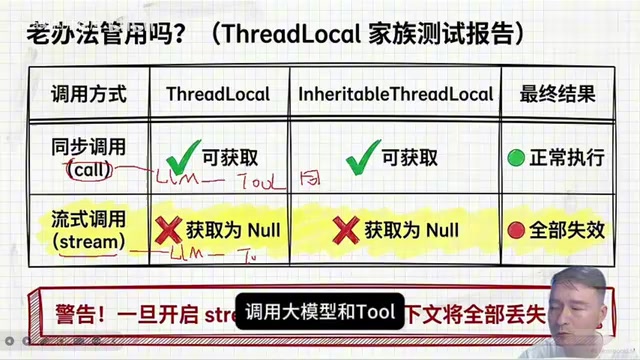
Bottom line first: ThreadLocal works fine in synchronous calls (the call method), but completely fails in streaming requests (stream).
Why Does ThreadLocal Fail in Stream Mode?
To understand this, you need to know the essence of ThreadLocal: it's a thread-local variable mechanism in Java where each thread owns an independent copy of the variable, naturally achieving thread isolation. InheritableThreadLocal is its subclass, allowing child threads to inherit variable values from parent threads. In the traditional Servlet synchronous model, a single HTTP request is handled by the same thread from start to finish, making ThreadLocal the standard approach for passing user context. However, in reactive/asynchronous programming models, a single request may span multiple threads or even thread pools, turning ThreadLocal's thread-binding nature into a trap—Spring WebFlux, Project Reactor, and similar frameworks all have this issue, typically using dedicated Context objects to replace ThreadLocal for cross-async-boundary context passing.
The root cause lies in the difference in threading models:
- Call mode: LLM invocation and Tool execution run on the same thread, so
ThreadLocalnaturally passes through correctly - Stream mode: LLM invocation and Tool execution belong to different threads—neither
ThreadLocalnorInheritableThreadLocalcan pass data across threads
There's another easily overlooked detail: never set ThreadLocal in the ReactAgent's @Bean configuration method. The reason is simple—Bean initialization happens during the Spring Boot startup phase, and by the time a user actually sends a request, it's long since switched to a different thread.
The Correct Approach: RunnableConfig + ToolContext
The Alibaba Agent Framework provides a dedicated RunnableConfig mechanism to solve the context passing problem, with two core steps.
Step 1: Build a RunnableConfig and pass it when calling the Agent
RunnableConfig config = RunnableConfig.builder()
    .threadId("sessionId-xxx")  // For chat history isolation
    .addMetadata("userId", "xushu")  // Custom metadata
    .build();
agent.call(message, config);
Step 2: Change the Tool's Function interface to BiFunction to receive ToolContext
BiFunction accepts an additional ToolContext parameter compared to Function. This is an extension design of the Alibaba Agent Framework that enables tool functions to be aware of the Agent runtime context, rather than just processing input parameters—this is the key interface design for solving the context passing problem.
BiFunction<InputType, ToolContext, OutputType> toolFunction = (input, toolContext) -> {
    RunnableConfig runnableConfig = (RunnableConfig) toolContext.getContext().get(AGENT_CONFIG);
    String userId = runnableConfig.getMetadata().get("userId");
    // Business logic...
};
Usage Recommendations for Metadata and ThreadId
threadId's responsibility is chat history isolation (it can be a session ID or user ID), while business data (user ID, permission info, etc.) should be passed uniformly via addMetadata. This approach is more flexible and avoids conflicts with the chat history isolation dimension.
Hidden Capabilities of ToolContext
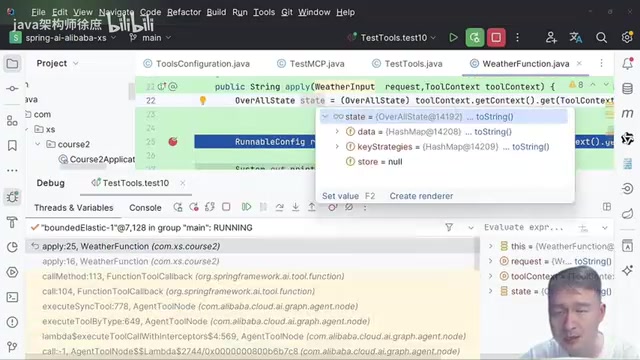
ToolContext can not only access custom metadata but also the current chat history State—a core concept in Alibaba Graph that contains the complete conversation context including user prompts, LLM responses, tool call parameters, and more.
Text-to-SQL Assistant: Core Architecture Design
Text-to-SQL Technical Background
Text-to-SQL is a classic NLP task aimed at automatically converting natural language questions into structured query language. Early approaches relied on rule engines and semantic parsing, with accuracy limited by rule coverage. In the deep learning era, models based on Seq2Seq and Transformer architectures (such as IRNet, RATSQL) achieved breakthroughs on benchmarks like Spider. In the LLM era, models like GPT-4 can generate high-quality SQL under zero-shot conditions thanks to powerful context understanding capabilities, but still face the hallucination problem—models may generate SQL that is syntactically correct but uses wrong table/column names. The four-step tool chain in this article is specifically designed to address this pain point: by dynamically fetching real Schema and sample data, injecting database structure information into the model context, fundamentally reducing hallucination occurrences.
Background on Multi-Source Retrieval
In AI applications, different data sources have their own strengths:
| Retrieval Type | Best Data Source |
|---|---|
| Aggregate queries (count, average, max) | Relational databases |
| Semantic search | Vector databases |
| Graph relationship queries | Graph databases |
| Keyword search | Elasticsearch / Markdown+Grep |
This article focuses on the relational database scenario, converting natural language to SQL and executing MySQL queries through the Tool chain.
Four-Step Tool Chain Design
The core of the Text-to-SQL assistant consists of four custom Tools forming a rigorous ReAct iteration chain. ReAct (Reasoning + Acting) is an Agent paradigm proposed by Google in 2022, with the core idea of having the LLM alternate between reasoning (Thought) and acting (Action), observing (Observation) results after each action before deciding the next step. Unlike Chain-of-Thought (CoT) pure reasoning, ReAct allows the model to call external tools, enabling it to handle complex tasks requiring real-time information. In the Text-to-SQL scenario, ReAct's iterative nature is particularly crucial—the model doesn't need to generate perfect SQL in one shot, but rather progressively collects information, validates, and corrects through multiple rounds of tool calls, ultimately arriving at an executable query:
- ListTables Tool — Retrieve all table names in the database
- GetSchema Tool — Get the target table's structure definition and sample data
- VerifyQuery Tool — Use the LLM to verify whether the generated SQL syntax is valid
- ExecuteQuery Tool — Execute the final SQL query and return results
Hands-On Code Walkthrough
ReactAgent Configuration Details
The system prompt explicitly guides the LLM to call the four Tools in sequence, with tools bound using the FunctionToolCallback approach:
@Bean
public ReactAgent textToSqlAgent() {
    return ReactAgent.builder()
        .systemPrompt("You are a Text-to-SQL assistant, please follow these steps...")
        .tools(listTablesTool, getSchemaTool, verifyQueryTool, executeQueryTool)
        .build();
}
There are two main ways to register Tools in Spring AI: dynamic binding (loading tools dynamically at runtime based on requests) and static binding (determined at compile time, registered during Bean initialization). The reason for choosing FunctionToolCallback static binding is: it wraps Java functions (Function/BiFunction) as tool descriptions callable by the LLM, including meta-information such as tool name, function description, and input parameter JSON Schema—the LLM uses these descriptions to decide when to call which tool. These Tools are fixed in number, their logic can be determined at compile time, and they're foundational components of the application—perfectly fitting the use case for static binding.
Core Logic Breakdown for Each Tool
ListTables Tool: Executes SHOW TABLES via JdbcTemplate to get all table names, returning them to the LLM for reasoning and targeting.
GetSchema Tool: Retrieves the target table's structure definition and sample data.
Related articles
 Tutorials
ChatGPT Plus Subscription Guide: Are GPT-5.5, image-2, and Codex Worth the Upgrade?
A detailed look at ChatGPT Plus features — GPT-5.5, image-2, and Codex — with a Plus vs Pro comparison and a complete step-by-step subscription guide for users outside the US.
 Tutorials
Harness AI Engineering in Practice: Using Claude Code to Master Enterprise-Level E-Commerce Development
Deep dive into Harness AI Engineering: master enterprise e-commerce development with Claude Code using the Rules, Skills, Wiki, and Changes framework.
 Tutorials
Cursor + Codex Dual-IDE Collaboration: A Practical Methodology for Open-Source Project Customization
A complete methodology for open-source project customization based on real-world experience, detailing the Cursor+Codex dual-IDE workflow, seven-stage process, MVP validation, and AI source code reading techniques.