Stable Diffusion Local Deployment Tutorial: A Beginner's Guide to Installing All-in-One Packages

A beginner-friendly guide to installing Stable Diffusion locally using all-in-one packages in three simple steps.
This guide walks beginners through deploying Stable Diffusion locally, covering hardware requirements (GPU VRAM needs), a three-step installation process using all-in-one packages that eliminate complex dependency management, model management with Chinese-localized annotations, and a comparison between local deployment and paid cloud services to help users choose the right approach.
Why Deploy Stable Diffusion Locally
As AI art technology becomes mainstream, more and more creators are shifting their attention from paid online platforms to local deployment solutions. Compared to cloud services that require subscriptions, queue waiting, and impose various content restrictions, Stable Diffusion as an open-source model allows users to run it freely on their own hardware—representing a significant shift in how AI tools are used.
Stable Diffusion was first released by Stability AI in 2022, built on the Latent Diffusion Model architecture. Its core innovation lies in moving the image generation process from pixel space to a compressed latent space. In simple terms, the model doesn't operate pixel by pixel on high-resolution images directly. Instead, it first compresses images into a low-dimensional mathematical representation space, completes the "denoising" generation process there, and then decodes the result back into a full image. This design dramatically reduces computational resource requirements, making it possible for consumer-grade GPUs to run large image generation models. Unlike closed-source commercial products such as DALL-E and Midjourney, Stable Diffusion's model weights are fully public—anyone can download, modify, and redistribute them. This has spawned a massive community ecosystem including tens of thousands of fine-tuned models, plugins, and tools.
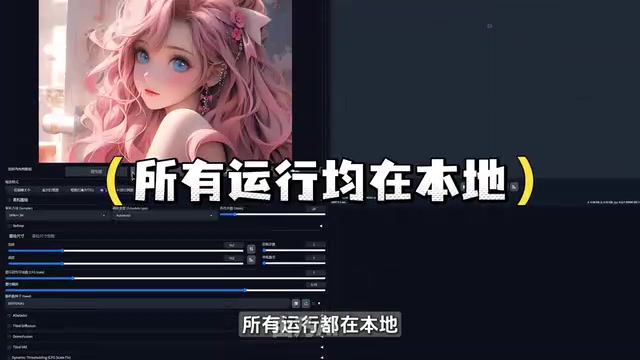
The core advantage of local deployment is the return of "control." All computation happens on your local GPU—no internet connection needed, no subscription fees, and no content moderation policies imposed by third-party platforms. For professional creators who need to generate large volumes of images frequently, this approach offers clear appeal in terms of long-term costs and creative freedom.
It's worth noting that "no censorship" also means users must take responsibility for content compliance themselves. Open-source tools grant freedom, but creators should use these capabilities within legal and ethical boundaries, avoiding the generation of infringing or illegal content.
Stable Diffusion Hardware Requirements and Target Users
Many people hesitate about local deployment, mainly worried about high hardware requirements. In reality, the barrier to running Stable Diffusion has been continuously lowering. All-in-one packages can support NVIDIA 1600 series GPUs at minimum, meaning even mid-range gaming cards from a few years ago can handle basic image generation tasks.
How GPU VRAM Affects AI Art Generation
In AI art generation, the GPU handles the vast majority of computational workload, and its VRAM size directly determines the image resolution and batch size you can generate. GPUs are well-suited for AI image generation because they have thousands of parallel computing cores (NVIDIA calls them CUDA cores) capable of simultaneously processing massive matrix operations—the core operation of neural network inference. Unlike CPUs, which excel at complex logical decisions, GPU architecture is naturally suited to this "massive simple calculations executed in parallel" work pattern.
VRAM is the GPU's dedicated high-speed memory. During image generation, it must simultaneously hold model parameters, intermediate activation values, and output tensors. Taking Stable Diffusion XL as an example, the model parameters alone occupy approximately 6.5GB of VRAM, and actual usage is higher when including intermediate data produced during inference. This is why VRAM capacity is so critical—if VRAM is insufficient, the system will attempt to transfer data to regular RAM or even disk storage, causing generation speed to drop dramatically. Generally speaking:
- 6GB VRAM: Can run basic models (e.g., SD 1.5), generating standard-size images like 512×512, with single image generation taking anywhere from a few seconds to over ten seconds
- 8GB and above: Can load larger models (e.g., SDXL), support HD upscaling (e.g., via Tiled VAE block processing), and run more plugins simultaneously
- 12GB and above: Can smoothly handle video generation (e.g., AnimateDiff), batch processing, and other high-load tasks, as well as loading multiple LoRA models for style blending
For users who want to experiment but have limited hardware, starting with smaller models and gradually upgrading configurations is recommended. Additionally, the community has developed techniques like model quantization and attention mechanism optimization (e.g., xFormers) to help low-VRAM users push past hardware limitations to some extent.
Stable Diffusion All-in-One Package Installation: Complete Local Deployment in Three Steps
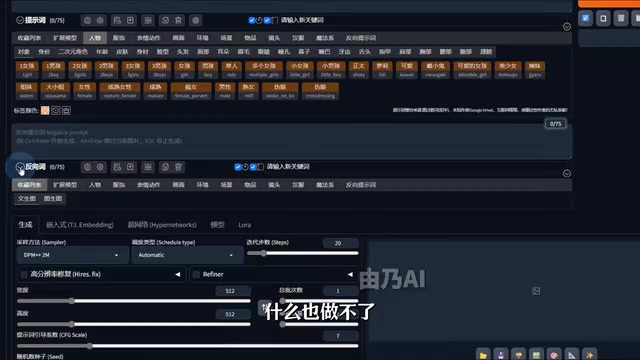
For beginners, configuring a Python environment and installing dependencies from scratch is often the biggest obstacle. Running Stable Diffusion depends on the PyTorch deep learning framework, the CUDA toolkit (NVIDIA's GPU parallel computing platform), and dozens of Python third-party libraries. Different versions of PyTorch require specific CUDA driver versions, and various plugins may have conflicting library version requirements—for example, one plugin needs transformers library version 4.30, while another requires 4.35 or above. Traditional installation requires users to manually configure virtual environments, resolve version dependencies, and sometimes even compile C++ extensions—extremely unfriendly for non-technical users.
The emergence of "all-in-one packages" has greatly simplified this process, packaging complex environment configurations into ready-to-use form. Through pre-configured virtual environments and fixed version locking, all-in-one packages resolve all dependency relationships at once, allowing users to complete deployment without any programming knowledge.
Specific Installation Steps
The entire installation process can be summarized in three steps:
Step 1: Extract the Package
Right-click and extract to the current folder. Here's a critical detail—the path must use only English characters; avoid Chinese directory names. Chinese characters in file paths are a common cause of startup failures for many AI tools, because some underlying libraries (particularly Python extension modules written in C/C++) use ASCII encoding when processing file paths and cannot correctly recognize multi-byte Chinese characters, resulting in file-not-found or encoding errors. It's recommended to place files in a short English path like D:\StableDiffusion\.
Step 2: Double-click the Launcher
After extraction, no additional software installation is needed—simply double-click the pink launcher icon to enter the interface.
Step 3: One-Click Launch
Click the "One-Click Launch" button. The first launch will perform environment deployment, requiring a few minutes of waiting. This process actually completes background dependency initialization, including detecting the GPU model, configuring CUDA acceleration parameters, pre-compiling certain computation kernels, and other operations.
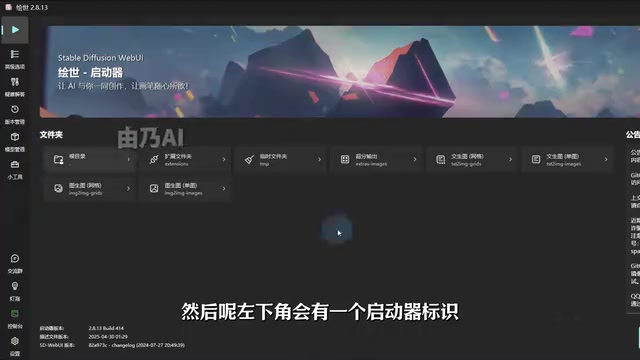
Once deployment is complete, you can enter the Stable Diffusion WebUI interface and begin AI art creation. WebUI (the most well-known versions being AUTOMATIC1111 and the Forge fork) is built on the Gradio framework—a web interface library designed specifically for machine learning models. It launches a local HTTP server (typically at 127.0.0.1:7860), and users access the interface through their browser. All computation still happens on the local GPU, and no data is uploaded to any external server. The advantage of this browser/server architecture is that the interface can be flexibly extended through plugins, and the community has developed hundreds of functional plugins.
Model Management: The Real Value of All-in-One Packages
A freshly deployed Stable Diffusion is like an "unfinished apartment"—it has only a base model with limited actual capabilities. What truly determines generation quality are the various model files you load.
Model files in the Stable Diffusion ecosystem come primarily in two formats: .safetensors and .ckpt. .safetensors is a more secure serialization format introduced by Hugging Face that stores only tensor data, avoiding the security risk of .ckpt format (essentially Python pickle files) potentially carrying malicious executable code. It has now become the community-recommended standard format.
Regarding model types, the ecosystem includes several varieties serving different purposes:
- Checkpoints: Complete base generation models, typically 2-7GB in size, determining the overall art style and generation capabilities
- LoRA (Low-Rank Adaptation): Low-rank adaptation fine-tuned models, typically only tens to hundreds of MB, capable of overlaying specific styles, characters, or concepts without changing the base model
- VAE (Variational Autoencoder): Responsible for encoding and decoding between latent space and pixel space; different VAEs affect color saturation and detail rendering
- ControlNet models: Provide precise control capabilities for pose, lineart, depth maps, and more
Chinese-Localized Model Management
Native Stable Diffusion model files are typically named with long strings of English code (e.g., realisticVisionV51_v51VAE.safetensors), which is extremely unfriendly for beginners. The all-in-one package includes a practical optimization: adding Chinese annotations and preview images for each model. This allows users to intuitively see sample images and Chinese names in the interface, quickly selecting appropriate styles without facing a bunch of difficult-to-decipher English codes.
This all-in-one package includes 337 verified practical workflows and models, covering various style types including portraits, landscapes, anime, and more. The "workflows" mentioned here refer to complete generation pipeline configuration files saved in node-based interfaces like ComfyUI, containing all settings information including model selection, sampler parameters (such as steps and CFG guidance scale), post-processing steps (such as HD upscaling and face restoration). Users only need to load a workflow to reproduce specific effects with one click. This "curated integration" approach essentially lowers the learning curve for AI art, letting creators focus their energy on creation itself rather than environment configuration.
How to Choose Between Local Deployment and Paid Cloud Services
Open-source local models and paid cloud services aren't a simple replacement relationship—they're two solutions serving different needs:
| Comparison | Paid Cloud Services | Local Open-Source Deployment |
|---|---|---|
| Hardware Investment | None required | Dedicated GPU needed |
| Entry Barrier | Ready to use immediately | Some learning curve |
| Long-term Cost | Ongoing subscription | One-time hardware investment |
| Freedom | Limited by platform | Fully self-controlled |
| Model Updates | Automatic platform upgrades | Manual download and update |
| Best For | Light, occasional use | Professional, high-frequency users |
From a cost perspective with further quantification: mainstream cloud AI art services typically charge $10-$60 per month. At a median of $30/month, annual costs reach $360. Meanwhile, a used RTX 3060 12GB GPU costs around $200, and with other component upgrades, the local solution typically pays for itself within 3-6 months. Of course, this calculation assumes the user actually has sustained, high-frequency usage needs.
The thriving open-source ecosystem has indeed created competitive pressure for paid platforms, but the two are more likely to coexist and promote each other long-term. Cloud services continue innovating in usability and model capabilities, while the open-source community maintains advantages in customizability and transparency. For creators, what matters most is choosing the tool that best fits your hardware conditions, usage frequency, and technical ability.
Conclusion
The barrier to local Stable Diffusion deployment is being continuously lowered by tools like all-in-one packages—undoubtedly a sign that the open-source AI art ecosystem is maturing. Since its initial release in 2022, the community has built a complete industry chain including model training, interface development, plugin ecosystems, and tutorial systems, allowing new users to get started quickly by standing on the shoulders of predecessors. For users committed to diving deep into AI creation, local deployment offers unmatched freedom and cost advantages. However, while enjoying this freedom, please be sure to comply with relevant laws and regulations, use AI tools responsibly, and let technology truly serve creativity.
Related articles

Ponytail: Giving AI Coding Agents a Senior Engineer's Mindset
Ponytail is a free GitHub tool that injects a senior engineer's mindset into AI coding agents, making them ask whether code is even necessary first. According to TamilDeck, it can compress 200 lines of AI-generated code to 30, cutting token costs, with support for Cursor rules and Claude Code skill integration—though security review still requires human oversight.

Complete Guide to Connecting Cursor AI to the GitHub MCP Server
A step-by-step guide to connecting Cursor AI to the GitHub MCP server: create a personal access token, configure mcp.json, store the token in the ENV block, and verify with a PR query.

AI Agent Hacks? Don't Get Swept Up in the Hype
AI agent hacking news is everywhere, but Reddit users liken the hype to Y2K panic—lacking real attack cases and possibly driven by IPO and regulatory arbitrage motives.