Stagehand Tutorial: An AI Browser Automation Framework That Balances Control and Intelligence

Stagehand blends code and AI for flexible, controllable browser automation
Stagehand is a hybrid browser automation framework combining the stability of traditional code frameworks like Playwright with the flexibility of LLM-driven tools. It offers four core capabilities — Act (natural language actions), Extract (structured data extraction), Observe (scout first, act later), and Agent (fully automatic) — letting developers choose their own balance between code control and AI flexibility while significantly reducing token costs through the Observe mechanism.
The Dilemma of Browser Automation
Current browser automation tools are divided into two main camps:
Traditional code frameworks (like Playwright and Puppeteer) are entirely code-driven, offering stable and reliable execution. However, they come with a steep learning curve, long development cycles, and high maintenance costs — whenever the target webpage's structure changes, selector code needs to be updated. Playwright is developed by Microsoft, and Puppeteer is maintained by the Google Chrome team. Both communicate with browsers through CDP (Chrome DevTools Protocol) or similar protocols. Their core mechanism involves precisely locating page elements through CSS selectors, XPath, or ARIA attributes, then executing actions like clicking, typing, or taking screenshots. The stability of this approach comes from determinism — the same selector on the same page structure will always locate the same element. But modern web applications heavily use dynamically generated class names (like CSS Modules or Tailwind's hashed class names) and frequently updated frontend components, making selectors extremely prone to breaking. This is the fundamental reason why traditional frameworks have high maintenance costs.
LLM-driven tools (like Browser Use) go to the other extreme — users simply input natural language instructions, and AI takes full control of browser operations. While incredibly easy to get started with, the execution results are hard to control. Every step depends on LLM reasoning, leading to massive token consumption and considerable execution time. Specifically, tools like Browser Use need to send the current page's DOM structure (or screenshot) to the LLM for reasoning at every step, with the model deciding what to do next. A typical webpage DOM might contain thousands of nodes, easily exceeding tens of thousands of tokens when serialized. If an automation workflow involves 10-20 steps, cumulative token consumption could reach hundreds of thousands. At GPT-4o pricing, a single workflow run could cost several dollars. Additionally, each LLM call introduces network latency and inference time, typically 2-10 seconds, making the entire automation workflow far slower than traditional code solutions.
Is there a solution that lets developers freely choose which steps to write in code and which to describe in natural language, achieving both stability and flexibility? This is exactly what Stagehand aims to solve.
Stagehand's Four Core Capabilities
Stagehand's design philosophy is crystal clear — it breaks browser automation into four atomic operations: Act, Extract, Observe, and Agent. Developers can freely combine them based on actual scenarios, finding the optimal balance between code controllability and AI flexibility.
The core idea behind this hybrid mode stems from the "separation of concerns" principle in software engineering. In real browser automation projects, roughly 70-80% of operations are structured and predictable (like navigating to fixed URLs, waiting for page loads, handling known popups) — these are most efficiently and reliably implemented with traditional code. The remaining 20-30% involve dynamic content understanding (like identifying CAPTCHA types, understanding search box locations across different websites, parsing unstructured page content) — these are where LLMs truly shine. Stagehand's hybrid mode lets developers precisely control where AI intervenes, avoiding both the uncontrollability of "leaving everything to AI" and the fragility of "doing everything in code."
Act: Translating Natural Language into Concrete Actions
Act is Stagehand's most fundamental operation unit. You describe an action in natural language, and the framework translates it into actual browser operations. For example:
click the Login button→ clicks the login buttonfill the search box with "stagehand"→ types content in the search boxscroll down→ scrolls the page downselect an option from the menu→ selects an option from a menu
Essentially, it embeds natural language instructions within your code flow, letting AI handle those operations where "locating elements with CSS selectors is too cumbersome," while the overall flow remains under your code's control.
Extract: Structured Data Extraction with Schema Validation
Extract is used to pull data from webpages and return structured JSON results according to a predefined Zod Schema. For example, you can ask it to "extract all search result titles from the page," and it returns a string array with a fully controllable output format.
Zod is the most popular runtime type validation library in the TypeScript ecosystem. It allows developers to define data structures (Schemas) in code and validate at runtime whether data conforms to the expected format. In Stagehand's Extract feature, Zod Schema plays the role of a "contract": developers declare the expected return data structure in advance, and the LLM's output must strictly match that structure — otherwise a validation error is triggered. This mechanism addresses the core pain point of LLM output uncertainty. Even if the model's natural language understanding has deviations, as long as the output format doesn't match the Schema, the system can immediately detect the problem rather than letting incorrect data silently flow into downstream logic.
This is extremely practical in automated data collection scenarios, eliminating the tedious work of manually parsing the DOM.
Observe: Scout First, Act Later
Observe is the most ingenious design in Stagehand. Rather than directly executing operations, it first scans the current page and returns a list of all executable actions, including element descriptions, available methods (like click), and precise CSS selectors.

Observe's underlying implementation combines DOM analysis with LLM semantic understanding. It first scans the current page for interactive elements, identifying all clickable, typeable, and selectable elements. Then it sends these elements' contextual information (text content, ARIA labels, positional relationships) to the LLM, which determines which elements are relevant to the user's instruction. The returned results include precise CSS selectors, meaning subsequent operations can completely bypass the LLM and execute directly through Playwright's native API. This design essentially concentrates the LLM's "intelligence" in the element-locating phase while returning the execution phase to deterministic code operations — achieving optimal allocation of intelligence and efficiency.
This "scout first, act later" mechanism brings three key advantages:
1. Operation Validation: Confirm whether target elements exist before execution. For example, if you want to click a "Log Out" button but the user might not be logged in, using Observe to check whether the button exists first prevents invalid operations and script errors.
2. Significant Token Savings: After Observe locates all target elements in one pass, subsequent Act operations can directly use the returned selectors without any further LLM interaction. For example, if you use Act to fill form fields one by one (username, password, email...), each fill consumes one LLM call. But if you use Observe to find all input fields at once, subsequent filling becomes pure Playwright code operations with virtually zero token cost.
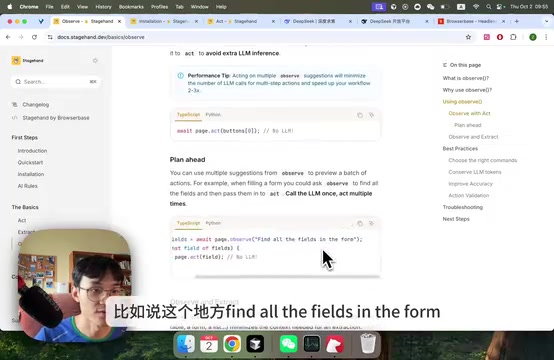
3. Narrowing Data Extraction Scope: First use Observe to locate a specific area on the page (like a data table), then pass that area's selector to Extract, so data extraction only operates within a local scope — further reducing token consumption and improving extraction accuracy.
Agent: Fully Automatic Mode
Agent mode works similarly to Browser Use — you simply issue a natural language instruction, and AI automatically orchestrates all operation steps. However, testing reveals that Agent mode currently lacks stability, with issues like pages freezing or crashing. It's recommended to prioritize the Act + Extract + Observe combination for building automation workflows.
Hands-On: Building a Stagehand Project from Scratch
Let's walk through a complete practical example demonstrating how to implement Baidu search automation with Stagehand.
Environment Setup and Dependency Installation
First, create a Next.js project and install the required dependencies:
npx create-next-app LearnStageHand
cd LearnStageHand
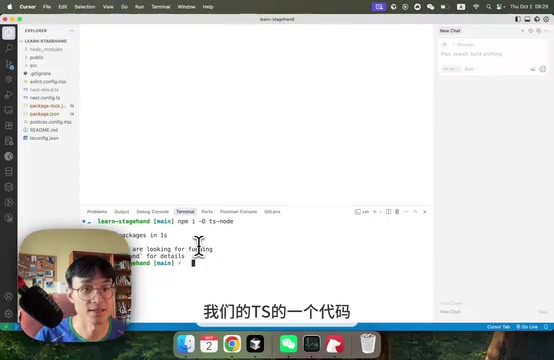
npm install -D ts-node
npm install @browserbasehq/stagehand playwright zod
npx playwright install chromium
Explanation of each dependency:
ts-node: Runs TypeScript code directly without additional compilation steps. It registers a TypeScript compiler in the Node.js runtime for just-in-time compilation and execution — ideal for quickly validating script logic during development.@browserbasehq/stagehand: The Stagehand core framework, developed and maintained by the BrowserBase team. BrowserBase itself is a cloud browser infrastructure provider. Stagehand can connect to their cloud browser cluster or run in purely local mode.playwright: The underlying browser driver engine. Stagehand builds an AI-enhanced layer on top of it, with all final browser operations (clicking, typing, navigation, etc.) executed through Playwright's API.zod: A data Schema validation tool used with Extract to ensure LLM-returned data strictly conforms to predefined structures.- The final step installs the Chromium browser driver — a binary file required for Playwright to control the browser.
Configuring Environment Variables
Create a .env file with the following keys:
- OPENAI_API_KEY: LLM API Key (users in China can substitute with DeepSeek)
- BROWSERBASE_API_KEY and BROWSERBASE_PROJECT_ID: Cloud runtime configuration (optional, not needed for local execution)
For users in China, DeepSeek API is recommended as an alternative — simply visit the DeepSeek website to create an API Key. DeepSeek is a leading LLM service provider in China, with its DeepSeek-V3 and DeepSeek-R1 models performing close to or even surpassing GPT-4 level on multiple benchmarks. For developers in China, using DeepSeek API offers three significant advantages: first, lower network latency with stable access without a VPN; second, significant cost advantages, with API call costs typically one-tenth of OpenAI's or even lower; third, more accurate understanding of Chinese-language scenarios, often achieving better results when locating elements and extracting data from Chinese webpages. Stagehand routes to different model providers through model name prefixes (like deepseek/deepseek-chat), making the switching process almost transparent to business code.
Writing the Automation Script
Create src/lab-stagehand.ts with the following core logic:
// Create a Stagehand instance using a local browser
const stagehand = new Stagehand({ env: "local" });
await stagehand.init();
const page = stagehand.page;

// Navigate to the target page
await page.goto("https://www.baidu.com");

// Act: Fill the search box
await page.act({ action: `fill the search box with "stagehand"` });

// Act: Click the search button
await page.act({ action: "click the search button" });

// Extract: Pull search results
const searchResult = await page.extract({
  instruction: "extract the search results as an array",
  schema: z.object({ results: z.array(z.string()) })
});
console.log(searchResult);
Note: When using DeepSeek, you need to specify modelName: "deepseek/deepseek-chat" during initialization and pass the corresponding API Key.
Advanced Usage of Observe
// Scout first: find the search button
const searchButtons = await page.observe({
  instruction: "find the search button"
});
console.log(searchButtons);
// Returns an action list containing description, method, and selector

// Then execute: directly use observe's returned result, no additional token cost
if (searchButtons.length > 0) {
  await page.act(searchButtons[0]);
}
This "scout first, act later" pattern makes every step evidence-based, dramatically improving the controllability and debuggability of automation workflows.
Stagehand vs Playwright vs Browser Use: Side-by-Side Comparison
| Dimension | Playwright (Traditional) | Browser Use (AI-Driven) | Stagehand (Hybrid) |
|---|---|---|---|
| Learning Curve | High | Low | Medium |
| Execution Stability | High | Low | High |
| Token Consumption | None | Extremely High | Controllable |
| Flexibility | Low | High | High |
| Controllability | High | Low | High |
| Maintenance Cost | High (code changes needed on page updates) | Low | Medium |
Stagehand's core value lies in giving the choice back to developers: write the structured, logic-fixed parts in Playwright code; describe the parts requiring page semantic understanding and dynamic element location in natural language for AI to handle. This hybrid mode preserves code determinism while fully leveraging LLMs' semantic understanding capabilities.
Its use cases are extensive: automated data collection, batch execution of repetitive daily tasks, and serving as the underlying infrastructure for LLM Agents to operate browsers. For developers looking to build reliable browser automation workflows, Stagehand's Act + Extract + Observe trio is currently the optimal solution balancing efficiency and controllability.
Key Takeaways
- Stagehand combines the stability of traditional code frameworks with the flexibility of LLM-driven tools, letting developers choose their own code-to-natural-language ratio
- Four core features: Act (execute actions), Extract (structured data extraction), Observe (scout first, act later), and Agent (fully automatic mode)
- The Observe feature significantly reduces LLM call frequency by pre-locating elements, saving tokens and improving execution speed
- Users in China can use DeepSeek API as a substitute for OpenAI; local execution doesn't require BrowserBase cloud service configuration
- Agent mode currently lacks stability — the Act + Extract + Observe combination is recommended
Related articles
 Tutorials
ChatGPT Plus Subscription Guide: Are GPT-5.5, image-2, and Codex Worth the Upgrade?
A detailed look at ChatGPT Plus features — GPT-5.5, image-2, and Codex — with a Plus vs Pro comparison and a complete step-by-step subscription guide for users outside the US.
 Tutorials
Harness AI Engineering in Practice: Using Claude Code to Master Enterprise-Level E-Commerce Development
Deep dive into Harness AI Engineering: master enterprise e-commerce development with Claude Code using the Rules, Skills, Wiki, and Changes framework.
 Tutorials
Cursor + Codex Dual-IDE Collaboration: A Practical Methodology for Open-Source Project Customization
A complete methodology for open-source project customization based on real-world experience, detailing the Cursor+Codex dual-IDE workflow, seven-stage process, MVP validation, and AI source code reading techniques.