Starlie: A Blazing-Fast Native Jira Client for Mac

Starlie is a native Mac Jira client built for speed, privacy, and AI coding tool integration.
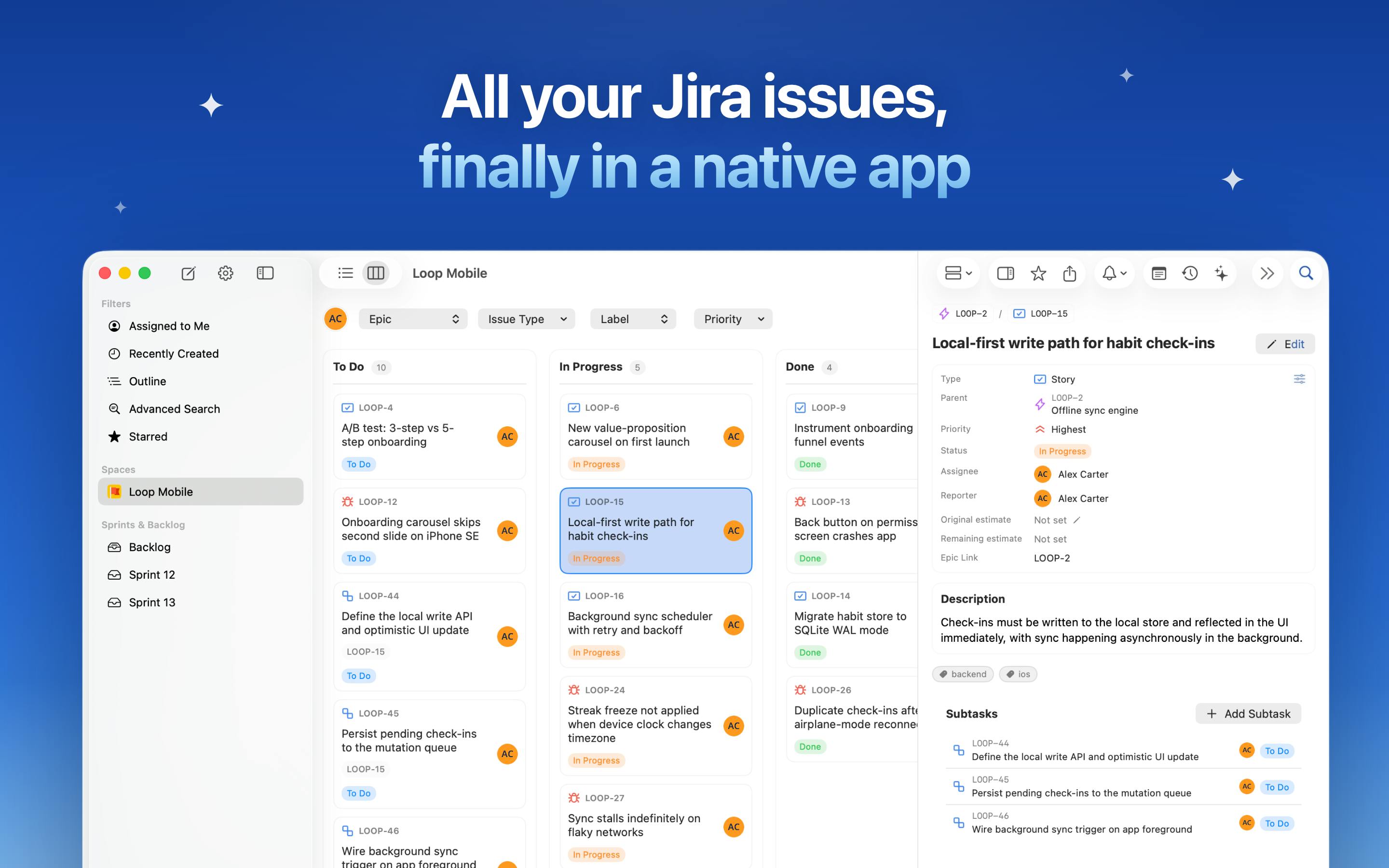
Starlie is a native macOS Jira client designed to eliminate the friction of using Jira in a browser every day. It offers smooth Kanban drag-and-drop, JQL autocomplete, a ⌘K command palette, Quick Look previews, and Reminders integration. It supports both Jira Cloud and self-hosted deployments, maintains a strict no-analytics privacy policy, and can pass Jira issue context directly into Claude Code or Codex — compressing the "read issue to write code" workflow significantly. The app earned 77 upvotes and ranked #12 on Product Hunt at launch, though real-world performance still awaits broader user validation.
Constantly switching tabs in Jira, waiting for pages to load, hunting down a specific issue — these are daily frustrations for almost every team that uses Jira. Starlie aims to eliminate that friction with a native macOS app. It landed at #12 on Product Hunt with 77 upvotes, with a clear mission: make everything you do in Jira every day significantly faster.
Focused on High-Frequency Daily Actions
Starlie's product philosophy isn't about piling on features — it's about optimizing the actions developers and project members repeat every single day: finding an issue, checking its status, updating content, leaving a comment, moving it on the board, and getting back to actual work. This "nail the common workflow" approach stands in sharp contrast to the relatively bloated interaction model of Jira's web interface.
The app offers smooth Kanban drag-and-drop, quick filters, JQL (Jira Query Language) autocomplete, and custom field support. For power Jira users, JQL autocomplete and custom fields are particularly noteworthy — they're often the most painful parts of the web experience.
JQL (Jira Query Language) is a dedicated query language designed by Atlassian for Jira, with SQL-like syntax that lets users build precise issue searches by combining fields like project, assignee, status, labels, and priority. For example,
project = BACKEND AND assignee = currentUser() AND status != Done ORDER BY updated DESCinstantly surfaces all your open backend tasks. JQL is far more expressive than standard filters, but the autocomplete experience in the browser has always been clunky — field names, operators, and valid values often require manual memorization or constant doc lookups. A native client with smart autocomplete means users can write accurate queries faster, without breaking flow to check documentation.
The Efficiency Edge of a Native App
As a native Mac client, Starlie integrates macOS system-level capabilities directly into the experience. Quick Look previews, Reminders integration, and the ⌘K shortcut to instantly pull up recently visited issues — these are things web apps simply can't deliver.
The ⌘K command palette interaction has become a hallmark of modern productivity tools in recent years. Anyone familiar with Raycast or Linear will feel right at home. It means users don't need to click through layers of UI — a few keystrokes gets you where you need to go. For engineers juggling dozens of issues per day, these micro-interactions add up to meaningful time savings.
Compatibility and Privacy by Design
Starlie supports both Jira Cloud and self-hosted Jira deployments. This matters significantly for enterprise users — many companies still run Jira on their own servers for compliance or security reasons, and this use case is often overlooked by third-party tools.
On the privacy front, Starlie is explicit about being "Private by design" — no analytics, no tracking code whatsoever. As data privacy becomes increasingly important, this zero-tracking commitment is a real plus for teams handling sensitive project information.
Integration with AI Coding Tools
One notably forward-thinking feature is the ability to open coding tasks directly in Claude Code or Codex, with issue context and local project information automatically included. This dramatically shortens the path from "reading a bug report" to "having AI help fix it."
This approach of bridging project management tools with AI coding assistants reflects a broader direction in how development workflows are evolving: issues are no longer just task descriptions — they're structured context that can be fed directly to AI. For teams that have already incorporated Claude Code or Codex into their daily development, this kind of integration genuinely reduces context-switching overhead.
Claude Code is Anthropic's developer-focused AI coding assistant, running as a command-line tool that can read local codebases, execute terminal commands, and make multi-step code changes. Codex is OpenAI's earlier code-generation model, integrated into tools like GitHub Copilot. What both tools share: given rich enough context (requirement descriptions, error messages, relevant code paths), output quality improves significantly. Starlie's integration leverages exactly this — a Jira issue already contains structured information like title, description, acceptance criteria, and comments. Passing all of that alongside the local project path to an AI model eliminates the manual step of copying issue content and switching to a terminal, truly connecting the "read issue → write code" workflow at the tooling level.
Verdict
Starlie isn't trying to reinvent Jira — it's focused on making the day-to-day experience faster and more fluid. A native Mac experience, support for self-hosted deployments, a no-tracking privacy stance, and integration with AI coding tools together form a compelling differentiated offering. For Mac users who've been slowed down by the web version of Jira, it's worth trying. One caveat: current public information is largely based on the Product Hunt launch page, so real-world performance and stability will need validation from a broader user base.
Related articles

Why Does the Tesla Roadster Need to Fly? A Deep Dive into Musk's Wild Demo
Tesla's Roadster launch showed wall-climbing, upside-down driving, and flying stunts—but The Vergecast notes the demo car may lack a battery, the Rocket version is invite-only and not street-legal, and the website terms don't guarantee delivery. After nine years of delays, why does this car still need to exist?

AI Is Not a Replacement: Human-AI Collaboration Through the Lens of Factory Root Cause Analysis
Starting from factory root cause analysis, this article explains how AI accelerates evidence chain construction rather than replacing human experts, exploring the pragmatic implementation logic and business value of 'AI supporting people rather than replacing them.'

AI Agent Decision Auditing: Building an Evidence Chain in Regulated Workflows
Starting from a Reddit discussion, this article analyzes three core issues in AI agent decision auditing within regulated workflows: what fields audit records should contain, how to handle feedback latency for erroneous decisions, and how to continuously calibrate LLM judge consistency with human judgment.