statusbar: An Open Source Tool to Add a Status Bar to Any Terminal

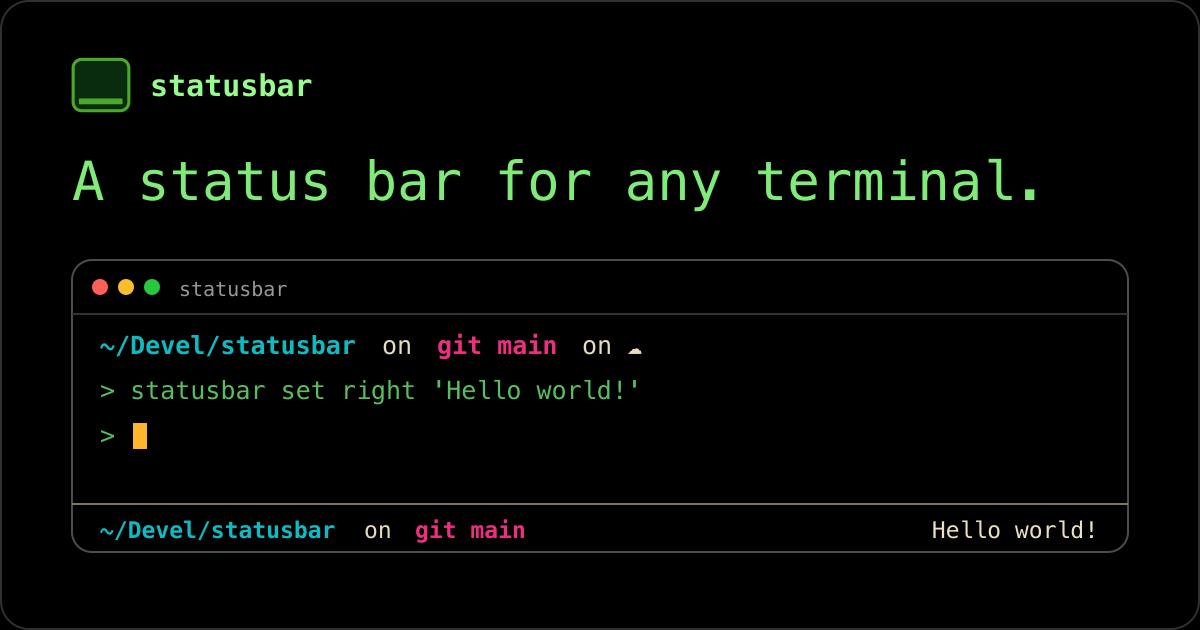
statusbar brings a persistent, standalone status bar to any terminal, filling a long-ignored UX gap.
Developer Panayotis Vryonis's open source project statusbar aims to add a persistent status bar to any terminal environment, bridging the experience gap between GUIs and the command line. Unlike tmux's session-bound status line, PS1's prompt-only rendering, or Powerline's visual-focused approach, statusbar takes an independent path and claims consistent support across iTerm, Alacritty, Kitty, and more. It earned 95 upvotes on Product Hunt (ranked 7th for the day), confirming real demand among terminal users. As an open source project, its greatest potential lies in extensible data source modules — though cross-terminal compatibility and ease of use still await broader real-world validation.
A Overlooked Gap in the Terminal Experience
Nearly every modern GUI application has a status bar — the loading progress at the bottom of a browser, line and column numbers in a code editor, the clock and battery indicator in the system tray. Yet when you open a terminal, you're often greeted by nothing but a blank command prompt. The open source project statusbar, created by developer Panayotis Vryonis, targets exactly this gap: adding a status bar to any terminal.
The project hit Product Hunt and earned 95 upvotes and 9 comments, ranking 7th for the day in the Open Source and GitHub categories. For a small utility project, that level of attention signals a genuine, unmet need among terminal users for better information display.
What Problem It Solves
The terminal is one of the environments where developers, sysadmins, and heavy command-line users spend the most time each day. Yet the terminal itself carries very low information density: if you want to know your current Git branch, system load, network status, or the time, you typically have to either customize your shell prompt (PS1), open a tmux status bar, or switch to another window entirely.
The core value of statusbar lies in decoupling from any specific terminal. It claims to work on "any terminal," meaning whether you use iTerm, Alacritty, Kitty, or GNOME Terminal, you get a consistent status bar experience without having to configure each terminal separately.
How It Differs from Existing Solutions
Experienced command-line users will immediately think of similar tools: tmux's status line, shell prompt customization, and beautification frameworks like Powerline. Each has its limitations — the tmux status bar is tied to a multiplexer session, PS1 only renders on the input prompt line, and Powerline leans more toward visual styling. statusbar takes an independent path: treating the status bar as a persistent information area that spans the terminal, rather than a feature attached to a specific tool.
tmux (Terminal Multiplexer) is a widely used terminal multiplexer on Unix systems that allows multiple sessions and panes within a single terminal window. Its built-in status line can display the time, hostname, current window list, and more — but it requires the user to be working inside a tmux session. The status bar is tightly coupled to the multiplexer itself and disappears entirely outside of tmux. PS1 (Prompt String 1) is an environment variable in Bash/Zsh and other shells that controls the appearance of the command prompt. It can embed dynamic information like Git branch, username, and path — but it only renders on the input line where the cursor sits and cannot form an independent, persistent information area. Powerline is a beautification framework built around font icons, originally designed for Vim and later extended to shell prompts and tmux. It focuses on visual consistency, carries relatively high configuration complexity, and requires a Nerd Font to display icons correctly. The shared limitation of all three approaches is that they are either deeply coupled to a specific tool or can only display information within the prompt line — none can exist independently across arbitrary terminals.
Open Source and a Focus on Customizability
As an open source project, statusbar's greatest potential lies in extensibility. A status bar's value depends entirely on what it can display — system metrics, version control information, custom script output, and more. Being open source means the community can contribute various data source modules over time, gradually turning it into a composable information panel.
For users who prioritize terminal efficiency, the appeal of a tool like this is "grasping context at a glance." During long command-line workflows, reducing the need to switch windows or actively query for information is itself a productivity gain.
Terminal status bars are typically implemented through one of two technical approaches: the first uses ANSI escape codes to directly control cursor position, writing content to a fixed row on screen; the second leverages the terminal emulator's own extension mechanisms (such as OSC sequences or plugin APIs) to inject an additional UI region. The former offers broader compatibility — virtually any ANSI-capable terminal will work — but requires careful handling of edge cases like scrolling and window resizing. The latter provides a more native feel but depends on support from specific terminals. statusbar's claim to support "any terminal" suggests it likely uses the escape code approach, which also explains why it can remain decoupled from a particular terminal. Understanding this underlying distinction helps in assessing its real-world compatibility boundaries across different terminal environments.
An Early-Stage Project Worth Watching
Based on currently available information, statusbar is still in its early stages. The official description is fairly sparse, lacking detailed documentation on installation, supported platforms, or configurable options. Its real-world performance, resource overhead, and actual cross-terminal compatibility remain to be validated by more users.
That said, the pain point it addresses is clear. In the terminal tooling ecosystem, status bar solutions that are genuinely universal, lightweight, and capable of aggregating information are rare. If statusbar can strike the right balance between ease of use and extensibility, it has a real chance of becoming a practical addition to the command-line user's toolkit. Interested users can visit the project's homepage via its Product Hunt page to learn more.
Summary
statusbar is a focused terminal enhancement tool with a clear idea: bringing the status bar concept — long taken for granted in GUI applications — to any terminal environment. It doesn't solve a complex problem; it fills a long-neglected gap in the user experience. For heavy terminal users, this kind of low-profile but practical open source tool is often worth keeping an eye on.
Related articles

Why Does the Tesla Roadster Need to Fly? A Deep Dive into Musk's Wild Demo
Tesla's Roadster launch showed wall-climbing, upside-down driving, and flying stunts—but The Vergecast notes the demo car may lack a battery, the Rocket version is invite-only and not street-legal, and the website terms don't guarantee delivery. After nine years of delays, why does this car still need to exist?

AI Is Not a Replacement: Human-AI Collaboration Through the Lens of Factory Root Cause Analysis
Starting from factory root cause analysis, this article explains how AI accelerates evidence chain construction rather than replacing human experts, exploring the pragmatic implementation logic and business value of 'AI supporting people rather than replacing them.'

AI Agent Decision Auditing: Building an Evidence Chain in Regulated Workflows
Starting from a Reddit discussion, this article analyzes three core issues in AI agent decision auditing within regulated workflows: what fields audit records should contain, how to handle feedback latency for erroneous decisions, and how to continuously calibrate LLM judge consistency with human judgment.