Stone+ Beginner's Guide: Set Up Your AI Coding Environment in 1 Minute

Stone+ setup wizard: configure your entire AI coding environment end-to-end in under a minute.
Stone+ (StonePlus) streamlines AI coding environment setup with a guided wizard that handles environment scanning, multi-channel API configuration (OAuth/Token/official API/relay), proxy egress verification, model validation via real requests, client binding, and end-to-end testing — all in about one minute, with automatic config backup for safety.
For developers new to AI coding tools, the biggest hurdle is rarely writing code itself — it's navigating the maze of accounts, API keys, proxies, and model configuration. This complexity stems from multiple stacked layers: you need to handle local runtime environments (Node.js and Python version dependencies), manage API key authentication, configure network proxy forwarding, and route model endpoints — all of which are interdependent. For mainstream tools like GitHub Copilot, Cursor, and Continue, common failure points include environment variable path conflicts, TLS certificate validation errors, and proxies failing to intercept HTTPS traffic. When any one of these breaks, you're stuck in the "can't connect, can't run" trap. Stone+ (StonePlus) addresses this with an end-to-end automated setup wizard that compresses all these steps into under a minute. This article walks through the complete configuration logic and design philosophy based on the official beginner's tutorial.
Step 1: Environment Scan — Assess Your Local Setup First
Once you open the Stone+ setup wizard, click "Start Scan" and the tool will automatically check your local runtime environment. This step looks simple, but it forms the stability foundation for everything that follows — detecting local dependencies and environment state upfront prevents connection failures caused by missing prerequisites later on.
Unlike many AI coding tools that require manual environment variable configuration, Stone+ moves environment detection to the front of the process, giving users a "diagnostic report" before any actual configuration begins. For beginners, this eliminates the need to master complex command-line operations from the start, significantly lowering the learning curve.
Step 2: Account and API Configuration — Multi-Channel Compatibility Is the Standout Feature
After the environment scan passes, you move on to selecting your account or API connection method. Stone+ stands out for its broad compatibility: it simultaneously supports OAuth, Token, official API, and relay/proxy services.
Each method has its own use case. OAuth (Open Authorization) is a token-based authorization framework based on the RFC 6749 standard, allowing third-party applications to access user resources without obtaining their passwords — ideal for direct account connections with platforms like GitHub and Google. Token authentication is a lighter-weight static key approach, typically issued directly by the service provider. Developers include the token in request headers for authentication, making it well-suited for API calls to AI platforms like OpenAI and Anthropic. Relay APIs (also known as proxy APIs) are third-party proxy services commonly used by developers in China, forwarding official API requests through domestic nodes to work around access restrictions. They typically support the same format as official APIs but use a different Base URL.
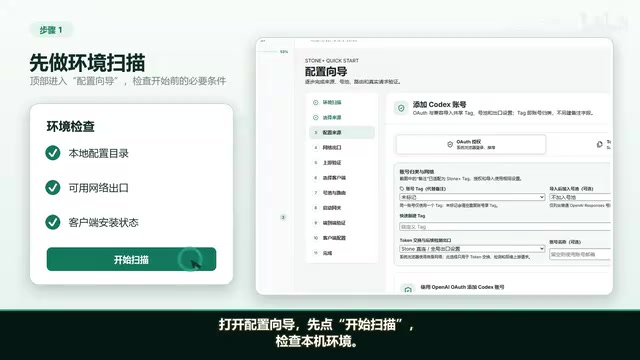
The value of multi-channel compatibility is that whether you're using an official direct account or an API service obtained through a third-party relay, everything can be configured from the same interface. For developers in China, relay services and proxies are an unavoidable practical reality, and Stone+ has built-in support for this.
If a proxy is needed, you can configure it on the corresponding screen, after which the tool will detect your actual network egress. The value of this step is "verifying the real traffic path" — it works by sending a request to a known external address and comparing the returned egress IP against the expected proxy node, confirming that packets are actually being routed through the designated proxy path. This is more meaningful than a simple proxy connectivity ping test, and it eliminates the hidden problem of "configured a proxy that never actually activated." In practice, system-level proxies and application-level proxies have different scopes — some request libraries bypass proxy settings by default, or traffic goes direct due to NO_PROXY environment variables. These issues can only be caught through egress IP verification.
Step 3: Model Selection and Real Request Validation
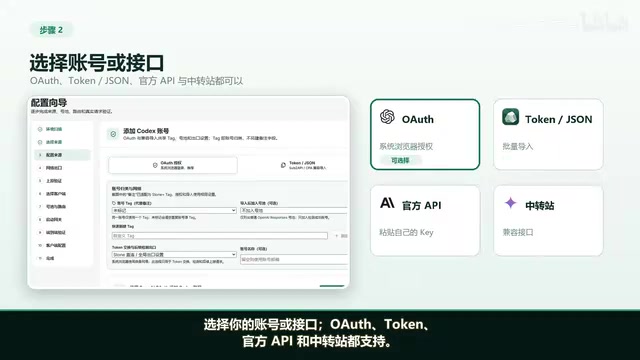
Once the API is configured, you proceed to model selection. Stone+ takes a pragmatic approach here: it sends a minimal real request to confirm the selected source is actually usable.
This "small-sample real validation" approach is worth paying attention to. Traditional API connectivity tests typically only verify the TCP handshake or HTTP status code, but that's not sufficient to prove that a model endpoint works for actual inference tasks. The interface might respond normally but return a rate limit error (429 Too Many Requests), insufficient balance (402 Payment Required), unavailable model version (404 Model Not Found), or a mid-stream disconnection. By sending a "minimal real request" (typically a simple prompt with very few tokens), Stone+ triggers the complete authentication → routing → inference → response chain, achieving a high-confidence availability check at minimal API cost (usually less than $0.001). For users relying on paid APIs, this saves troubleshooting time and prevents the frustrating discovery that an endpoint doesn't work once you're already trying to use it for real.
Step 4: Bind Your Primary Client — Using Codex as an Example
After confirming the model is available, the next step is selecting your primary client. The tutorial uses Codex as the example. Once selected, Stone+ automatically creates or reuses the corresponding configuration entries and enables the matching routing rules.
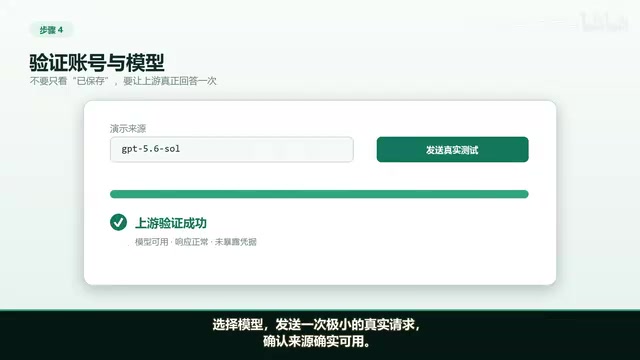
Automated routing matching is the key element of this step. Stone+'s gateway service is architecturally a local reverse proxy, acting as an intermediary layer between the local client and the remote AI model API — a pattern also used by tools like LiteLLM, LM Studio, and Ollama. The local gateway unifies API format differences across multiple AI service providers (such as adapting between OpenAI format and Anthropic format), supports request logging, and enables dynamic switching of underlying models without modifying client configuration. Users don't need to manually set up complex forwarding rules; the tool automatically handles routing based on the selected client, delegating decisions about "which model to use and which path to take" to the system, further lowering the configuration barrier.
Step 5: Run the Gateway Service — Default Localhost Binding for Security
After binding the client, click to run the gateway service. There's a noteworthy default setting here: the gateway listens only on the localhost address.
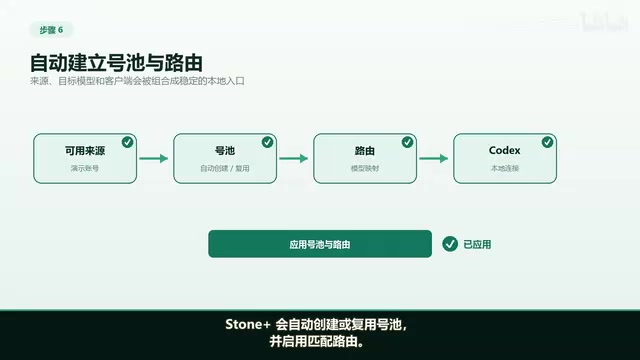
Listening only on localhost (127.0.0.1) rather than all network interfaces (0.0.0.0) is a basic network security practice that follows the Principle of Least Privilege. This means the gateway service is not exposed to the local network or internet by default, ensuring the service is only visible to processes on the same machine. It also prevents other devices on the local network from gaining unauthorized access to the local AI gateway and the API keys it carries. For local development scenarios, this "minimal exposure surface" default is the more prudent choice — users who need external access can adjust this setting themselves when the need arises.
Step 6: End-to-End Validation — The Pipeline Isn't Done Until It's Fully Connected
The final phase of configuration is running the end-to-end validation. Only when you see the "Success" message is the entire pipeline from local client to model endpoint truly confirmed working.
The tool then applies the client configuration. Stone+ creates a backup before writing any config, then writes only the necessary connection fields. This "backup first, then write" mechanism is especially important in practice: a developer's local config files (such as ~/.config/codex/config.json) often accumulate a large number of manually tuned parameters and custom rules. If an error occurs during the write process (insufficient disk space, permission issues, or unexpected process termination), it could corrupt the config file or overwrite existing settings. Automatic backups are typically stored with timestamp-based filenames, allowing users to roll back with a single action if the new configuration causes issues. This effectively prevents the risk of a botched config overwriting a working environment, and reflects genuine respect for user data.
Once configuration is complete, send a test message and confirm success in the request log. At this point, a full AI coding environment setup is complete.
Summary: Complex Pipeline, Packaged into a One-Minute Wizard
Looking at the overall flow, Stone+'s core value is packaging the entire sequence — environment scan → API configuration → network egress detection → model validation → client binding → gateway launch → end-to-end verification — into a guided, one-minute setup process.
A few design highlights are worth emphasizing: multi-channel API compatibility (OAuth/Token/official API/relay) lowers the barrier to entry; small-sample real request validation triggers the full inference chain, improving configuration reliability; network egress IP verification ensures the proxy is actually working rather than just configured in name; the default localhost-only binding follows the Principle of Least Privilege for security; and pre-write automatic backups protect the user's existing environment. For developers who want to get started quickly with AI coding tools without getting bogged down in environment configuration, Stone+ can meaningfully shorten the distance from "installed" to "working."
Related articles

Claude Code v2.1.316 Update Analysis: Enterprise Gateway and Multiple Stability Fixes
Claude Code v2.1.316 released: new enterprise gateway pooled group budgets, layered policy mode, subagent effort control, dozens of Shell, network, and session recovery fixes, and Opus 4.8 fast mode deprecated.

17th-Century British Floods and Doomsday Panic: A New Perspective on Weather History
Based on a Hacker News discussion of '17th-Century British Floods and Foreboding,' this piece explores how extreme weather was given divine and political significance, and what weather history teaches us about contemporary climate communication.

Salesforce Acquires Rune for $375M: AI Logistics Tech Bolsters Defense Business
Salesforce reportedly acquires defense tech startup Rune for $375M. Rune's AI logistics tech will strengthen Salesforce's Missionforce defense platform, continuing its M&A spree.