Stop Flying Blind: A Complete Practical Guide to Writing Evals for AI Agent Skills

Why and how to write evals for AI agent skills—straight from a Google DeepMind engineer's practical guide.
Over 50,000 AI agent skills on GitHub ship with almost no evaluations. Drawing on Google DeepMind's internal practice, this guide covers why skills need evals, how to write high-quality skills, how to build a low-cost eval harness with JSON and Python, and when to retire skills as models improve.
In an era where AI coding tools have become standard equipment for developers, an awkward reality has surfaced: almost everyone is using "Skills," but almost no one is writing evaluations (evals) for them. Philip from the Google DeepMind team put it bluntly in a talk: Don't ship agent skills without evals. This isn't just a slogan—it's a core conclusion he reached based on large-scale data analysis and internal practice.
This article systematically walks through the key points of that talk, helping you understand why skills need evaluations, how to write good skills, and how to build your own evaluation pipeline at the lowest possible cost.
An Overlooked Reality: Skills Are Flying Blind
Philip opened his talk with a quick poll: raise your hand if you use coding agents to write code—nearly everyone did; raise your hand if you use skills—still plenty; raise your hand if you've written evaluations for your skills—almost no one.
This contrast perfectly reveals the current industry problem. The well-known benchmark SkillBench indexed over 50,000 skills from GitHub and found that almost none of them came with evaluations. The vast majority of skills were AI-generated and had never been truly tested.
The issue is that agents are inherently non-deterministic. When a task fails, it's hard to tell whether it's because the skill was poorly written or because the task itself was simply too difficult for the model. Without evals, you're shipping blind.
The Agents We "Use" vs. the Agents We "Build"
Philip emphasized a key distinction:
- The agents we use: coding tools like Cursor, Claude Code, Antigravity, and so on. In this case, you are the engineer and you know your skills inside out. If a skill isn't invoked correctly the first time, you'll notice immediately and re-prompt, or manually trigger it with a slash command.
- The agents we build: consumer- or customer-facing agents embedded in applications. Users have no idea what a "skill" even is—they're not going to say "please handle my issue using the refund skill."
This distinction is crucial—because customer-facing agents can only rely on model-invoked skills, and that's exactly the scenario evals most need to cover.
The Underlying Mechanics and Classification of Skills
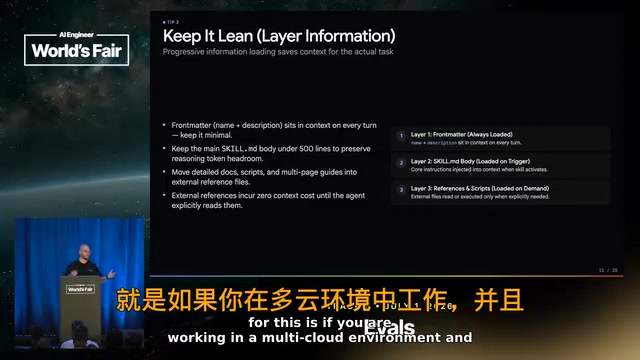
A skill is essentially a folder containing a skills.md file, plus some supporting resources. Its core mechanism is progressive disclosure:
- First level: the title and description. The description typically lives in the model's context, letting the model know when to use the skill.
- Second level: the skill body, containing more detailed instructions and references to external files.
- Third level: referenced files—the full context the model only explores in depth when needed.
Philip further divides skills into two categories:
- Capability Skills: teach the model things it currently can't do well, such as log tracing or creating a React app. These skills are temporary—as models get stronger, they'll eventually be phased out, and evals will tell you when it's safe to retire them.
- Preference Skills: more enduring, such as team-specific workflows, coding styles, and domain preferences. These skills need evals to protect them, because base models struggle to internalize this highly proprietary knowledge.
So do skills actually work? The answer is yes. SkillBench version 1.1 evaluated a variety of open- and closed-source models across roughly 100 coding and productivity tasks, and the results showed that skills improved performance by about 15% on average.
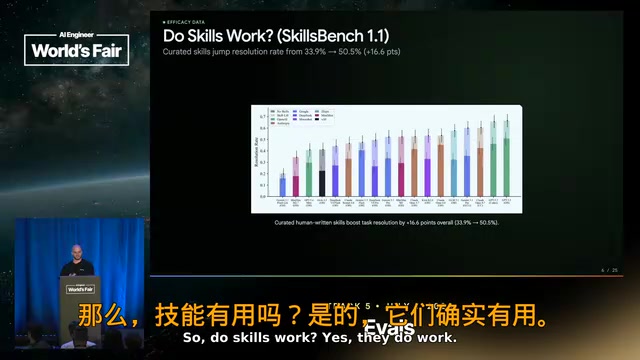
But here's a cautionary note: human-written skills are the highest quality, while AI-generated skills can actually hurt performance. Additionally, the skills.md file should be kept under 500 lines—if your skill exceeds this length, be sure to review it as soon as possible.
Eight Practices for Writing Good Agent Skills
For model-invoked skills, the most important thing is the description. It's usually just two sentences written into the system instructions, and it determines when the model should use the skill. If the description is too weak, the skill will either be triggered incorrectly all the time or fail to trigger when it should.
1. Clearly State the Why, How, and When
The description should clearly explain why the model should use it, how to use it, and when to use it. For example: "Use this skill when working with React apps."
2. Write Instructions, Not Prose
Don't write vague statements like "The Interactions API is recommended for multi-turn conversations because it handles session state." Instead, write "Use the Interactions API when building chat applications"—give the model clear, instructive guidance.
3. Keep It Lean, Organize Information in Layers
The description is a cost you pay on every model invocation (roughly 100–200 tokens). The skill body also enters the context when it's read. So keep it as lean as possible and put deeper content into referenced files. For a multi-cloud deployment scenario, for example, you should turn the AWS, Google Cloud, and Azure deployment instructions into separate referenced files rather than cramming them into the main file.
4. Set the Right Level of Freedom
If the process is a fixed, unchanging "step one, step two, step three," then it shouldn't be a skill—it should be a script. Skills should define goals and constraints, not precise operational steps—the model knows how to do it.
5. Don't Skip Negative Cases
We always focus on "when to use a skill" but ignore "when not to use it." If the description says "for web development tasks," the model may over-trigger; if it says "only for React components or Tailwind CSS," the model can make precise judgments.
6. Test Early
Every time you create a new skill, write 10–20 test prompts: 5 positive paths (should trigger), 5 negative paths (should not trigger), and even better if you have real data from production—nothing is more valuable than real-world data.
7. Eliminate No-ops
This one comes from AI educator Matt's finding: AI-generated skills often contain lots of "no-ops"—instructions that don't change the agent's behavior at all, like "please write clear, high-quality code." These are already the model's default expectations and are purely a waste of tokens.
8. Know When to Retire a Skill
Skills aren't immortal. Models get stronger, behavior changes, and environments shift. Always run evaluations both with and without the skill enabled. If the model can hit the target performance even without triggering the skill, you can confidently retire it, saving tokens and maintenance costs.
A Real Case Study: Evaluating the Gemini Interactions API Skill
Philip shared a real example. The team wanted to create a skill for the Gemini Interactions API. Since this API was released after Gemini's last training run, Gemini 3, 3.1, and even 3.5 knew nothing about it and were still using the old Gemini 2.0 when generating code.

The team created 117 test cases for this, sourced from real user behavior generating Gemini code, synthetic cases, and user feedback. In the end, the accuracy of generating valid Interactions API code improved to nearly 90%.
All You Need Are Two Simple Assets
Implementing this evaluation required only two things:
- A JSON file with a clear structure: containing
prompt(user input),language(testing TypeScript and Python),should_trigger(whether the skill should be read), and severalexpected_checks(simple assertions). - A basic Python script that runs the coding agent (in this case Gemini CLI), captures the output, and parses it.
The key is that most checks can be done with regular expressions: Did it use the correct SDK? The correct model? The correct method? Did it use an old pattern? These assertions are extremely cheap to run and can be executed repeatedly. When a new model is released, you just update the model ID. For more complex skills, you can also bring in an LLM as a judge, using a scoring rubric to make pass/fail judgments on the full trajectory.
DeepMind's Internal Skill Evaluation Mechanism
Inside Google DeepMind, every skill comes with an evaluation. Each test runs in a clean workspace, where you can define the environment, startup commands, script validators, and LLM judges.
The most critical point: every change to a skill file triggers evaluations, and if the results don't improve, the change won't be merged. This creates a strict regression-testing mechanism—you can only modify a skill on the condition that you improve existing evals or add new ones.
Ten Best Practices Summarized

Philip closed with a distilled list of best practices:
- The skill description is crucial—50% of failures stem from the skill not being triggered correctly, especially in customer-facing scenarios where user prompts are often too brief.
- Write instructions, not passive information—clearly tell the agent what to do or not do.
- Include negative tests—this is the most easily forgotten step.
- Start small—even 10–20 samples is better than nothing.
- Test outcomes, not paths—don't test whether the model loads the skill on the first turn; test whether it ultimately completes the task.
- Run in isolation—coding agents are good at "cheating," potentially stealing context from prior conversations without actually using the skill.
- Run multiple trials—agents are non-deterministic, so run each case 3–6 times to measure reliability.
- Test across harnesses—the same skill might perform great on Gemini but poorly on Codex; if your customers use different tools, be sure to cover them all.
- Keep your evals—even after retiring a skill, don't throw away the evals; use them to monitor model performance and reintroduce the skill if you detect regression.
- Detect when to retire—you'll be surprised how a skill that was essential six months ago can now be phased out as models iterate.
Take Action Now: Your Homework
Philip left the audience with hands-on homework: pick your most-used skill, write 5 test prompts (you can have your coding agent analyze historical trajectories to find high-frequency skills); build a simple evaluation harness (a JSON/YAML file plus a bit of Python script); try removing no-ops to save costs; and run ablation tests—always compare eval results with and without the skill loaded. Only this way can you truly judge whether a skill is useful and when it should be retired.
The core message is just one sentence: Don't ship skills without evals.
Related articles

Gemini 3.7 Flash Spotted in Google Cloud Console — Launch Countdown Begins
Developers spot Gemini 3.7 Flash in Google Cloud Console, sparking discussion about its relationship to Pro and Google's model distillation strategy.

AI-Memory: Building a Cross-Tool Long-Term Memory System for Coding AIs
AI-Memory is a Rust-based open-source project providing long-term memory for Claude Code, Cursor, Aider and other Agent coding CLIs, enabling seamless handoff between vendors.

Bullet Enters the Stage: YC Newcomer Bets on a Faster Coding Agent
YC S26 startup Bullet launches a speed-focused coding Agent targeting developer latency pain points. Analysis of its differentiation, acceleration techniques, and market opportunity against Cursor and Claude Code.