Struggling with AI Agents? The Real Breakthrough Is Understanding the Fundamentals

Master AI agents by understanding their fundamentals, not by hoarding tools and example workflows.
Most people struggle with AI agents not because of insufficient tools or budget, but because they lack foundational understanding of how agents work. This article breaks down three common traps — ignoring personalized configuration, defaulting to restarts when things break, and blindly collecting examples — and explains how understanding config file mechanics, memory system architecture, and attention distribution is the real key to getting more out of AI agents.
Why Collecting "100 Viral Workflows" Still Leaves You Frustrated with AI Agents
You've spent hundreds on a premium LLM subscription, loaded your agent with a dozen tools, and after a month of use, the experience still isn't better than the free version — the problem isn't the tools. It's that you've never truly understood how AI agents work under the hood.
Bilibili creator "AI Super Soldier" opens his beginner-friendly OpenClawAd (Lobster) tutorial series not with any hands-on tips, but with an entire episode dedicated to one core idea: learning operations without learning principles will always cap your ceiling. This applies not just to OpenClaw, but to every AI agent platform out there.
Investment ≠ Output: The Most Hidden Cognitive Trap in AI Usage
Here's how most people approach AI: pay for a premium model → load the agent with tools → expect magic. The result? No meaningful improvement in experience.
It's like buying a professional DSLR camera and always shooting in auto mode. Does it work? Sure. But the gap between you and a professional photographer is enormous — you might not even beat a smartphone shot.
The core insight is this: in the AI space, the bridge between input and output is cognitive understanding, not money. AI is inherently uncertain. Like a person, it needs to be understood and guided. The deterministic mindset — "spend X, get Y" — simply doesn't apply in the age of AI.
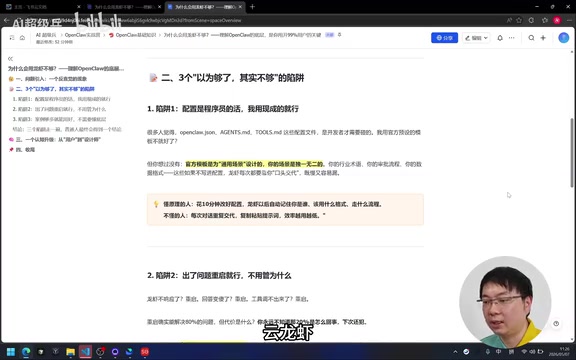
Three Common Traps: Why Everyday Users Keep Stumbling
Trap #1: Thinking Configuration Is "a Developer Thing"
Many people freeze up when they see files like opencloud.json or agents.md, figuring they'll just stick with the default presets. The problem is that official defaults are generic — but your agent should serve your specific context.
Take user.md and soul.md as examples. The former defines "who you are in the AI's eyes"; the latter defines the agent's "core values." From an engineering perspective, externalizing key configurations into structured files rather than hardcoding them into prompts reflects the software engineering best practice of "separation of configuration and code" — users can customize agent behavior without touching core logic. user.md defines a user profile (professional background, preferences, work context), essentially giving the model a persistent "user model" so you don't have to re-introduce yourself every session. soul.md defines the agent's behavioral principles and value orientation — think of it as an employee handbook that keeps the agent consistent across any situation.
At their core, these files replace lengthy conversation history with concise, structured information. Large language models can have context windows of 128K or even 200K tokens — but a 2023 Stanford research paper titled Lost in the Middle revealed a "middle forgetting" phenomenon: when critical information is placed in the middle of a very long context, the model's retrieval accuracy drops significantly, while information at the beginning and end receives higher attention weights. By front-loading key context into the System Prompt via configuration files, you're deliberately exploiting this attention distribution pattern — ensuring the model accesses the most important information within its limited attentional budget. If you never customize these files to fit your needs and just use everything at default, don't be surprised when the agent underperforms.
Someone who understands the principles spends 10 minutes adjusting the config, and the agent automatically remembers who they are, what format to use, how to follow the workflow, and whether to confirm before executing. Someone who doesn't will repeat themselves every session, copy-paste prompts endlessly, and get less efficient over time — not more.
Trap #2: When Something Breaks, Just Restart
Agent not responding? Restart. Restarting does fix some issues — but you'll never know what caused the other 20%, and you'll hit the same wall again.
Worse, some problems can't be fixed by restarting at all. For example, if the path to a memory file referenced in memory.md is wrong, you can restart the agent 100 times and it still won't load the memory. You think it "forgot" everything — but the real issue is a misconfigured file path.
Understanding this requires knowing how memory systems work: large language models are fundamentally stateless — each inference is independent, and the model itself stores nothing across sessions. Agent frameworks compensate for this by attaching external memory systems. In both academic research and engineering practice, agent memory is typically divided into four layers: sensory memory (immediate input in the current conversation turn), short-term memory (the full conversation history within the current context window), long-term memory (persisted via vector databases or structured files, supporting semantic retrieval), and external memory (knowledge bases, document systems, and other external sources). In this architecture, memory.md acts as a "memory router" — it tells the agent where to look for what kind of information, similar to a file index in an operating system. A misconfigured path means the memory router fails on every startup. This has nothing to do with model capability; it's a pure engineering configuration issue. Restarting, of course, changes nothing.
Someone who understands the principles checks the logs and config, and resolves the issue in 5 minutes. Someone who doesn't gets stuck in a loop: restart → limp along → break again → restart — wasting time instead of saving it.
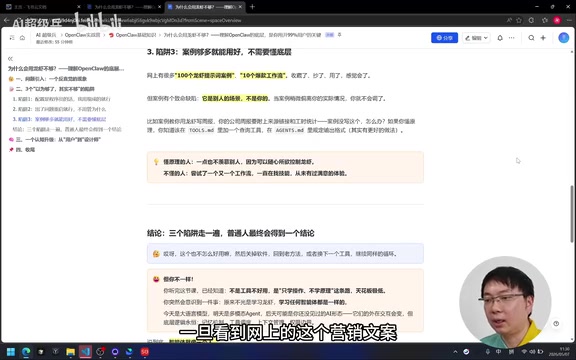
Trap #3: Chasing Volume of Examples Instead of Fit
When you see "100 Lobster Prompt Cases" or "10 Viral Workflows," the instinct is to save them all. But collecting examples without understanding the underlying principles is like hoarding recipes without knowing how to cook — you'll never know which one actually fits your situation, or how to adapt it when it doesn't quite work.
The right approach isn't to collect more — it's to deeply understand fewer. Once you grasp why a workflow is structured the way it is, you can adapt any template to your own needs, or even build one from scratch.
From Operator to Agent Architect: The Real Upgrade
The gap between a casual AI user and a power user isn't the number of tools they have or the amount they've spent — it's the depth of their mental model. Understanding configuration file mechanics, memory system architecture, and attention distribution characteristics transforms you from someone who operates an agent into someone who designs one.
That's the real unlock: not more subscriptions, not more workflows saved to a folder — but a clearer picture of what's actually happening inside the system you're working with.
Related articles
Deep Dive into AI Agent Skill Design: …
Deep Dive into AI Agent Skill Design: Engineering Practices from Anthropic and Perplexity
A deep dive into Skill design philosophy from Anthropic's Claude Code team and Perplexity's Agent team, covering the Tax Test, Gotchas Flywheel, progressive disclosure, and Eval-First practices for building high-quality AI Agent skill systems.
Deep Dive into OpenAI's Official GPT-5…
Deep Dive into OpenAI's Official GPT-5.6 Prompting Guide: The Shift from Manual to Automatic
A deep dive into OpenAI's official GPT-5.6 Sol prompting guide: conciseness-first, outcome-oriented design, autonomy boundaries, tool routing, and reasoning intensity tuning.
 Deep Dives
Deep Dive into How OpenClaw (Open-Source Crayfish) AI Agent Works
Deep analysis of OpenClaw AI Agent internals: System Prompt, tool calling, SubAgents, Skill system, memory, and Context Engineering explained.