Tencent Hunyuan Hy3 Free Access Guide: 5 Channels to Try It at No Cost

5 ways to access Tencent Hunyuan Hy3 for free, including up to 100M tokens via WeChat Mini Program.
Tencent's Hunyuan Hy3 is a multimodal LLM with Agent and Coding capabilities that's taking the AI world by storm. This guide covers five free access channels — WorkBuddy, Hermes Agent, OpenRouter (with Codex integration), SiliconFlow International, and the WeChat Mini Program Growth Plan — with the last offering up to 100 million tokens plus 10,000 image generation credits.
Why Hunyuan Hy3 Is Taking the AI World by Storm
Since Tencent officially launched Hunyuan Hy3 (Hunyuan 3), the entire AI community has been rushing to integrate it. The model's popularity is no accident — it's a multimodal large language model with built-in Agent and Coding capabilities, backed by Tencent's deep domestic ecosystem, giving it the perfect conditions for rapid adoption.
A Multimodal Large Language Model is an AI model capable of simultaneously processing and understanding multiple data types — text, images, audio, video, code, and more. Unlike early LLMs that handled only text, multimodal models fuse information from different modalities through a unified neural network architecture. The core technique involves using a Vision Encoder to transform image data into vector representations aligned with text tokens, which are then fed into the language model backbone for inference. This architecture makes the model particularly strong at tasks requiring joint visual-text understanding, such as front-end page generation and game asset creation — the technical foundation behind Hy3's competitive edge in visual programming scenarios.
Hunyuan Hy3's built-in Agent capability means the model can autonomously plan task steps, invoke external tools, and execute continuously until a goal is achieved — rather than simply answering single-turn questions. Agent-capable models support Function Calling or the ReAct (Reasoning + Acting) framework, allowing the model to dynamically make decisions during inference: calling search engines, running code validation, operating file systems, or invoking third-party APIs. In software development, this means the model doesn't just generate code snippets — it can automatically run tests, identify errors, and iterate on fixes, enabling end-to-end task automation.
According to Tencent's official Hunyuan page, Hy3 delivers notable improvements across software development, office productivity, financial modeling, front-end design, and game development. Official benchmarks show it outperforms the previous flagship model. Based on live demos of front-end page generation and game prototypes, Hy3's performance at the code and interaction layer is genuinely worth attention.
Riding the launch wave, multiple AI platforms have launched limited-time free access programs. This guide consolidates five channels where you can try Hunyuan Hy3 for free, with the highest offering up to 100 million tokens — plus 10,000 image generation credits. Bookmark this for reference.
Channel 1: WorkBuddy — Zero-Rate Limited-Time Access
The first recommended platform is WorkBuddyAd. The setup is extremely simple: find "Hy3 Hunyuan Model" in the model selection list and enable it directly.
The model is currently in a limited-time free, zero-rate state on WorkBuddy, meaning calls consume zero quota — making it one of the most straightforward ways to try Hunyuan Hy3. Ideal for users who want to get started quickly without any configuration hassle.
Channel 2: Hermes Agent — Free Integration
The second channel is Hermes Agent. Go to the Hermes model page and select the first "Tencent Hunyuan 3" campaign model from the list.
If you're not logged in, the system will redirect you to the Hermes website to register and log in. After logging in and returning to the model selection interface, you'll see Hunyuan 3 marked as "Free." Once you launch Hermes and start a conversation, the model will explicitly confirm: "I am currently using Tencent's Hunyuan 3 large model, which is currently available for free access" — confirming the integration is live and ready to use.
Channel 3: OpenRouter — Integration with Codex
The third channel is the aggregated model platform OpenRouter — and this is the most detailed section of this guide, because it can be further connected to the coding tool Codex.
OpenRouter is an AI model aggregation and routing platform. Its core value lies in providing a unified OpenAI-compatible API interface, so developers don't need to integrate each model vendor's SDK separately — just one API Key and one Base URL gives access to hundreds of models from different sources. Its architecture is similar to a cloud service "unified gateway": OpenRouter maintains backend connections to major model providers (OpenAI, Anthropic, Google, Tencent, Meta, etc.) and exposes a standardized /chat/completions endpoint externally. Developers can switch underlying models simply by changing the model parameter string, dramatically reducing the cost of multi-model comparison testing and migration. This is the technical foundation for the "OpenRouter + Codex" approach described below — as long as a tool supports custom Base URL and API Key, it can access any listed model through OpenRouter.
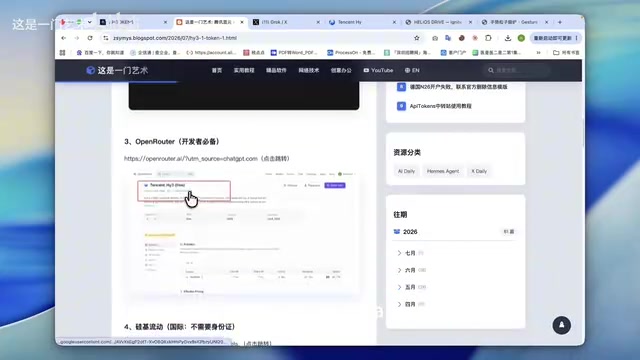
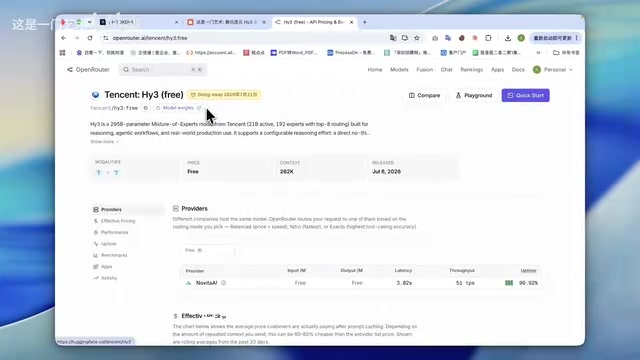
After logging into the OpenRouter website, go to the Models page and search for "Hunyuan Hy3" — you'll see that Tencent Hunyuan 3 is also available for free.
Complete Steps to Integrate with Codex
If you want to connect Hunyuan 3 to Codex, here's the full workflow:
- In the OpenRouter "Workspace," click "API Keys" in the left sidebar and create a new key (any name works);
- Open CCSwitch (or the Codex model management interface) and click "Add Model" in the top right;
- Enter the OpenRouter Base URL and paste the API Key you just created;
- Fetch the model list from the dropdown, select "Tencent Hunyuan 3," and click Save;
- Click "Test" — once it shows a successful connection, restart Codex.

After restarting, start a conversation in Codex and ask "Tell me which large model you are." Codex will respond based on your local configuration: it's currently using Tencent Hunyuan 3, routed through the OpenRouter endpoint. At that point, you can freely use Hy3 for code development within your programming environment.
Channel 4: SiliconFlow International
The fourth channel is SiliconFlow International. This site is specifically recommended because it does not require uploading ID card information, making registration much lower friction.
Open the model page and you'll see Tencent Hunyuan 3 listed first. Clicking into the details shows that both input and output pricing are currently 0 — completely free.
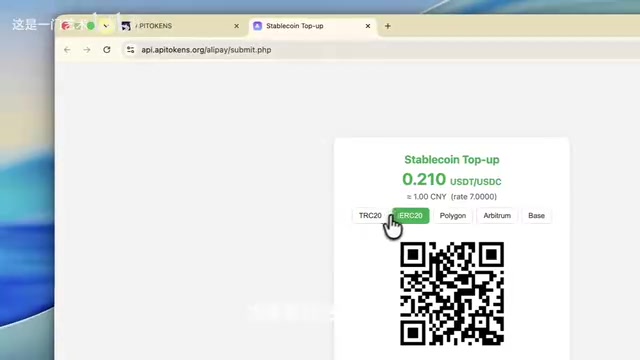
The integration process is similar to OpenRouter: generate an API key on the API page, copy the Base URL from the documentation, paste the API address and key into CCSwitch, fetch the model list, select Hunyuan 3, and test to confirm. The overall integration experience is smooth and well-suited for developers with stable API call requirements.
Channel 5: WeChat Mini Program Growth Plan
The fifth — and most generous — channel is the WeChat Mini Program Growth Plan, which directly grants up to 100 million tokens plus 10,000 image generation credits.
Before appreciating the practical value of this quota, it's worth understanding how tokens are measured: a token is the basic unit by which large language models process text. In Chinese, roughly 1.5–2 tokens correspond to one Chinese character. Token counts cover both input (user questions, system prompts, conversation history) and output (model responses) combined. Estimating an average of 2,000 tokens per conversation, 100 million tokens supports approximately 50,000 conversations; for code generation, a single task might consume anywhere from 5,000 to 20,000 tokens. For mini program developers, 100 million tokens represents considerable practical value.
How to Claim
- Register via the sign-up link by entering your email, verification code, and password;
- When selecting "Mini Program Background," if you don't have a business license, choose "Individual" and enter your ID card information;
- Enter the mini program page, find "Mini Program Growth Plan" under "Industry Capabilities" in the left sidebar, and click to claim;
- Enter a name and click "Start Using" — the system will automatically redirect you to the Tencent Cloud website;
- Generate a new API Key on Tencent Cloud for future use.
Important Usage Restrictions
One critical note: the AI resources (tokens) granted by the Growth Plan can only be consumed within Mini Program SDKs and Cloud Functions — they cannot be used from other calling sources. This large quota is therefore better suited for developers genuinely working on mini program development, rather than general-purpose API calls.
Comparison and Recommendations
From the perspective of onboarding effort and use case, each of the five channels has its own strengths:
- Quick experimentation: WorkBuddy, Hermes Agent — zero configuration, chat directly;
- Integration with coding tools: OpenRouter (connect to Codex), SiliconFlow International (no ID verification required);
- Maximum quota: WeChat Mini Program Growth Plan (100M tokens + 10K images, restricted to Mini Program SDK/Cloud Functions).
Hunyuan Hy3's wave of free access programs is fundamentally a strategic move by Tencent to accelerate model penetration through its ecosystem resources. There's deep industry logic behind this approach: since 2023, major domestic players — Baidu ERNIE, Alibaba Qwen, Tencent Hunyuan, Zhipu AI, Moonshot (Kimi), DeepSeekAd — have been iterating flagship models in rapid succession, and competition has evolved from pure benchmark score comparisons into a battle for ecosystem lock-in and developer mindshare. Tencent's core advantage lies in the scale effect of its existing ecosystem — WeChat Mini Programs has over 400 million daily active users, and Tencent Cloud serves a large enterprise customer base. By deeply integrating Hy3 with WeChat Mini Program SDK, Tencent Cloud Functions, Codex, and other developer tools, Tencent is trying to make model calls the default option in developers' workflows. This "use ecosystem to lock in model penetration" strategy is highly consistent with the logic OpenAI used to build moats through the ChatGPT plugin ecosystem and Microsoft through the Copilot suite — free quota is a user acquisition tool, but developer habits are the real moat.
For developers and early adopters, this is a rare window to get hands-on with a Chinese multimodal large model at minimal cost. Keep in mind that the free policies across these platforms are time-limited and subject to change at any time — try them early and pay attention to quota usage rules.
Key Takeaways
Related articles
AWS AgentCore Gateway: Connecting AI A…
AWS AgentCore Gateway: Connecting AI Agents to Enterprise Backends with MCP
How AWS AgentCore Gateway acts as a primary MCP server to aggregate REST APIs, Lambda, and existing MCP services? Analyzing its AST real-time mapping, zero cold start, semantic search for tool overload, session isolation, and key injection security design, plus the architectural approach to decoupling enterprise AI agents from backends.

One Link Gives Figma AI a New Skill: Hands-On with MCP Connectors
Paste one MCP server link and the AI Agent in Figma gains new tool capabilities. We break down the setup flow, 20+ one-click apps, read/write permissions and execution policies, and the public HTTPS requirement.

Cognition SWE-2 in Practice: One Prompt to Handle the Whole Product Launch Process
Analyzing a YouTube creator's prompt for using Cognition SWE-2 to launch a product: a landing page, seven-email sequence, and non-buyer follow-up tool, plus how the 'test and report' constraint changes AI delivery quality.