Tested: The Claude Code Money-Saving Trick That Backfires

Testing debunks a Claude Code money-saving tip: costs doubled, and tokens are the real key.
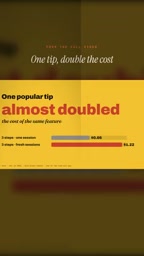
The article tests a widely shared Claude Code cost-saving tip and finds it doesn't reduce costs—it nearly doubles the expense for the same functionality, from $0.66 to $1.22. Building the same app seven ways, all passing nine functional checks, the cheapest option cost about a quarter of the default, with differences driven mainly by token consumption rather than code quality. It also notes that switching Opus to low effort mode cut costs to 19 cents but caused title misalignment—a visual defect automated checks missed. Conclusion: validate tips with your own use cases, focus cost optimization on token consumption patterns, and pair low-cost options with human review.
A widely shared cost-saving tip that nearly doubled our bill
When using AI coding tools, controlling costs is something every developer cares about. Recently, a tip claiming to save on Claude Code usage kept coming up, so we decided to verify it ourselves. The result was unexpected: not only did the advice fail to save money, it nearly doubled the cost of the same functionality.
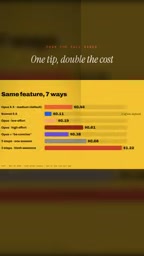
According to data shared by a YouTube channel, they had Claude Code build the same app in seven different ways, and the cheapest approach cost only about a quarter of the default. This finding directly challenges the effectiveness of that popular advice.
The key variable isn't lines of code—it's token consumption
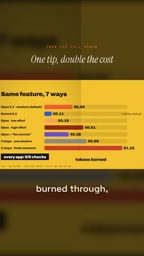
Why do different implementation approaches vary so wildly in cost? The answer lies in token consumption. All seven app versions passed the same nine checks, meaning there was no meaningful difference in functional completeness. What actually changed was the number of tokens each version consumed.
According to the same source, token consumption is essentially what your usage limit is made of. In other words, no matter how elegant the code or how beautiful the structure, it all ultimately converts into a token bill. Any approach that tries to "save" usage through specific tricks will backfire if it actually increases token consumption.
Tokens are the basic units that large language models use to process text—one token corresponds to roughly 0.75 English words or half a Chinese character. The model is billed by token every time it reads a prompt, generates code, or executes a tool call, so a usage limit is essentially a token quota. What makes agentic tools like Claude Code special is that they repeatedly read files, think, modify, and re-verify, so a single task can produce multiple rounds of conversation, accumulating far more tokens than a single Q&A. This also explains why differences in implementation paths get amplified: one extra file scan or one extra retry round makes the bill rise significantly. Understanding this is what allows you to ground cost optimization in reducing interaction rounds and context redundancy, rather than simply pursuing concise code.
The cost of low effort mode: save money, lose details
The test also surfaced a detail worth watching out for. After setting the Opus model to low effort mode, the cost dropped to 19 cents, and the app still worked. Sounds great, right? But a careful look at the interface reveals that the title text has inexplicably shifted to the middle of each line.
This visual issue was not caught by any of the nine automated checks. That is, low effort mode saves money but can sacrifice quality in places you don't notice. For developers aiming for production-grade output, this kind of hidden defect can be more expensive than a few extra cents.
Low effort mode typically means reducing the computation the model invests during the reasoning phase—for example, shortening the chain of thought, limiting internal reflection rounds, or letting the model stop generating earlier. Anthropic provides adjustable reasoning-strength parameters for some models; the lower the strength, the faster the response and the fewer tokens used, but planning ability and attention to detail on complex tasks decline. This kind of mode suits high-determinism scenarios like format conversion and simple completions, but not interface-generation tasks that require fine layout or long-range planning. The title misalignment in the article is exactly a symptom of the model paying insufficient attention to CSS alignment rules after reasoning was compressed, showing that the price of saving money often appears as hidden quality loss.
The blind spot of automated checks
All nine checks passed, yet the layout problem remained. This exposes a fundamental limitation of automated verification: the checks cover functional correctness, not every dimension of quality. Whether a title is centered or offset—visual details like this are hard to cover with simple assertions.
The video's author also admits: "None of my nine checks caught this problem." This reminds us that while we rely on automated testing, human review remains irreplaceable—especially when evaluating different cost options.

Automated checks usually consist of assertions—pre-written boolean judgments such as whether an endpoint returns 200, whether an element exists, or whether text matches. These checks excel at verifying functional contracts but struggle to describe vague aesthetic requirements like "the title should be visually centered." Covering visual quality requires additional measures such as screenshot comparison, layout coordinate validation, or visual regression testing, which are costlier and more complex to maintain. Therefore, all nine checks passing only proves the functionality works, not that the product is acceptable. When evaluating low-cost options, manual walkthroughs or visual testing should be part of the acceptance process; otherwise, a high automated pass rate creates a false sense of security.
Takeaways for developers
This test delivers several clear messages. First, don't blindly trust circulating "money-saving tips"—A/B test them with your own use cases. Second, the core of cost optimization is understanding token consumption patterns, not applying fixed formulas. Finally, low-cost options need to be paired with more careful human review, or the money you save may come at the cost of product quality.
When you try different implementation paths in Claude Code, take the time to record each version's token usage and final output quality. That hyped trick pushed the cost from $0.66 to $1.22—a lesson worth remembering.
Related articles

Gemini 4 Neon Leak: A Potential Strong Contender Against Opus 5.5
A Hacker News thread suggests Gemini 4 Neon looks like an Opus 5.5 competitor. This article unpacks the product positioning behind this community signal, shifts in the top-model competitive landscape, and what it means for developers' model selection strategy.

Claude Fable 5.2's Self-Authored Short Film 'Fable' Sparks Discussion
A short film 'Fable,' credited to Claude Fable 5.2 for script, visuals, and directing, appears on Hacker News. This article analyzes the significance of full-pipeline AI creation, community reactions, and what it means for content creators.

Anthropic IPO Pricing: A Signal of AI Giants Going Public
Anthropic's IPO pricing draws attention. This article analyzes its potential impact on AI industry valuation, commercialization paths, and the competitive landscape, and highlights public-market expectations and challenges for AI companies.