The Challenge of Managing 50 AI Skills: Achieving Smart Auto-Invocation with the MCP Protocol

An MCP-based tool that lets AI auto-select and invoke skills across all your tools.
As AI skill libraries grow past 50, users face repeated installs, poor searchability, and memory overload. This article introduces an MCP-based unified management tool enabling a new workflow: describe intent → AI selects the skill → auto-execute, with one-time config sharing all skills across tools.
When Your Skill Library Balloons to 50, Management Becomes a Nightmare
With the explosive growth of the AI tool ecosystem, more and more users are installing various "Skills" for their AI assistants. These skills are essentially preset capability modules that enable AI to complete specific tasks. However, once the number of skills exceeds 50, the management experience deteriorates dramatically—one heavy user summed up the three major pain points he personally encountered.
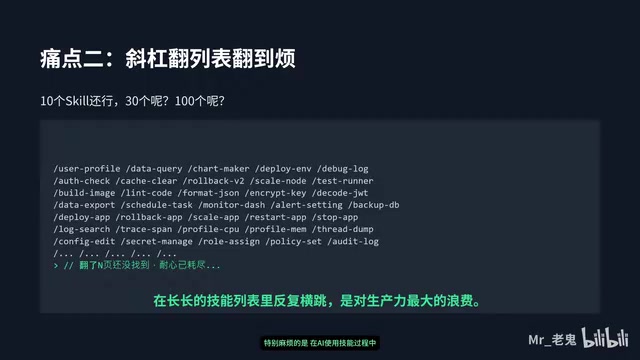
Pain point one: The burden of repeated installation. To use the same skill across different AI tools, users have to install it separately in each tool. Once the number of skills exceeds 30, just synchronizing across multiple tools becomes exhausting.
Pain point two: Search efficiency collapse. Every time you want to invoke a skill, you have to type a slash (/) to bring up the command list, then dig through dozens of options one by one—seriously slowing down your workflow.
Pain point three: Excessive memory burden. When you install too many, the skills you rarely use are eventually forgotten completely over time, which means installing them was pointless.
This phenomenon reveals a structural problem in the current AI tool ecosystem that has been overlooked: the growth rate of capabilities far outpaces the evolution of capability management mechanisms. A skill library may look powerful, but if it can't be efficiently searched and invoked, it might as well not exist.
From "People Searching for Skills" to "AI Choosing Skills"
To address these pain points, this user developed a small tool for his own use, with a core design philosophy summarized in a single sentence: let the AI decide which skill to use, rather than having people constantly wrestling with it in the middle.
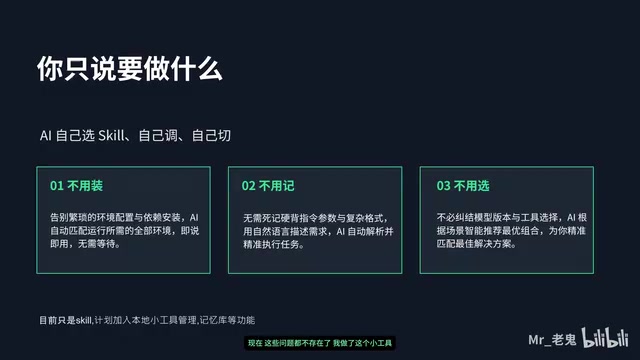
The traditional workflow requires users to remember skill names, manually type commands, and filter through lists—leaving the human perpetually stuck running around in the middle of the process. The new approach restructures the workflow into—
User describes the need → AI autonomously matches the skill → Automatic execution
Users only need to describe "what I want to do" in natural language, and the AI will automatically complete skill matching and invocation, saying goodbye once and for all to the tedium of manually digging through lists. This intent-driven interaction shifts control of skill invocation from humans to AI, returning human-machine collaboration to its most natural state: describing intent, not memorizing commands.
A Unified Management Architecture Based on MCP
What supports cross-tool skill sharing is the MCP (Model Context Protocol) mechanism adopted at the tool's foundation.
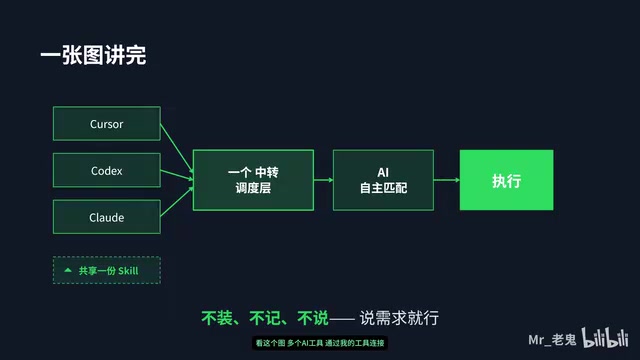
The architecture diagram shows multiple AI tools interconnected through this middle layer. The middle layer continuously feeds the AI two key pieces of information: which skills are currently available, and how these skills should be used. With complete context, the AI can autonomously make decisions and execute the corresponding skill invocations.
This architecture brings two core advantages:
Configure Once, Share Globally
Previously, skills had to be installed one by one in each AI tool; now you only need to configure once in the middle layer, and all connected AI tools automatically synchronize the full set of skills. The problem of skill consistency across multiple tools is fundamentally solved—you no longer have to worry about a certain tool missing a certain skill.
Balancing Speed and Scalability
The standardized MCP protocol interface makes adding new skills and connecting new AI tools effortless. This aligns closely with the industry's current push toward MCP standardization—decoupling AI applications from capability providers through a unified protocol layer, allowing capabilities to be flexibly combined and reused.
An Ultra-Simple Onboarding Experience
Beyond architectural design, this tool has also put effort into lowering the barrier to entry.
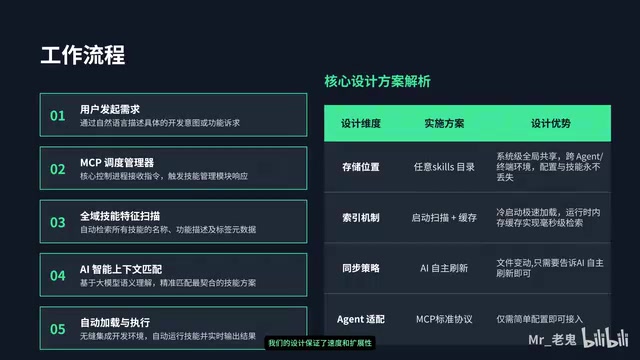
The actual operation is extremely straightforward: double-click the program, configure MCP, and it's ready to go—no complex environment setup required. For ordinary users who are put off by tedious technical configuration, this "out-of-the-box" experience is especially friendly.
The tool's creator summed up the before-and-after change in a single sentence: from "people wrestling with every step of the process in the middle" to "letting the AI run through the entire process"—freeing people from the quagmire of skill management so they can focus solely on expressing their needs.
A Practical Tool Born from a Real Pain Point
What's most compelling about this case is that it stems from real, lived frustration rather than being conjured out of thin air. The creator admits the tool was initially "purely for personal convenience," and he only decided to share it because others faced the same problem.
From a broader perspective, this small tool reflects an important trend in AI application development: as skills, plugins, and Agents continue to proliferate, capability orchestration and scheduling is becoming a new core proposition. When capabilities become abundant enough, enabling AI to autonomously and efficiently select and combine capabilities is more valuable than simply piling up more capabilities. The rise of the MCP protocol is precisely aimed at providing a standardized answer at this level.
For users equally mired in the difficulties of AI skill management, the idea of "intent-driven, unified scheduling" is worth serious attention. It reminds us that a truly useful AI tool isn't just about having strong capabilities—it's about making every capability usable, findable, and memorable.
Related articles

Trick Questions Put to the Test: Deep Analysis of Why Gemini Outperformed Claude
Comparing Gemini 3.7 Flash vs Claude Sonnet 5 on 5 trick questions reveals deep insights into AI over-pattern-matching, lack of critical thinking, and resistance to misdirection.

DeepSeek V4 Pro Frontend Programming Test: Compared Against Grok 4.6 and Kimi K3
Hands-on comparison of DeepSeek V4 Pro, Grok 4.6, and Kimi K3 in frontend programming, testing particle effects and 3D scene development with analysis on performance and cost-effectiveness.

DeepSeek V4-Pro Deep Dive: Agent Capability Upgrades, Benchmark Analysis & API Price Hike Breakdown
DeepSeek V4-Pro launches with major Agent upgrades, 3-tier reasoning effort, and native OpenAI Responses API support. Full benchmark analysis, DS Bench insights, and August 17 time-of-use API pricing breakdown.