The Complete Guide to OpenCode: Installation, Configuration, and Advanced Usage

A complete guide to installing, configuring, and mastering OpenCode, the terminal-native AI coding assistant.
OpenCode is an open-source, terminal-native AI coding assistant that integrates LLM capabilities into developer workflows. This guide covers two installation methods (desktop and WSL), core configuration modules including model selection, rules files, and Agent types, as well as advanced features like custom commands, MCP protocol extensions, and Agent SQL for natural-language database queries.
What is OpenCode
OpenCode is a highly regarded open-source AI programming tool that deeply integrates large language model capabilities into everyday development workflows. Through terminal-based interaction, it helps developers write, debug, refactor, and even manage project-level development tasks. Compared to graphical IDE plugins, OpenCode emphasizes command-line and configuration-driven flexibility, allowing developers to customize models, rules, commands, and toolchains on demand.
It's worth noting that the "terminal-native AI coding assistant" that OpenCode represents is an important technical trend in recent years. To understand this trend, it helps to look back at three generations of AI programming tool evolution: the first generation relied primarily on static rules and pattern matching (like early IntelliSense), depending on predefined code templates; the second generation introduced neural network models — exemplified by GitHub Copilot — enabling context-aware intelligent code completion; the third generation places large language models at the core, combined with Agent mechanisms, capable of understanding natural language intent, planning multi-step tasks, and executing them autonomously.
The essence of this three-generation evolution is a fundamental shift in knowledge representation. First-generation tools relied on manually authored rule libraries — highly interpretable but extremely expensive to scale, since every new language feature required engineers to manually add rules. Second-generation neural network models learned statistical patterns from massive code corpora, achieving a degree of generalization, but were still limited to local context pattern matching and couldn't understand cross-file project structures. Third-generation LLM+Agent systems gained cross-domain world knowledge through large-scale pretraining and broke through the boundaries of pure text generation via tool-calling mechanisms — truly acquiring the complete engineering capability of "understand intent → plan path → execute operations → verify results." Unlike earlier tools focused primarily on code completion, next-generation AI coding assistants can understand context, execute multi-step tasks, and even autonomously invoke system tools to complete complex engineering work. This "agentified" coding assistant is redefining how developers interact with code — AI is no longer just a "suggestion provider" but a true "collaborator" actively participating in the development process.
OpenCode's core positioning is as an AI coding assistant that "anyone can get started with quickly, even without prior experience." It not only supports integration with mainstream large language models but also offers complete Agent mechanisms, custom commands, external tool invocations, and other advanced capabilities — covering everything from simple code completion to complex project development.
For developers looking to enter the world of AI-assisted programming, OpenCode offers a relatively gentle learning curve — ready to use out of the box while retaining ample room for deep customization.
Installing OpenCode
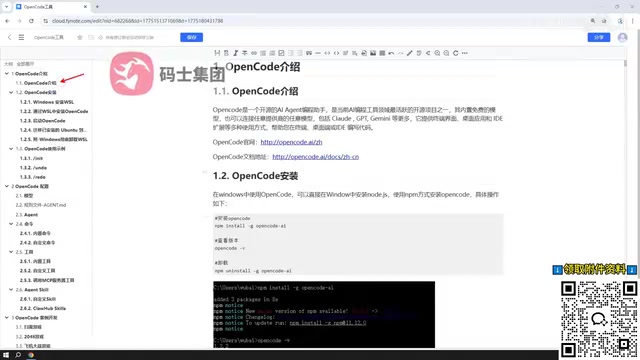
Installation is the first step to using OpenCode. Below are two primary installation paths; developers can choose based on their operating system and preferences.
Desktop Installation
The simplest way to get started is via desktop installation. This approach is ideal for beginners and users who want a quick experience — no additional environment setup is required; just download the installer and you're ready to go. For users who simply want to explore OpenCode's basic features, this path has the lowest barrier to entry and the fastest onboarding.
WSL-Based Installation (Officially Recommended)
The second approach is to first install WSL (Windows Subsystem for Linux) on Windows, set up a Linux virtual environment on top of it, and then install OpenCode within that environment. This is the officially recommended installation method.
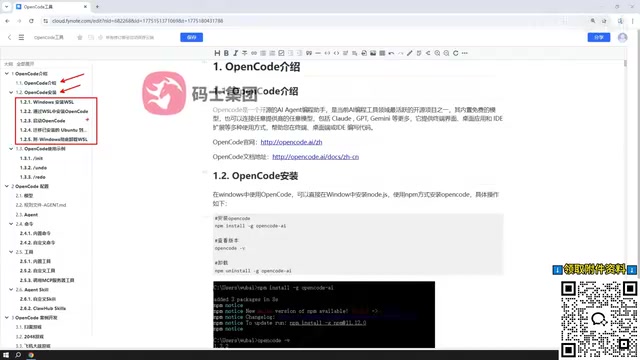
WSL Technical Background: WSL is a compatibility layer provided by Microsoft in Windows 10 and later versions, allowing users to run Linux binaries natively in a Windows environment. WSL has gone through two key versions: WSL 1 achieved Linux compatibility through a system call translation layer, but had performance bottlenecks; WSL 2 introduced a lightweight Hyper-V-based virtual machine running a real Linux kernel, delivering significant improvements in file system performance and system call compatibility, while also supporting GPU passthrough (via CUDA on WSL), enabling machine learning workloads to run smoothly on Windows.
From an architectural perspective, WSL 2's lightweight virtual machine differs fundamentally from traditional VMs (like VMware or VirtualBox): it shares the Windows host's memory resource pool, boots in just a few seconds, and interoperates with the Windows file system via the 9P protocol — allowing developers to access Linux files directly from Windows Explorer, and access Windows drives from within Linux (mounted at paths like /mnt/c). This deep integration makes WSL 2 one of the best solutions for running AI development tools on Windows. For AI programming tools specifically, the Linux environment offers advantages including more mature package managers (apt/brew), better shell script compatibility, a more unified file permission model, and the fact that a large number of open-source toolchains are inherently designed for Unix environments.
The official recommendation for the WSL approach is based on exactly these reasons — AI programming tools and command-line utilities run more stably and with better compatibility in Unix-like environments, effectively avoiding common path, permission, or dependency issues encountered in native Windows environments. For developers who plan to use OpenCode intensively over the long term, the WSL approach — though slightly more involved to set up initially — delivers a more consistent and reliable experience.
Common Commands and Basic Usage
Once installation is complete, mastering the basic commands is key to using OpenCode efficiently. Day-to-day operations in OpenCode revolve primarily around the command line, where users issue instructions to interact with the AI — completing the full workflow from asking questions and generating code to executing tasks.
Familiarity with these common commands allows developers to seamlessly integrate OpenCode into their development rhythm. This step bridges installation and configuration with the advanced customization features that follow.
Core Configuration Deep Dive
Configuration is at the heart of OpenCode's flexibility. The following breaks down three key configuration modules.
Model Configuration
Model configuration determines which large language model powers OpenCode's intelligence. Users can connect to different model services based on cost, performance, and task requirements. This pluggable model mechanism gives OpenCode remarkable adaptability — it can connect to commercial APIs like OpenAI and Anthropic, or connect to open-source models (such as Llama, Qwen, etc.) via local inference frameworks like Ollama, making it equally suitable for data-privacy-sensitive or offline scenarios.
Different models vary significantly in capability, cost, and latency: commercial models (such as GPT-4o and Claude 3.5 Sonnet) typically perform better on complex reasoning and code generation quality, but require per-token payment; local open-source models offer advantages in data privacy protection and zero marginal cost, making them suitable for enterprise scenarios with strict data security requirements.
It's worth noting that model selection strategy is itself a discipline. In real-world engineering practice, one common optimal strategy is "tiered routing" — routing low-complexity tasks like simple code completion and comment generation to lightweight local models (such as Qwen2.5-Coder-7B), while routing high-complexity tasks like cross-file refactoring and architecture design to commercial flagship models, thereby achieving the optimal balance between cost and quality. OpenCode's multi-model support design naturally provides the infrastructure for this tiered routing strategy, enabling developers to flexibly switch based on the complexity and sensitivity of each task to achieve the optimal balance of cost and performance.
Rules File Configuration
Rules files are used to constrain and guide AI behavior, making OpenCode's output more aligned with project conventions and personal preferences.
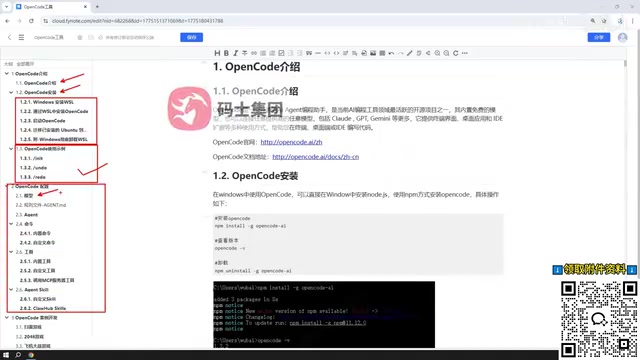
Through rules files, developers can define code style, naming conventions, comment requirements, and even specific business logic preferences. This is essentially setting a "code of conduct" for the AI coding assistant, so that it generates code more aligned with actual project requirements — reducing the cost of manual adjustments later. This mechanism is in the same spirit as the popular "System Prompt Engineering" concept in the industry — through carefully designed context constraints, the consistency and usability of AI output can be significantly improved.
From a prompt engineering perspective, rules files are essentially persistent system-level prompts (System Prompts). Research shows that clearly structured, well-constrained system prompts can improve the consistency of AI output by 30–50%. Rules files solidify this best practice into version-controllable configuration files, enabling teams to share unified AI behavior standards and continuously iterate as the project evolves.
From a team collaboration perspective, rules files also carry significant knowledge preservation value. When a team encodes project-specific architectural conventions, security standards, and performance requirements into rules files and places them under version control (such as Git), this tacit knowledge is transformed into explicit assets that can be inherited, reviewed, and iterated upon. When new members join the team, the AI assistant automatically follows these standards when generating code, significantly shortening the project onboarding period and reducing code style inconsistencies caused by individual habits.
Agent Categories
OpenCode has multiple built-in Agent types, each responsible for different roles. Agents are a core concept in AI — referring to AI systems capable of perceiving their environment, autonomously planning, and executing multi-step actions to accomplish goals.
Understanding the Agent mechanism requires familiarity with the underlying ReAct (Reasoning + Acting) paradigm — a core architecture proposed by a Google research team in 2022 that creates a dynamic decision loop by having the model alternate between three steps: "Thought" (reasoning), "Action" (acting), and "Observation" (observing). Specifically: the AI first analyzes the current task state and formulates an action plan (reasoning), then invokes tools or performs operations (acting), then observes the execution results and adjusts the next strategy accordingly (observation) — continuing this cycle until the task is complete.
Here's a concrete programming scenario to illustrate how ReAct works: when a developer asks OpenCode to "fix all failing unit tests," the Agent will first reason about the current state (run the test suite, get the list of failures), then act (read the source files related to the first failing test), then observe (analyze the discrepancy between the code logic and the test expectations), then reason about a fix, act (modify the source code), observe (re-run the test to verify the fix), and cycle through each failing test case until all tests pass. This "alternating reasoning and action" paradigm enables AI coding assistants to handle complex engineering tasks that require multiple iterations, such as automatically fixing test failures or refactoring cross-file code structures. In the context of programming tools, the Agent mechanism means AI is no longer passively answering questions — it can proactively decompose tasks, invoke tools, read and write files, execute commands, and dynamically adjust its strategy based on execution results. Understanding and using these Agents appropriately makes OpenCode far more efficient and organized when handling complex tasks.
Commands, Tools, and MCP Extensions
OpenCode's power lies not only in its out-of-the-box functionality, but also in its high degree of extensibility.
Custom Commands and Tools
Users can define custom commands to encapsulate frequently used operations as convenient shortcuts, and can also define custom tools to continuously expand OpenCode's capability boundaries. This programmable extension mechanism allows OpenCode to adapt to an ever-changing variety of development scenarios.
Calling External MCP Services
OpenCode supports calling tools published by external MCP (Model Context Protocol) services. The background behind MCP is worth understanding in depth: this protocol was proposed and open-sourced by Anthropic in late 2024, designed to solve the interoperability problem between AI models and external tools and data sources.
MCP's design was inspired by a successful precedent in software engineering — LSP (Language Server Protocol). Proposed by Microsoft in 2016, LSP defined a standard communication protocol between editors and language servers, enabling a single language server (such as Python's Pylsp) to be reused across all LSP-compatible editors like VS Code, Vim, and Emacs — completely breaking through the combinatorial explosion of "N editors × M languages = N×M integrations."
MCP extends this thinking to the interaction layer between AI and tools. Its technical architecture consists of three core roles: MCP Host (e.g., OpenCode, which initiates tool-calling requests), MCP Client (a protocol client embedded in the Host that handles communication details), and MCP Server (the tool provider, which exposes standardized tool descriptions and invocation interfaces). Communication between the three uses the JSON-RPC 2.0 protocol, supporting both stdio (local processes) and SSE (remote HTTP) transport modes. Before MCP, every AI tool needed to individually develop integrations for different external services, creating significant duplicated work. MCP defines a unified tool description format and invocation interface, so any tool that follows the protocol can be directly called by any MCP-compatible AI client — forming a standardized ecosystem analogous to a "USB interface." Hundreds of MCP servers have now been published by the community, covering database queries, file operations, network requests, code execution, and many other scenarios. OpenCode's MCP support means it can seamlessly tap into this continuously growing tool ecosystem, greatly expanding its range of applications.
Agent SQL Capabilities
OpenCode also supports Agent SQL, a particularly notable feature.

Users can not only define custom Agent SQL, but also directly use ready-made Agent SQL resources available on the external web. The technical principles behind Agent SQL are worth understanding in depth: they typically combine two core components — Text-to-SQL technology and an Agent execution mechanism. Text-to-SQL models can convert natural language queries (such as "find the top 10 products by sales revenue in the past 30 days") into standard SQL statements; the Agent mechanism then further empowers the system with a "execute-observe-correct" closed-loop capability — when the generated SQL encounters an error during execution (such as an incorrect table name or syntax incompatibility), the Agent can analyze the error message and automatically correct the query, rather than simply returning a failure result.
From a technical evolution perspective, Text-to-SQL is not a new concept — as early as around 2017, academic benchmarks like WikiSQL and Spider were already driving progress in the field. However, the fatal weakness of early Text-to-SQL systems was their lack of self-correction capability — once the generated SQL had a syntax error or logical deviation, the system could only return an error and could not self-correct. Agent SQL addresses this by introducing the ReAct paradigm, feeding database error feedback (such as ERROR: column "sale_amount" does not exist) back into the reasoning loop as "observations," enabling the model to automatically infer the correct column name using database schema information and regenerate the query. This design — which deeply integrates AI reasoning capabilities with database execution capabilities — allows developers to reuse community contributions and quickly integrate agent capabilities that others have already refined, without building from scratch. The core value of Agent SQL lies in combining structured data query capabilities with AI reasoning capabilities, greatly lowering the barrier to database operations — making it especially practical for data analysts and backend developers. This "standing on the shoulders of giants" approach further reduces the barrier to entry and genuinely improves development efficiency.
Practical Examples and Summary
By connecting all of the above features together, OpenCode builds a complete and flexible AI programming workflow: from installation and configuration to model integration, from rule constraints to tool extensions, and ultimately to project development — each step connects seamlessly to the next.
Overall, OpenCode is an AI programming tool that combines a low barrier to entry with high extensibility. Beginners can quickly get started via the desktop version, while advanced users can leverage WSL, custom commands, MCP services, and Agent SQL to transform it into a highly personalized development powerhouse. From a broader perspective, the "terminal-native, agent-driven, protocol-standardized" form of AI programming tool that OpenCode represents is a microcosm of the entire industry's current evolution — just as LSP unified the editor ecosystem and Docker unified deployment environments, MCP has the potential to become the foundational infrastructure standard for AI tool interoperability, while the ReAct paradigm is becoming the mainstream architectural choice for Agent systems. AI is gradually evolving from an assistive tool into a true development collaborator. For developers looking to embrace AI-assisted programming, OpenCode is well worth deep study and long-term investment.
Key Takeaways
Related articles

Salesforce Acquires Rune for $375M: AI Logistics Tech Bolsters Defense Business
Salesforce reportedly acquires defense tech startup Rune for $375M. Rune's AI logistics tech will strengthen Salesforce's Missionforce defense platform, continuing its M&A spree.

Why Fair Use Benefits Everyone in the AI Era
Starting from a Hacker News discussion, this article analyzes the legal logic and controversies of the fair use principle in AI training and content creation, and its dual impact on creators and the tech ecosystem.

Mistral Large 4 Open-Sources a Trillion Parameters, Microsoft Offers Voluntary Severance to 60,000 Employees
Mistral Large 4 open-sources a trillion-parameter multimodal model with a coding agent score of 48; SanDisk earnings show AI inference reshaping NAND demand; Google Gemini adds in-app file editing, OpenAI raises Codex quotas, and Microsoft offers voluntary severance to 60,000 employees.