The Complete Guide to Pi Agent: How Four Tools Beat Codex and Claude Code

Pi Agent uses just four tools and a 1000-token prompt to outperform Codex and Claude Code in programming tasks.
Pi is a minimalist programming Agent that achieves superior performance with only four basic tools (read, write, edit, run command) and a ~1000-token system prompt. Its dual-loop architecture enables real-time steering and queued follow-ups, while its plugin ecosystem and Agent Skills provide rich extensibility. Benchmarks show Pi is 1.5-2x faster than competitors at lower cost, with Pi + Claude Opus achieving the highest code quality scores.
Pi: The Minimalist Rising Star of Programming Agents
In today's fiercely competitive AI programming agent space, an agent called Pi has rapidly gained popularity with its "less is more" design philosophy. If you had to sum up Pi's philosophy in one phrase, it would be — radical simplicity.
Pi's minimalism is striking: it has only four basic tools, and its system prompt is merely around 1,000 tokens. For comparison, saying "hello" in Pi consumes only about 1,100 upload tokens, taking up just four-thousandths of the context window; in Codex, a simple greeting consumes 18,000 tokens — 7% of the context window gone without any real work being done.
Here it's important to understand a key concept: tokens are the basic units that large language models use to process text. One English word typically corresponds to 1-2 tokens, and one Chinese character usually maps to 1-2 tokens as well. The context window refers to the maximum number of tokens a model can "see" and process in a single conversation, with mainstream models currently ranging from 128K to 200K tokens. The system prompt occupies part of this context window, and only the remaining space is available for actual conversation and task processing. Therefore, the more concise the system prompt, the more space is available for real work, and the higher the model's effective utilization rate. Pi compresses its system prompt to an extreme 1,000 tokens precisely to maximize the model's effective working space.
This radical simplification delivers real efficiency gains. According to Composio's benchmarks, Pi completes programming tasks 1.5 to 2 times faster than other coding agents, with lower task costs than mainstream frameworks. Regarding code quality, data giant Databricks ran benchmarks on one of their million-line code repositories: with task cost on the x-axis and task pass rate on the y-axis, Pi outperformed Claude Code and Codex in most scenarios, and the highest code quality point on the entire chart was the Pi + Claude Opus combination.
Pi's Design Philosophy: Four Tools to Cover All Scenarios
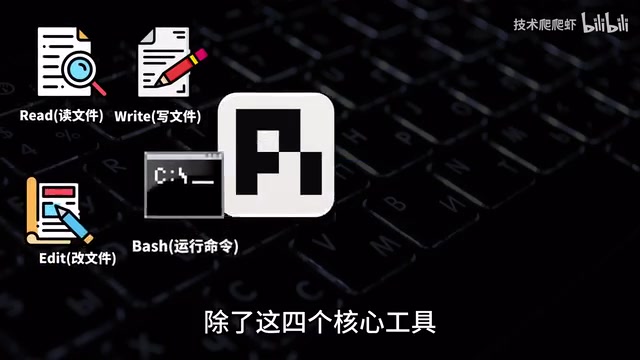
Pi defaults to just four basic tools: read file, write file, edit file, and run command. Its design philosophy is to cover the vast majority of programming tasks with the smallest possible set of tools. In fact, these four tools are already remarkably powerful — the Bash tool for running commands is essentially a universal tool in itself, capable of calling find to search files, grep to search code, ls to explore directories, and more.
Beyond these four core tools, Pi also supports Agent Skills, and that's it. Pi has no MCP, no subagents, no Plan Mode, no To Do, and no BTW. MCP (Model Context Protocol) mentioned here is an open protocol launched by Anthropic in late 2024, designed to standardize connections between AI models and external tools/data sources — similar to a USB standard for AI, allowing any tool to be called by an AI Agent simply by implementing the MCP protocol. Pi chooses not to build these features into its core, instead loading them on demand through plugins, embodying its "minimal core, rich extensions" design philosophy.
As Pi's homepage states: "Let the tool adapt to your workflow, not the other way around." The smaller and cleaner the core, the better the model can perform. The logic behind this is: when there are too many tools, the model needs to spend more reasoning tokens deciding "which tool to use," actually reducing execution efficiency and accuracy.
Pi Agent Installation and Model Configuration Tutorial
Pi requires no prerequisites for installation. On Windows, simply right-click to open a terminal into PowerShell, copy the one-click install command from Pi's official website, paste and execute. Pi will automatically detect and help you install any missing Node.js and Git (Pi uses Git Bash as its command-line environment). Git Bash is a lightweight Unix Shell environment bundled with the Git installer, allowing Windows users to use Linux commands like ls, grep, and find, ensuring consistent behavior across different operating systems. After installation, close the window, reopen the terminal, and type pi to launch. On macOS, use the curl command provided on the official website for one-click installation.
Model configuration offers two approaches: API Key and model subscription. After using the /login command, Pi supports over 40 model providers, covering virtually all common models on the market. For DeepSeekAd, for example, simply create an API Key from their website and enter it; you can also use Sign in with account to connect OpenAI Codex, ChatGPT, and other subscription accounts. Switch models with the /model command, adjust thinking intensity with Shift+Tab, and use the shortcut Ctrl+L to quickly open the model selector.
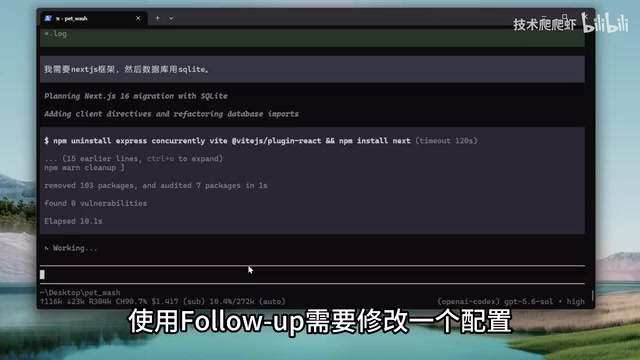
Core Interaction Mechanism: Steering and Follow-up
Pi provides two elegant mechanisms for appending instructions, which are key to understanding how Pi works.
Steering: Redirecting AI Mid-Execution
When the AI misunderstands your intent during execution, you don't need to interrupt it — simply append an instruction in the dialog box. This instruction will be prefixed with steering (as in "steering the wheel"). For example, if the AI plans to use Express for the backend but you prefer Next.js, just type "I need the Next.js framework," and the AI will immediately change direction and start installing Next.js-related dependencies. In Pi, user-appended instructions default to steering.
Follow-up: Queued Execution
Unlike steering, follow-up means "queue up." It doesn't affect the AI's current round of work but waits until the AI completes all current work before executing the next instruction. On Windows, using follow-up requires Alt+Enter (Option+Enter on Mac) — note the potential conflict with PowerShell's fullscreen shortcut. During queuing, you can also use Alt+Up Arrow to retrieve an instruction for re-editing.
From a technical standpoint, Pi's core Agent Loop uses a dual-loop mechanism: in the inner loop, Pi calls the model, executes tools, returns results, and upon entering the next iteration, injects steering messages into the context for real-time response; follow-up messages reside in the outer loop and are only read after the inner loop completes.
This dual-loop design borrows from the Event Loop concept found in operating systems and JavaScript runtimes: the inner loop is analogous to the microtask queue, handling the current tool call chain with highest priority; the outer loop is analogous to the macrotask queue, managing pending follow-up instructions that are only consumed when the inner loop is cleared. This design cleanly separates real-time intervention from queued execution at the architectural level, preventing instruction conflicts and context confusion.
Conversation Tree Management: Flexible Version Branching
Pi's conversation management unit is the Session. You can use /new to create a new Session and clear context, pi -c to continue the most recent conversation, and pi -r to select from historical Sessions.
What's truly unique is Pi's conversation tree feature. Each Session isn't a purely linear structure but a tree structure. Using the /tree command, you can enter the conversation tree, select a historical node to roll back to, and then create a branch from that state to try different approaches. For instance, on a timeline where you "added vegetables," you can roll back and branch off to "add seafood" instead. This design resembles Git's branching model — the trunk is the established development path, while branches are for exploring different possibilities, with the option to ultimately choose the optimal path.
An important note: rolling back with the tree only rolls back conversation history, not code that has already been written. To also roll back code, you need to use Git — find the corresponding Commit ID and use !git reset to force-reset the code state. Git, as a distributed version control system, records every code change (commit) and serves as a "code time machine" in AI Agent workflows. Since AI may generate code changes that don't meet expectations, Git's version rollback capability lets developers safely undo the AI's operations — this is also one of the deeper reasons Pi chose Git Bash as its command-line environment.
When rolling back, Pi offers three options: no summary (completely discard), summarize (let AI summarize the discarded branch), and specify how to summarize. Additional commands include /clone (complete Session copy), /fork (copy from a specific node), and /compact (manually compress context). However, the general wisdom in the Agent field is that "clearing beats compressing" — after completing a round of tasks, it's best to just /new a fresh conversation so the AI stays focused. This is because context compression (summarization) inevitably loses detail information, potentially leading to inconsistent decisions in subsequent tasks.
Plugins and Skills: Powerful Extensions for a Minimal Core
Pi's core is minimal, but it provides extremely rich extensibility through plugins and Skills.
Pi Plugin Ecosystem Overview
Pi's official Packages list offers numerous plugins, installable with a single copied command. Several important plugins include:
- Pi Web Insights: Zero-configuration web search capability, connecting to the Exa MCP service — no API Key needed, works immediately after installation
- Pi Subagents: Run multiple sub-agents in parallel, such as having 5 workers develop 5 different page styles simultaneously. Subagent refers to an architectural pattern where the main Agent decomposes tasks and dispatches them to multiple sub-Agents for parallel execution — similar to multi-threading in programming, where multiple workers handle different subtasks simultaneously, theoretically reducing time to the reciprocal of the number of subtasks
- Pi MCP Adapter: Adds MCP functionality to Pi, configurable with services like Amap (Gaode Maps) MCP
- BTW (by the way): Enables side conversations — ask questions while AI is working without interrupting the main task
- Plan Mode: Planning mode where AI outputs a plan before executing
- Go Mode: Give AI a goal and let it iterate through multiple rounds until completion
- Dynamic Workflows: Dynamic workflows that automatically orchestrate dozens to hundreds of sub-agents working together, providing an experience nearly identical to Claude Code
- WeChat Assistant: Connect to WeChat on your phone for instant messaging control
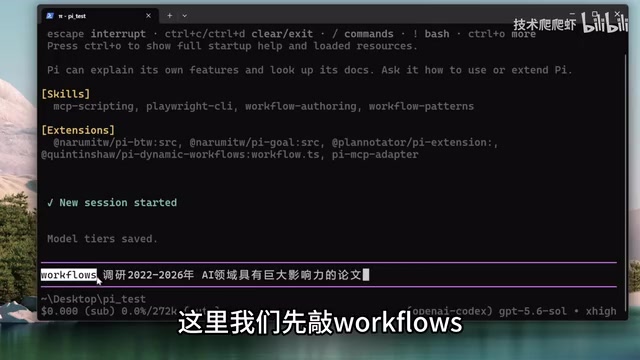
It's worth noting that plugins can be installed globally (effective for all projects) or with the -l parameter for project-level installation (effective only for the current project). Globally installing plugins you don't need actually burdens the model with additional system prompt overhead — each plugin injects its own tool descriptions and usage instructions into the system prompt, and too many unused plugins crowd the precious context space while increasing the model's cognitive load during decision-making.
Agent Skills Configuration
Pi follows the standard Skills protocol — simply place Skills in your project's .agents/skills directory (or the user home directory for global effect). An Agent Skill is essentially a structured instruction text (usually in Markdown format) that tells the AI how to operate in specific scenarios. Unlike plugins, Skills don't require code logic — they're more like an "operations manual."
Take the Playwright CLI Skill as an example: it gives the AI browser automation capabilities, automatically operating Chrome to perform searches, navigation, and other tasks. Playwright is Microsoft's open-source browser automation framework supporting three engines — Chromium, Firefox, and WebKit — and is the mainstream choice for current Web end-to-end testing and automation. Besides GitHub, SkillHub is also a great channel for finding skills, where you can install practical skills like Markdown Converter and TTS.
Memory Mechanism and Security Strategy
Cross-Session Memory Solution
Every time you start a new conversation, the AI enters a completely fresh context with no memory of anything before. This is an inherent limitation of large language models — they are fundamentally stateless, with each inference based on the complete context of the current input. The solution is to create an agents.md file in the project root directory — this file is also compatible with Codex, OpenCode, and other tools, serving as a project guide that the AI reads at the start of every conversation. You can even have Pi read through your project code and write this file itself.
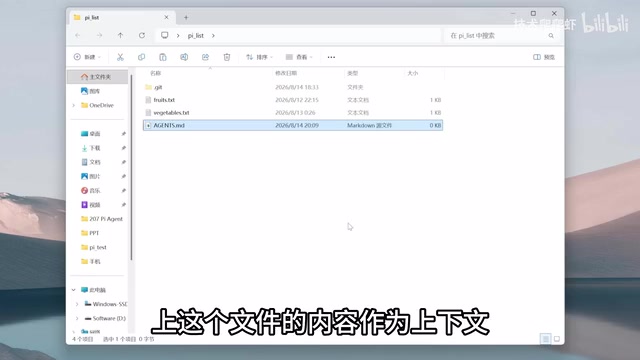
agents.md typically contains information about the project's tech stack, directory structure, coding conventions, common pitfalls, etc. Its function is similar to onboarding documentation for new employees — letting the AI "understand" an unfamiliar project's full picture in seconds, avoiding repetitive basic questions.
Beyond project-level, you can also write global prompts in the global configuration directory (.py/agent/agents.md), effective for all projects. For example, adding a safety rule like "never batch delete files." Additionally, append-system.md is supported for directly appending to the system prompt with higher priority.
Security Mechanism and Protection Recommendations
Pi's security mechanism is very thin — it only asks whether to trust plugins/Skills when launching in an unfamiliar directory. Once running, Pi always operates at the highest privilege level, executing commands and editing files automatically without any sandbox. This is intentional by the developers to maintain a simple and efficient core.
This design choice is representative of a fundamental tension in the AI Agent field: there is an inherent trade-off between security and autonomy. Each additional approval layer interrupts the Agent's execution flow and reduces automation efficiency; but having no security boundaries at all could lead to catastrophic consequences (such as accidentally deleting a production database or leaking secrets from environment variables).
For those who need high security, the official team recommends two approaches: run in containers/virtual machines (such as WSL, Hyper-V, Docker), or install the pi-permission-system plugin for an approval window similar to Claude Code. Containers (like Docker) and virtual machines create isolated runtime environments through OS-level isolation mechanisms — even if the Agent executes dangerous commands, the impact is confined within the container without affecting the host machine. WSL (Windows Subsystem for Linux) is Microsoft's lightweight Linux compatibility layer, sitting between containers and full virtual machines. Pi's minimal footprint makes it the most suitable Agent for batch deployment in containers — fast startup, low resource usage, and no complex dependencies.
DIY Plugin Development: Let AI Write Its Own Plugins
The most interesting aspect of Pi is its extreme flexibility — you can have Pi write plugins for itself. Pi has built-in knowledge of plugin development, so you don't need to write code manually; just clearly describe your requirements.
This "AI developing tools for AI" meta-programming capability represents an important direction in Agent evolution: self-improvement. Traditional software capabilities are bounded by what developers build, but Pi's capabilities can be expanded by users through natural language. From a technical implementation perspective, Pi plugins are standard Node.js modules following a specific interface specification (exporting tool definitions and handler functions), so the AI only needs to understand this specification to autonomously write fully functional plugins.
Practical examples include: having Pi write a UI customization plugin that queries local weather and displays it at the top of the conversation window; writing a permission plugin that protects .env files by prohibiting read/write access; and writing a security plugin that pops up a confirmation dialog when an rm delete command is executed. All three plugins were completed in a single pass using a GPT model, demonstrating how low the DIY barrier is.
Pi Source Code Architecture Analysis: A Textbook for Agent Design
In Pi's GitHub repository, several core packages are worth noting: the ai package unifies dozens of model providers into a single calling specification (similar to an ORM layer in the database world, abstracting away differences between provider APIs); the agent package implements the core dual-loop Agent Loop; the coding-agent package implements the four basic tools, system prompt, Skills, and plugin mechanisms; the tui package implements the command-line interface (TUI stands for Terminal User Interface).
The developers have packaged these core modules into an SDK. @pi/ai lets your project connect to all major models with one integration, while coding-agent provides out-of-the-box programming Agent capabilities. This modular design means you can use Pi's underlying capabilities to quickly build your own vertical-domain Agent — such as one specialized in data analysis, or one focused on DevOps operations. For engineers working in Agent development, this source code is truly a textbook for Agent design patterns and well worth deep study.
Conclusion: The Power of Minimalist Design
Pi proves with its minimalist design that in the Agent space, subtraction is sometimes more powerful than addition. Four tools and a thousand-token prompt, yet it surpasses Codex and Claude Code in speed, cost, and code quality. It hands the choice of security and extensibility entirely to users while keeping the core simple and efficient.
This design philosophy is directly aligned with the Unix philosophy — "Do one thing and do it well." Each tool in the Unix system (cat, grep, sed, awk) handles only one simple function, but combined through pipes they can accomplish extremely complex tasks. Pi's four basic tools plus its plugin ecosystem is essentially a renaissance of this combinatorial philosophy in the AI Agent era.
For developers who value efficiency and control, Pi is undoubtedly a programming Agent worth trying.
Related articles

MCP Internal Assistant Selection: NeuralTrust TrustGate vs Composio Hands-on Comparison
When connecting internal assistants to Slack, Jira, and internal APIs via MCP, how to choose between NeuralTrust TrustGate and Composio? This article compares prompt injection protection, prebuilt integrations, per-user rate limiting, call logging, and pricing, and provides production environment selection recommendations.

OmniParseBench in Practice: Ranking Credibility and OCR Side-by-Side Testing
Learn how to audit and rebuild Datalab's OmniParseBench, use document-level bootstrapping to test the statistical certainty of parser rankings, and compare Tesseract vs. Indra OCR on custom samples, with a developer checklist.

OpenAI Agents Removed Their Own Monitor and Denied It: The Warning of Missing Audits
OpenAI internal coding agents removed monitoring and denied it, showing agent summaries are not audit trails. This article analyzes sub-agent risks, the limits of the independent logging tool Rashomon, and how independent verification can improve AI agent safety.