The Four Core Components of n8n AI Agent: Model, Tools, Memory, and Output Parser

n8n AI Agent consists of four core components: Chat Model, Tools, Memory, and Output Parser, where Model and Tools are required, and Memory and Parser are optional.
This article introduces the four core components of building an AI Agent in n8n: Chat Model (the brain), Tools (action execution), Memory (multi-turn conversation), and Output Parser (structured output). Chat Model and Tools are required components, while Memory and Output Parser are optional. The article also clarifies the common confusion between Chain and Agent: Chains follow fixed steps with no memory, while Agents support dynamic tool calls and memory. Finally, it offers starting advice: begin with a single model and tool, add memory only for conversational scenarios, and expand gradually.
The Four Core Components of n8n AI Agent: Model, Tools, Memory, and Output Parser
When building AI Agent in n8n, many people get confused by the concepts of "Chain vs. Agent." In reality, a complete AI Agent consists of four core components: Chat Model, Tools, Memory, and Output Parser. According to the explanation from the YouTube channel "Made Crystal Clear," Chat Model and Tools are required, while Memory and Output Parser are optional. Understanding the roles of these four components is the first step to building efficient AI workflows.

Chat Model: The Brain of the Agent
The Chat Model is the "brain" of the AI Agent, responsible for understanding user input and generating responses. In n8n, you can connect to mainstream models like OpenAI, Anthropic, or use local models. It is the reasoning core of the entire Agent; without it, the Agent cannot function.
When choosing a model, you need to balance response quality, cost, and speed. For simple tasks, a lightweight model may suffice; for complex reasoning, a more powerful model is needed. n8n's flexibility allows you to switch models within the same workflow, making testing and optimization easy.
Tools: Enabling the Agent to Perform Actions
Tools are external functions that the Agent can call, such as invoking another workflow, querying a database, or sending emails. At least one tool must be configured for the Agent to perform actual operations. The essence of tools is to extend the Agent's capabilities, enabling it not only to "speak" but also to "act."
In n8n, tools can be Sub-workflows or built-in nodes. When designing tools, clearly define their input and output formats to ensure the Agent can call them correctly. For example, a "Send Email" tool needs to receive recipient, subject, and body as parameters.
Sub-workflow is a modular design in n8n that allows you to call a complete workflow as a node in another workflow. In the context of AI Agent, sub-workflows are often used as tools because you can encapsulate complex business logic into an independent sub-workflow and then have the Agent trigger it through tool calls. Sub-workflows can receive input parameters and return output results, enabling the Agent to perform multi-step operations such as "query database and format results" or "send email and log." The benefits of using sub-workflows as tools are reusability and maintainability: you can share the same sub-workflow across multiple Agents without duplicating logic. When configuring a sub-workflow tool in n8n, ensure that the sub-workflow's input and output match the Agent's calling conventions.
Memory: The Key to Handling Multi-turn Conversations
Memory is used to store previous chat turns, allowing the Agent to maintain context during conversations. Memory is optional and only needed when your Agent handles multi-turn conversations. For single-task Agents, omitting memory saves resources and avoids unnecessary state management.

n8n supports various memory types, such as Window Buffer Memory. Properly configuring memory length balances context completeness and performance overhead.
Output Parser: Ensuring Structured Output
The Output Parser is used to parse the model's free-text output into a fixed structure (e.g., JSON) and is also optional. When your downstream processes require structured data, the Output Parser becomes necessary. It works with the model to ensure output conforms to the expected format, reducing errors in subsequent processing.
Chain vs. Agent: The Most Common Confusion
According to the same source, the confusion between Chain and Agent is the most common mistake among beginners. A Chain follows fixed steps and has no memory; an Agent can dynamically call tools based on the situation and optionally use memory. Many users migrating from Chains easily make mistakes here.
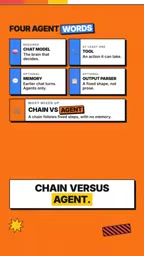
If you only need to execute deterministic processes, a Chain may be simpler; if you need dynamic decision-making and tool calls, use an Agent. Understanding the difference helps you choose the right building blocks.
Chain is a fundamental concept in the LangChain framework, referring to a series of predefined, sequentially executed steps. Chains are typically used for deterministic task flows, such as: receive input → call model → parse output → return result. Each step in a Chain is hardcoded and does not dynamically adjust subsequent steps based on intermediate results, nor does it have memory capabilities (unless a memory module is explicitly added). Common Chain types include LLMChain, SequentialChain, etc.
Agent is more flexible; it uses a language model as a reasoning engine to dynamically decide which tools to call and in what order based on user input, and can incorporate memory to maintain context. The core of an Agent is the "think-act-observe" loop: the model first reasons about what to do, then calls tools, observes results, and decides the next step until the task is complete. This dynamism makes Agents suitable for open-ended tasks requiring multi-step reasoning, but also introduces higher complexity and unpredictability. Understanding the difference between Chain and Agent helps you choose the appropriate construction approach in n8n based on task requirements.
Getting Started: Start Simple
For beginners, it is recommended to start with one model and one tool, and only add memory for conversational scenarios. This allows you to quickly validate the Agent's basic functionality and then gradually expand. n8n's modular design makes this incremental building easy.
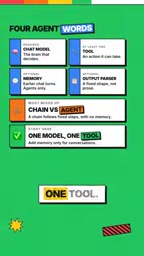
Additionally, the source mentions that deeper learning can explore advanced topics such as sub-workflows, encryption keys, and real backups. These can help you build more robust production-grade Agents.
Conclusion
The four core components of n8n AI Agent form a flexible and powerful foundation: the Chat Model provides intelligence, Tools enable action, Memory supports conversation, and the Output Parser ensures structure. Mastering their roles and configuration methods allows you to build AI Agents in n8n that meet your needs. Remember, starting simple and expanding as needed is an effective strategy to avoid complexity.
Related articles

Why Does the Tesla Roadster Need to Fly? A Deep Dive into Musk's Wild Demo
Tesla's Roadster launch showed wall-climbing, upside-down driving, and flying stunts—but The Vergecast notes the demo car may lack a battery, the Rocket version is invite-only and not street-legal, and the website terms don't guarantee delivery. After nine years of delays, why does this car still need to exist?

AI Is Not a Replacement: Human-AI Collaboration Through the Lens of Factory Root Cause Analysis
Starting from factory root cause analysis, this article explains how AI accelerates evidence chain construction rather than replacing human experts, exploring the pragmatic implementation logic and business value of 'AI supporting people rather than replacing them.'

AI Agent Decision Auditing: Building an Evidence Chain in Regulated Workflows
Starting from a Reddit discussion, this article analyzes three core issues in AI agent decision auditing within regulated workflows: what fields audit records should contain, how to handle feedback latency for erroneous decisions, and how to continuously calibrate LLM judge consistency with human judgment.