The Indie Developer's Budget Meal: A Practical Guide to Launching a Complete App at Zero Cost

A zero-cost tech stack helping indie developers build and launch products for free
This article outlines a zero-cost tech stack for indie developers and startup teams, covering AI-assisted coding (VSCode+Cline+OpenRouter free API), full-stack framework selection (Next.js), Serverless deployment (Vercel/Cloudflare), and more. It also highlights AI coding limitations — AI may overlook architectural security principles like frontend-backend separation, and developers must still serve as the architect.
For indie developers, students, and early-stage startup teams, how to complete product development and go live without spending a dime is an incredibly appealing topic. This article outlines a complete "budget meal" tech stack covering AI-assisted coding, code hosting, databases, deployment, domains, user analytics, and more — helping you launch a fully functional business application at zero cost.
Tech Stack Choices: Why Next.js + Node.js
The lowest-cost backend option is Node.js, because it can easily be adapted into Serverless Functions.
What is Serverless? Serverless doesn't literally mean no servers — it means developers don't need to worry about purchasing, configuring, or maintaining servers. Code is deployed as individual "functions," and the platform charges based on actual invocation count, generating zero cost when idle. This model is extremely friendly to low-traffic startup projects — traditional VPS hosting requires monthly payments even if not a single user visits your site; Serverless truly costs nothing at zero traffic. Cloudflare Workers run on V8 engine across global edge nodes with extremely short cold start times; Vercel's Serverless Functions deeply integrate with Next.js API Routes, automatically converting files under the
/app/apidirectory into standalone cloud functions during deployment, requiring no additional configuration.
Many platforms currently offer free serverless deployment services, such as Cloudflare Workers, Vercel, and Netlify.
Frontend framework choice has almost no impact on deployment cost. React is a solid choice, with the added benefit of later adapting to cross-platform mobile apps via React Native. The Node.js + React combination naturally leads to Next.js — a full-stack development framework that's extremely popular internationally.
Why is Next.js SEO-friendly? Next.js is developed and open-sourced by Vercel, built on top of React, and solves the core pain point of pure React single-page applications (SPAs): poor SEO. Traditional SPAs render page content dynamically via JavaScript in the browser, and search engine crawlers often only see blank HTML, making pages difficult to index. Next.js provides Server-Side Rendering (SSR) and Static Site Generation (SSG) modes, pre-generating HTML on the server so crawlers can directly read complete content. Additionally, the App Router architecture introduced in Next.js 13 uses
"use server"and"use client"directives to enforce server/client code boundaries at the framework level, fundamentally preventing sensitive information like database credentials from leaking to the browser.
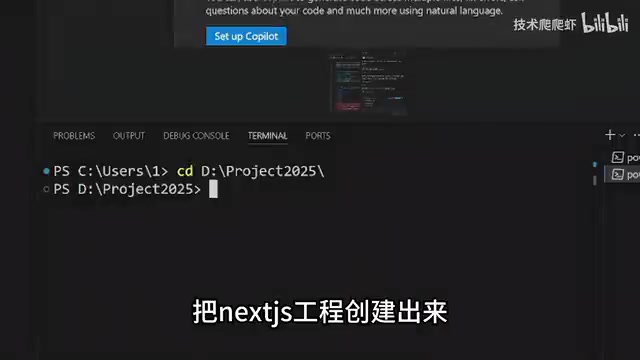
Creating a project is dead simple — just run npx create-next-app. After the project is set up, run npm run dev to see it in action locally.
Free AI Coding Setup: VSCode + Cline + OpenRouter
Here's a completely free AI coding setup: VSCode + Cline plugin + OpenRouter free API.
Toolchain Background: Cline (formerly Claude Dev) is an open-source VSCode AI coding plugin. Its core difference from tools like GitHub Copilot is its "autonomous agent" capability — it can read/write files, execute terminal commands, and use a browser, enabling complex cross-file refactoring tasks rather than just code completion. OpenRouter is an AI model aggregation routing platform that unifies API formats from dozens of model providers including OpenAI, Anthropic, Google, and DeepSeekAd. Developers only need one API Key to switch between different models. DeepSeek, developed by China's DeepSeek company, performs excellently on coding benchmarks and offers limited free API calls. The essence of this combination is: using an open-source plugin + free model quotas to replicate the core experience of paid tools like Cursor.
Configuration steps:
- Install VSCode, search for Cline in the extension marketplace and install it
- Open Cline, choose to use your own API Key
- Go to OpenRouter to get a free API Key (directly accessible from China)
- Search for "DeepSeek Free" in the model list and select the free DeepSeek 0324
This gives you a zero-cost AI coding assistant. In practice, you can have AI quickly generate page code — for example, transforming a blank page into a Snake web game.
AI Coding Limitations: Humans Are Still the Architects
A typical issue surfaced during real-world use: AI-generated code called database save methods directly from the frontend page. This causes two serious problems — the browser environment doesn't have database-related packages and will throw errors, and sensitive database connection information gets exposed on the frontend.
Why can't the frontend connect directly to the database? Frontend-backend separation is a fundamental security principle in modern web development. All code running in the browser is completely transparent to users — anyone can inspect JavaScript source code and network requests through developer tools. Therefore, database connection strings, API keys, service account passwords, and other sensitive credentials must never appear in frontend code. The correct architecture is: the frontend only handles UI rendering and user interaction, calling backend APIs via HTTP requests; the backend API runs in a server environment, holds sensitive credentials, and operates the database only after validating request legitimacy. Next.js Server Actions (
"use server"directive) essentially auto-generate this API layer — code is written in the same file but gets split to execute on the server during build time. Developers need to understand this mechanism rather than solely relying on AI-generated code.
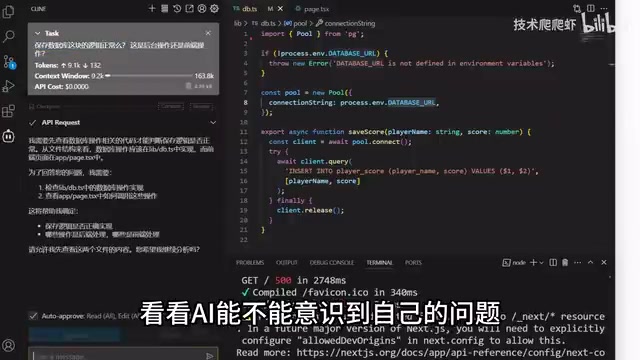
When asked "Is the database saving logic here correct?", the AI didn't recognize its own mistake until the error message was pasted back to it, at which point it began to correct the issue. The proper approach is to create a separate API endpoint, or add "use server" to the method.
Related articles
 Tutorials
ChatGPT Plus Subscription Guide: Are GPT-5.5, image-2, and Codex Worth the Upgrade?
A detailed look at ChatGPT Plus features — GPT-5.5, image-2, and Codex — with a Plus vs Pro comparison and a complete step-by-step subscription guide for users outside the US.
 Tutorials
Harness AI Engineering in Practice: Using Claude Code to Master Enterprise-Level E-Commerce Development
Deep dive into Harness AI Engineering: master enterprise e-commerce development with Claude Code using the Rules, Skills, Wiki, and Changes framework.
 Tutorials
Cursor + Codex Dual-IDE Collaboration: A Practical Methodology for Open-Source Project Customization
A complete methodology for open-source project customization based on real-world experience, detailing the Cursor+Codex dual-IDE workflow, seven-stage process, MVP validation, and AI source code reading techniques.