The Kindle Page Turner Can Do What? Remote Camera Shutter and Manual TikTok Scrolling

A Kindle Bluetooth page-turn button dismissed as pointless turns out to be surprisingly addictive thanks to its physical convenience and redefinable uses.
Starting from a The Vergecast discussion, the article introduces Amazon's Kindle Click, a Bluetooth page-turn button designed for e-readers. Initially called "a dumb thing nobody needs" since modern readers dropped physical page keys, it proves far less effort than swiping — especially on a treadmill or in bed. More interestingly, users repurpose it as a camera remote shutter or a manual TikTok scroller. The common logic: it handles high-frequency, mechanical single-trigger actions. The article recommends cheaper alternatives over the premium official version.
A "solution in search of a problem" button — so why is it so addictive?
Amazon's Kindle Click is essentially a Bluetooth page-turn button designed specifically for e-readers. In the The Vergecast discussion, the host flat-out called it "a dumb thing nobody needs" — after all, today's Kindles and most e-readers long ago dropped physical page-turn keys, making screen swipes the default. But after actually using it, his verdict changed: it turned out to be surprisingly good.
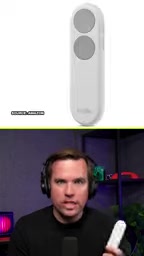
The core experience is simple: holding a physical button to turn pages is far less effort than reaching out to swipe the screen every time. Especially when you've got your reader mounted on a treadmill, or propped up in bed, being able to turn pages without reaching for the screen — those small conveniences add up, and the improvement to the reading experience is quite noticeable.
Beyond the official accessory: a flood of alternatives and more use cases
The Vergecast noted that Amazon has "a million" products like this — there's no must-buy reason for the official version, and a huge number of white-label equivalents offer lower prices and similar functionality. Their original pitch was modest: turn pages while running, avoid reaching out while reading in bed.

But the truly interesting part is that users started putting this button to completely unexpected uses.
From page-turn key to shutter button
One use case mentioned: pairing this kind of Bluetooth button as a remote shutter for your phone camera. When one person is taking a group photo, shooting a timelapse, or needs a stable camera, pressing the little button in your hand triggers the shot — more controllable than a countdown timer. Logically it's no different from page turning — both send a "press" command to a device; only the recipient changes from an e-reader to a camera app.
Bluetooth remote shutter use cases like this rely on the Bluetooth HID (Human Interface Device) protocol. HID was originally a standard defined in the USB era for keyboards, mice, and other input devices; Bluetooth HID lets wireless peripherals send key events directly to phones and tablets without the manufacturer needing to build a separate app. Many Bluetooth shutters and page turners actually ship with the same HID descriptor burned in — only the key mapping differs. That also explains why a Kindle page-turn button can be recognized by a camera app as a shutter: the phone system treats it as an external keyboard, and pressing it emits a standard volume-key or Enter keycode — and most camera apps happen to map the volume key to capture. Users can even use the system's accessibility features or third-party mapping tools to further rewrite what action that keycode triggers.
A remote for manually scrolling TikTok
An even more amusing use case: some people use these remote buttons to manually scroll TikTok. Short-video immersive design already makes it hard to stop, and now even the swipe action can be delegated to an external button — lying down or walking, you can "one-click next" anywhere. The Vergecast host's take: it's genuinely astonishing how many scenarios a single button can serve.

Scrolling TikTok with an external button technically usually relies on two paths: first, Bluetooth keypresses simulating arrow keys or Page Down, working with apps that support keyboard navigation to achieve paging; second, through Android's accessibility services or iOS's AssistiveTouch/Shortcuts, binding key events to an "swipe up" gesture. This kind of modification falls under the broader category of "input remapping," which has mature practices in the accessibility field — users with limited mobility have long used external switches to control their phones. The high-frequency swiping of short-video platforms happens to be a natural fit for this input method, so peripherals originally serving accessibility or reading get repurposed for entertainment scenarios.
The universal logic behind a single button
What these use cases share: they're all "repetitive single-trigger actions." Turning a page, pressing a shutter, scrolling to the next video — fundamentally they're the same class of command. Any hardware that can be mapped to Bluetooth key input can, in theory, take over those high-frequency, mechanical operations on your phone.

That's also why a small accessory designed for an e-reader unexpectedly becomes a universal remote. The manufacturer sells a "Kindle page turner," but what users get is a physical shortcut key whose purpose they can freely define. This kind of "purpose overflow" isn't rare in consumer electronics, but every occurrence brings a bit of delight.
What the article calls "purpose overflow" is often described in consumer electronics research as the opposite of functional fixedness: a product is designed for a single purpose, but users redefine it according to their own needs. Physical buttons are easy to redefine because they output a minimalist discrete signal — press to trigger, carrying no semantics; who receives it and what action it performs is entirely determined by software. By contrast, touchscreen swipes carry continuous information like direction, distance, and speed, making them hard to simply repurpose. That also explains why, years after touchscreens became ubiquitous, single-key remotes, macro keyboards, and devices like Stream Deck have become popular again: they compress complex operations into a single deterministic physical action, reducing the cognitive and physical cost of repetitive labor.
Is it worth buying?
The Vergecast's stance is clear: the official version carries an obvious premium — don't buy it unless you have a specific reason; the many alternatives on the market are more than sufficient. But if there's any part of your daily routine that involves repeatedly reaching for your phone — reading, taking photos, scrolling videos — the experience improvement from such a small button may be worth more than its price.
It doesn't solve any big problem — just a very small friction point you encounter many times a day. That's probably why these "dumb things" are so addictive.
Related articles

GPT-6 Cyber Unearths 948 Linux Kernel Vulnerabilities: A New Era in AI Security Offense and Defense
GPT-6 Cyber and a custom vulnerability research pipeline analyzed the Linux kernel and confirmed 948 exploitable vulnerabilities. This article explains how the AI vulnerability discovery pipeline works, the risks of kernel vulnerabilities, and how the security community can respond collaboratively.

Jensen Huang Returns to Nvidia HQ to Hero's Welcome from Employees
Nvidia CEO Jensen Huang returned to headquarters to a hero's welcome and said he would "do better the second time as CEO." This article analyzes the leadership iteration signal and its impact on the AI industry.

Apple Renews Ted Lasso for Season 5: Why the Phenomenal Series Keeps Going
Apple TV+ renews Ted Lasso for Season 5 after a record-breaking Season 4 debut. We analyze the platform strategy, emotional value, and streaming competition logic behind the renewal.