The Programmer's Desk Setup Guide: Building a Workspace That Feels Like Home

How programmers design workspaces that trigger flow states and maximize productivity.
A well-designed desk isn't just furniture — for programmers, it's an extension of the mind. This guide explores the science behind productive workspaces, covering multi-monitor setups, mechanical keyboards, ergonomics, and the psychology of remote work environments, helping you build a setup that truly feels like home.
A Desk That Feels Like Home
On social media, a developer shared a photo of their workstation with a short but resonant caption: "I feel at home on this desk."
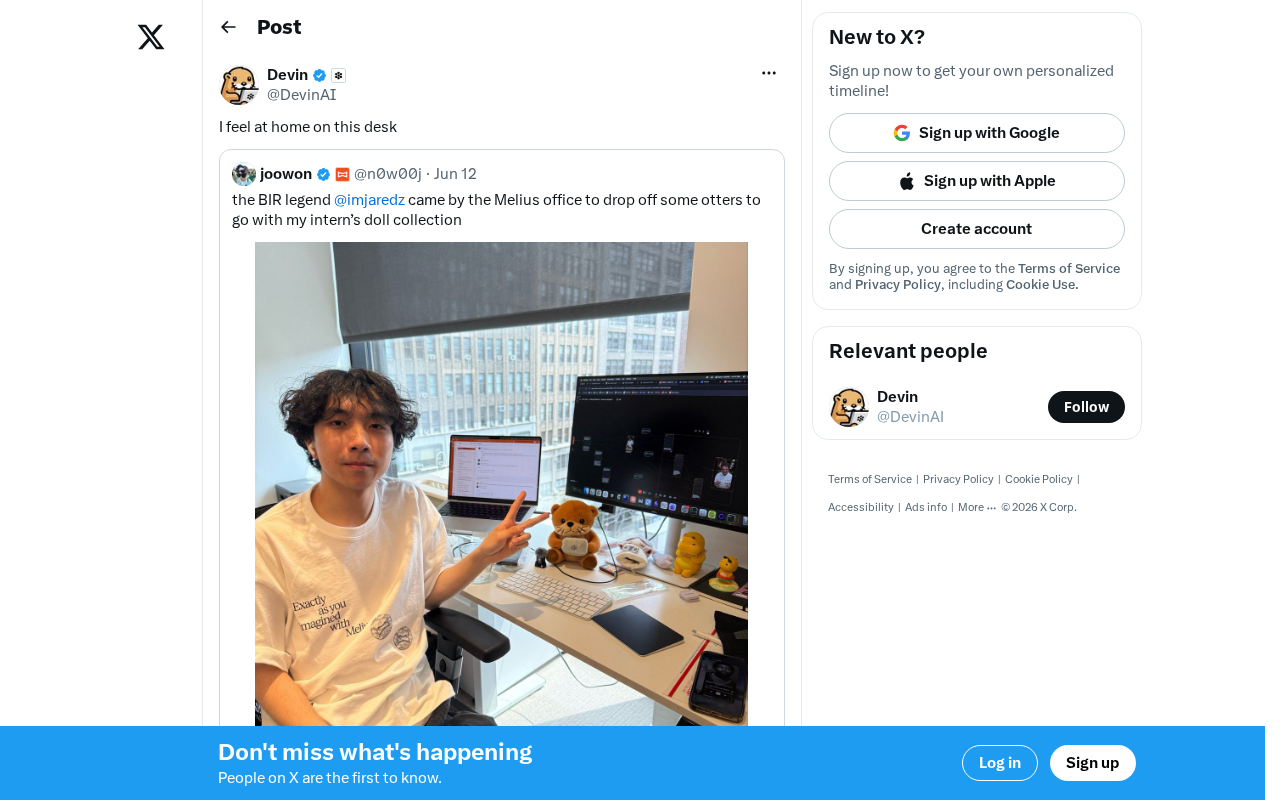
Those words captured something many tech professionals deeply relate to — when your tools, environment, and workflow align perfectly, the sense of immersion and belonging is truly irreplaceable.
How Your Desk Environment Affects Programmer Productivity
Physical Space as Mental Space
For programmers and AI practitioners, a desk isn't just a surface to place devices on — it's an extension of the mind. Psychologist Mihaly Csikszentmihalyi's theory of "Flow" offers a scientific framework for this: flow is the optimal experience of being completely absorbed in an activity, during which the brain's prefrontal cortex operates at peak efficiency, significantly boosting creativity and problem-solving ability. One of the key conditions for triggering flow is reducing external distractions — a thoughtfully designed workspace essentially paves the way, at a physical level, for flow states to emerge.
A well-arranged workspace can:
- Reduce cognitive load: Every tool is within reach, so you never have to break your train of thought to hunt something down
- Improve focus: A clean, organized environment helps the brain enter a state of deep work
- Reduce fatigue: An ergonomically sound desk layout minimizes the physical discomfort that comes from long coding sessions
The Desk Philosophy of Tech Workers
Unlike typical office setups, a tech worker's desk often reflects their personal workflow and technical preferences. Multi-monitor configurations, mechanical keyboards, specific mice and audio gear — every choice reflects deliberate thinking about efficiency.
Multiple Monitors and Cognitive Extension: Multi-screen setups are extremely common among tech workers, and cognitive science backs them up. Human working memory is limited (typically 7±2 chunks of information at a time), and when you're juggling a code editor, terminal, documentation, and browser simultaneously, constant window-switching creates significant "context-switching costs." Research from the University of California, Irvine found that after each interruption, it takes an average of about 23 minutes to return to a state of deep focus. Multiple screens "externalize" information into physical space — essentially a hardware-level expansion of working memory — freeing the brain to dedicate more resources to actual problem-solving.
Mechanical Keyboards and the Efficiency Logic of Tactile Feedback: The popularity of mechanical keyboards among developers isn't purely "geek culture" — it has a functional foundation. The clear tactile feedback (actuation point) provided by mechanical switches reduces accidental keystrokes, shortens finger dwell time on keys, and can effectively reduce wrist fatigue over extended use. Different switch types (clicky, tactile, linear) correspond to different actuation forces and sound profiles, and programmers often make careful selections based on their typing habits and work environment. This attention to input devices reflects a mindset that extends the "tools are workflow" philosophy down to every interaction detail.
When all these elements work in harmony, work is no longer about "sitting at a desk" — it becomes truly "being immersed in your own world." This is why many developers are willing to invest significant time and effort into their desk setup.
Building Your Own High-Performance Workspace
Core Principles
- Function first: Choose equipment based on your actual work needs, not just chasing specs. A front-end developer and a machine learning engineer have very different monitor requirements.
- Personalize it: Add elements that make you feel comfortable — whether that's plants, ambient lighting, or meaningful objects.
- Iterate continuously: A great desk setup isn't built overnight. It needs constant adjustment and refinement through daily use — just like refactoring code.
The Special Significance in the Remote Work Era
With AI tools now widespread and remote collaboration the norm, the importance of a personal workspace has been amplified further. Sociologist Ray Oldenburg once introduced the concept of the "Third Place" — the social buffer zone outside of home and work (think cafés, libraries). The rise of remote work has completely blurred the boundary between "home" and "office," erasing the psychological buffer that third places once provided. The brain struggles to switch between work mode and rest mode within the same physical space, leading to "role confusion" and persistent fatigue. This is precisely why creating a dedicated workspace at home — one with a strong sense of "work ritual" — has become an important strategy for many remote workers to maintain both mental well-being and productivity. Your desk at home may be where you spend 8 to 12 hours every day. It deserves to be taken seriously.
When you sit down and immediately feel "this is my place," you're equipped to tackle even the most complex code or the most stubborn bug in your best possible state.
Final Thoughts
A simple "I feel at home" reflects both the careful crafting of a work environment and a genuine love for the work itself. From flow theory to cognitive science, from ergonomics to environmental psychology, a growing body of research confirms a simple intuition: environment shapes mindset, and mindset determines output. Technology changes, tools change — but the human desire for a comfortable and efficient workspace never does. Finding the desk setup that makes you feel "like you're home" may just be one of the secrets to sustained, high-quality output.
Key Takeaways
- A thoughtfully arranged workspace can trigger flow states, significantly boosting a developer's focus and productivity
- Multi-monitor configurations are essentially a hardware-level expansion of human working memory
- Choices in input devices like mechanical keyboards reflect an efficiency philosophy where "tools are workflow"
- In the remote work era, the disappearance of "third places" means a dedicated workspace takes on a more important psychological anchoring role
- A great desk layout requires function-first thinking, personal customization, and continuous iteration
Related articles
 Product Reviews
Qoder vs Cursor Real-World Comparison: Which $20/Month AI IDE Is Better?
Hands-on comparison of Qoder vs Cursor AI IDEs: Agent autonomy, human interaction count, and architecture decisions. Qoder needed only 2 interactions vs Cursor's 8.
 Product Reviews
Cursor Cloud Agent Demo: Eliminating Bottlenecks Across the Entire Software Development Lifecycle
Deep analysis of Cursor's Cloud Agent demo showing how cloud VMs, automated test artifacts, and a full-chain control plane systematically eliminate human bottlenecks across the software development lifecycle.
 Product Reviews
Cursor 3.0 Deep Dive: Multi-Agent Parallelism, Design Mode & Best-of-N Model Comparison
Cursor 3.0 evolves from an AI coding assistant into an Agent fleet command center. Deep dive into multi-agent parallelism, Design Mode, and Best-of-N model comparison.