The Trust Boundary of AI Coding Extensions: Auditing Cursor Installation and Execution

AI coding extensions are full Node processes carrying user credentials and must be audited as credentials, not plugins.
AI coding extensions are full Node processes running as the user, inheriting API keys and cloud credentials from environment variables before code executes. Some auto-activate via events like workspaceContains when a repo with .env files is opened. The article offers an audit path — list extensions, read metadata, pin trusted versions, default-deny commands, and review MCP servers and autorun — noting that signatures prove identity, not safety.
AI coding extensions are not ordinary plugins — they are credentials with a UI. This perspective comes from a deep audit of the extension mechanisms in AI coding tools like Cursor. The extension host is a full Node process running as your user, which means your tokens are already present in its environment before any extension code runs. Even more insidiously, some extension manifests activate the moment you open a repository containing environment files — the user never clicks anything.
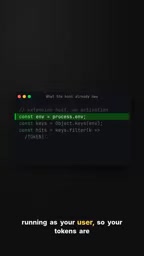
The Extension Host: An Overlooked Credential Container
The traditional plugin model assumes code runs in a sandbox with restricted permissions. But the host process for AI coding extensions directly inherits user environment variables, including API keys, access tokens, and cloud credentials. According to the video analysis, this sensitive information is already exposed in the process environment before extension code executes. The attack surface isn't the extension itself — it's the runtime environment of the entire host process.
This means the first step of an audit isn't reading code, but understanding how credentials flow. Extensions can silently read environment variables, make network requests, and even modify local files, all without any indication in the UI.
Node Process and Credential Inheritance
The reason the extension host becomes a credential container is that it typically launches as a full Node.js process rather than a restricted sandbox process. Node processes inherit the environment variables of their parent process when created, and the parent process that launches the editor is often the shell of your logged-in desktop session. As a result, anything present in the current environment — ~/.aws/credentials, GITHUB_TOKEN, a cloud provider's AWS_SECRET_ACCESS_KEY — appears verbatim in the extension process's process.env. An extension author needs no privilege escalation at all; a single process.env read yields every credential. This inheritance is default operating system behavior, not a flaw in the extension framework, so updating the framework alone cannot eliminate the risk — it can only be mitigated by restricting environment variable injection, using short-lived credentials, or employing a dedicated credential proxy.
Silent Activation: Opening a Repository Triggers Execution
Some extension manifests configure automatic activation conditions, such as triggering when a .env file or a particular project structure is detected. The video emphasizes that the user never clicks anything — the extension is already running. This design was intended to improve the developer experience, but it pushes the trust boundary from "the user actively installs" to "opening a folder grants authorization."
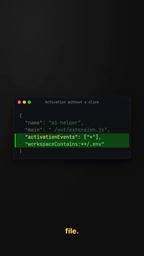
For repositories containing sensitive credentials, this is like handing the keys to the first stranger through the door. During an audit, you need to check extensions' activation events to determine which ones start automatically when a project is opened.
Activation Events
Activation events are a set of trigger conditions declared in an extension manifest that determine when the extension's code is loaded and executed. Common forms include onLanguage:python (when a Python file is opened), onCommand:xxx (when the user runs a command), and broader conditions like workspaceContains:**/.env (when the workspace contains a .env file). The latter is exactly where the risk lies: it doesn't depend on any user interaction — as long as the opened folder meets the condition, the host automatically loads and runs the extension code. During an audit, examine the activationEvents field in each manifest one by one, treat broad conditions like workspaceContains and * (activate on startup) as high-risk signals, and assess the risk in combination with whether the extension requests network or file system permissions.
Audit in Practice: List, Read, Pin
The audit path suggested by the video is straightforward: list the installed extension folders, read the version and installation path from the metadata records, and then pin the versions you trust. Pinning prevents automatic updates from introducing unaudited changes.
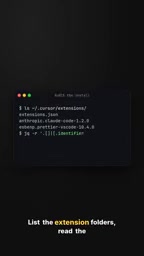
Metadata records typically contain the extension ID, version number, installation source, and publish time. By comparing installation paths and publisher information, you can identify extensions distributed through unofficial channels. Once pinned, an extension won't quietly upgrade in the background unless you actively unpin it and re-audit.
A Signature Is Not Security
A common misconception is that a signature-verified extension is safe. The video makes clear that a signature only proves the publisher's identity and that the code wasn't tampered with in transit — it says nothing about what the code actually does.
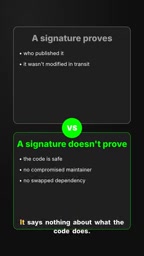
A signed extension can equally read environment variables, upload data, or execute arbitrary commands. Trusting signatures mistakes "identity verification" for "behavior auditing." Real security requires a combination of code review, permission restrictions, and runtime monitoring.
What Extension Signing Actually Means
Extension signing in mainstream editor ecosystems typically involves cryptographically signing the extension package with the publisher's private key, and the editor verifies the signature with the publisher's public key at install time. This guarantees two things: the package was indeed issued by that publisher, and it wasn't tampered with by a third party during transmission or storage. But there is no contract whatsoever between a signature and code behavior — a signer can absolutely include logic in legitimately signed code that reads environment variables and sends outbound HTTP requests. In other words, a signature answers "who made this," not "what does it do." Judging behavior still requires code review, runtime network monitoring, or a permission sandbox; a signature is only the starting point of a chain of trust, never the endpoint.
Reducing the Blast Radius: Default Deny and Allowlists
After the audit, the next step is limiting the scope of damage. The strategies proposed in the video include: deny all command execution by default and allow only a few allowlisted command prefixes; review project-level MCP servers before they start; and treat autorun as executing repository code with your credentials.
Default deny means any operation not explicitly permitted is blocked, rather than relying on a blocklist. Allowlists should be as narrow as possible, covering only the commands essential to your development workflow. For MCP servers, project-level configuration may start them automatically when a repository is opened, so you need to check their origin and permissions before startup.
The Risk Model of MCP Servers and Autorun
MCP (Model Context Protocol) servers are external processes that provide tool calls for AI coding assistants, and project-level configuration (such as a .mcp.json in a repository) may specify that a server starts automatically when the project is opened. Because these servers likewise run as the user and are often granted file read/write and command execution capabilities, an MCP configuration from an untrusted repository amounts to automatically executing code specified by the repository's author when you open the folder. Autorun refers to the behavior where extensions or tasks automatically execute commands upon detecting project configuration. Together, the two mean that cloning a repository can trigger arbitrary code execution. Mitigations include disabling project-level auto-start, requiring manual confirmation of MCP server origins, and treating all autorun as "executing repository code with your credentials."
Trust Boundaries Must Be Actively Managed
The convenience of AI coding extensions is built on deep integration, and deep integration means broad exposure of credentials, files, and network access. The core argument of the video can be summed up as: audit extensions as credentials, not install them as plugins. Listing what's installed, reading metadata, pinning trusted versions, denying commands by default, and reviewing auto-start items — these steps form an actionable path for managing trust boundaries.
For developers who use tools like Cursor every day, spending time on an extension audit once is far more cost-effective than investigating a data breach after the fact.
One-line Summary
AI coding extensions are full Node processes carrying user credentials and must be audited as credentials, not as plugins.
Paragraph Summary
The article argues that AI coding extensions are not sandboxed plugins in the traditional sense, but full Node processes running as the user, inheriting API keys, access tokens, and cloud credentials from environment variables before any code executes. Even more insidiously, some extensions auto-start via activation events like workspaceContains when a repository containing .env files is opened, with no user click required. The author proposes an audit path: list extension folders, read metadata records, pin trusted versions, and reduce the blast radius through default deny, command allowlists, and reviewing project-level MCP servers and autorun. The article stresses that signatures only prove publisher identity and transmission integrity, not code behavior, and that trust boundaries must be actively managed.
Related articles
 Tech Frontiers
GitHub Daily · November 8: Agent Infrastructure Blooms Across the Board
GitHub Daily Nov 8: agent infrastructure dominates Trending—browser automation, design systems, skill libraries, VM runtimes, and context compression—while veteran tools warm up.
 Tech Frontiers
Comparing Routing Mechanisms of 10 Open-Source MoE Models: DeepSeek, Qwen, Mixtral, Llama 4, gpt-oss
A configuration-based comparison of routing mechanisms in 10 open-source MoE models, analyzing DeepSeek, Qwen, Mixtral, Llama 4, and gpt-oss on expert count, top-k, shared experts, gating, and load balancing.
 Tech Frontiers
Vibe Coding Step-by-Step Guide: Learn to Build Products with AI in Six Steps
Breaking down the six-step methodology of Bilibili's 748-episode Vibe Coding course, analyzing the usage boundaries and prompt techniques of Codex, Claude Code, and Cursor, and discussing who this AI coding course suits, who it doesn't, and how to avoid the trap of watching without acting.