The Ultimate Codex Guide: From Installation to Hands-On Practice — Let AI Operate Your Computer Directly

Codex can directly operate computer files; this guide shows its capabilities and boundaries from installation to hands-on practice.
This article presents an ultimate usage guide for the AI tool Codex. Codex is available in the Microsoft and Apple app stores and is easy to install. Its interface resembles Doubao but it can directly operate computer files. Using the "project" concept to manage folders, Codex can read all files in a specified folder and complete tasks such as organization, data extraction, and Excel generation. In demos, Codex detected missing transaction records and invoice anomalies, showing data validation awareness, and generated a visual dashboard that can be modified on demand. Plan Mode suits complex tasks, with Codex planning a checklist and asking questions first, reducing the risk of misinterpreting intent. The article stresses that Codex is an executor, not a decision-maker, and the practical value of its analysis still needs verification by practitioners.
The Ultimate Codex Guide: From Installation to Hands-On Practice — Let AI Operate Your Computer Directly
In today's world where AI assistants are everywhere, most people know tools like Doubao and DeepSeekAd as "you ask, I answer" chatbots. Codex, however, pushes the interaction model a big step forward — it doesn't just chat with you, it actually does work directly on your computer. From organizing files and building reports to writing weekly summaries, operating a browser, and even running tasks automatically while you sleep, these sci-fi-sounding scenarios are already achievable with Codex. The Bilibili creator "the most detailed Codex App guide on all of Bilibili" devoted an entire video to showing, from installation to hands-on practice, the full scope of what this tool can do.
Installation and Initial Setup: Simpler Than You'd Think
Codex is already available in the Microsoft and Apple app stores — just search "Codex" and install it directly, no technical background required. Once opened, the interface looks similar to the web version of Doubao: an input box in the center, a sidebar on the left. But the sidebar hides features Doubao doesn't have: plugins, automated workflows, and more.
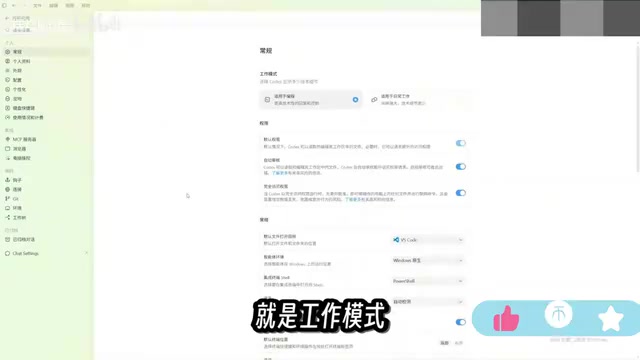
The creator suggests adjusting one setting on first use — the work mode. By default, Codex may show a lot of technical detail, which isn't friendly to ordinary users. After switching the mode to "Daily Work," Codex remains powerful but won't throw a pile of incomprehensible jargon at you, making the experience much smoother. This detail shows that the tool's designers already understand: lowering the cognitive barrier matters more than piling on features.
Core Concept: Projects and Folders
For Codex to operate your computer directly, it needs to know "where to work." It calls working folders "projects," which appear in the sidebar. The creator's approach is worth borrowing: categorize different tasks into different folders, with each folder corresponding to a project, so everything is clear at a glance. After selecting the project for the current conversation below the input box, Codex can read all the files in that folder.

In the video, the creator prepared a folder called "Computer Story Café," stuffed with sales records, invoices, and inventory lists in formats ranging from spreadsheets to PDFs to images. The task was clear: organize the files and extract the key data into an Excel file. This entry-level task seems simple but actually involves multiple actions — analyzing files, moving files, modifying content, and creating new files.
Working Directory and File Access Permissions: The reason Codex can "operate your computer directly" is that, after obtaining user authorization, it sets a certain folder as the working directory (i.e., the "project") and has read/write permissions for that directory. This means Codex can list files, read content, move or rename files, and create new files, but it typically will not go beyond the project to access system files. This directory-based sandbox mechanism ensures both flexibility of operation and a clear security boundary. When users select a project, they are effectively telling Codex: "You may act freely within this scope." Understanding this helps users plan folder structures reasonably and avoid accidentally placing sensitive files into work projects.
Hands-On Practice 1: File Organization and Data Extraction
Codex took a few minutes to complete the task. The results were satisfying: files were organized by purpose, sales data and product rankings were sorted into separate tables, and the line items in PDF invoices were extracted. More importantly, the creator had deliberately planted some "traps" in the files — missing transaction records and two anomalous invoices — and Codex not only found the problems but clearly flagged them.
This means Codex isn't just mechanically executing instructions; it has a certain awareness of data validation. For everyday tasks — organizing reports, writing daily summaries, sorting files on your computer — this capability is already practical enough. The creator's assessment was blunt: "By this point, many of your daily tasks can already be handed over to Codex."
Awareness of Data Validation: The article mentions that Codex can detect missing transaction records and invoice anomalies. This isn't magic but rule- and pattern-based checking. When Codex reads multiple files, it compares data from different sources (such as sales records and invoice details) and looks for inconsistencies — mismatched amounts, missing dates, duplicate entries, and so on. This ability depends on whether the task description explicitly requires "checking data integrity" and on how structured the files themselves are. For messy or unstructured data, Codex's validation effectiveness will be reduced. Therefore, when designing tasks, users should ideally specify the dimensions to be validated so that Codex's "data validation awareness" can be fully leveraged.
Hands-On Practice 2: From Data to a Visual Dashboard
Daily tasks were just a warm-up. The creator then raised the difficulty: directly in the command line, add a summary table generated by Codex, and ask it to create a visualization showing business conditions such as sales, expenses, costs, and inventory, and to analyze the issues that need attention.

Because the task was complex, the creator switched to "Plan Mode." In this mode, Codex doesn't act immediately; instead, it first plans a detailed execution checklist, asks you questions about task details, and proceeds only after confirmation. In the video, Codex indeed raised several questions, and only after the creator made choices did it continue working.

The final dashboard was quite professional, containing all the requested data, with suggestions and priorities listed below. The creator admitted that he isn't a sales professional and couldn't judge the dashboard's real-world value, but the demonstration itself already shows: Codex can handle complex tasks that require multi-step reasoning. Afterward, the creator asked to change the theme to be "modern and intuitive, like Apple," and Codex completed the modification smoothly. This ability to keep iterating on existing results is exactly where AI assistants differ from traditional software.
Easter Eggs and Details: Plan Mode and Desktop Pet
The video also includes two easily overlooked but quite interesting designs.
Plan Mode is suited to complex tasks. It splits "execution" into three steps — "plan, confirm, execute" — reducing the risk of the AI misinterpreting intent. For tasks that require precise control, this mode is far more reliable than direct execution.
Desktop Pet is a fun feature. Type a slash in the input box to bring it up, and it displays all tasks currently being executed; click to jump to them. The pet's appearance can be changed in settings, and after trying a few, the creator switched back to the default. This design turns the boring part — "task monitoring" — into something lightweight and visual. For users who need to handle multiple tasks at once, it's a thoughtful little tool.
Plan Mode: This is a human-AI collaboration interaction paradigm designed to solve the problem of large language models potentially deviating from user intent when executing complex tasks. In Plan Mode, Codex does not execute operations immediately; instead, it first outputs a structured execution plan listing steps, required information, and potential questions, and waits for user confirmation or supplementation. Users can correct the direction by answering questions and adjusting steps, and only after confirmation does Codex actually start working. This approach turns "black-box execution" into "white-box controllability," making it especially suitable for multi-step, high-risk tasks such as batch file modifications or generating reports involving critical data. Plan Mode also reflects the shift of AI assistants from "command executors" to "collaborative planners."
Usage Tips and Capability Boundaries
From the entire demonstration, Codex's barrier to entry is lower than expected — no need to learn technical skills; a few sentences can produce something cool. The creator's core advice is: first mess around freely according to your own ideas, but understanding the two concepts of "Project" and "Plan Mode" will make it much more usable.
Objectively speaking, the commercial value of the dashboard in the video has not been verified by practitioners, and whether Codex's "analytical suggestions" are reliable depends on data quality and task descriptions. It can detect invoice anomalies, but how to handle those anomalies still requires human judgment. Codex is an executor, not a decision-maker. Treating it as an assistant that can take action, rather than an all-purpose answer, is the reasonable expectation for using it.
One-line Summary
Codex can directly operate computer files; from installation to hands-on practice, this guide shows its capabilities and boundaries.
Paragraph Summary
This article introduces an ultimate usage guide for the AI tool Codex. Codex is already available in the Microsoft and Apple app stores, is easy to install, and has an interface similar to Doubao but can directly operate computer files. Through the "project" concept for managing folders, Codex can read all files in a specified folder and complete tasks such as organization, data extraction, and Excel generation. In the hands-on demonstration, Codex successfully detected missing transaction records and invoice anomalies in the data, showing a certain awareness of data validation; it also generated a visual dashboard from the data and modified the theme on demand. Plan Mode is suited to complex tasks, with Codex first planning an execution checklist and asking questions for confirmation, reducing the risk of misinterpreting intent. The article emphasizes that Codex is an executor rather than a decision-maker, and the practical value of its analytical suggestions still needs verification by practitioners.
Related articles

Nothing CMF Buds 2A Drops to $17.89 on Black Friday: A New Low for ANC Earbuds
Nothing CMF Buds 2A wireless earbuds Black Friday deal: just $17.89 on Amazon, about $11 off retail and a record low. ANC earbuds at an entry-level price.

When AI Creation Gets Accused of "Spitting": Hacker News Heats Up Over the Glaude Controversy
A Hacker News post, "Spitting in the Face of Glaude," sparks debate on AI creation transparency and attribution ethics. This analysis examines the blurred creator identity behind the controversy and offers practical advice for AI content production.

Akai Embraces Custom Firmware: MPC Sample 1.4 Lets Users AI-Program Their Sampler
Akai embraces the modding community with MPC Sample 1.4 firmware, supporting vibe-coded custom firmware and effects. We analyze the impact of this open strategy on music hardware and AI-assisted programming.