The Ultimate Codex Tutorial: From Installation to Real-World Projects — AI Coding for Beginners

Codex tutorial recommends beginners start with the APP, comparing it to Claude Code and Cursor and stressing tool mastery.
Based on a Bilibili Codex tutorial, this article covers Codex's four forms (CLI, web, plugin, APP) and recommends the APP for beginners. It compares Codex with Claude Code on price, stability, and focus—Codex is cheaper and better for UI/frontend, while Claude Code excels at logic/backend. It also advises mastering all three (Cursor, Claude Code, Codex) and outlines a beginner path: install, configure, learn features, practice projects, and integrate into daily workflows.
AI coding tools keep popping up, with Cursor, Claude Code, and Codex each having their own fans. For developers just getting started or looking to boost efficiency, choosing the right tool and mastering it thoroughly matters more than blindly chasing the latest release. This article is based on a Bilibili Codex tutorial that viewers call "the most detailed step-by-step guide," combined with the uploader's hands-on experience, to lay out Codex's core advantages, use cases, and learning path—helping you decide whether it's right for you.
The Four Forms of Codex: Why the APP Is Recommended
According to the uploader, Codex currently comes in four forms: terminal (CLI), web, plugin, and APP. In the past, many people integrated Codex into various development tools via the plugin form, but now the APP is recommended directly because it's the most feature-complete and powerful of the four.
For developers used to working in an IDE, the APP can also be used alongside traditional tools like VS Code for a complementary setup. The uploader emphasizes that if you don't have much development experience, or mainly work on projects that involve organizing rather than coding, Codex's APP form delivers a better presentation and has a lower barrier to entry.
The four forms of Codex correspond to different use cases: the CLI suits developers comfortable with the command line and supports scripted integration; the web version is handy for quick trials and lightweight tasks; the plugin embeds into IDEs but is limited by the host's capabilities; and the APP is a standalone desktop application that consolidates the abilities of the first three and optimizes the interaction. The uploader recommends the APP because it reduces environment setup complexity, is especially beginner-friendly, and provides more complete UI feedback and project management features.
Codex vs Claude Code: Price, Stability, and Emphasis
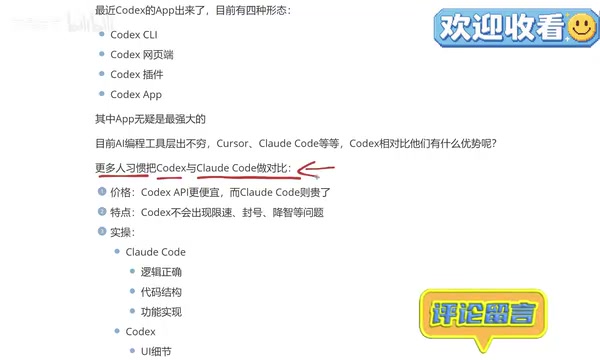
Many developers habitually compare Codex and Claude Code, and the uploader offers observations from several angles.
Price and Stability
On price alone, Codex's APP is cheaper, while Claude Code is more expensive. In addition, Claude Code has issues like rate limiting and account bans, whereas Codex doesn't experience rate limiting, account bans, or quality degradation. That said, the uploader candidly notes that the quality degradation issue remains to be verified, since some users have reported encountering it—but in his personal use cases, he hasn't noticed any obvious degradation.

Rate limiting and account bans are common operational policies for cloud-based AI coding tools, typically used to control resource consumption or prevent abuse. Claude Code has stricter API call limits and account risk controls, so some users encounter slower responses or account bans; Codex currently hasn't adopted similar measures, though it may adjust as its user base grows. Quality degradation refers to a decline in model output quality, which may be related to server load or version updates and requires ongoing observation.
Different Capability Emphasis
The uploader concludes that Claude Code leans toward logical correctness, code structure, and feature implementation, which is why many backend developers prefer it; Codex, on the other hand, focuses more on UI details, color schemes, animations, and operational prompts, so many frontend and app developers prefer Codex. As a frontend developer himself, the uploader feels Codex offers a better overall experience, though he acknowledges Claude Code may be stronger at the logic level.

Logical correctness refers to whether code compiles, runs, and meets business logic, which usually requires the model to understand algorithms and data structures; UI details involve visual fidelity, interaction smoothness, and style consistency, relying more on parsing design mockups and familiarity with frontend frameworks. Claude Code performs more reliably on complex logical reasoning, while Codex stays closer to designers' intent when generating CSS, animations, and component layouts—which is related to the proportion of frontend code in its training data.
You Need All Three: Cursor, Claude Code, and Codex
The uploader notes that although there are many AI coding tools, you can't avoid the big three: Cursor, Claude Code, and Codex. Ideally, developers should know how to use all three rather than just one, because different companies may provide different accounts or require different AI tools.

He shared his own journey: he started with Cursor for a long time but found it really expensive, cringing every time he paid; later he tried Claude Code, and although it got cheaper after integrating domestic models, the experience wasn't great; and since he personally isn't a fan of terminal CLI, the APP form of Codex is friendlier to him by comparison.
Cursor is an AI-first editor built on a fork of VS Code, deeply integrating code completion and chat; Claude Code is a terminal tool from Anthropic that emphasizes logical reasoning and code structure; Codex is a multi-form tool from the OpenAI ecosystem that focuses on UI and ease of use. The three have different positioning: Cursor suits developers used to IDEs, Claude Code suits backend and algorithm scenarios, and Codex suits frontend and rapid prototyping. Mastering multiple tools lets you adapt flexibly to different teams' tech stack requirements.
How Beginners Can Get Started with Codex
This tutorial covers everything from download and installation to environment setup, core features, usage tips, and real-world projects, with the goal of explaining it all thoroughly. The uploader suggests that since this course is about Codex, you should aim to become highly proficient with it—especially if you're inexperienced, since Codex's presentation is better and can help you build confidence quickly.
In practice, you can follow this path: first download and install the APP, then configure your development environment; next, get familiar with the core feature interface and interaction logic; then practice your skills through small real-world projects; and finally, integrate Codex into your daily development workflow alongside tools like VS Code. The uploader stresses that no matter how many tools there are, the key is to master one thoroughly and then apply that knowledge to others.
Conclusion
With its lower price, more stable experience, and advantages in frontend UI details, Codex has become a new choice for many developers. But it's not a silver bullet—Claude Code still has its own strengths in logical implementation. For beginners, starting with Codex's APP form, paired with systematic tutorials and hands-on practice, is a solid entry point. As for which one to ultimately choose, take the uploader's advice: try all three, then decide based on your actual project needs.
One-line Summary
Codex tutorial recommends beginners start with the APP, compares it to Claude Code and Cursor, and stresses mastering one tool thoroughly.
Paragraph Summary
Based on a Bilibili Codex tutorial, this article outlines Codex's four forms (terminal, web, plugin, APP) and recommends the most feature-complete APP for beginners. Compared to Claude Code, Codex is cheaper, has no rate limiting or account bans, and focuses more on UI details and frontend experience, while Claude Code is preferred for logic implementation and backend scenarios. The article also notes that developers should master all three—Cursor, Claude Code, and Codex—since different companies require different tools. The beginner learning path includes download and installation, environment setup, getting familiar with core features, real-world projects, and integrating into daily development workflows, emphasizing mastering one tool thoroughly before branching out.
Related articles

Nothing CMF Buds 2A Drops to $17.89 on Black Friday: A New Low for ANC Earbuds
Nothing CMF Buds 2A wireless earbuds Black Friday deal: just $17.89 on Amazon, about $11 off retail and a record low. ANC earbuds at an entry-level price.

When AI Creation Gets Accused of "Spitting": Hacker News Heats Up Over the Glaude Controversy
A Hacker News post, "Spitting in the Face of Glaude," sparks debate on AI creation transparency and attribution ethics. This analysis examines the blurred creator identity behind the controversy and offers practical advice for AI content production.

Akai Embraces Custom Firmware: MPC Sample 1.4 Lets Users AI-Program Their Sampler
Akai embraces the modding community with MPC Sample 1.4 firmware, supporting vibe-coded custom firmware and effects. We analyze the impact of this open strategy on music hardware and AI-assisted programming.