The Universal Formula for AI Website Creation: Five Modules for Generating Stunning Front-End Pages with AI
A five-module prompt formula that helps AI generate professional front-end websites with stunning interactions.
This article presents a proven five-module prompt framework for generating professional front-end websites with AI tools like Kimi K2.5. The modules—role assignment, basic requirements, visual style, interactions & animations, and tech stack—work together to produce pages with cursor following, parallax scrolling, and entrance animations in a single generation, demonstrating that structured, professional prompts are the key to unlocking AI's full development potential.
AI Development Has Entered the Practical Stage—Are You Ready?
While many people in China still treat AI as a chatting tool, overseas developers have already pushed AI programming to new heights. Data from OpenRouter, a globally renowned model aggregation platform, shows that Token usage for AI programming tools is growing exponentially. On the real developer usage rankings, Kimi's recently released K2.5 open-source model ranks first, with Token usage 50% higher than the second and third-place Gemini and Claude smaller models.
This signals a trend: Developers are voting with their feet, choosing models that actually work for real projects.
One creator used Kimi K2.5 over the past six months to replicate over a hundred creative websites, covering electronics, cosmetics, portfolios, traditional culture, and more—with results far exceeding expectations. But he also admitted that the websites he made at first were "embarrassingly ugly"—no matter how powerful the model is, if you don't know how to harness it, you're wasting its capabilities.
After extensive experimentation, he developed a stable prompting framework that maximizes AI's front-end development capabilities. This article will fully break down this methodology.
The Opening Move: Give AI a Clear Reference Target
When you don't know how to describe the website you want, the simplest approach is to provide a reference website directly. You can supply:
- A direct link to the webpage
- A recorded video of the website in action
- Screenshots of key pages
Kimi can generally identify the design style, layout structure, and interaction details quite well. The core idea here is: Let AI first "see" what you want, then have it implement it.
Five Modules: The Universal Prompt Formula for AI Website Creation
Below is the five-module prompt framework validated through extensive practice. It's worth emphasizing that not every case requires strict adherence to the template, but the template makes generated results much more controllable. Feel free to adjust flexibly based on your needs.
Module 1: Role Assignment—Put AI in Professional Mode
Give AI a professional identity, and all its subsequent outputs will be approached from that role's professional perspective.
Example:
You are now a top-tier front-end development engineer and UI/UX designer, skilled in React, Three.js, GSAP, and Tailwind CSS.
This step seems simple, but the effect is immediate. Once given a professional identity, AI's output quality noticeably improves because it draws on the professional knowledge system associated with that role to organize code and design.
Module 2: Basic Requirements—Describe Needs with Structured Sentences
Describe what website you want to build using a fixed sentence structure containing six elements: Qualifier + Reference Source + Action Instruction + Change Requirements + Basic Requirements + Mandatory Requirements.
Example:
This is a highly creative, production-ready cosmetics website. The reference URL is XXX. Please replicate the webpage 1:1. It should have strong design sensibility and excellent visual effects. The design style should be minimalist and elegant, with smooth mouse interaction effects.
The key to this module is structured expression. Break your requirements into clear dimensions rather than vaguely saying "make a nice-looking website"—only then can AI precisely understand your intent.
Module 3: Visual Style—Describe Precisely from Four Dimensions
Expand your description across four dimensions: Color Scheme, Typography, Image Style, and Spatial Feel. The more specific the description, the more precise the output.
Using a cosmetics website as an example:
- Color Scheme: Use a minimalist neutral palette, avoid too many clashing colors, keep the overall tone unified, paired with dark elegant text
- Typography: Use sophisticated serif fonts for headings, clean sans-serif fonts for body text, emphasize the ratio of large title fonts to whitespace
- Image Style: Use high-resolution skin close-ups and product texture detail shots, support overlapping image layouts and irregular grids
- Spatial Feel: Hero Section with full-screen oversized centered title, semi-transparent navigation bar; product showcase using hover-scroll or large card flow
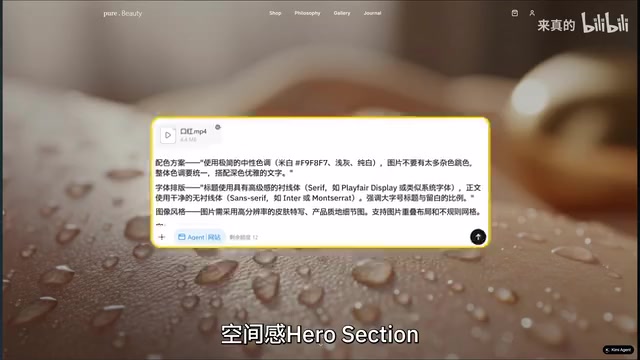
Each product card should include a hover zoom effect—this level of detail in your descriptions is the key to getting AI to output stunning websites.
Module 4: Interactions & Animations—The Core of Going from "Acceptable" to "Stunning"
This is the core module that transforms a website from "acceptable" to "stunning," divided into three categories:
Mouse Interactions:
- Custom cursor with circular follow effect
- Circle enlarges and becomes semi-transparent when hovering over clickable elements
- Magnetic snap effect, 3D tilt, hover glow feedback
Scroll Interactions:
- Smooth scrolling with a sense of resistance in overall page scroll
- Images slightly scale or shift on mouse hover
- Capsule-shaped buttons with smooth background fill on hover
- Parallax scrolling, inertia resistance effects
Transition Animations:
- Text and images slide up into view as the page scrolls
- Scroll-triggered Animation
- Explosion and reconstruction transition effects
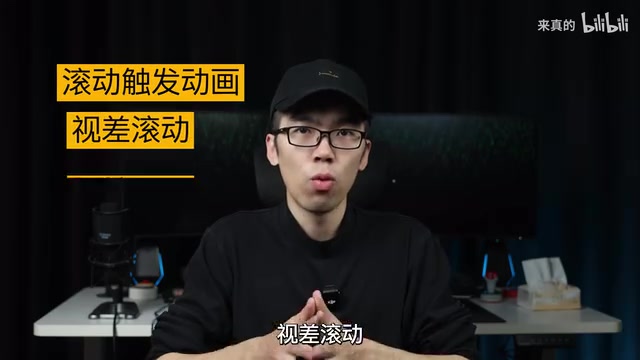
Key Tip: Make sure to use professional terminology! Stagger Animation, particle systems, Glassmorphism... The more professional your terminology, the more AI recognizes you know what you're talking about, and the higher the output quality. This essentially uses professional vocabulary to narrow AI's "interpretation space," allowing it to pinpoint exactly the effect you want.
Module 5: Tech Stack—Make AI Use the Right Tools
Explicitly specify the development framework so AI uses professional tools for professional work:
| Technology Area | Recommended Solution |
|---|---|
| Front-end Framework | React + Next.js |
| Styling | Tailwind CSS |
| Animation Engine | Framer Motion + GSAP |
| 3D Effects | Three.js |
Specifying the tech stack prevents AI from "hesitating" between different frameworks, letting it directly use the most suitable tool combination to achieve the desired effects.
Practical Results: What Can the Five Modules Produce Together?
Combine the five modules in order—Role Assignment → Basic Requirements → Visual Style → Interactions & Animations → Tech Stack—and you have a complete prompt. Feed this prompt to Kimi, wait for it to generate code, and open it directly to see the results: cursor following, parallax scrolling, entrance animations—all done in one shot.
The power of this formula lies in its reusability. Just modify a few keywords to switch to completely different visual effects:
- Change "cosmetics" to "electronics," switch the color palette from neutral tones to tech blue-black
- Change "minimalist elegant" to "cyberpunk," add neon glow effects and glitch art
- Change "serif" to "monospace font," and it instantly becomes a developer portfolio style
Core Insight: AI Output Quality Depends on Your Input Precision
The underlying logic behind this methodology is actually simple: AI's output quality depends on the precision of your input. Vague requirements can only produce mediocre results, while structured, professional prompts unlock a model's maximum potential.
For front-end developers, AI isn't here to replace you—it's demanding that you upgrade from "a person who writes code" to "a person who directs AI to write code." Mastering prompt engineering is mastering the core skill of collaborating with AI.
Related articles
 Tutorials
ChatGPT Plus Subscription Guide: Are GPT-5.5, image-2, and Codex Worth the Upgrade?
A detailed look at ChatGPT Plus features — GPT-5.5, image-2, and Codex — with a Plus vs Pro comparison and a complete step-by-step subscription guide for users outside the US.
 Tutorials
Harness AI Engineering in Practice: Using Claude Code to Master Enterprise-Level E-Commerce Development
Deep dive into Harness AI Engineering: master enterprise e-commerce development with Claude Code using the Rules, Skills, Wiki, and Changes framework.
 Tutorials
Cursor + Codex Dual-IDE Collaboration: A Practical Methodology for Open-Source Project Customization
A complete methodology for open-source project customization based on real-world experience, detailing the Cursor+Codex dual-IDE workflow, seven-stage process, MVP validation, and AI source code reading techniques.