Three AI Productivity Tools Beyond ChatGPT: Perplexity, n8n, and Cursor

Recommending ChatGPT no longer offers a differentiated edge; turn to vertical tools like Perplexity, n8n, and Cursor.
Based on a Spanish YouTube creator's view, the article argues that recommending ChatGPT has lost its differentiated value and that real efficiency comes from vertical tools. It analyzes three: Perplexity compresses information retrieval while keeping real sources; n8n automates customer replies and sales via email and social accounts; Cursor lets non-coders build complete apps in natural language. All three embed AI into specific work steps, though real use requires attention to setup costs, data permissions, and error handling.
Why ChatGPT Is No Longer the Go-To Recommendation
A Spanish-language YouTube creator raised an interesting point in a short video: recommending ChatGPT to people today is like telling them to "just use Google" back in the day—it has become the default option that everyone uses, and therefore no longer offers a competitive edge. Those who genuinely want to stand out at work need to focus on more specialized, more "hands-on" tools.
The three tools he named are Perplexity, n8n, and Cursor, covering three high-frequency scenarios: information retrieval, workflow automation, and application development. This combination is worth unpacking on its own: they are not replacements for ChatGPT, but different facets of embedding AI capabilities into concrete workflows.
Third Place: Perplexity—Chewing Up Search Results Before Handing Them to You
The creator's positioning of Perplexity is straightforward: no more manually sifting through search engines and enduring ad-riddled blog posts. Perplexity performs a round of deep retrieval and then directly delivers conclusions with real cited sources.
The product logic behind this is compressing the chain of "search—filter—read—summarize" into a single query. Traditional search leaves the filtering cost to the user; AI search shifts that cost to the model side, at the price of requiring users to judge whether sources are reliable. Perplexity chooses to retain source links, which is arguably trading verifiability for trust—and for people who need to do research and write reports, that value is greater than simply getting an answer.
The creator's phrasing is that it "chews up real sources and hands them to you," emphasizing time savings rather than replacing judgment. If this boundary is ignored, AI search can easily become a breeding ground for hallucinations that "look like they have sources but were never actually read thoroughly."
How AI Search Differs from Traditional Search Mechanically: Traditional search engines (like Google) are built around "retrieval + ranking," returning a list of web links that users must open, read, and filter themselves. AI search (like Perplexity) adopts a Retrieval-Augmented Generation (RAG) architecture: it first fetches multiple web pages in real time, then has a large language model read and summarize that content, and finally generates an answer with citations. This mechanism shifts the cost of filtering and summarizing from the user to the model side, but at the price of the model potentially misreading sources or generating plausible-sounding but incorrect conclusions (i.e., "hallucinations"). Therefore, Perplexity's design of retaining source links is crucial—it lets users quickly verify the reliability of answers, striking a balance between efficiency and credibility.
Second Place: n8n—Handing Customer Communication to Automation
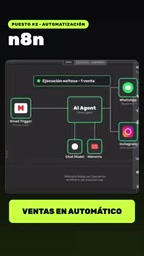
Ranked second is n8n, a workflow automation platform. The usage shown in the video is very specific: connect it to your social accounts and email, and let AI automatically reply to customers and drive sales in "autopilot" mode.

What sets n8n apart is that it gives users control over the orchestration of "trigger—process—output," with AI serving merely as a node in the flow. An email arrives, triggering the workflow; the model generates a reply; the reply is written back to the corresponding channel—the entire chain is visualizable and adjustable. Compared to cramming everything into a chat window, this approach is closer to real business: customer messages don't wait for you to open a dialog box before they appear.
However, there's a considerable gap between "auto-replying to customers" and "auto-closing deals." The video describes it as quite effortless, but in practice, tone boundaries, exception branches, and human fallbacks all need to be designed in advance—otherwise automation will amplify errors along with everything else.
Workflow Automation and AI Nodes: n8n is an open-source workflow automation platform whose core concepts are "nodes" and "workflows." Each node represents an operation (such as receiving email, calling an API, or sending a message), and connections between nodes define execution order and data flow. Compared to tools like Zapier, n8n emphasizes visualization and self-hosting, giving users full control over their data. In AI scenarios, n8n typically integrates a large language model as a node: when trigger conditions are met (such as receiving a customer email), the workflow automatically calls the model to generate a reply, then sends it back to the original channel through another node. This design makes AI a part of the workflow rather than an isolated chat window, enabling real-time responses to customer messages.
First Place: Cursor—Build an App by "Speaking" It, Even Without Coding Skills
Ranked first is Cursor, an AI code editor. The creator's core selling point: even if you don't know how to code, you can describe your requirements directly in Spanish and let the editor build a complete application. His assessment is that "it's shaking up the market."
This judgment aligns with the direction of AI coding tools over the past year: the competitive focus has shifted from "completing a line of code" to "understanding a requirement and turning it into a runnable project." Cursor sits on the editor side and can read the entire project context, making it better suited than purely conversational tools for multi-file, cross-module changes.
The claim that "you can build apps without coding" needs a caveat. Tools can lower the barrier to entry, but requirement decomposition, debugging, and deployment still require human oversight. A more accurate understanding is: Cursor lowers the barrier to "writing code" while leaving the barrier of "thinking clearly about what to build" to the user.

Context Understanding in AI Code Editors: Cursor is an AI code editor built on VS Code, whose core capability is reading the entire project context (including file structure, dependencies, and existing code) to understand the developer's intent and generate or modify code. Unlike purely conversational coding assistants (such as ChatGPT), Cursor can directly manipulate project files, supporting multi-file editing, cross-module refactoring, and even generating complete feature modules from natural language descriptions. This "project awareness" makes it better suited to real development scenarios, since real projects often involve coordinated changes across multiple files. However, the tool still requires users to have basic debugging and deployment knowledge to turn generated code into a runnable application.
Looking at the Three Tools Together
Placing these three choices side by side reveals a common thread: they all pull AI out of the "chat box" and insert it into specific work steps. Perplexity takes over the information entry point, n8n takes over process execution, and Cursor takes over the building process. ChatGPT remains powerful, but its generality means it isn't deeply optimized for any single step.
For individuals and small teams, this approach is more practical than "switching to a stronger chat model": first identify the thing you repeat most every day, then see if there's a tool that can take it over. The video creator also solicits more tool recommendations at the end and teases a part two—showing that demand for this kind of "AI tool list" is itself robust.
One caveat: short videos are naturally optimistic in how they present tools, demonstrating the smoothest path. In real use, configuration costs, data permissions, and troubleshooting after errors occur are all things that won't appear on such lists.
The Complementary Relationship Between Vertical Tools and General Models: Perplexity, n8n, and Cursor are not meant to replace ChatGPT; rather, they represent a new paradigm for AI applications: embedding the capabilities of general large models into specific workflows and deeply optimizing for high-frequency scenarios. As a general conversational model, ChatGPT's strengths lie in flexibility and broad knowledge coverage, but it lacks deep integration with specific work steps. Vertical tools, through preset processes, interfaces, and context management, lower the user's barrier to entry and improve task completion efficiency. For individuals and small teams, a sensible strategy is to keep ChatGPT as the entry point for exploratory tasks while introducing vertical tools for highly repetitive, process-driven work to achieve automation or semi-automation—thereby gaining a genuine differentiated advantage in efficiency.
One-line Summary
Recommending ChatGPT no longer offers a differentiated edge; turn to vertical tools like Perplexity, n8n, and Cursor.
Paragraph Summary
Based on the views of a Spanish-language YouTube creator, the article points out that recommending ChatGPT has lost its differentiated value, just as recommending "use Google" did back in the day, and that real efficiency gains come from vertical tools. The author analyzes three tools in detail: Perplexity compresses the information retrieval chain through AI search while retaining real sources, making it suitable for research scenarios; n8n, as a workflow automation platform, can connect AI to email and social accounts to automate customer replies and sales processes; Cursor, as an AI code editor, supports building complete applications using natural language (including Spanish), lowering the programming barrier. What all three share is embedding AI from the chat box into specific work steps. The article also cautions that short-video demonstrations are overly optimistic, and real-world use requires considering configuration costs, data permissions, and exception handling.
Related articles

Java4Shell Vulnerability Analysis: Has Java's Memory Safety Myth Been Shattered?
Computerphile breaks down the Java4Shell vulnerability: OpenJDK's native Base64 decoder mishandles AVX-512 mask calculation, causing out-of-bounds writes and RCE. Covers root cause, Base64 padding mechanics, AI-assisted discovery debate, and fixes.

Controversial US Surveillance Law Section 702 Nears Expiration: Congress Races to Renew
FISA Section 702 surveillance authority is nearing expiration. Congress is urgently pushing reauthorization, possibly attaching it to the NDAA. This article analyzes the controversies, legislative strategy, and future outlook.

iFood Manages 15,000 Repositories with Coding Agents: An Architectural Lesson at 4 Cents per Run
How iFood scaled coding agents to 15,000 repositories with its Remote Agents Platform: REST API-driven, GPT-5.6 Luna selection, structured output acceptance, $0.04 per run, security fixes doubled.