Three-Layer Workflow Optimization for Claude Code: Requirements Extraction, HTML Specs, and Embedded Verification in Practice

Three-layer Claude Code workflow: AI interviews, HTML specs, and embedded DOM verification.
Anthropic architect Arno reveals how internal teams optimize Claude Code through three layers: letting Claude interview developers for requirements extraction, using interactive HTML instead of Markdown for specifications, and embedding verification directly into application artifacts via DOM data attributes. Combined with Auto Mode, Opus 4.7's improved vision, and Playwright MCP, this Agent-first workflow dramatically improves AI-assisted development efficiency.
Arno, an architect on Anthropic's Applied AI team, recently shared in a workshop how Anthropic's internal teams use Claude Code for day-to-day development. This isn't a beginner's tutorial — it's aimed at developers with existing experience, demonstrating how to dramatically improve the efficiency and quality of AI-assisted coding through three layers of workflow optimization: requirements extraction, HTML specifications, and embedded verification.
Core Philosophy: The Stronger the Model, the More You Should Let Go
Arno opened by citing reinforcement learning pioneer Richard Sutton's classic essay The Bitter Lesson: rather than spending enormous effort hard-coding constraints into systems using human expertise, it's better to let more data and compute unlock the model's capabilities. This philosophy maps directly to how you should use Claude Code.
Richard Sutton is one of the founders of reinforcement learning. In this short essay published in 2019, he identified a pattern that has recurred throughout 70 years of AI research: methods that try to hard-code human knowledge into systems may seem effective in the short term, but are invariably surpassed by general-purpose methods that fully leverage computational scale. From chess and Go to speech recognition and computer vision, every field has undergone a transition from "expert systems" to "letting data and compute do the talking." The lesson is "bitter" because it means that researchers' carefully designed domain knowledge ultimately proves less effective than brute-force scaling. Applied to AI-assisted coding, this means that instead of spending extensive time writing exhaustive constraint rules to limit Agent behavior, you're better off giving it better context and verification mechanisms and letting it operate autonomously.
As model capabilities continue to improve, Agents can run longer and handle more complex tasks. But this also means that if the direction is wrong, token consumption can be staggering. In LLM API calls, tokens are the basic billing unit, encompassing both input and output tokens. As an Agent system, Claude Code performs multiple rounds of reasoning and tool calls within a single task, with each round accumulating costs. With the Opus model, for example, pricing is significantly higher than smaller models — a single misdirected long-running Agent session can consume tens of dollars in API fees. This makes upfront validation critical — you need to ensure specifications are thorough enough before the Agent begins a long run.
A key insight: Claude may be better at extracting requirements from you than you are at writing them yourself. Just as your users often "don't know what they want until they see it," you yourself struggle to articulate all requirements in one go. Having Claude interview you actually produces more comprehensive specifications.
Layer 1: Let Claude Interview You Instead of Writing Requirements Docs
The Difference Between Good and Bad Prompts
Arno was blunt: the most common input he sees people type into Claude Code is "make it better" — a textbook bad prompt. Good prompts should have these characteristics:
- Specify the domain, not the outcome: Tell Claude what aspects you care about (audience, scenarios, constraints), but don't predefine specific solutions
- Use open-ended questions: Encourage Claude to progressively extract your real requirements through the
ask_user_questiontool - Trigger iterative interviews: Explicitly reference the
ask_user_questiontool in your prompt so Claude proactively asks you questions
Using a bill-splitting app as an example, Arno entered a carefully crafted prompt, and Claude immediately began asking follow-up questions: Who's the target user? Are there secondary audiences? What's the usage scenario? Through this interactive requirements extraction, the resulting specification was far more comprehensive than anything you'd write yourself.
Three Claude Code Settings You Must Enable
Arno specifically emphasized three Claude Code settings during the workshop:
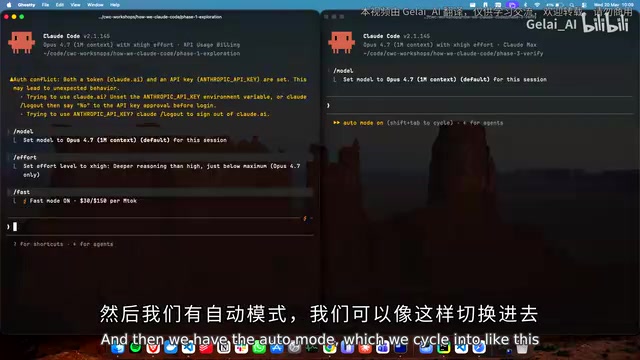
- Auto Mode (toggle with Shift+Tab): This is Arno's most recommended mode — "if you're not using Auto Mode, you need to start." By default, Claude Code pauses and requests user confirmation when performing file writes, running commands, and similar operations. With Auto Mode enabled, Claude Code automatically executes most operations without step-by-step confirmation, only pausing for potentially destructive actions. This dramatically reduces how often developers need to intervene during Agent execution, allowing Claude to complete multi-step tasks continuously. Auto Mode is especially valuable for projects with well-established verification mechanisms, since even if the Agent makes incorrect changes, the verification layer catches problems promptly.
- Fast Mode (
/fast): While it consumes more tokens, it's highly efficient when rapidly iterating on specifications - Effort parameter (
/effort): Officially recommended to set tox-high, or evenmax effort
Layer 2: Use HTML Instead of Markdown for Specifications
Arno quoted a colleague: "Markdown files are the lingua franca of the AI-native software development lifecycle." But that era is passing.
Why HTML Specifications Are Superior
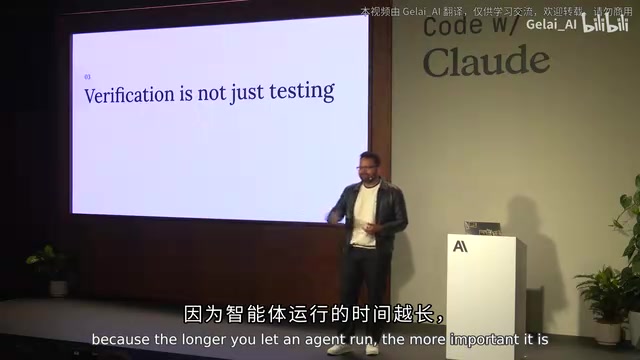
When a Markdown spec file exceeds 200 lines, you're unlikely to read through it carefully — and your colleagues certainly won't. HTML files offer these advantages:
- Higher information density: The same content can be presented in a more compact, more structured way with HTML
- Interactive: You can click and browse directly in the browser instead of staring at plain text
- Visually intuitive: You can directly showcase design directions and feed screenshots back to Claude
In Practice: Four Design Directions Generated at Once
Arno used Opus 4.7 to have Claude generate four completely different HTML design directions in a single pass — Brutalist style, Tokyo Fintech style, and more. Each direction was an interactive HTML file that could be opened directly in a browser to see the full visual effect.
This is far more efficient than trying to "imagine" the final result from a Markdown file. You can take screenshots and feed them directly back to Claude, telling it "this is slightly off" or "this alignment is wrong." Arno specifically noted that Opus 4.7's vision model has seen significant improvements, with much better capability for processing screenshot feedback than before.
Regarding concerns about token efficiency, Arno gave a clear answer: while generating HTML consumes more tokens per instance than Markdown, in the long run, because HTML specifications are more precise, you need fewer iterations, and total token consumption is actually lower.
Layer 3: Embed Verification into the Artifact Itself
This is the most core and innovative part of the entire workshop. Arno demonstrated a React to-do app, showing how to make verification an integral part of the application itself.
Three Verification Surfaces
The verification framework is designed with three layers:
- Human-readable dashboard: Run verification steps directly in the browser and view pass/fail status
- Agent-driven verification: Claude reads state directly from the browser via Playwright MCP and executes verification
- Headless CI verification: Automatically run via the
run verifycommand in CI environments
Playwright is an end-to-end browser automation framework developed by Microsoft, supporting three major browser engines: Chromium, Firefox, and WebKit. MCP (Model Context Protocol) is an open protocol introduced by Anthropic that allows AI models to interact with external tools and data sources in a standardized way. Playwright MCP combines the two, enabling Claude to operate a browser like a human tester — navigating pages, clicking buttons, filling forms, and reading DOM elements. In verification scenarios, Claude accesses the running application in the browser via Playwright MCP, reads the data-verify attributes published to the DOM by components, and determines whether the application state meets expectations — without relying on screenshots or manual descriptions.
Key Technique: Publishing Component State to the DOM
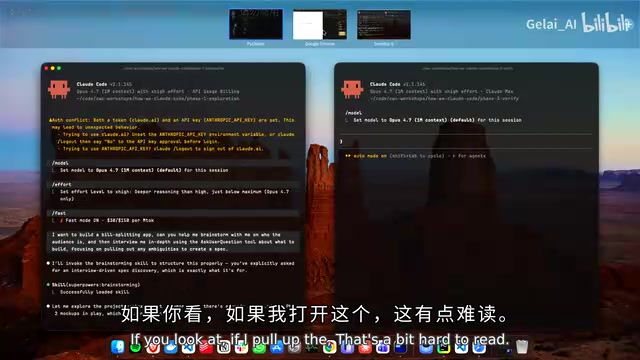
The core idea is to have each React component publish its state to the DOM as data-verify attributes. This way, the Agent doesn't need to "scrape" the DOM to understand application state — it can directly read a structured data contract.
HTML's data-* attributes are a namespace in the W3C standard specifically designed for custom data and don't affect page rendering or semantics. In traditional front-end testing, data-testid attributes are commonly used to provide stable element selectors for tests. The approach Arno demonstrated dramatically extends this concept: data attributes are used not just to identify elements, but to serialize and publish a component's complete runtime state to the DOM. This essentially establishes a machine-readable "state contract" at the UI layer — the component promises to expose specific data structures under specific conditions. When this contract is broken (even if nothing looks wrong visually), verification fails. This approach borrows from Contract Testing principles, transplanting them from the API layer between microservices to the front-end component layer.
Each component includes:
- Schemas: Data structure definitions
- Fixtures: Snapshots of known states. Fixtures are a classic concept in testing — predefined, known data sets used to place a system in a predictable state. In this verification framework, Fixtures play a role similar to Storybook Stories — they define the exact state a component should present given specific inputs. But unlike Storybook, these Fixtures don't run in an isolated development environment; they're embedded in the production application itself, enabling verification under real runtime conditions.
- Invariants: Conditions that must always hold true. Invariants are a core concept in formal verification and Design by Contract, first systematized by Bertrand Meyer in the Eiffel language's Design by Contract methodology. An invariant is a condition that must always be true at specific points during program execution. For example, a to-do app invariant might be "completed tasks + incomplete tasks = total tasks." In Agent-driven development, invariants give Claude clear correctness criteria, enabling it to autonomously verify whether modifications introduce logical errors rather than relying solely on visual inspection or functional testing.
- Probes: Exploratory tests designed to push beyond the "happy path"
When you modify a component's data contract (e.g., removing the data-verify-total-stats attribute), even if the application itself doesn't crash, verification immediately fails — because you've broken the contract, not the functionality.
Recording Verification as Evidence of Change
Anthropic's Claude Code team already uses this workflow in their daily work: every front-end change includes a recorded video clip of the verification process, stored in S3 or internal systems as evidence of the change. Given Anthropic's extremely high release cadence, this automated verification recording has become standard practice.
Practical Recommendations Summary
Based on Arno's presentation, here are Claude Code optimization tips you can apply immediately:
- Use Opus 4.7 instead of Sonnet for this workflow — the vision model improvements are key
- Enable Auto Mode + Fast Mode: the former reduces manual confirmations, the latter accelerates spec iteration
- Let Claude interview you instead of writing requirements docs yourself — reference the
ask_user_questiontool in your prompts - Use HTML instead of Markdown for specifications, especially for projects involving UI/UX
- Embed verification into artifacts: make component state visible to the Agent via data attributes, enabling three-layer verification
The core of this methodology isn't some brand-new technology — it's a recombination of existing primitives (Storybook fixtures, testing-library, data attributes, Playwright MCP) into an Agent-first workflow. Storybook is a widely used component development and documentation tool in front-end development, testing-library is a user-behavior-centric testing toolkit, data attributes provide machine-readable DOM annotations, and Playwright MCP gives Agents the ability to directly operate browsers. None of these tools are new on their own, but when recombined into a workflow where the Agent is a first-class citizen, the result is a qualitative leap. As model capabilities continue to improve, this trend of "letting the Agent do more" will only accelerate.
Related articles

Salesforce Acquires Rune for $375M: AI Logistics Tech Bolsters Defense Business
Salesforce reportedly acquires defense tech startup Rune for $375M. Rune's AI logistics tech will strengthen Salesforce's Missionforce defense platform, continuing its M&A spree.

Why Fair Use Benefits Everyone in the AI Era
Starting from a Hacker News discussion, this article analyzes the legal logic and controversies of the fair use principle in AI training and content creation, and its dual impact on creators and the tech ecosystem.

Mistral Large 4 Open-Sources a Trillion Parameters, Microsoft Offers Voluntary Severance to 60,000 Employees
Mistral Large 4 open-sources a trillion-parameter multimodal model with a coding agent score of 48; SanDisk earnings show AI inference reshaping NAND demand; Google Gemini adds in-app file editing, OpenAI raises Codex quotas, and Microsoft offers voluntary severance to 60,000 employees.