tiny11builder: Building a Streamlined Windows 11 Image with WinUI

tiny11builder turns Windows 11 image trimming into a graphical tool with C# and WinUI, lowering the barrier to system slimming.
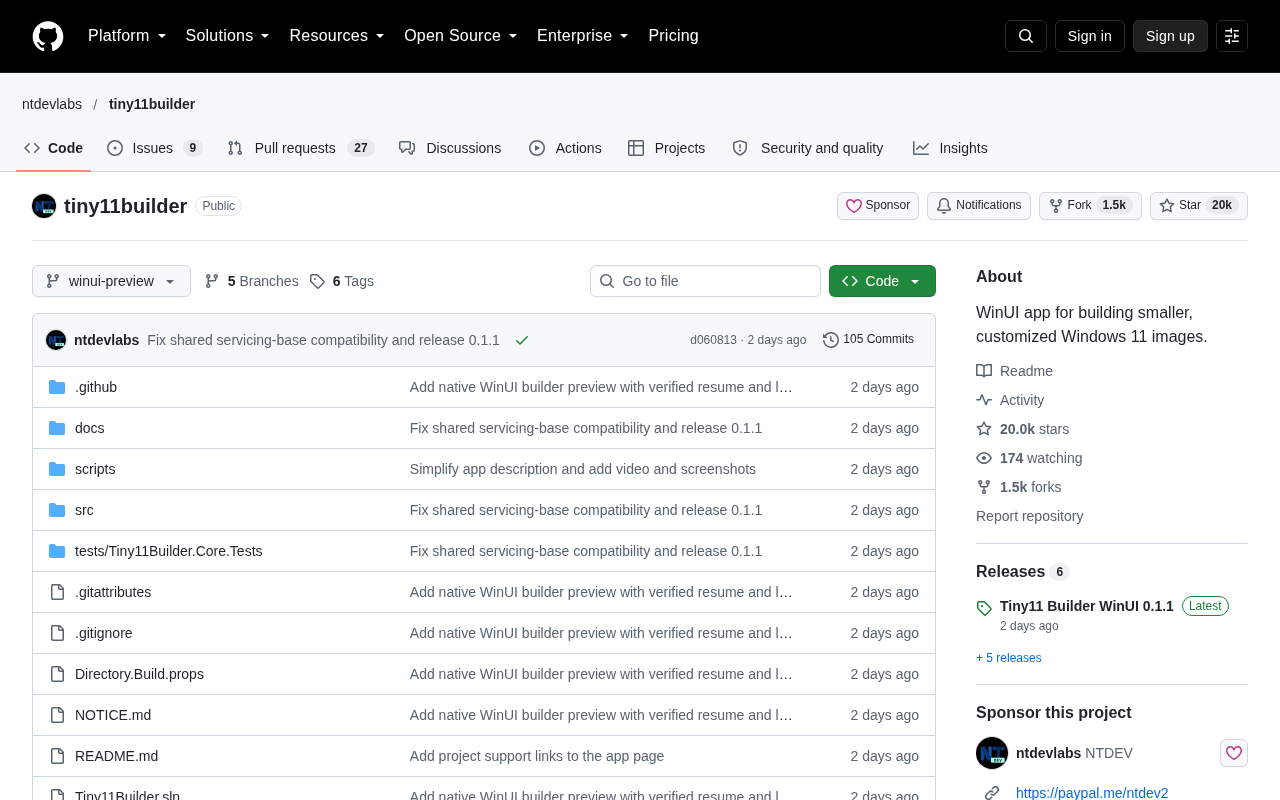
tiny11builder is an open-source C#/WinUI app that trims Windows 11 at the image build stage, removing redundant services, pre-installed apps, and telemetry for a smaller, more controllable install source. Unlike post-install optimization scripts, it mounts and modifies WIM/ESD images directly, offering better control and easier distribution. Its WinUI interface lowers the barrier, so users don't need to memorize PowerShell parameters. The project has 20,015 GitHub stars and 1,543 forks, gaining 132 stars in a day. The article also warns that image trimming is version-sensitive, may affect updates, and should be tested in a VM first.
tiny11builder: Building a Streamlined Windows 11 Image with WinUI
Windows 11's hardware requirements and pre-installed components often leave users feeling constrained, and the tiny11builder project on GitHub offers a lightweight alternative. Built with C# and WinUI, this application lets users generate smaller Windows 11 installation images with more controllable components. It has now garnered 20,015 stars and 1,543 forks on GitHub, with 132 new stars in a single day, showing sustained momentum.
Why a Streamlined Windows 11 Is Needed
Microsoft's official images typically include a large number of services, apps, and telemetry components that ordinary users never need. These not only consume disk space but also slow down system responsiveness on lower-end devices. The approach behind tiny11builder isn't to "subtract" after installation — it removes redundant content during the image build stage itself, producing a cleaner system foundation.
This approach is fundamentally different from common "system optimization scripts": the latter run on an already-installed system and can easily break component dependencies, whereas image-level trimming happens before deployment, offering greater controllability and easier bulk distribution.
The Graphical Build Experience Brought by WinUI
Unlike many similar tools that rely on command-line scripts, tiny11builder uses WinUI to build a native graphical interface, lowering the barrier to entry. Users don't need to memorize complex PowerShell parameters — they can simply select an image, configure trimming options, and start the build process.
According to the project description, the goal of the application is to make "building smaller, customizable Windows 11 images" intuitive. The combination of C# and WinUI also means it aligns naturally with the Windows ecosystem, offering inherent advantages in UI responsiveness and system integration.
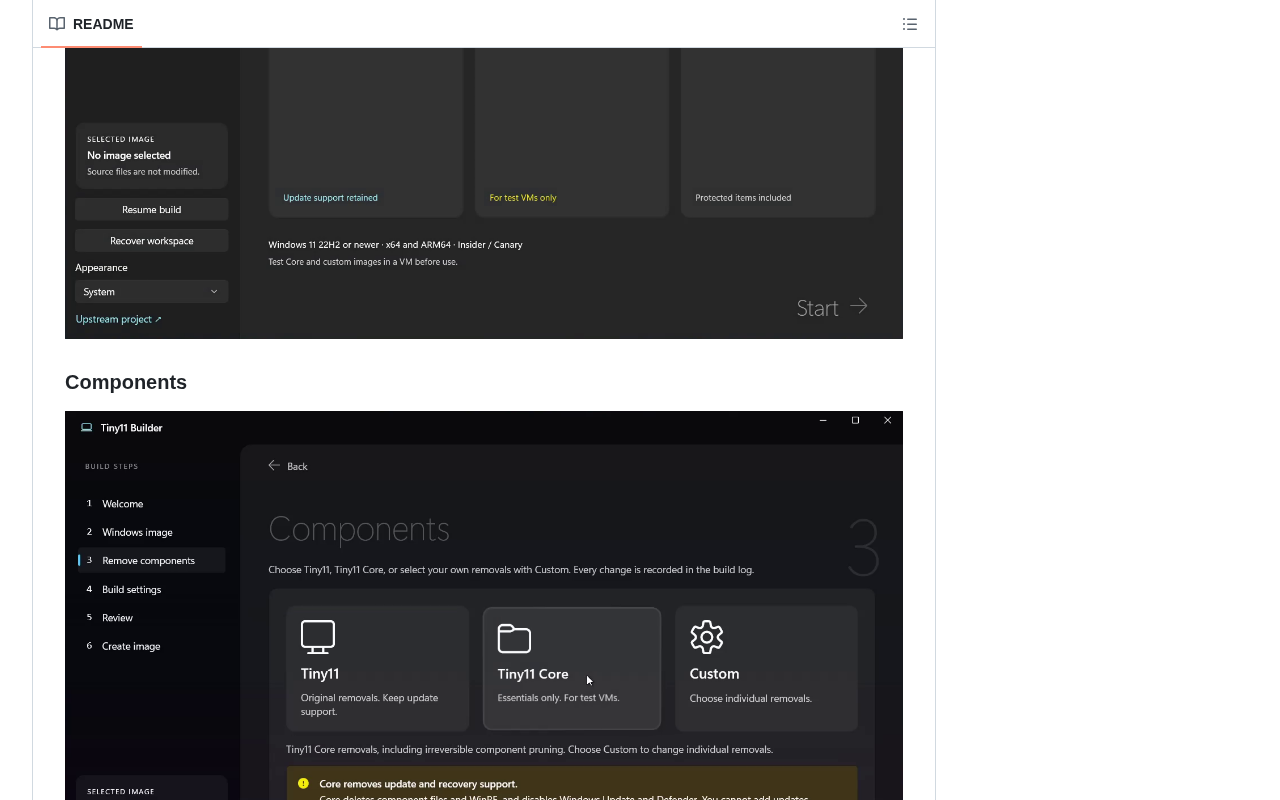
WinUI is Microsoft's modern native UI framework, part of the Windows App SDK, designed to replace the traditional WPF, WinForms, and legacy control systems in UWP. It adopts the Fluent Design language, supports visual effects like rounded corners, acrylic material, and mica backgrounds, and natively adapts to high DPI, dark mode, and touch interaction. Compared to command-line tools, WinUI lets developers quickly build desktop applications with a modern look using XAML and C#, while maintaining deep integration with the Windows system. tiny11builder's choice of WinUI means it isn't just a script wrapped in a shell — it productizes the image trimming workflow into a standard Windows desktop application, delivering native experiences in UI responsiveness, system tray, file pickers, and more. This is also a key reason it appeals to non-technical users.
Technical Implementation and Usage Boundaries
At its core, tiny11builder works with Windows image files, removing unwanted components through a process of mounting, modifying, and re-packaging. Such operations are sensitive to image versions — differences may exist between various Windows 11 releases — so confirming compatibility before use is essential.
It's worth noting that trimming system images may affect subsequent updates and the completeness of some features. For users pursuing a stable production environment, it's advisable to verify in a virtual machine first before deciding whether to use it on a primary device. The project's high star count indicates strong community recognition, but this does not equate to official support.
Windows image files typically refer to the WIM or ESD formats Microsoft uses in installation media, which package an entire system partition into a compressible, indexable container. WIM supports multiple images in a single file (e.g., containing both Home and Pro editions), and allows mounting via the DISM tool, mapping the image contents to a read/write directory, then unmounting and committing changes after modification. tiny11builder's trimming is based on this mechanism: first mount install.wim, delete unnecessary component packages, built-in apps, and policy entries, then re-package into a new install.wim or convert to ESD, and finally write back to the ISO. Since component package naming and dependency relationships change across Windows 11 versions, the removal list in the script needs to be updated with each version — this is also the main source of compatibility issues.
Who Should Use tiny11builder
- Users with older hardware: Those looking to balance a new system against limited hardware — a streamlined image reduces resource usage.
- Virtual machines and test environments: Smaller images mean faster deployment and lower storage costs.
- System customization enthusiasts: Those who want deep control over Windows pre-installed components and a personalized installation source.
The Signal Behind the Project's Popularity
The growth of 132 stars in a single day reflects users' ongoing demand for "system controllability." As Microsoft continues to strengthen system services and account binding, open-source tools like tiny11builder offer a counterbalancing force. Their value isn't just in saving a few GB of space — it's in returning the power of choice over image building to users.
For readers interested in AI applications and the open-source tool ecosystem, tiny11builder is also a noteworthy sample: when a seemingly "low-level" system tool is rebuilt with a modern UI framework, it can reach a far broader user base than traditional scripts.
"System controllability" is not a new topic in the Windows ecosystem, but recent controversies have centered on several changes: forced Microsoft account binding during installation, Windows 11's hard requirements for TPM 2.0 and Secure Boot, and the increase in built-in ads and recommended content. These design choices make some users feel their choices are being narrowed, which has also given rise to demands for bypassing account binding, skipping hardware checks, and removing pre-installed apps. Tools like tiny11builder essentially consolidate these scattered workarounds into a reusable image-building workflow. Their high popularity doesn't necessarily mean all users actually use them — it reflects more of a sentiment and expectation: when official policies tighten, the open-source community can still provide an alternative path.
One-line Summary
tiny11builder turns Windows 11 image trimming into a graphical tool with C# and WinUI, lowering the barrier to system slimming.
Paragraph Summary
tiny11builder is an open-source application built with C# and WinUI for trimming Windows 11 at the image build stage, removing redundant services, pre-installed apps, and telemetry components to produce a smaller installation source with more controllable components. Unlike running optimization scripts after installation, it directly mounts and modifies WIM/ESD images, offering greater controllability and easier bulk distribution. The WinUI graphical interface lowers the barrier to entry, letting users complete configuration without memorizing PowerShell parameters. The project has earned 20,015 stars and 1,543 forks on GitHub, with 132 new stars in a single day. The article also notes that image trimming is sensitive to version compatibility, may affect subsequent updates, and recommends verifying in a virtual machine first.
Related articles

Why Does the Tesla Roadster Need to Fly? A Deep Dive into Musk's Wild Demo
Tesla's Roadster launch showed wall-climbing, upside-down driving, and flying stunts—but The Vergecast notes the demo car may lack a battery, the Rocket version is invite-only and not street-legal, and the website terms don't guarantee delivery. After nine years of delays, why does this car still need to exist?

AI Is Not a Replacement: Human-AI Collaboration Through the Lens of Factory Root Cause Analysis
Starting from factory root cause analysis, this article explains how AI accelerates evidence chain construction rather than replacing human experts, exploring the pragmatic implementation logic and business value of 'AI supporting people rather than replacing them.'

AI Agent Decision Auditing: Building an Evidence Chain in Regulated Workflows
Starting from a Reddit discussion, this article analyzes three core issues in AI agent decision auditing within regulated workflows: what fields audit records should contain, how to handle feedback latency for erroneous decisions, and how to continuously calibrate LLM judge consistency with human judgment.