TinyFolder: A Lightweight Tool That Brings App Folders Back to the Mac Dock

TinyFolder is a free Mac tool that adds fully customizable app folders to the Dock after Launchpad's removal.
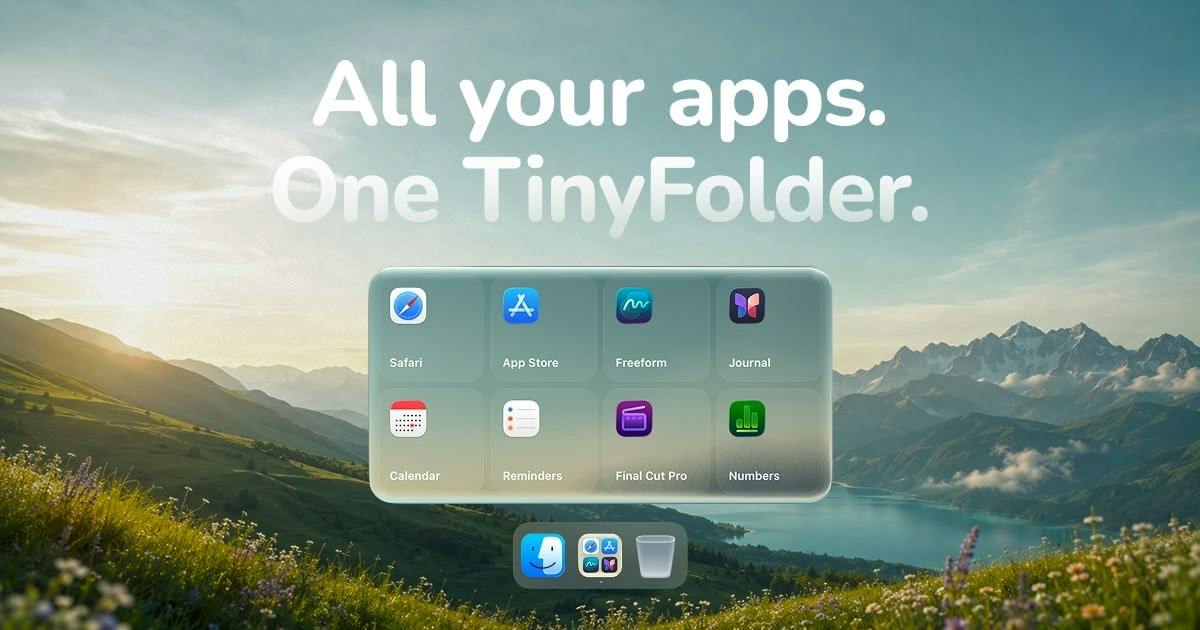
macOS Tahoe removed Launchpad, and the Dock has never natively supported app folders — TinyFolder fills that gap for free. It embeds a dynamic app folder in the Dock that expands on click, with an icon dynamically composed from the apps inside. Its core strength is deep customization: glass, color, and texture material styles; custom layouts and icon sizes; optional labels; and animated effects like snow and lava, all with live preview. It earned 63 upvotes and ranked 19th on Product Hunt, and is completely free on the Mac App Store.
After Launchpad Disappears, Mac Users Need a New Way to Stay Organized
With macOS Tahoe, many Mac users noticed a familiar feature quietly disappearing — Launchpad is gone. And the Dock itself has never supported true app folders natively. This means that as your app library grows, you're left relying on Finder or Spotlight to launch them, weakening the quick-launch experience right from the desktop.
TinyFolder was built to fill exactly that gap. It places an app folder directly in your Dock — click it, and the folder expands above the icon to reveal all the apps inside. The problem it solves is straightforward: restore a convenient app launcher when the native system feature is no longer there.
Launchpad has been a native feature since macOS Lion (2011), directly inspired by the iOS home screen — a full-screen view of all installed apps, with support for grouped folders and drag-to-arrange. It was designed for users transitioning from iPhone to Mac, giving them a familiar way to manage their apps. Over the years, however, criticism mounted: it couldn't auto-sort by usage frequency, folder management felt clunky, and it never quite fit Mac's "pro tool" identity. Its removal in macOS Tahoe signals that Apple believes Spotlight and Finder are sufficient for launching apps — but that assumption doesn't hold for every user, especially those who rely on visual categorization rather than remembering app names.
Core Features: Not Just Functional, But Fully Customizable
What makes TinyFolder most compelling is its deep customizability. The folder icon isn't a static graphic — it's dynamically composed from the icons of the apps inside, so you can tell at a glance what's in each folder.
Beyond that, users have control over nearly every detail of both the icon and the expanded interface:
- Material styles: Three visual directions — glass, color, or texture
- Layout & size: Customize how app icons are arranged and how large they appear
- Label display: Choose whether or not to show app names
- Dynamic effects: Includes "living effects" like snow and lava animations
All of these adjustments happen in a live preview — you see changes in real time without any trial-and-error guessing. This design philosophy transforms what could have been a purely utilitarian tool into something that feels more like personalized desktop décor.
Product Positioning and Market Reception
On Product Hunt, TinyFolder earned 63 upvotes and ranked 19th for the day, listed under the Mac, Design Tools, and Productivity categories. By the numbers, it's a niche tool that attracted a modest but focused audience — not a viral hit, but a precise solution to a specific pain point.
Worth noting is its pricing strategy: completely free on the Mac App Store. For a lightweight tool that fills a system-level gap with a low barrier to entry, free is a rational choice — it reduces friction, lowers the cost of trying it, and accelerates user adoption.
What It Represents: Third-Party Tools Filling System Gaps
TinyFolder's emergence reflects a long-standing pattern: when an operating system removes or never includes a certain feature, third-party developers tend to step in quickly. Launchpad's departure left a subset of users inconvenienced, and TinyFolder offers an alternative — even an upgrade — through a more flexible approach: embedded in the Dock, dynamic icons, and rich customization options.
For Mac users who like to categorize their apps visually, care about desktop aesthetics, or miss the quick-launch feel of Launchpad, tools like this are worth trying. They don't require a major shift in habits, yet they deliver tangible convenience in daily use. That said, as a newly released small utility, its long-term stability and compatibility across system versions still remain to be proven over time.
This "Apple removes it, the ecosystem fills it" phenomenon has a long tradition on the Mac platform. Every time Apple adjusts or cuts a feature in a system update, it tends to spawn a wave of replacement tools in the Mac App Store or among indie developers. Classic examples include: the wave of desktop widget tools that emerged after Apple scaled back Dashboard; and the expansion of third-party software like Premiere after Final Cut Pro X's rewrite drove professional users away. The underlying logic is that Mac users are highly sensitive to workflow disruption, have strong customization needs, and the low publishing barrier of the App Store allows individual developers to respond to system changes at minimal cost. The timing of TinyFolder's appearance — right as Launchpad exits — is yet another confirmation of this pattern.
Related articles

Why Does the Tesla Roadster Need to Fly? A Deep Dive into Musk's Wild Demo
Tesla's Roadster launch showed wall-climbing, upside-down driving, and flying stunts—but The Vergecast notes the demo car may lack a battery, the Rocket version is invite-only and not street-legal, and the website terms don't guarantee delivery. After nine years of delays, why does this car still need to exist?

AI Is Not a Replacement: Human-AI Collaboration Through the Lens of Factory Root Cause Analysis
Starting from factory root cause analysis, this article explains how AI accelerates evidence chain construction rather than replacing human experts, exploring the pragmatic implementation logic and business value of 'AI supporting people rather than replacing them.'

AI Agent Decision Auditing: Building an Evidence Chain in Regulated Workflows
Starting from a Reddit discussion, this article analyzes three core issues in AI agent decision auditing within regulated workflows: what fields audit records should contain, how to handle feedback latency for erroneous decisions, and how to continuously calibrate LLM judge consistency with human judgment.