Tips from the Creator of Claude Code: Prompt Engineering Techniques and Efficient Workflow Guide

Claude Code creator Boris shares practical tips for mastering this fully agentic AI coding assistant.
Claude Code creator Boris systematically explained the tool's positioning and usage in a technical talk. Claude Code isn't a code completion tool — it's a fully agentic AI coding assistant built on tool-calling architecture, running in the terminal without being tied to any IDE. The recommended starting point is using it for codebase Q&A, leveraging the 200K token context window for zero-configuration code understanding, supporting code usage queries, Git history tracing, GitHub integration, and more.
Boris, the creator of Claude Code, condensed his hands-on experience as an Anthropic engineer into a 28-minute technical talk, systematically explaining how to truly make the most of this all-in-one AI coding assistant, from beginner to advanced levels. This article compiles the most essential takeaways.
What Is Claude Code? How Does It Differ from Traditional Programming Tools?
Boris got straight to the point in defining Claude Code's positioning: it's not a traditional code completion tool, but rather a fully agentic AI coding assistant. Its design goal isn't to complete a single line of code, but to build complete features, write entire functions and files, and fix whole bugs in one go.
A "fully agentic" AI system refers to an AI architecture that can autonomously plan, invoke tools, execute multi-step tasks, and self-correct based on feedback — distinct from earlier models that could only handle single-turn Q&A or code completion. The core of this paradigm is Tool Use (Function Calling) capability — the model can not only generate text but also proactively invoke external tools like the file system, Shell, and search engines, forming a closed loop of "perceive-decide-execute." Claude Code is built on exactly this architecture: it internally maintains a task planner that decomposes a user's high-level intent into a series of executable sub-steps, chaining them together through file editing, Bash execution, code search, and other tools. This is fundamentally different from traditional completion tools like GitHub Copilot — the latter is essentially "next token prediction" based on context, while the former is closer to a "software engineer agent" capable of autonomously completing workflows.
The most critical difference: Claude Code is not tied to any IDE. Whether you use VS Code, Xcode, JetBrains, or Vim/Emacs, it works. It runs in the terminal, supporting local, remote SSH, Tmux, and any other environment. Boris revealed two reasons for choosing CLI over an IDE plugin: first, Anthropic's internal engineers use a wide variety of IDEs, and the terminal is the lowest common denominator; second, having observed the pace of model improvement up close, they believe "by the end of this year, people may no longer be using IDEs."
This CLI design decision deeply embodies the legacy of Unix philosophy: "Do one thing and do it well, and cooperate with other programs." The claude -p parameter exposes Claude Code as a standard Unix pipe tool, enabling seamless integration with decades of command-line ecosystem tools like grep, awk, jq, and curl. This composability means users can embed Claude Code into any Shell script, Makefile, or CI/CD pipeline without waiting for official integrations.
First Step: Using Claude Code for Codebase Q&A
Boris's strongly recommended way to get started isn't having Claude Code write code — it's using it for Codebase Q&A first. This is also the skill Anthropic new hires learn on their first day.
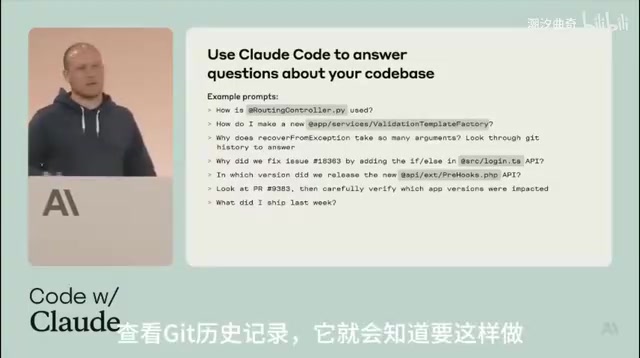
The reason Claude Code's codebase Q&A works with "no indexing, zero configuration" relies on the technical breakthrough of large language models' ultra-long context windows. The Claude 3 series models support up to 200K tokens of context, meaning tens of thousands of lines of code can be loaded directly into a single session for analysis — without needing to pre-build an index database like traditional code search tools (e.g., Sourcegraph, ctags). When a user asks a question, Claude Code dynamically retrieves relevant code snippets through file search tools, then combines the model's semantic understanding to provide answers. This is similar to RAG (Retrieval-Augmented Generation) architecture but more flexible — it doesn't rely on pre-computed vector embeddings, but instead reasons in real time.
Specific use cases include:
- Code usage queries: Ask "How is this class instantiated?" and Claude Code won't simply do a text search — it goes one level deeper to find actual usage examples
- Git history tracing: Ask "Why does this function have 15 parameters?" and it will automatically check Git history to find out who introduced each parameter and under what circumstances
- GitHub integration: Retrieve Issue context, view PR-related information
- Weekly report generation: Boris asks every Monday standup "What did I commit this week?" and Claude Code checks the Git log and generates a summary
Related articles
 Tech Frontiers
T3 Code: Free, Open-Source, and a Unified Way to Manage All AI Coding Agents
T3 Code is a free open-source app that aggregates AI coding tools like Cloud Code and Codex into one interface, with conversation handoff, branch isolation review, automatic PR creation, and remote access.
 Tech Frontiers
Conductor Cloud Service Shutting Down? A Comparative Review of Three Parallel AI Coding Agent Solutions
Conductor's cloud service is shutting down—how can developers keep running AI coding agents in parallel? This article compares three alternatives: Orca, Codex, and Cursor: Orca is open-source and free and compatible with old workspaces, Codex is built into the ChatGPT desktop app and supports cloud handoff, and Cursor offers multi-agent windows within the editor. Choose the tool that best fits your workflow.
 Tech Frontiers
Cursor Launches Live Apps: One-Click Shareable Links
Cursor launches Live Apps for cloud agents: auto-build a web app, configure Postgres and Cursor login, run security checks, deploy to your domain, and generate a shareable link. Here's what it covers, its governance controls, and getting-started advice.