TONGYI Lingma + EasyClick Configuration Tutorial: A Practical Guide to AI-Powered Automated Programming

Four-step integration of TONGYI Lingma with EasyClick for precise AI-generated EC code.
This article details the complete configuration workflow for integrating TONGYI Lingma (AI programming assistant) with the EasyClick automation framework: installing TONGYI Lingma, deploying EC official AI documentation (building a RAG knowledge base via the Aldox support library), importing the EC-specific agent (binding an expert identity), and using slash commands to activate the EC programming AI. The three-layer architecture works in synergy, enabling AI to precisely generate code conforming to EC specifications and significantly boosting automation development efficiency.
What kind of efficiency spark can you expect when an AI programming assistant meets an automation development framework? This article walks you through the complete configuration of TONGYI Lingma and EasyClick (EC), enabling AI to precisely understand EC's API specifications and achieve a fully automated programming experience from requirement description to code generation.
Two Installation Methods: Plugin vs. Standalone IDE — Which One to Choose
TONGYI Lingma offers two installation methods suited to different use cases. Developers can choose based on their needs.
Before getting started, let's briefly understand TONGYI Lingma's background. TONGYI Lingma is an AI programming assistant built by Alibaba Cloud based on the Tongyi large model, leveraging the code comprehension and generation capabilities of the Qwen series large language models. It belongs to the emerging category of "AI Coding Copilot" products, similar in positioning to GitHub Copilot and Amazon CodeWhisperer, but with unique advantages in Chinese language understanding and domestic development ecosystem compatibility. TONGYI Lingma supports code completion, code generation, code explanation, unit test generation, code optimization, and more, covering over 200 programming languages. It's precisely this powerful foundation that makes it an ideal choice for deep integration with the EasyClick framework.
Method 1: IDE Plugin Installation (Recommended for Daily Development)
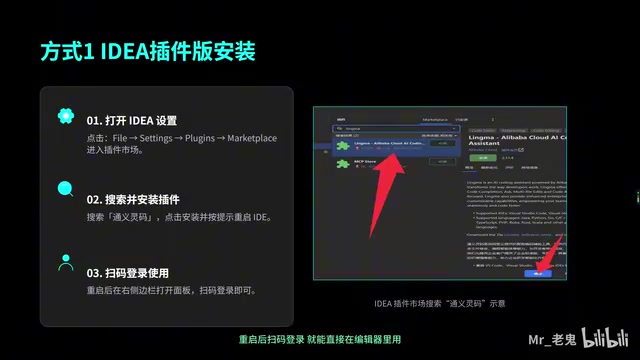
This is the most convenient way to install TONGYI Lingma, suitable for users with existing development environments:
- Open your IDE (e.g., VS Code), go to Settings → Plugin Marketplace
- Search for "TONGYI Lingma" and click Install
- After restarting the IDE, scan the QR code to log in with your Alibaba Cloud account
- Once logged in, you can use AI-assisted programming directly in the editor
The plugin version's advantage lies in seamlessly integrating into your existing workflow — call it up anytime during daily development without switching tools.
Method 2: Standalone Lingma IDE Version
If you want a more complete AI programming experience, you can choose the standalone version:
- Visit the TONGYI Lingma official website and download the installation package for your operating system
- After installation, log in by scanning the QR code with your Alibaba Cloud account

The standalone IDE version provides a dedicated environment for pure AI programming with more complete features and faster updates, suitable for heavy AI programming users. Both methods offer the same core functionality — just choose based on personal preference.
Deploying EC Official AI Documentation: Teaching AI to Understand EasyClick
Installing TONGYI Lingma is just the first step. To make AI write code that conforms to EasyClick specifications, you must deploy the EC official AI documentation — this step directly determines the quality of AI code generation.
It's worth understanding the EasyClick framework itself here. EasyClick (abbreviated as EC) is an automation development framework for Android/iOS platforms, widely used in RPA (Robotic Process Automation), automated testing, batch operations, and other scenarios. It provides a set of encapsulated JavaScript APIs that allow developers to automate UI element finding, clicking, swiping, text input, and other operations, while also supporting XML layouts for building UI interfaces. EC's core value lies in significantly lowering the barrier to automation script development, enabling non-professional developers to get started quickly. Because EC has its own unique API system and development specifications, a general-purpose AI programming assistant without specialized configuration will struggle to generate code that meets EC standards.
Here are the specific steps:
- Open the EasyClick plugin panel
- Find and install the Aldox support library
- This support library imports the complete EC API documentation into TONGYI Lingma's knowledge base
The technical principle behind this step involves the RAG (Retrieval-Augmented Generation) mechanism — currently the mainstream solution for addressing large models' "knowledge cutoff" and "insufficient domain knowledge" problems. When the Aldox support library imports EC's API documentation into TONGYI Lingma's knowledge base, the system vectorizes the documents and stores them in a vector database. When a user asks a question, the system first retrieves the most relevant document fragments through semantic search, then injects these fragments as context into the large model's prompt, enabling the AI to generate code based on accurate API documentation rather than relying solely on vague memories from training data. This is why documentation deployment is so critical — without it, AI can only "guess" when writing EC code.
After completing documentation deployment, the AI will strictly reference EC's API standards when generating code, producing standardized and directly runnable output that won't "drift" into other frameworks' syntax. Think of this step as equipping the AI with an EC development manual that it consults before writing any code.
Importing the EC-Specific Agent: Binding an Expert Identity to AI
After documentation deployment, the next critical step is importing the EC-specific agent.
The "agent" mentioned here is the concrete application of the AI Agent concept in programming tools. An AI Agent refers to an AI instance with specific role definitions, knowledge base bindings, and behavioral constraints. In TONGYI Lingma, importing an agent essentially loads a predefined System Prompt configuration file that includes role definition (e.g., EC expert), behavioral rules (e.g., prioritize EC APIs), output format constraints, and more. This approach originates from the Role-Playing technique in Prompt Engineering — by giving the large model a clear identity and knowledge boundaries, it can significantly improve output quality and accuracy in specific domains. Combined with the RAG documentation deployment from the previous step, the agent provides the strategy of "how to use knowledge," while the documentation provides the content of "what knowledge to use" — both are indispensable.
Here's the workflow:
- Go to TONGYI Lingma's Settings page
- Find the Agent entry
- Import the EC-specific configuration file
- The system will automatically generate a dedicated wake-up command
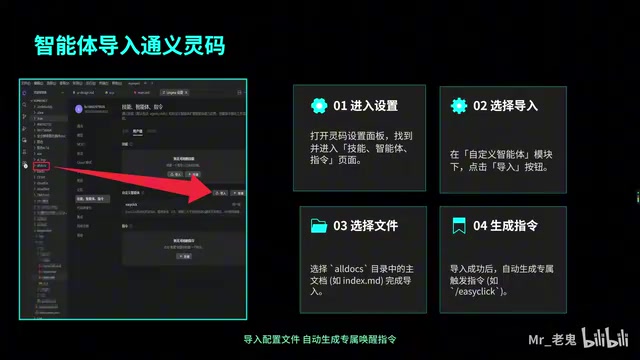
The essence of this step is binding an "EasyClick expert identity" to the AI. After importing the agent, the AI is no longer a general-purpose programming assistant but a professional developer with deep understanding of the EasyClick framework, capable of providing precise code solutions for EC-specific scenarios.
Slash Commands in Practice: One-Click EC Programming AI Activation
After configuration is complete, daily usage is very straightforward. The core method is simple: slash commands.
Slash Commands are an interaction paradigm originating from collaboration tools like Slack and Discord, where users type "/" plus a keyword to trigger specific functions. In AI programming assistants, slash commands serve as shortcut entries, encapsulating complex prompt engineering into simple one-click operations. Compared to manually writing detailed prompts, slash commands not only lower the barrier to use but also ensure that each invocation carries complete context configuration (including agent identity, knowledge base references, etc.), thereby guaranteeing consistency and stability of output quality. This means that even newcomers to AI programming can get the same quality code output as experienced users.
In TONGYI Lingma's chat box, simply type / followed by the agent command name to precisely activate the EC programming AI. No complex prompts needed, no additional context explanation required — a single slash command puts AI into EasyClick development mode.
Practical Demo: Generating an EC XML UI Page
Let's look at the actual results using the generation of an EasyClick XML UI page as an example:
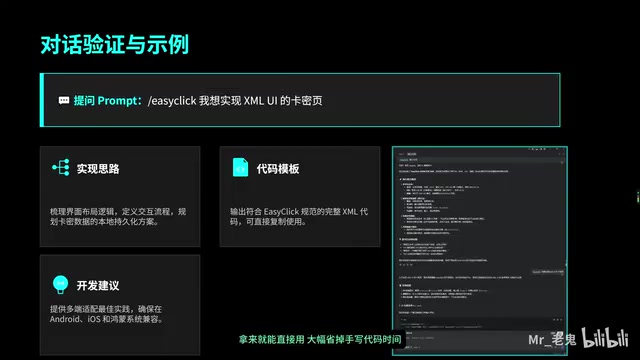
- Enter the slash command in TONGYI Lingma's chat box
- Describe the requirement: generate an EC XML UI page
- The AI will provide complete output all at once, including:
- Design rationale: page structure and layout logic
- Complete code: XML code conforming to EC specifications
- Development suggestions: future optimization and extension directions
The generated code is ready to use immediately, saving significant time spent on manual coding. For repetitive UI building, feature module development, and similar scenarios, the efficiency improvement is particularly notable. It's worth mentioning that because the RAG document knowledge base was deployed earlier, the AI-generated XML code will strictly follow EC's layout specifications and component naming conventions rather than generating generic Android XML layout code — this is precisely the value of the entire configuration system working in synergy.
Configuration Troubleshooting Guide
You may encounter three typical types of issues during configuration. Following this troubleshooting approach should resolve most of them:
Issue 1: EC Documentation Import Failure
- First check your network connection to ensure you can access Alibaba Cloud services normally
- Try reinstalling the Aldox support library
- Confirm whether the EasyClick plugin version is up to date
Documentation import failure typically means the RAG knowledge base failed to build successfully. In this case, the AI will fall back to relying solely on pre-trained knowledge, and the generated EC code will likely contain non-existent API calls or incorrect parameter formats.
Issue 2: Slash Commands Not Responding
- Check whether the agent was imported successfully by confirming the import status in Settings
- Verify that the command name is entered correctly (pay attention to capitalization and spaces)
- Restart the IDE and try again
Issue 3: AI Output Code Doesn't Conform to EC Specifications
- This is most likely due to documentation not being imported correctly — redeploy the EC official AI documentation
- Check whether the agent configuration file is complete
- Confirm that you're using slash commands to activate rather than regular chat mode
The root cause of this issue is: if you don't activate the dedicated agent through slash commands, the AI responds as a general programming assistant, without the EC expert role constraints or triggering the RAG retrieval process, naturally unable to output EC-compliant code.
The core troubleshooting approach is three steps: Check network → Reinstall documentation → Verify agent status.
Summary: Complete TONGYI Lingma + EasyClick Configuration in Four Steps
The combination of TONGYI Lingma and EasyClick essentially creates a deep binding between AI large model code generation capabilities and EasyClick framework's professional knowledge. Documentation deployment enables AI to master API specifications (RAG knowledge injection), agent import gives AI an expert identity (role and behavioral constraints), and finally, concise slash commands enable one-click invocation (interaction encapsulation). These three layers — knowledge layer, role layer, and interaction layer — together form a complete domain-specific AI programming solution.
The entire configuration process isn't complex, but no step can be skipped:
- Install TONGYI Lingma (plugin version or standalone IDE version)
- Deploy EC official AI documentation (install Aldox support library, build RAG knowledge base)
- Import EC-specific agent (bind expert identity, set behavioral rules)
- Use slash commands (one-click activation of EC programming AI)
Once properly configured, a large amount of repetitive coding work in daily development can be handed off to AI. Developers only need to focus on business logic and architecture design, truly spending their time on more valuable tasks. This "AI + professional framework" deep integration model also represents the development trend of AI-assisted programming tools — moving from general-purpose code completion toward precise code generation for specific frameworks and domains.
Related articles
 Tutorials
ChatGPT Plus Subscription Guide: Are GPT-5.5, image-2, and Codex Worth the Upgrade?
A detailed look at ChatGPT Plus features — GPT-5.5, image-2, and Codex — with a Plus vs Pro comparison and a complete step-by-step subscription guide for users outside the US.
 Tutorials
Harness AI Engineering in Practice: Using Claude Code to Master Enterprise-Level E-Commerce Development
Deep dive into Harness AI Engineering: master enterprise e-commerce development with Claude Code using the Rules, Skills, Wiki, and Changes framework.
 Tutorials
Cursor + Codex Dual-IDE Collaboration: A Practical Methodology for Open-Source Project Customization
A complete methodology for open-source project customization based on real-world experience, detailing the Cursor+Codex dual-IDE workflow, seven-stage process, MVP validation, and AI source code reading techniques.