TouchGrass: A Smart Mac Break Reminder That Understands Your Work Context

A context-aware Mac break reminder that knows when to stay silent during meetings and calls.
TouchGrass is a macOS menu bar app that reinvents break reminders with context awareness — automatically silencing during meetings, calls, and screen recordings while counting time away as rest. It runs entirely locally without requesting Accessibility permissions, covers eye, posture, and hand health, and costs just $3.99 one-time with lifetime updates.
In today's world of productivity tool overload, a macOS utility that climbed to #2 on Product Hunt (388 upvotes, 48 comments) is turning heads. It's called TouchGrass, and it champions a counterintuitive idea: A truly good break reminder shouldn't just track time — it should understand your work context.
Product Hunt is one of the most influential tech product discovery platforms globally, where community members submit new products daily and a voting mechanism determines rankings. Landing in the top three of the daily chart means gaining widespread recognition from tech early adopters within 24 hours, typically driving thousands of visits and significant media exposure. For indie developers, 388 upvotes indicate the product has struck a notable chord with its target audience. Notably, early feedback from the Product Hunt community is extremely valuable for product iteration — journalists, investors, and tech bloggers regularly browse the rankings for story ideas, meaning high-ranking products often generate long-tail effects far exceeding first-day traffic. TouchGrass appeared simultaneously in the Health & Fitness, Productivity, and Menu Bar Apps categories, a multi-category exposure strategy that effectively broadened its audience reach.
The Core Flaw of Traditional Break Reminder Tools
The vast majority of break reminder tools on the market share the same problem — they only understand one dimension: time. Set a reminder every 25 minutes, and no matter what you're doing at that moment, the popup appears right on schedule.
This timed approach is heavily influenced by the Pomodoro Technique — a method proposed by Francesco Cirillo in the 1980s that suggests working in 25-minute units followed by 5-minute breaks. While simple to implement, it assumes that human attention and work states are uniformly distributed, completely ignoring the existence of "Flow State" in cognitive science. Psychologist Mihaly Csikszentmihalyi described flow state in his groundbreaking research — an optimal experience state of complete absorption where time seems to disappear. Research in software engineering has further quantified the cost of interruption: Gloria Mark's studies at UC Irvine found that knowledge workers need an average of 23 minutes and 15 seconds to fully return to their previous task after being interrupted. More importantly, interruptions don't just consume time — they increase cortisol secretion levels, with cumulative long-term effects on physical and mental health. When someone enters a flow state, forcibly interrupting them actually consumes more cognitive resources to re-enter focused work.
This creates an awkward experience: when you're in a video meeting, on an important phone call, recording a screen demo, or focused on media content, a sudden "time to take a break!" popup isn't just unhelpful — it creates a new distraction. Over time, users often simply disable these tools altogether.
TouchGrass developer Saran clearly identified this pain point. The product's positioning can be summed up in one sentence: Context-aware break reminders without invasive permissions. The two keywords here — "context-aware" and "non-invasive permissions" — are precisely what differentiate it from competitors.
TouchGrass's Context-Aware Mechanism: Knowing When to Stay Silent
TouchGrass's biggest highlight is its ability to "read" your current work context and intelligently adjust its reminder strategy accordingly.
The context-aware computing approach that TouchGrass employs traces back to ubiquitous computing research at Xerox PARC in the 1990s. Pioneer Mark Weiser proposed that future computing devices should sense users' environments and states, proactively adapting rather than passively waiting for commands. In mobile devices, context awareness is already very mature — phones adjust brightness based on ambient light and switch to driving mode based on motion. But in desktop applications, context awareness has lagged due to privacy concerns and permission model limitations. TouchGrass's innovation lies in finding a minimum-permission path to achieve context awareness within macOS's strict privacy framework.
From a technical implementation perspective, macOS provides multi-layered system state APIs that allow developers to obtain contextual information without requesting Accessibility permissions. For example, the CoreAudio framework can detect audio device usage status (determining if a call is in progress); NSWorkspace notification mechanisms can sense screen lock/unlock events (determining if the user has stepped away); relevant APIs can detect screen recording status; and Now Playing information can determine media playback state. These system-level signals don't require reading screen content or monitoring keyboard input, providing the technical foundation for TouchGrass's context awareness.
Auto-Silent During Meetings and Calls
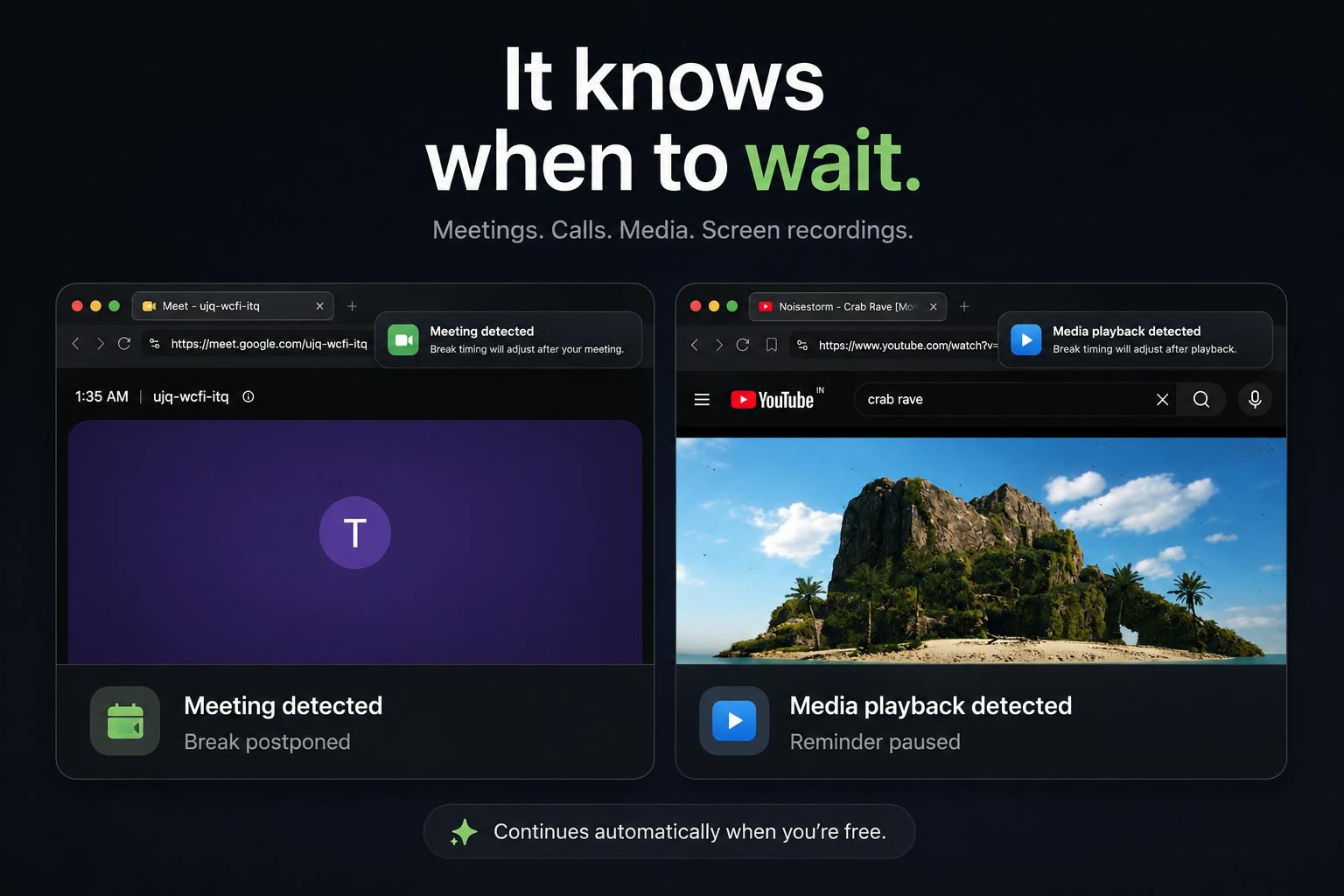
When it detects you're in a meeting or on a phone call, TouchGrass proactively waits and won't hastily pop up a reminder. This means it won't interrupt your train of thought during a critical conversation with a client.
Auto-Pause During Media Playback and Screen Recording
Similarly, when you're playing media content or screen recording, the tool stays quiet. For users who need to record screen demos, livestream, or watch tutorial videos, this attention to detail is remarkably thoughtful.
Time Away from Computer Automatically Counts as a Break
This is an exceptionally clever design: TouchGrass tracks the time you're away from your Mac and treats it as a completed break. In other words, if you've already gotten up to walk around or grabbed a glass of water, the tool won't immediately nag you to rest when you return — because it understands you've already "touched grass" (connected with the real world).
This logical closed loop ensures reminders truly serve health purposes rather than mechanically punching a clock.
Triple Health Reminders: Eyes, Spine, and Hands Fully Covered
Beyond smart timing control, TouchGrass also covers the common health risks of prolonged computer use in its reminder content:
- Blink reminders: Extended screen time reduces blink frequency, causing dry and fatigued eyes;
- Posture improvement: Prolonged forward-leaning posture is the primary culprit behind cervical and lumbar spine issues;
- Rest after extended typing: Intervention for repetitive strain injuries of the hands and wrists.
These three points correspond to the eyes, spine, and hands — the three body parts most vulnerable to damage for digital workers.
From a medical perspective, these health issues have been systematically studied and categorized. Computer Vision Syndrome (CVS) affects approximately 50%-90% of computer workers, with core symptoms including dry eyes, blurred vision, and headaches. Research shows that blink frequency drops from a normal 15-20 times per minute to just 4-5 times when staring at a screen, leading to tear film instability. Regarding Repetitive Strain Injury (RSI), carpal tunnel syndrome and tendinitis are highly prevalent among programmers and writers — U.S. Bureau of Labor Statistics data shows RSI accounts for nearly two-thirds of all occupational disease reports, causing billions of dollars in medical and productivity losses annually. As for forward head posture (commonly called "tech neck"), for every inch the head moves forward, cervical spine pressure increases by approximately 10 pounds; when the head tilts 60 degrees forward (a typical phone-viewing angle), the cervical spine bears force equivalent to a 27-kilogram weight. The 20-20-20 rule widely recommended by ophthalmologists (every 20 minutes, look at something 20 feet away for 20 seconds) is precisely the theoretical basis for TouchGrass's blink reminders.
Clearly, TouchGrass isn't offering generic "take a break" advice, but rather a targeted health management approach.
Privacy Design: Runs Locally, Refuses Accessibility Permissions
In the macOS ecosystem, many tools that need to sense user behavior request Accessibility permissions, which allow applications to read screen content, monitor input, and more — carrying significant privacy risks.
macOS Accessibility permission is one of the most powerful and dangerous permissions in the system. Applications granted this permission can read text content in any window, simulate keyboard and mouse actions, and monitor UI element hierarchies across all applications. In recent years, multiple macOS malware incidents have involved abusing Accessibility permissions to steal passwords and capture sensitive information. For example, several malware strains exposed in 2023 (such as XCSSET and Atomic Stealer) used social engineering to trick users into granting Accessibility permissions before executing data theft. Apple further tightened the permission approval process after macOS Ventura, requiring users to manually enable permissions one by one in System Settings. However, user-level security awareness remains uneven — many people habitually click "Allow" on permission requests without understanding their implications.
TouchGrass explicitly promises: All features run locally, and it will never request Accessibility permissions. It achieves context awareness without obtaining sensitive permissions, which technically requires cleverly leveraging non-invasive system state signals (such as call status, media playback state, screen lock/wake events, etc.). This design embodies the "Principle of Least Privilege" in security engineering — every program component should possess only the minimum set of permissions necessary to fulfill its function. A tool choosing not to request this permission at all eliminates this category of security risk at the architectural level.
For users increasingly concerned about data privacy, this "just enough, never overreaching" design philosophy is precisely the key to earning trust. It's no wonder it gained attention simultaneously in Product Hunt's Health & Fitness, Productivity, and Menu Bar Apps categories.
Pricing Strategy: One-Time Purchase, Say Goodbye to Subscription Fatigue
In an era dominated by subscription models, TouchGrass's pricing strategy feels refreshingly clean:
- 7-day free trial
- Then a one-time purchase of $3.99
- With lifetime updates
At under $4, combined with a one-time purchase and lifetime updates, the barrier to entry for a menu bar utility is extremely low.
Subscription Fatigue is a prominent trend in tech consumption over the past two years. Statistics show the average consumer subscribes to 12-15 digital services, with total monthly spending continuously rising, leading to strong resistance toward new subscriptions. West Monroe survey data reveals that over 80% of consumers underestimate their total monthly subscription spending, experiencing noticeable "bill shock" when they realize the true cost. In the indie developer community, one-time purchases are making a comeback as a differentiation strategy — well-known Mac apps like Raycast, CleanShot X, and Pixelmator Pro all use one-time payment or hybrid payment models. For utility apps with clear functionality and manageable maintenance costs, one-time pricing not only reduces users' decision-making pressure but also establishes a healthier developer-user relationship through explicit value exchange.
The macOS Menu Bar app is a unique software category — they reside permanently in the top status bar, providing continuous services in an extremely lightweight manner. This ecosystem has flourished in recent years, producing well-known products like Bartender, iStatMenus, and Dato. The core design philosophy of menu bar apps is "present but not intrusive" — they don't occupy Dock space, don't steal window focus, and only reveal their interface when needed. This form factor is naturally suited for monitoring tools like TouchGrass: it needs to run continuously to sense user state, but shouldn't become an attention burden. The $3.99 price point is entry-level among menu bar apps, further lowering the barrier for users to give it a try.
This "small but beautiful, one-time purchase" model is becoming a mainstream choice for indie developers combating subscription fatigue.
Summary: A Good Reminder Tool Knows When to Stay Silent
TouchGrass's success doesn't lie in complex functionality, but in rethinking the essence of "break reminders": A good reminder tool's value lies not only in when it speaks up, but more importantly, when it stays silent.
This design philosophy aligns perfectly with "Calm Technology" in the interaction design field. This concept also originated at Xerox PARC, proposed by Mark Weiser and John Seely Brown in 1995, advocating that technology should operate at the periphery of users' attention, only entering the foreground when truly needed. In an age of information overload, not creating noise is itself a product value — TouchGrass is a concrete implementation of this philosophy in the health tools domain.
It solves the interruption problem with context awareness, earns privacy trust through local operation and rejection of sensitive permissions, and lowers the trial barrier with one-time purchase pricing. These three points combined form its differentiated competitive advantage among similar products.
For macOS users who spend long hours at their desks — especially knowledge workers plagued by eye fatigue and neck discomfort — TouchGrass offers a lightweight solution worth trying. After all, sometimes what we need isn't more reminders, but smarter reminders.
Related articles

AI Crawlers Crash Gentoo Bugzilla: Open-Source Infrastructure Faces a Data Plundering Crisis
Gentoo's official Bugzilla was forced offline by AI crawler overload, exposing the data plundering crisis facing open-source infrastructure in the AI era.

Cloudflare OS Explained: An Edge Computing Open Platform for AI Agents
Deep dive into Cloudflare OS's technical architecture and strategic positioning—how it leverages its global edge network, Workers runtime, and Durable Objects to provide low-latency, secure environments for AI agents.

Fastmail Launches EU Data Region: A New Option for Email Data Sovereignty
Fastmail launches its EU Data Region, letting users store email data on EU servers. Analysis of its GDPR compliance implications, data sovereignty benefits, and comparison with ProtonMail.