Trae IDE Download & Installation Guide: Complete Tutorial for Coding with AI from Scratch

ByteDance's free AI IDE Trae lets anyone build apps using natural language — no coding experience required.
Trae is a free AI-powered IDE from ByteDance, built on VS Code architecture with built-in Claude 3.5 chat and natural language code generation. Users with no programming background can describe what they want to build and have the AI automatically scaffold entire projects. It supports Mac and Windows, offers plugin extensibility and third-party API integration, and enters the competitive AI IDE market with a free, low-barrier positioning.
What Is Trae IDE?
Trae is a free AI-powered integrated development environment (IDE) launched by ByteDance, designed to make AI-assisted development accessible even to users with zero coding experience. Built on an editor architecture similar to VS Code, it features built-in AI chat and automated development capabilities, allowing everyday users to build applications simply by describing what they want in natural language.
Industry Context for AI IDEs: AI IDEs represent one of the most significant evolutionary directions in software development tooling in recent years. Traditional IDEs (such as Eclipse and IntelliJ IDEA) primarily offer syntax highlighting, code completion, and debugging features, while the new generation of AI IDEs deeply embeds large language models into the development workflow. Competition in this space is already fierce: GitHub Copilot pioneered commercialization in 2021, Cursor quickly gained traction in the developer community with its "AI-first" philosophy, and Replit focuses on cloud-based collaborative development. ByteDance's launch of Trae is its entry into this landscape, aiming to capture market share through a free pricing strategy and a low barrier to entry.
Trae currently supports downloads for both Mac and Windows. For users who want to explore AI-assisted programming but lack a coding background, it's an extremely accessible entry point.
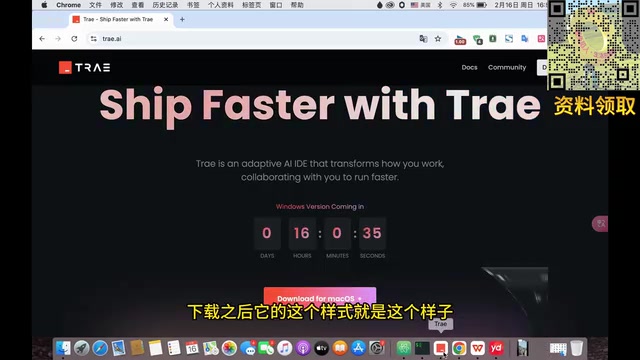
Downloading and Installing Trae IDE
Installation Steps
The installation process is straightforward and can be completed in just a few minutes:
- Visit the official Trae website (trae.ai) and download the version for your operating system
- Open the application after installation and enter the main interface
- First-time users will need to log in and complete identity verification
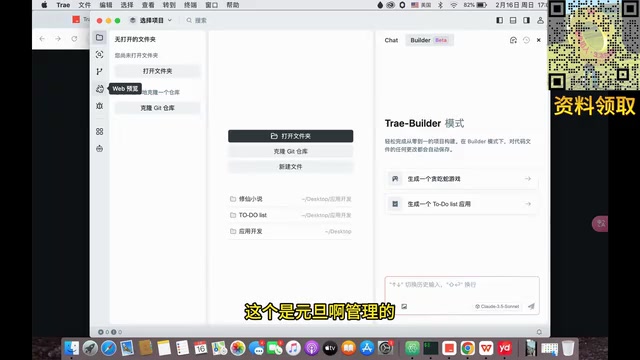
The login process redirects to a web page for verification. Once confirmed, automated development features are unlocked. After a successful login, the system provides two starter projects to help you quickly get a feel for Trae's core capabilities.

Interface Layout Overview
Trae's interface closely mirrors VS Code, divided into three main areas:
- Left Navigation Panel: Contains the file explorer, search, source control, and other feature entry points
- Center Editor Area: The primary workspace for writing code and editing files
- Right AI Panel: Houses the Chat feature and automated development tools
Why VS Code Architecture?: VS Code (Visual Studio Code) is an open-source code editor released by Microsoft in 2015, built on the Electron framework — essentially a web application running on the desktop. It has become the foundation for many AI IDEs due to its open plugin API system, mature LSP (Language Server Protocol) support, and a massive developer user base. Leading AI coding tools like Cursor and Windsurf are both built on top of VS Code's open-source version (VSCodium). This approach allows new tools to directly inherit VS Code's plugin ecosystem and familiar UX patterns, significantly lowering the cost of user migration. Trae follows the same path, meaning developers already familiar with VS Code will need virtually no time to relearn the interface.
The interface supports both dark and light themes, which can be adjusted to personal preference.
Trae Core Features Explained
AI Chat
Trae includes a built-in AI chat feature powered by the Claude 3.5 model. You can ask questions directly in the Chat panel, and the AI will respond with code suggestions, technical explanations, and more. This is essentially the equivalent of integrating ChatGPT directly into your development environment, eliminating the need to switch between multiple tools.
Claude 3.5's Technical Strengths: Claude 3.5 is a large language model series developed by Anthropic, with particularly strong performance on code generation and comprehension tasks. Compared to OpenAI's GPT-4 series, Claude has notable advantages in handling long contexts (supporting a 200K token context window) and following complex instructions — both critical for IDE scenarios that require understanding an entire codebase. Anthropic's training of Claude places special emphasis on the "Constitutional AI" approach, making the model more inclined to produce safe and interpretable implementations when generating code. Trae's choice to integrate Claude 3.5 rather than a ByteDance in-house model reflects a pragmatic strategy: at this stage, licensing top-tier foundation model capabilities allows the team to focus on refining the product experience.
Natural Language Automated Development
This is Trae's most distinctive feature and the capability most relevant to users without a coding background. Simply describe what you want to build in natural language, and the AI will automatically generate the corresponding code files. For example, tell it "build me a Snake game" and it will scaffold the entire project from scratch.
How Natural Language Programming Works Under the Hood: Trae's automated development feature is essentially an engineering implementation of a "code generation agent." The underlying process typically involves: converting the user's natural language requirements into a structured task description, having the large model plan the project's file structure, generating code for each module incrementally, and using tool calls (Tool Use) to handle file writing and command execution. These systems often incorporate a "reflect-and-revise" loop: after generating code, the AI automatically runs checks, and if errors occur, the error messages are fed back to the model for correction. This paradigm traces its lineage to OpenAI's Codex research, but the engineering implementation today is far more complex than early demos — requiring carefully designed prompt engineering and context management strategies to ensure consistent output quality.
For users who can't write code, this means that as long as you can clearly articulate your requirements, you can complete basic application development.
Plugin Extensibility
Trae supports a plugin ecosystem, allowing users to install various plugins to enhance functionality based on their needs. It can also integrate with VS Code and supports connecting to third-party APIs (such as DeepSeekAd) to extend AI capabilities.
The Value and Considerations of Third-Party API Integration: Trae's support for third-party APIs like DeepSeek reflects the broader trend in the AI tooling space toward "model interoperability" — the idea that the underlying model powering your tools should be swappable based on your needs and preferences.
Related articles
 Tutorials
ChatGPT Plus Subscription Guide: Are GPT-5.5, image-2, and Codex Worth the Upgrade?
A detailed look at ChatGPT Plus features — GPT-5.5, image-2, and Codex — with a Plus vs Pro comparison and a complete step-by-step subscription guide for users outside the US.
 Tutorials
Harness AI Engineering in Practice: Using Claude Code to Master Enterprise-Level E-Commerce Development
Deep dive into Harness AI Engineering: master enterprise e-commerce development with Claude Code using the Rules, Skills, Wiki, and Changes framework.
 Tutorials
Cursor + Codex Dual-IDE Collaboration: A Practical Methodology for Open-Source Project Customization
A complete methodology for open-source project customization based on real-world experience, detailing the Cursor+Codex dual-IDE workflow, seven-stage process, MVP validation, and AI source code reading techniques.