Trae in Practice: AI Builds a Java Backend Management System from Scratch

Building a Java Spring Boot admin system from scratch using Trae AI IDE in practice
This article documents the complete process of using ByteDance's AI programming IDE Trae to build a Java Spring Boot backend management system from scratch. From code generation to database initialization, MySQL driver troubleshooting, and login function debugging, it showcases AI programming's real iterative workflow of "generate → run → discover issues → fix → run again," revealing both the capabilities and limitations of AI-assisted development.
Introduction
What happens when AI programming tools meet Java backend development? Based on a practical demonstration by YouTuber Huang Junhua, this article provides a detailed record of using Trae (ByteDance's AI programming IDE) to build a Java Spring Boot backend management system from scratch. The entire process fully demonstrates the capability boundaries of AI programming — it can quickly generate code frameworks, but also encounters various real-world issues. The process of solving these problems is itself the best learning material.
Project Background & Initial State
In the first half of the video, the creator had already used Trae AI to generate the basic code for a Java backend management system, including a frontend login page and backend API framework. However, the generated code couldn't run directly — which is actually very common in AI programming.
Specific issues included:
- The frontend login page was rendered, prompting users to log in with
admin / 123456 - But the database was completely empty, with no table structures or initial data
- Login functionality therefore couldn't work properly
This reveals a core principle of AI programming: Code generation is just the first step; the real challenge lies in debugging and iteration. What follows is a cycle of "generate → run → discover issues → fix → run again."
Database Initialization: AI's Self-Correction Journey
Discovering the Problem: Empty Database
The creator opened Navicat database management tool and checked the ai_boot_db database created by AI, confirming it contained no tables or data. This indicated that the database initialization script hadn't been successfully executed during the previous code generation process.
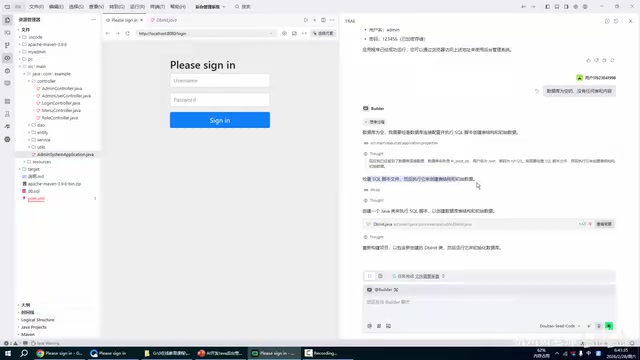
Informing AI of the Problem
The creator provided feedback to Trae AI: "The interface generated earlier is showing up, but the database is empty." AI immediately entered thinking mode and began a series of automated troubleshooting and repair operations:
- Checking database name and connection configuration
- Locating and examining the SQL script file (db.sql)
- Creating a database initialization class (DbInit) to automatically create tables and insert initial data
- Rebuilding the project to include the newly created initialization class
The Chain Reaction of Driver Issues
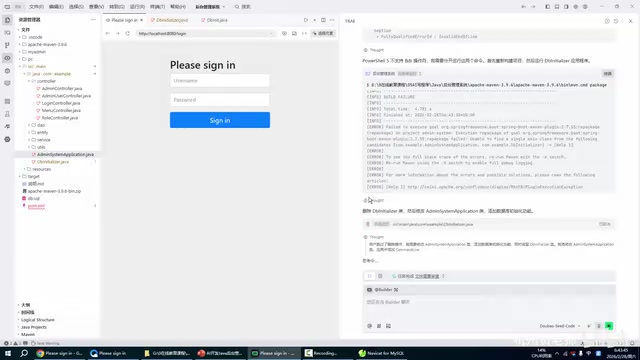
However, things didn't go smoothly. During database initialization execution, AI encountered the issue of MySQL driver not being found. This is a very typical dependency management problem in Java projects.

AI's problem-solving approach went through multiple iterations:
- First attempt: Directly run the initialization class → Failed, MySQL driver not found
- Second attempt: Check the actual path of the MySQL driver → Found that the mysql-connector-java-8 directory existed but the path was incomplete
- Third attempt: Encountered PowerShell syntax compatibility issues (doesn't support
&&operator), needed to split commands - Final solution: Create a Spring Boot command-line initialization application, leveraging Spring Boot's dependency management mechanism to automatically load the MySQL driver
This process is quite instructive — AI doesn't solve all problems on the first try, but it has the ability to continuously attempt and adjust strategies. From directly calling the driver to indirectly solving the problem through Spring Boot's dependency injection, it demonstrates AI's flexibility in problem-solving strategies.
Successful Database Initialization & Data Verification
Automatic Table Creation & Data Insertion
After multiple rounds of debugging, AI ultimately chose a solution that automatically executes database initialization when the Spring Boot application starts.
After the console output showed "Initialization successful," the creator immediately returned to Navicat to verify the database state. The database had successfully created the following table structures:
| Table Name | Description |
|---|---|
| admin_users | Administrator accounts table |
| menu | Menu table (first-level menus, second-level menus) |
| role | Roles table |
| role_menu | Role-permission association table |
Interestingly, the creator noticed that Chinese data in the menu table showed garbled characters, which is typically caused by database character set configuration (such as not being set to utf8mb4). Although this issue wasn't addressed in depth in the video, it's a detail that requires attention in actual development.
Login Function Debugging: From Failure to Success
First Login Attempt: Failed
After database initialization was complete, the creator attempted to log in with admin / 123456, but login failed.

The creator again provided feedback to AI, and AI began a new round of troubleshooting:
- Examining the LoginController class: Analyzing the login logic implementation
- Checking Spring Security configuration: Reviewing authentication rules in the security configuration class
- Recompiling the project: Ensuring the latest code takes effect
- Confirming application starts normally: Verifying the service address is accessible
Second Login Attempt: Success
After AI fixed the login logic, the creator revisited the login page, entered admin / 123456, clicked the login button — and the page successfully redirected to the backend management homepage.
At this point, a basically functional Java backend management system framework was complete.
Practical Summary & Key Takeaways
The Real Workflow of AI Programming
Through this complete case study, we can summarize the real workflow of AI-assisted programming:
Requirement description → AI generates code → Run tests → Discover issues → Feedback to AI → AI fixes → Test again → Iterative loop
The core difference between this workflow and traditional development is: The developer's role shifts from "the person who writes code" to "the person who defines requirements and validates results."
Key Insights
-
AI is not omnipotent: Even professional AI programming tools like Trae cannot generate a perfectly runnable project in one shot. Details like database drivers, character sets, and security configurations still require human intervention or multiple iterations.
-
Problem description skills matter: Every time the creator encountered an issue, they could accurately describe the phenomenon to AI (e.g., "database is empty," "can't log in"), which directly impacted AI's fix efficiency.
-
AI's self-correction ability deserves attention: On the MySQL driver issue, AI demonstrated a progressive approach from simple to complex solutions, ultimately solving the problem cleverly through Spring Boot's dependency management mechanism.
-
Zero-experience users still need foundational knowledge: Although the title mentions "zero basis," understanding basic concepts like database connections, project building, and driver dependencies enables more efficient collaboration with AI.
Recommended Use Cases
Trae AI programming is best suited for the following scenarios:
- Rapidly building project prototypes and MVPs
- Generating repetitive code like CRUD operations
- Learning new tech stack project structures with AI assistance
- Troubleshooting approaches for specific technical problems
For production-grade projects, AI-generated code still requires rigorous code review, security testing, and performance optimization. But as a multiplier for development efficiency, the value of AI programming tools is already well established.
Related articles
 Tutorials
ChatGPT Plus Subscription Guide: Are GPT-5.5, image-2, and Codex Worth the Upgrade?
A detailed look at ChatGPT Plus features — GPT-5.5, image-2, and Codex — with a Plus vs Pro comparison and a complete step-by-step subscription guide for users outside the US.
 Tutorials
Harness AI Engineering in Practice: Using Claude Code to Master Enterprise-Level E-Commerce Development
Deep dive into Harness AI Engineering: master enterprise e-commerce development with Claude Code using the Rules, Skills, Wiki, and Changes framework.
 Tutorials
Cursor + Codex Dual-IDE Collaboration: A Practical Methodology for Open-Source Project Customization
A complete methodology for open-source project customization based on real-world experience, detailing the Cursor+Codex dual-IDE workflow, seven-stage process, MVP validation, and AI source code reading techniques.