Trae MCP Plugin for FoxTable in Action: AI Builds a Complete Business System in 4 Minutes

A custom MCP plugin enables Trae AI to automatically build a complete business system in FoxTable in just 4 minutes.
A developer built a custom MCP plugin connecting Trae (ByteDance's AI IDE) with FoxTable (a low-code platform), combined with a domain knowledge base and carefully designed system prompts, enabling AI to automatically complete a full business system in just four minutes — including employee, attendance, and department tables with event code, custom functions, and window controls. This demonstrates that the 'MCP plugin + knowledge base' pattern effectively enables AI to master niche platform development capabilities.
The combination of low-code platforms and AI coding assistants is fundamentally changing how developers work. Recently, a developer created a custom MCP plugin that enables Trae to directly operate FoxTable — from creating table structures to writing event code and custom functions — completing an entire business system in just about four minutes. This article provides a complete record of the demonstration process and technical details.
MCP Plugin: The Core Bridge Between Trae and FoxTable
The developer's core solution was building an MCP (Model Context Protocol) plugin that serves as a middleware layer between FoxTable and Trae.
MCP (Model Context Protocol) is an open standard protocol released by Anthropic in late 2024, designed to establish a unified communication specification between large language models and external tools/data sources. Before MCP, every AI application needed custom integration code to connect with external tools, resulting in massive duplication of effort. MCP's design philosophy is similar to what USB ports are to hardware devices — providing a standardized "interface" that allows any protocol-compliant tool to be called by AI. MCP uses a client-server architecture where the AI coding assistant acts as the client making requests, and the MCP plugin acts as the server exposing tool capabilities. This architecture means developers only need to write an MCP server plugin once to enable all MCP-compatible AI clients to call the target tool's functions.
At the communication layer, the MCP protocol uses JSON-RPC 2.0 as its message format, supporting both stdio (standard input/output) and SSE (Server-Sent Events) as transport methods. In this case, the MCP plugin as a server needs to define a set of "Tools," each corresponding to a specific FoxTable operation capability, such as creating data tables or writing event code. Each tool has a clearly defined input parameter Schema, and the LLM automatically constructs parameters based on the Schema when making calls. This strongly-typed interface definition approach ensures both calling accuracy and enables the LLM to "understand" each tool's purpose and usage.
With this plugin, Trae can directly call various FoxTable functions:
- Create and manage data tables
- Write table event code
- Define custom functions
- Design and place window controls
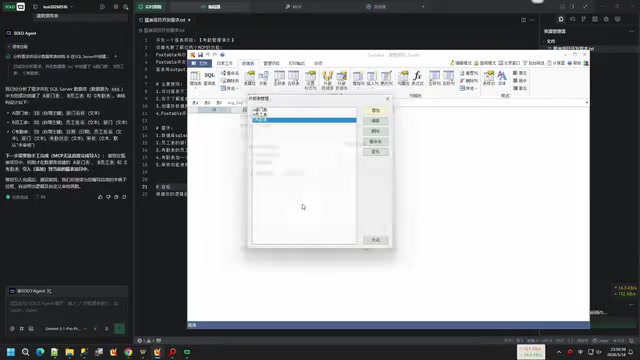
In other words, developers only need to describe requirements in natural language, and Trae automatically completes the development work in FoxTable through the MCP plugin — truly achieving a "hands-off whenever possible" approach.
Here it's worth briefly introducing the two core tools. Trae is an AI coding assistant (AI IDE) launched by ByteDance, built on the VS Code architecture with built-in support for multiple large language models. Developers can complete code generation, debugging, and refactoring through natural language conversations within the editor. A key feature of Trae is its support for the MCP protocol, meaning developers can extend its capabilities by writing MCP plugins, enabling it not only to write code but to directly operate external tools and platforms. Trae's ability to operate external tools through MCP plugins relies on the LLM's "Function Calling" capability. Function Calling is a feature first introduced by OpenAI in mid-2023, subsequently adopted by major model providers. Its principle is that during model inference, when the model determines it needs to call an external tool, it generates a structured function call request (rather than natural language text), which the client executes and returns results to the model for continued reasoning. The MCP protocol is precisely a standardized wrapper built on top of this capability, extending Function Calling from single calls to multi-turn interactive tool-use sessions.
FoxTable is a Chinese low-code development platform primarily targeting small and medium enterprises and individual developers for quickly building data management business systems. Its core characteristic is visualizing database operations — developers can manage data tables as easily as using Excel, while also supporting business logic through a VB.NET-style scripting language, including table events, custom functions, and window control design. FoxTable's scripting language is based on VB.NET syntax but with extensive simplification and encapsulation to better suit data management scenarios. For example, FoxTable has rich built-in data operation object models, allowing developers to access data through syntax like DataTables("Employee Table").DataRows without writing SQL statements or handling database connections. This design lowers the development barrier but also means LLMs cannot simply apply standard VB.NET syntax — they must understand FoxTable's unique object model and APIs, which is precisely why the knowledge base is indispensable.
In this case, Trae acts as the "brain," receiving the developer's natural language instructions, combining the knowledge base to understand FoxTable's syntax rules, and then sending specific operation commands to FoxTable through the MCP plugin for execution.
How to Handle LLMs Not Knowing FoxTable? Knowledge Base + Prompt Engineering
The Knowledge Base Is the Real Breakthrough
The biggest obstacle encountered in practice: mainstream LLMs know virtually nothing about FoxTable. As a relatively niche Chinese low-code platform, FoxTable has minimal representation in LLM training data, and the technical documentation and community discussions available online are far less comprehensive than those for mainstream programming languages. Directly asking AI to write FoxTable code simply doesn't work.
The developer adopted a two-pronged strategy to solve this problem:
- MCP Interface Layer: Giving the LLM the ability to call FoxTable's operation interfaces
- Domain Knowledge Base: Systematically organizing FoxTable's syntax features, coding rules, and MCP interface usage into knowledge base documents, giving the LLM a reliable reference before generating code
The underlying technical principle of this "knowledge base" approach is closely related to RAG (Retrieval-Augmented Generation). RAG's core idea is: before the LLM generates an answer, relevant document fragments are first retrieved from an external knowledge base and injected as context into the model's prompt, enabling the model to generate content based on the most current and accurate domain knowledge. This method effectively addresses two inherent limitations of LLMs — the timeliness of training data and insufficient coverage of niche domain knowledge.
RAG application in coding assistance scenarios differs significantly from general Q&A scenarios. Coding scenarios demand extremely high precision in retrieval results — a single incorrect API name or parameter order will cause code to fail. Therefore, knowledge bases for programming domains typically require finer-grained document chunking strategies, indexing by function, by API endpoint, and by syntax rule, rather than simple paragraph-level chunking. Additionally, code examples typically carry higher weight in the knowledge base than pure text descriptions, as LLMs tend to reference concrete code patterns when generating code.
In this case, the developer organized FoxTable's syntax documentation, API specifications, and coding standards into structured knowledge base documents. When Trae needs to write code for FoxTable, it first retrieves relevant content from the knowledge base, ensuring generated code conforms to FoxTable's syntax requirements rather than "imagining" non-existent API calls.
Carefully Designed Prompt Engineering
Beyond the knowledge base, the developer also wrote detailed system prompts covering:
- Background knowledge and technical characteristics of the FoxTable platform
- Knowledge base structure and how to reference it
- MCP interface calling specifications and parameter descriptions
- Behavioral constraints, such as "minimize manual intervention — don't make me do things unless absolutely necessary"
Prompt Engineering refers to the technical practice of carefully designing input instructions for large language models to guide them toward desired outputs. In AI coding scenarios, system prompts are particularly critical — they define the AI's role identity, behavioral boundaries, and workflow. A good system prompt needs to tell the AI not only "what to do" but also "how to do it" and "what not to do." The system prompt in this case contains multiple layers of information: first, role definition (you are a FoxTable development expert), then tool usage specifications (how to consult the knowledge base, how to call MCP interfaces), and finally behavioral constraints (complete tasks automatically as much as possible, minimize manual intervention). This layered design enables the LLM to execute complex tasks following a preset workflow in an orderly manner, rather than acting randomly.
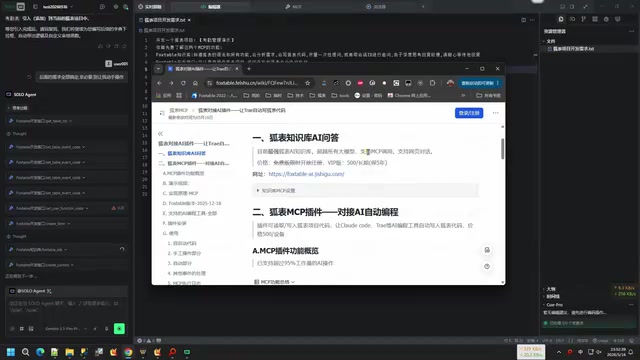
Through FoxTable's log window, the developer can monitor in real-time which operations Trae executed and which interfaces were called, facilitating debugging and result verification.
Practical Demo: Building a Business System with AI in Four Minutes
Step 1: AI Automatically Creates Data Tables
After the developer submitted business requirements to Trae, the AI first automatically created the data table structures. Although the developer admitted that "creating tables manually would actually be faster," the goal was to demonstrate AI's full-process capabilities, so Trae started from scratch.
The AI created three data tables — Employee, Attendance, and Department — with field designs that perfectly matched the developer's expectations, executed at high speed.
Step 2: Automatically Writing Event Code and Custom Functions
With table structures ready, Trae continued to automatically write table events and custom functions. The entire process required no manual intervention — the AI independently completed all code writing based on FoxTable syntax rules from the knowledge base.
It's worth noting that "table events" in FoxTable refer to code logic that automatically triggers when specific data changes occur (such as adding rows, modifying field values, deleting records, etc.), similar to the concept of triggers in databases. This event-driven programming pattern isn't unique to FoxTable — it's a widely adopted design paradigm in low-code platforms. Similar mechanisms are called Automations in Airtable, Behaviors in Microsoft Power Apps, and Actions in Google AppSheet. The core advantage of this pattern is tightly binding business logic to data changes, so developers don't need to write polling or listener code — the system automatically executes preset logic when data changes.
"Custom functions" are reusable code blocks written by developers in independent function modules that can be called by multiple table events or other functions. The AI's ability to correctly distinguish between these two code organization approaches and appropriately allocate business logic to the correct locations demonstrates that the knowledge base's descriptions of FoxTable's code architecture and programming paradigms were sufficiently clear.
Step 3: Reviewing the Development Results
After approximately four minutes, all development work was complete. Review results:

| Feature | Status | Notes |
|---|---|---|
| Employee Table | ✅ Pass | Correct structure, complete fields |
| Attendance Table | ✅ Pass | Reasonable date, employee, department field design |
| Department Dropdown | ✅ Pass | Dropdown selection functioning properly |
| Data Validation | ✅ Pass | Validation rules active |
| Auto-populate Department | ✅ Pass | Department auto-fills after employee selection, non-editable |
| Attendance Status | ✅ Pass | Status field functioning normally |
| Review Window | ✅ Pass | Window created and bound successfully |
| Custom Functions | ✅ Pass | Function logic correctly written |
One noteworthy detail: when handling custom functions, the AI chose to write code in an independent function module rather than inlining it into table events. This was exactly the behavior the developer wanted to see for demonstrating the custom function feature, proving that the knowledge base and prompt guidance were effective.
Technical Solution Breakdown: Three Core Components
The technical architecture of the entire solution can be summarized as the collaboration of three core components:
LLM (Trae) + Knowledge Base (FoxTable syntax/rules) + MCP Plugin (Operation interface)
     ↓                        ↓                              ↓
Understands needs      Knows how to write              Can execute
These three components each have distinct responsibilities while working closely together: the LLM is responsible for understanding natural language requirements and planning execution steps; the knowledge base provides the LLM with FoxTable-specific syntax rules and coding standards, filling the gap in training data; the MCP plugin transforms the LLM's "ideas" into actual operations in FoxTable. The elegance of this architecture lies in the fact that each component can be iterated independently — the knowledge base can be supplemented as FoxTable versions update, the MCP plugin can gradually add more operation interfaces, and the LLM itself continues to evolve.
From a software engineering perspective, this three-layer architecture embodies the classic "separation of concerns" principle. The LLM layer focuses on natural language understanding and task planning without needing to know the underlying tool's specific APIs; the knowledge base layer focuses on structured storage and retrieval of domain knowledge without caring who calls this knowledge; the MCP plugin layer focuses on communication and operation execution with the target platform without concerning itself with upper-layer business logic. This decoupled design gives the entire solution strong maintainability and extensibility.
This pattern is highly replicable. If you're using other niche development platforms or internal enterprise tools, you can similarly use the MCP plugin + domain knowledge base combination to enable Trae and other AI coding assistants to operate these tools.
Key steps summary:
- Develop an MCP plugin that encapsulates the target platform's operation interfaces
- Compile a domain knowledge base covering platform syntax, API documentation, and best practices
- Write system prompts clearly defining the AI's behavioral norms and calling methods
- Configure the plugin and knowledge base in Trae, then start driving development with natural language
The Future of AI + Low-Code Development
Although this demonstration lasted only a few minutes, it reveals several directions worth attention:
AI coding is penetrating low-code platforms. It's not just traditional code writing scenarios — low-code platform work like table structure configuration, event binding, and window design can all be handed over to AI for automatic completion. The low-code/no-code platform market has grown rapidly in recent years. According to Gartner, by 2025, 70% of new applications globally will be developed using low-code or no-code technology. AI's involvement is accelerating this trend — while traditional low-code platforms lower the development barrier, users still need to understand concepts like table structure design, event binding, and data validation. AI coding assistants further eliminate these cognitive barriers. Currently, Microsoft Power Platform has integrated Copilot, and mainstream low-code platforms like OutSystems and Mendix are actively incorporating AI capabilities. The value of this case lies in proving that even niche low-code platforms can quickly gain AI capabilities through the MCP protocol and knowledge base combination, without waiting for official platform vendor integration.
The MCP protocol's ecosystem value continues to grow. As a standard protocol connecting AI with external tools, MCP enables developers to build AI operation capabilities for virtually any tool, significantly expanding the application boundaries of AI coding assistants. As more AI clients (such as Cursor, Windsurf, Claude Desktop, etc.) announce support for the MCP protocol, the value of a single MCP plugin is being multiplied — the MCP plugin written for FoxTable could theoretically be directly called by other MCP-supporting AI tools, achieving "develop once, use everywhere."
Knowledge bases are the most effective means of teaching AI niche skills. For domains not covered by LLM training data, a clearly structured knowledge base can get AI up to speed quickly — a far more practical approach than waiting for model training data updates. This approach applies not only to coding scenarios but equally to enterprise internal process automation and professional domain knowledge Q&A. As vector database technologies (such as Pinecone, Milvus, Chroma, etc.) mature and embedding model performance improves, building high-quality domain knowledge bases is becoming increasingly convenient, and retrieval precision and response speed continue to improve, providing solid infrastructure support for AI enablement across more niche domains.
Of course, this solution has costs — LLM API calls incur fees. But from an ROI perspective, completing a business system with multiple data tables, event code, custom functions, and a review window in four minutes represents a very real efficiency gain.
For FoxTable users and developers on other low-code platforms, the MCP plugin + knowledge base pathway is worth serious exploration. As the MCP ecosystem matures and LLM capabilities continue to improve, the AI-assisted low-code development experience will only get better.
Related articles
 Tutorials
ChatGPT Plus Subscription Guide: Are GPT-5.5, image-2, and Codex Worth the Upgrade?
A detailed look at ChatGPT Plus features — GPT-5.5, image-2, and Codex — with a Plus vs Pro comparison and a complete step-by-step subscription guide for users outside the US.
 Tutorials
Harness AI Engineering in Practice: Using Claude Code to Master Enterprise-Level E-Commerce Development
Deep dive into Harness AI Engineering: master enterprise e-commerce development with Claude Code using the Rules, Skills, Wiki, and Changes framework.
 Tutorials
Cursor + Codex Dual-IDE Collaboration: A Practical Methodology for Open-Source Project Customization
A complete methodology for open-source project customization based on real-world experience, detailing the Cursor+Codex dual-IDE workflow, seven-stage process, MVP validation, and AI source code reading techniques.