Turn GitHub into Your Personal Arsenal with Doubao Agent: A Hands-On Guide to One-Click Open Source Deployment

Doubao Agent automates cloning, understanding, and deploying open source projects into shareable Chinese web apps.
The article introduces a new paradigm for using open source projects powered by Doubao AI Agent: just paste a GitHub link, and the Agent handles code cloning, directory analysis, visualization, local deployment, and testing — then uses an app generation skill to wrap command-line tools into full-featured Chinese web apps with backend logic and one-click publishing. The main case study is Microsoft's 184K-star MarkItDown, with three additional scenarios covering photo EXIF privacy cleanup, dual-voice TTS podcast generation, and FFmpeg-based video splitting. The author notes the demos were produced for a vendor event and that real-world stability with complex projects still needs further validation.
From Studying Projects Yourself to Letting the Agent Do the Work
Sound familiar? You stumble across a highly starred open source tool on GitHub, click in excitedly, and are immediately greeted by a wall of English README text and a long list of command-line installation steps — only to end up bookmarking it and never looking at it again. The biggest barrier in the open source world has never been finding great projects; it's knowing where to even start once you've found one.
According to hands-on demos from a Bilibili creator, AI Agents are rewriting this dynamic. Instead of spending hours figuring out how to use an open source project yourself, you can hand the entire GitHub link to Doubao and let it handle everything: downloading the code, mapping out the functionality, deploying locally, running tests, and even transforming a command-line tool into a Chinese-language web app. This isn't just conversational advice — it's a complete, executable engineering workflow.
MarkItDown in Action: Taming a 184K-Star Project
The video uses Microsoft's open source file-to-Markdown converter MarkItDown (184,000 stars) as its main example, walking through the entire workflow step by step. First, a local project folder is created in Doubao's workspace, and the GitHub link is pasted in directly — the Agent clones the code locally and analyzes the directory structure. No Git knowledge required. No copying commands one by one.
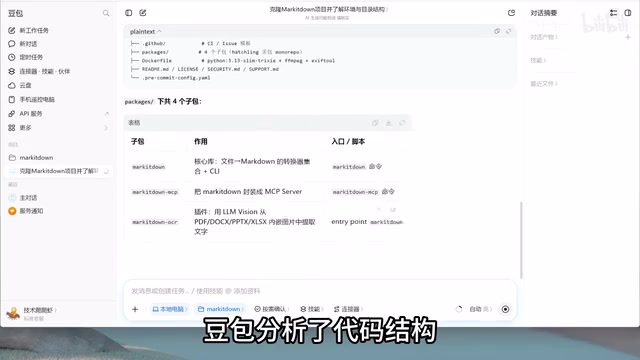
Once the code is downloaded, Doubao produces a structural breakdown: four sub-packages under the Packages directory, with the main project comprising 52 Python files. But staring at dozens of files still leaves most people at a loss — which is exactly where the visualization skill comes in.
Using the Visualization Skill to Draw a "Code Map"
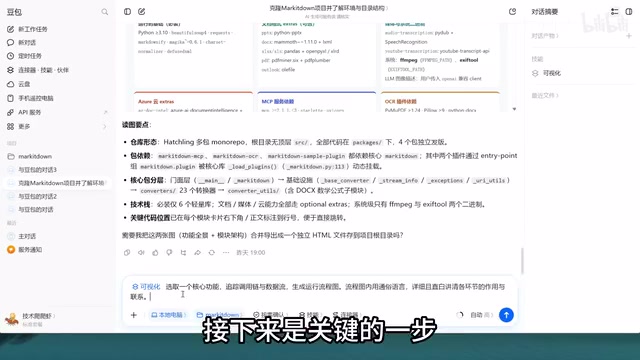
The creator frames understanding an open source project around three questions: What can it do? How is the code organized? How does the core functionality actually run? Doubao generates three corresponding diagrams: a functional overview, a module architecture diagram, and an execution flow diagram.
The functional overview reveals MarkItDown's core purpose at a glance: it converts 21 file formats into Markdown, includes three built-in conversion engines, and supports four integration methods — inputs, invocation styles, and use cases all visible in a single diagram. The module architecture diagram acts like a "code map," showing each module's responsibilities and the location of entry-point files.
The execution flow diagram best demonstrates the Agent's ability to trace logic — Doubao selects the Word-to-Markdown path as a representative chain, showing every step from file type detection and preprocessing through document parsing, style mapping, semantic conversion, and output generation, ultimately producing Markdown from HTML.
Worth noting is the cross-device collaboration: while the project downloads and analyzes on a computer, you can open the same task on your phone to check progress or add new instructions. When you return to the desktop to review results, there's no need to re-paste the link or re-explain the context — the task history is continuous.
MarkItDown is a file format conversion tool open-sourced by Microsoft in late 2024. Its core function is converting PDFs, Word documents, Excel spreadsheets, PowerPoints, images, audio, HTML, and many other formats into Markdown text — making them easier to feed into large language models. Its popularity is tied to the rise of RAG (Retrieval-Augmented Generation): LLM applications need large volumes of structured text as knowledge bases, yet vast amounts of enterprise information sits locked inside Office files and PDFs. MarkItDown serves as a "document preprocessing pipeline" for exactly this purpose. Its 184,000 stars reflect how universal this need is — but high star counts don't equal ease of use. The tool's primary interface is a Python library or command line, which is a hard barrier for non-developers.
The App Generation Skill: Turning Command Lines into Tools Anyone Can Use
Getting the project running locally is only the first step. Doubao can invoke MarkItDown on the creator's own machine to convert files, but a family member or colleague can't easily do the same. A truly useful tool should let anyone upload a file, click a button, and get the conversion done.
So the creator invokes the app generation skill within the same task — preserving MarkItDown's conversion capabilities while layering on a Chinese-language web interface. According to the demo, this skill doesn't produce a toy demo; it generates a real web application with data handling, backend logic, and user login support. Once generated, you can upload any supported file format, click Convert, and get Markdown back in seconds — with options to copy or download the result. A "Publish" button makes the app live instantly, and the link can be shared with anyone.
The key framing here: this isn't about reinventing a conversion tool from scratch. It's about building a user-friendly entry point on top of an existing open source capability.
Three Extended Cases: Privacy Cleanup, Dual-Voice Narration, Video Splitting
Beyond MarkItDown, the video demonstrates three more cases of command-line projects being transformed into web-based tools.
Photo Privacy Cleanup: ExifTool is an open source project for viewing and editing photo metadata — but it only has a command-line interface. Photos taken on a phone secretly store shooting location, device model, date, and even altitude. Share them online without stripping this data, and anyone with an EXIF viewer can pinpoint where the photo was taken. After wrapping ExifTool with an app UI, users can upload a photo, see all exposed metadata, and click "Clear All" to wipe it completely.

Dual-Voice Podcast Narration: edge-tts is a text-to-speech project whose biggest advantage is that it requires no local model deployment, no GPU, and zero cost to use out of the box — but it shares the same drawbacks of command-line-only access and complex installation. After being rebuilt with a UI, users can upload a text file and automatically generate a dual-speaker podcast-style audio track.
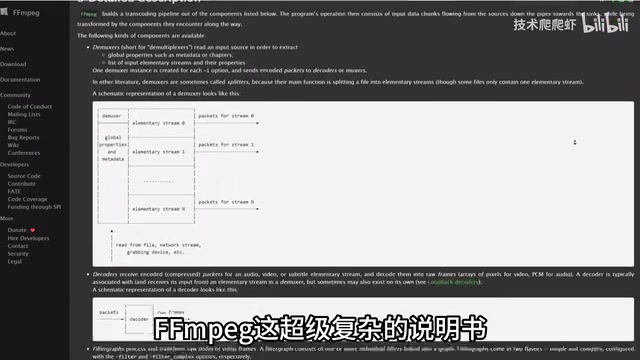
Video Splitting and Audio Export: FFmpeg is the "super-weapon" of audio and video processing — capable of video splitting, format conversion, and much more — but its documentation is notoriously complex. The creator had Doubao build a web tool based on FFmpeg for splitting video by timestamp: upload a video, click split, and download the segments.
What really showcases the Agent's value is iterative development: the creator then requested adding an "export to MP3" feature on top of the existing split functionality, to extract background music from videos as phone ringtones. Doubao added the feature directly to the existing project, and the MP3 export worked immediately. The entire tool runs as an online web app — no local deployment needed, shareable via link.
ExifTool was developed by Phil Harvey and is the authoritative open source tool for reading and writing metadata across images, audio, and video — supporting over 25,000 tag types. EXIF (Exchangeable Image File Format) is the standardized metadata format written by cameras and phones into photos, recording GPS coordinates, capture time, device model, aperture, shutter speed, and even altitude. Modern smartphones write location data by default; when users post photos to social media without clearing this data, anyone with an EXIF viewer can extract the shooting location — a real privacy and anti-tracking risk. FFmpeg, created by Fabrice Bellard in 2000, is a cross-platform audio/video processing framework that virtually every major video software relies on under the hood. Its command-line parameter system is notoriously complex — a single complete transcoding command can involve a dozen or more flag arguments — making it a steep learning curve and a classic candidate for "command-line tool turned web app" makeovers.
The Real Value of This Workflow
Looking across all these cases, what Doubao Agent actually completes is an entire engineering sequence: downloading code, understanding the project, deploying and testing, rebuilding the interface, and continuing to add features — not just offering advice in a chat window. The visualization skill handles converting project functionality, code structure, and execution flow into diagrams; the app generation skill handles turning command-line capabilities into Chinese-language web apps. Together, they cover the full chain from "understanding the code" to "being able to use it" to "sharing it with others."
For everyday users, this represents a meaningful mindset shift: the next time you spot an interesting GitHub project, you don't have to give up just because the docs are in English or require a command line. Hand the link to the Agent, get a real feature running first, then decide whether to reshape it into a tool that fits your needs. Those open source projects you've bookmarked but never actually used? In theory, they all have a shot at becoming tools you genuinely own.
That said, a realistic note is warranted: the video was produced in the context of a vendor promotional event and showcases selectively successful outcomes. Whether dependency conflicts, environment compatibility issues, and unexpected runtime errors in more complex projects can all be smoothly handled by the Agent still requires longer-term real-world validation. But based on what the demos show, the direction — AI Agents lowering the barrier to open source adoption — is already quite clear.
The role AI Agents play here is technically known as a "Code Execution Agent," distinct from a purely conversational LLM in that it has actual permissions to invoke a local environment, execute shell commands, and read and write the file system. These agents typically rely on Tool Use (also called Function Calling) as the underlying mechanism: the model plans which tools to call and when (e.g.,
git clone,pip install, running a Python script), then uses the tool's output to decide the next action — forming a loop of Plan → Execute → Observe → Re-plan. This is fundamentally different from simply asking a model to "write me some code" — the latter only produces text, while the former causes real side effects in the user's actual environment. For this reason, dependency conflicts, system permission constraints, and unpredictable runtime errors in complex projects remain the most critical stability bottlenecks for this class of Agent in production use today.
Related articles

Why Does the Tesla Roadster Need to Fly? A Deep Dive into Musk's Wild Demo
Tesla's Roadster launch showed wall-climbing, upside-down driving, and flying stunts—but The Vergecast notes the demo car may lack a battery, the Rocket version is invite-only and not street-legal, and the website terms don't guarantee delivery. After nine years of delays, why does this car still need to exist?

AI Is Not a Replacement: Human-AI Collaboration Through the Lens of Factory Root Cause Analysis
Starting from factory root cause analysis, this article explains how AI accelerates evidence chain construction rather than replacing human experts, exploring the pragmatic implementation logic and business value of 'AI supporting people rather than replacing them.'

AI Agent Decision Auditing: Building an Evidence Chain in Regulated Workflows
Starting from a Reddit discussion, this article analyzes three core issues in AI agent decision auditing within regulated workflows: what fields audit records should contain, how to handle feedback latency for erroneous decisions, and how to continuously calibrate LLM judge consistency with human judgment.