Turning Cars into Canvases: A Complete Guide to Android Automotive App Development

Google explains how to cover Android Auto and Automotive OS with one codebase using the Car App Library.
In a Google I/O session, the Android for Cars team broke down automotive app development: Android Auto is phone projection, Android Automotive OS runs directly on the car, and both share the same goals. The article distinguishes driving-optimized apps (which must use Car App Library templates for distraction compliance) from parked apps (which can offer near-phone Activity experiences). CAL 1.9 enters Beta with brand customization, a mini player, and media templates on AOS; 1.10 will focus on communication and conversational experiences. It also details seamless park-to-drive video-audio continuity and notes that game publishing is now open to all developers.
Title
Turning Cars into Canvases: A Complete Guide to Android Automotive App Development
Meta Description
A detailed breakdown of Android for Cars development: differences between Android Auto and Android Automotive OS, the Car App Library template architecture, new features in CAL 1.9/1.10, and how to implement seamless park-to-drive transitions for media apps.
Article Content
Car screens are becoming the next battleground for mobile apps. In a technical session at Google I/O, two developer relations engineers from the Android for Cars team, Paul Amertsmaw and Thomas Weathers, systematically broke down how to cover both Android Auto and Android Automotive OS with a single codebase, and explained in detail the architecture of the Car App Library, its template system, and the media and "park-to-drive" experience upgrades introduced by the latest versions.
Two Platforms, One Goal: Make the Car Your Canvas
Android for Cars is not a single platform. According to the two engineers, it comprises two technical tracks: Android Auto is a phone-driven projection system where apps run on the phone and project their interfaces to the car's display via wired or wireless connection; Android Automotive OS (AOS) is an Android variant that runs directly on the vehicle, independent of a phone, with direct access to vehicle hardware such as climate controls and the radio, and its own data connection. A subset of AOS—vehicles with Google built-in services—also comes preinstalled with the Play Store, Gemini, and Google Maps.
The scale of the platform was a key argument emphasized in this session: there are currently more than 250 million cars on the road compatible with Android Auto, and vehicles with Google built-in cover 16 brands and over 100 models. Citing AAA's 2024 American Driving Survey data, U.S. drivers spend an average of 60 minutes behind the wheel each day. More importantly, users don't only engage with apps while driving—waiting at charging stations and queuing to pick up kids at school are all dwell-time scenarios worth tapping into.
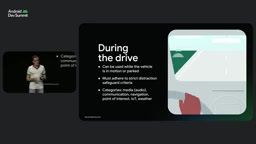
While Driving vs. Parked: Two App States Determine Technology Choices
To understand automotive development, you first need to distinguish between two operating states.
Driving-optimized experiences refer to apps that remain usable while the vehicle is in motion, covering categories such as media (audio), messaging and communication, navigation, ride-hailing driver apps, points of interest, IoT, and weather. These apps must comply with strict distraction-prevention safety standards, and their interfaces cannot be drawn arbitrarily.
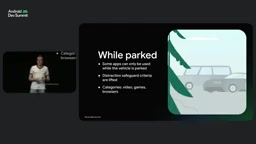
Parked apps are categories such as video, games, and browsers that can only be used when the vehicle is stationary. Once the vehicle is parked and turned off, distraction-prevention restrictions are lifted, and developers can offer a conventional Activity experience closer to that on phones and tablets. Even so, there are still automotive-specific quality requirements, such as manifest declarations, display cutout adaptation, and pausing playback when the vehicle starts moving.
Wheathers added that they have introduced an Android skill for parked apps: after developers install the Android CLI, they can run Android skills add Android for apps, parked apps to bring step-by-step guidance into the AI agent context, automatically handling manifest configuration, window inset handling, back navigation, driver distraction restrictions, and playback restrictions—and even auditing video, game, or browser apps before submitting to Google Play.
The Distraction Optimization standard is the core constraint in automotive app development, derived from research by institutions such as the U.S. National Highway Traffic Safety Administration (NHTSA) on driver distraction. Android for Cars engineers this into a set of runtime rules: while driving, an app's interface must be rendered by system-approved templates, the number of interactive elements, text length, and tap target sizes are all limited, and dynamic content such as video is prohibited. Developers indicate compliance with these rules through the androidx.car.app.category in the manifest and template declarations. If an app attempts to display an Activity not marked as distraction-optimized while driving, Android Automotive OS will actively block it and display a system overlay—this is a platform-enforced safety backstop, not an option. Understanding this is essential to grasping why driving-optimized apps cannot draw pixels as freely as phone apps.
Car App Library: Host-Rendered, Developers Just Feed Data
The core of driving-optimized apps is the Car App Library (CAL), a Jetpack library. It uses a template-based framework to provide driving-optimized user interfaces while automatically adapting to the various differences in vehicle hardware—input methods, screen sizes, and aspect ratios.
The key to its architecture lies in the host-client model. The host app (Android Auto itself, or the Google Automotive app host on vehicles with Google built-in) is the system renderer and ultimately controls what appears on the screen. Developers do not draw pixels directly; instead, they feed structured data and state to CAL templates, and the host renders them in a safe, compliant, distraction-optimized layout.
The class structure is organized into three layers: Car App Service is the entry point for communication between the host and the client, responsible for creating Sessions; one Service has a one-to-many relationship with Sessions—for example, a navigation app can create one Session for the main display and another for the instrument cluster, which is exactly how multi-display vehicles are supported. Within a Session, a stack of Screen instances is managed, each represented by a template class—grid, list, etc.—with its own lifecycle, supporting user flows within the app.
Templates are divided into generic templates and specialized templates (such as navigation and points of interest). Developers can mix and match them, preserving room for brand and experience customization within the safety framework.
Jetpack is a collection of libraries Google provides for Android developers, designed to reduce boilerplate code and ensure apps behave consistently across Android versions and devices. The Car App Library, as one of its members, follows the same release cadence and backward-compatibility commitments—after developers add the dependency, the library handles differences in communication protocols with different host app versions (Android Auto or the Google Automotive app host) on its own. This means developers don't need to adapt separately for each vehicle model or host version; they simply program against CAL's template APIs, and the library negotiates capability sets. This is also the engineering foundation for "one codebase covering two platforms": CAL abstracts away the underlying difference of whether the host is phone projection or a native car system.
App Categories and Release Status: Open, Beta, Coming Soon
Automotive apps are managed by category, and each category has different release permissions. Media apps (audio only) have two build paths: the simpler Media Browser Service, which provides only metadata and lets the car's infotainment interface render the playback UI in a car-optimized way; or building with CAL to gain more style and presentation control.
Category status comes in three tiers: Open means any developer can submit directly to production; Beta allows publishing to internal or closed testing tracks, but entering production requires acceptance into an early access program; Coming Soon means it is not currently supported but is planned.
Paul announced an important change at the session: as of a few weeks ago, game publishing on Android Auto and Android Automotive OS has been opened to all developers.
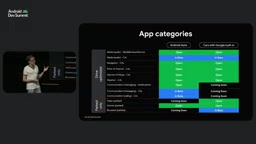
CAL 1.9 and 1.10: Media Experience and Platform Unification
Media was the scenario this session focused on most. Last year, CAL 1.8 introduced template-based browsing UI and custom actions for media apps, including the media playback template. This year's I/O introduced CAL 1.9, now in Beta, bringing a set of key updates: brand customization through App Expression, adjusting color and shape tokens while maintaining safety rules; new UI components such as spotlight sections, compact list items, scrollable chips, and a persistent mini player; and full expansion of media template support to AOS, driving true unification of the two ecosystems.
The next version, CAL 1.10, will enter Alpha within the year, focusing on custom templates for communication apps, a more robust in-car calling experience, and new app categories and templates for conversational experiences.
Media3 is the officially recommended media playback library for Android, replacing the old standalone ExoPlayer dependency and the MediaSession compatibility layer, and unifying the player, session, and UI components. In automotive scenarios, Media3's MediaLibraryService and MediaController are particularly critical: the former lets an app hold a player instance continuously in the background and expose its media library externally, while the latter allows different interfaces (phone UI, car templates, parked video Activity) to connect to the same playback session without each creating its own player. This is exactly the technical prerequisite for uninterrupted audio in the "park-to-drive" solution described later—playback state is centralized in the service, and interfaces are merely controllers attached to it, so switching interfaces does not interrupt decoding and output.
Park-to-Drive: Seamless Continuity Between Video and Audio
Thomas demonstrated the park-to-drive capability with a concrete example. The idea is: when the vehicle is stationary, grant the app full native Android Activity access to play rich media such as video; as soon as the vehicle is shifted into gear, distraction-prevention mechanisms kick in, and the app falls back to the CAL media template, remaining compliant while keeping audio listening uninterrupted.
There are several key points to the implementation. The video rendering surface should connect directly to the background playback instance rather than creating a separate player in the Activity—a unified ExoPlayer should be maintained in the main service (such as Media3's Media Library Service), handling both audio and video streams. While driving with no service binding, only audio is decoded; when parked and opening the video Activity, attach the rendering surface to the service's player by directly assigning playerView.player via Media3's MediaController.
The launch entry point needs to be wrapped in a parked-only onClickListener, providing a trigger intent in the header bar of the media playback interface. In driving mode, taps are intercepted by the host and a system safety prompt is shown; when parked, the callback launches a full-screen Activity through the car context. The video target must be marked as distractionOptimized=false in the manifest so the system recognizes this as a parked-only workflow.
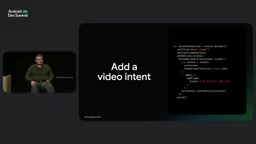
When the vehicle switches from parked back to driving, if the Activity is not marked as distraction-optimized but is still active, AOS will show a system overlay saying "Park to continue." To avoid this screen, the correct approach is to clear the video rendering surface and call finish when isRequiresDistractionOptimized evaluates to true—since the video Activity is launched on top of the CAL experience, finishing it returns directly to the media playback template with audio continuing uninterrupted. Keeping the media session running as a foreground service is the key to continuous sound across state transitions. In addition, you should override the CAL Screen's onNewIntent to capture media playback intents, letting users deep-link from the car system's media widget straight to the now-playing view.
Validation during development is simple: on AOS, run adb emulate driving state drive or the corresponding parked command to switch between the two states for testing.
From Emulator to Real Car: Getting Started Isn't Complicated
The two engineers' recommendations for action were quite pragmatic: reuse your existing adaptive app for the parked experience, and build the safe driving experience with CAL templates; for development and debugging, you can use the Desktop Head Unit emulator, AOS running on a Pixel tablet, or Firebase Test Lab. The automotive ecosystem's entry point is already paved—all that's left is to get your app on the road.
The Desktop Head Unit (DHU) is the standard debugging tool for Android Auto development, running on a development machine and simulating the car display via USB or Wi-Fi, letting developers preview their app's projected interface and interactions without a real car. For Android Automotive OS, you can use a system image running on a Pixel tablet or a virtual device in Firebase Test Lab. The shared value of these tools is shortening the feedback loop: template rendering, distraction-prevention interception, and park/drive state transitions can all be reproduced in a simulated environment, so developers don't have to wait until the app is installed in a car to discover layout overflow or state-switching issues. Real-car testing remains a necessary step before launch, but most iteration can be done on the desktop.
One-line Summary
Google explains how to cover Android Auto and Automotive OS with a single codebase using the Car App Library.
Paragraph Summary
In a technical session at Google I/O, the Android for Cars team systematically broke down automotive app development: Android Auto is a phone projection system, while Android Automotive OS is an Android variant running directly on the car, and both share the same development goals. The article distinguishes between driving-optimized apps and parked apps: the former must ensure distraction-prevention compliance through the Car App Library's template-based host-rendered architecture, while the latter can offer an Activity experience close to phones when the vehicle is stationary. CAL 1.9 enters Beta, bringing brand customization, a mini player, and expansion of media templates to AOS; 1.10 will focus on communication and conversational experiences. The article also details a seamless park-to-drive video-audio continuity solution, and notes that game publishing is now open to all developers.
Related articles

Will GitHub Die? Open Source Maintainer Burnout and the Collaboration Crisis in the AI Era
Lex Fridman podcast discussion on open source maintainer burnout and GitHub's predicament: massive pull requests overwhelm core maintainers, and AI worsens code bloat. Using math journal peer review and Poincaré conjecture verification as analogies, the article analyzes why verification in knowledge production must be deliberately slow, and how open source communities can avoid the failure mode of maintainers exiting.
Stop Building Cookie-Cutter AI Websites: 3 Tools That Transform Your Coding Agent
Three tools that boost AI coding agents: FFmpeg skill for local video editing in Claude Code and Cursor, Hallmark's 50 design themes to fix cookie-cutter AI sites, and Jailbreaks' 25+ model prompts.

How America's Gerontocracy Squeezes the Younger Generation
Americans over 55 hold nearly three-quarters of national wealth, alongside an 80-year-old president and elderly congressional leaders. The Atlantic's Idrees Kahloon explains how gerontocracy drives up housing costs, squeezes opportunities for the young, and explores zoning reform and child poverty reduction as practical fixes.