Tutorial: Free Claude 4.7 Model Access in Cursor via MCP & Security Risk Analysis

Community scheme uses MCP config in Cursor for free top-tier AI model access, with major security risks.
A method has been circulating in tech communities that claims to enable zero-cost access to top-tier models like Claude 4.7 in Cursor through MCP protocol configuration. The core mechanism involves injecting JS scripts and using MCP to route conversation requests to third-party proxy services, bypassing the official billing system. The scheme requires injecting unknown JS scripts, posing serious security risks including authentication token leakage and session hijacking, and may violate Cursor's user agreement resulting in account suspension.
Introduction: The "Unlimited Free" Scheme Circulating in Communities
Recently, a method has been circulating in tech communities (such as Bilibili) that claims to enable "zero-cost" access to the latest large language models like Claude 4.7 and GPT-5.5 within Cursor through MCP (Model Context Protocol) configuration. The scheme claims to bypass Cursor's usage limits, enabling unlimited free access to top-tier AI models. This article provides a technical breakdown of the workflow while objectively analyzing the security risks and controversies involved.
Disclaimer: This article is for technical analysis purposes only and does not encourage any behavior that violates terms of service. Using such methods may violate Cursor's user agreement and carries risks including account suspension.
Core Principles Behind the Cursor MCP Free Access Scheme
What Is MCP?
MCP (Model Context Protocol) is a protocol that allows AI editors to interact with external tools and services. Officially open-sourced by Anthropic in November 2024, it was designed to solve the "context silo" problem between AI models and external tools — before MCP, each AI application needed to develop separate integration solutions for different data sources and tools, resulting in massive duplication of effort. MCP uses a standardized client-server architecture based on JSON-RPC 2.0, supporting three core capabilities: Tool Use, Resource Access, and Prompt Templates, enabling AI models to access file systems, databases, API services, and other external resources in a unified manner. Currently, mainstream AI tools including VS Code, Cursor, and Claude Desktop have integrated into the MCP ecosystem, with the number of third-party MCP servers already exceeding several thousand.
In normal use cases, MCP is used to connect databases, API endpoints, file systems, and other external resources, allowing AI assistants to perform more complex tasks.
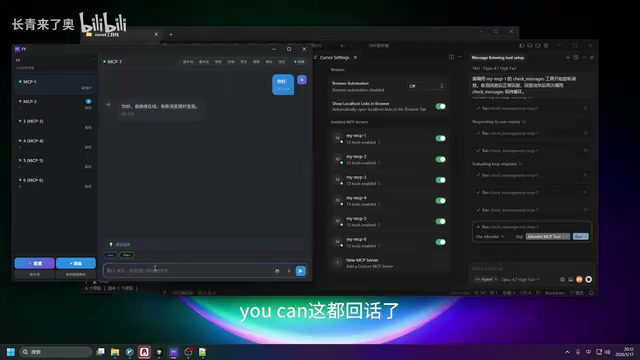
The core idea behind this scheme is: routing Cursor's conversation requests to a third-party proxy service via MCP, thereby bypassing Cursor's official model usage billing system. In simple terms, Cursor merely serves as a frontend interface while the actual model inference requests are routed to other servers.
Detailed Workflow: How to Configure MCP for Free Access
Step 1: Prepare the Toolkit
According to the video demonstration, the scheme provides a pre-packaged toolkit containing:
- Video tutorial and text guide: Detailed configuration steps
- ID plugin: A plugin related to identity identification
- Old Cursor installer: A specific version of the Cursor client
- JS injection script: The critical JavaScript code file
- Prompt templates: Pre-configured system prompts
Step 2: Inject JS Script into Cursor
This is the most critical and highest-risk step in the entire process. It's important to understand that Cursor is built on the Electron framework, which is essentially a Chromium browser environment running on the desktop with built-in Chrome DevTools (Developer Tools) that allow execution of arbitrary JavaScript code. Executing JS scripts via the F1 command palette to invoke developer tools is essentially equivalent to running code in a browser console, with full permissions to access application memory, network requests, and local storage. In security research, this type of attack vector is known as "Local Privilege Escalation" — attackers can use it to read authentication tokens (Auth Tokens), session cookies, and even hijack ongoing network requests.
The operator needs to:
- Open a new conversation window in Cursor
- Press
F1to open the command palette - Find the "Developer" related option
- Load the pre-prepared JS file, select all, copy, and paste to execute
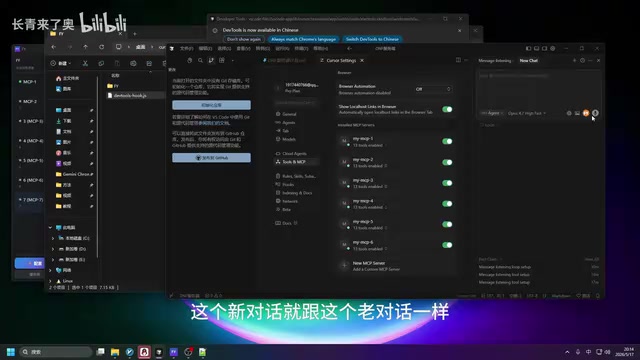
After execution, a special "FY" indicator appears on the new conversation window interface, confirming successful script injection.

Step 3: Configure MCP Service Connection
After successful script injection, MCP configuration is still needed:
- Copy the pre-configured prompt
- Click the "FY" indicator button
- Enter the configuration interface and click the "Configure" button to complete the MCP service connection
- The system will automatically upload the new conversation to the MCP server
In the video, the demonstrator noted that after configuration, the number of conversations on the MCP server increased from 6 to 7, confirming a successful connection.

Step 4: Verify Free Access
After configuration, the operator tested with the Claude 4.7 highest thinking model. Based on the demonstration:
- The model responded to conversation requests normally
- The usage consumption displayed in the bottom right corner remained at zero
- Consumption remained unchanged even after multiple inputs
In-Depth Analysis of Technical Risks and Security Controversies
Security Risks of Executing Unknown JS Scripts
Although this method appears "free and functional"
Related articles
 Tutorials
ChatGPT Plus Subscription Guide: Are GPT-5.5, image-2, and Codex Worth the Upgrade?
A detailed look at ChatGPT Plus features — GPT-5.5, image-2, and Codex — with a Plus vs Pro comparison and a complete step-by-step subscription guide for users outside the US.
 Tutorials
Harness AI Engineering in Practice: Using Claude Code to Master Enterprise-Level E-Commerce Development
Deep dive into Harness AI Engineering: master enterprise e-commerce development with Claude Code using the Rules, Skills, Wiki, and Changes framework.
 Tutorials
Cursor + Codex Dual-IDE Collaboration: A Practical Methodology for Open-Source Project Customization
A complete methodology for open-source project customization based on real-world experience, detailing the Cursor+Codex dual-IDE workflow, seven-stage process, MVP validation, and AI source code reading techniques.