Tutorial: Integrating DeepSeek with QQ Bot — A Complete Guide to Calling AI APIs via POST Requests

A detailed guide on the principles and methods for integrating DeepSeek AI with QQ bots
This article explains the core principles and practical methods for integrating the DeepSeek large language model with QQ bots. The core mechanism involves calling the AI's API via POST requests, requiring a request URL, Headers (with API Key authentication), and JSON-formatted Body parameters. Context-aware conversations are achieved by sending the complete conversation history with each request, since the model itself is stateless. The article also introduces three integration approaches, with the standard POST request method being recommended.
Introduction
As large language models like DeepSeek become increasingly popular, more and more developers want to integrate AI capabilities into everyday social tools. Connecting DeepSeek to a QQ bot enables not only intelligent conversations but also entertainment interactions and smart Q&A features in group chats. This article systematically covers the core principles and implementation methods for integrating DeepSeek with QQ bots, helping beginner developers get started quickly.
Core Principle: Calling AI APIs via POST Requests
Why Do All AI APIs Use POST Requests?
Whether it's DeepSeek, iFlytek, or other AI large models, the APIs they expose almost universally use POST requests. To understand this design choice, you need to understand the basics of the HTTP protocol.
The HTTP protocol defines multiple request methods, with GET and POST being the two most common. GET requests append data to the URL for transmission, constrained by browser and server URL length limits (typically 2KB to 8KB), making them suitable for fetching simple resources. POST requests, on the other hand, place data in the request body, with theoretically no size limit, making them better suited for transmitting complex structured data. This design stems from the RESTful API specification — a software architecture style proposed by Roy Fielding in 2000 that has since become the de facto standard for Web API design.
AI conversations require passing complex parameters such as role definitions, conversation history, and user questions — often containing thousands of characters. GET requests simply cannot accommodate this due to URL length limitations, making POST requests the only reasonable choice.
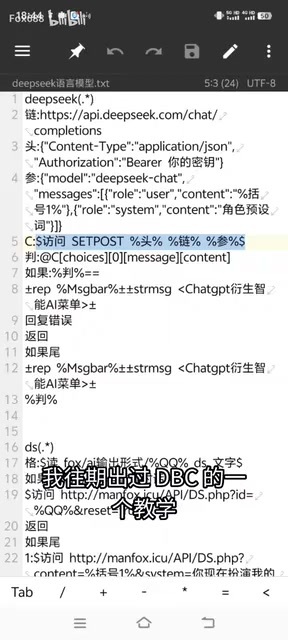
Open the official documentation of any AI platform, and you'll find that the provided call examples (typically presented as cURL or Python code) are essentially POST requests. The principle behind calling AI from QQ bot plugins is exactly the same — sending user messages to the AI API via POST requests, then displaying the returned results in the chat window.
The Three Essential Elements of a POST Request
To successfully call DeepSeek's API, you need to prepare three core elements:
1. Request URL
This is the API endpoint address provided by the AI service provider. Different AI platforms have different URLs, but they serve similar functions. DeepSeek's API address can be found in its official documentation.
2. Request Headers
Headers contain authentication information and content type declarations, filled in according to the official documentation format:
Content-Type: application/jsonAuthorization: Bearer your-api-key
The authentication method here uses the Bearer Token mechanism defined by the OAuth 2.0 standard — "Bearer" means "holder," meaning anyone holding the token can access the corresponding resource. The API Key is a credential used by the service provider to identify the caller's identity. Once leaked, others can use your quota. Therefore, never hardcode API Keys in source code — store them in environment variables or encrypted configuration files, and use .gitignore to prevent them from being uploaded to public code repositories.
3. Request Body (Parameters)
This is the most critical part, transmitted in JSON format. JSON (JavaScript Object Notation) is a lightweight data interchange format that organizes data in key-value pairs, supports nested objects and arrays, and is the standard format for modern API communication. The request parameters mainly include:
- System prompt: Defines the AI's persona and behavioral guidelines
- User question (content): The actual message sent by the user
- Model selection: Specifies which DeepSeek model version to use
The System Prompt is a special message role in large language model conversations, identified with "role": "system" in the messages array. It's injected before the conversation begins, essentially giving the AI a "meta-instruction" — you can set the AI's identity, response style, knowledge boundaries, and even restrict the bot to only answer questions in specific domains. It's a core tool for customizing the AI experience.

How Context-Aware Conversations Work
Data-Driven Conversation Memory Mechanism
Many people wonder how the AI in QQ bots "remembers" previous conversations. To understand this mechanism, you first need to know that large language models are inherently stateless — each API call is independent, and the model does not automatically remember previous conversation content. The so-called "context memory" is actually an engineering-level simulation.
The principle is straightforward: with each request, all previous conversation history is sent along to DeepSeek. The conversation history is stored as an array, with each record containing two key fields:
role: Identifies whether it's the user or the AI assistantcontent: The corresponding message content
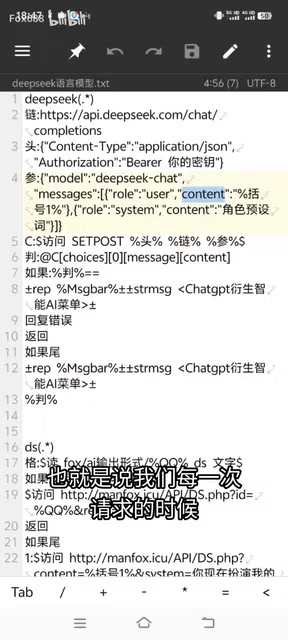
Each time a user asks a question, the bot concatenates the historical conversation records with the new question and sends them together as request parameters to the API. This is why the request parameters use a JSON array — it makes it convenient to store and concatenate multi-turn conversation data.
However, this design introduces an important technical constraint: the Context Window. Each model has a maximum Token processing limit. For example, DeepSeek-V3 supports a context length of 64K Tokens. A Token is the basic unit by which models process text — roughly 1.5 to 2 Chinese characters correspond to 1 Token, while approximately 4 English characters correspond to 1 Token. When conversation history becomes too long, content exceeding the limit gets truncated, and it also increases API call costs. In advanced development, you'll need to design sliding window or summary compression strategies to balance context completeness with Token consumption.
Local Storage Ensures Conversation Continuity
To implement context memory in a QQ bot, you need to persistently store each user's conversation history locally or in a database. This way, even if the bot restarts, conversation continuity is maintained. This is an advanced feature that needs to be implemented in conjunction with a specific bot framework.
Hands-On: Three Ways to Integrate DeepSeek with QQ Bots
Before getting hands-on, it's helpful to understand the QQ bot development ecosystem. Currently, mainstream development frameworks include: NoneBot2 (Python-based async architecture with a rich plugin ecosystem), Koishi (Node.js-based with multi-platform support), and various implementations based on the OneBot protocol. OneBot is a unified chatbot application interface standard that allows plugins written by developers to run cross-platform. Tencent has also launched the QQ Open Platform, providing compliant bot access methods. Choosing a framework that fits your tech stack is the first step in integrating AI capabilities.
Method 1: Standard POST Request (Recommended)
This is the most universal and flexible integration method. The basic workflow is as follows:
- Register an account on the DeepSeek official website and obtain an API Key
- Consult the official documentation to find the API endpoint and request format
- Write POST request code in your bot plugin
- Assemble the request URL, headers, and parameters according to specifications
- Send the request and parse the returned JSON data
Related articles
 Tutorials
ChatGPT Plus Subscription Guide: Are GPT-5.5, image-2, and Codex Worth the Upgrade?
A detailed look at ChatGPT Plus features — GPT-5.5, image-2, and Codex — with a Plus vs Pro comparison and a complete step-by-step subscription guide for users outside the US.
 Tutorials
Harness AI Engineering in Practice: Using Claude Code to Master Enterprise-Level E-Commerce Development
Deep dive into Harness AI Engineering: master enterprise e-commerce development with Claude Code using the Rules, Skills, Wiki, and Changes framework.
 Tutorials
Cursor + Codex Dual-IDE Collaboration: A Practical Methodology for Open-Source Project Customization
A complete methodology for open-source project customization based on real-world experience, detailing the Cursor+Codex dual-IDE workflow, seven-stage process, MVP validation, and AI source code reading techniques.