Tutorial: Protecting Sensitive Files in Claude Code and Cursor

Configure Claude Code and Cursor to exclude sensitive files and prevent silent uploads of secrets by AI tools.
AI programming tools use RAG technology to silently read sensitive project files (keys, certificates, environment variables) and upload them to their servers. This article explains how to configure global exclusion rules in Claude Code via user-level settings.json, and how to use Cursor's Global Cursor Ignore List and .cursorignore files. It also recommends a multi-layer defense strategy combining AI tool exclusions, .gitignore, envelope encryption, and regular audits.
When using AI programming tools, sensitive data in your project—configuration files, secret keys, certificates—can easily be read and uploaded by AI Agents without your knowledge. The consequences of such a leak can be devastating. This article provides a detailed guide on configuring sensitive file exclusion rules in Claude Code and Cursor to protect your privacy at the source.
Why Must AI Programming Tools Exclude Sensitive Files?
Modern development projects almost always contain various configuration files: database connection strings, API keys, SSL certificates, OAuth credentials, and more. When we use AI programming assistants like Claude Code or Cursor, they proactively read files in the project directory to understand code context.
Here's a critical technical detail worth understanding: modern AI programming assistants widely adopt RAG (Retrieval-Augmented Generation) technology and context window injection mechanisms. When you ask a question within your project, the tool automatically indexes the project directory, builds a file tree, and injects relevant file contents into the prompt sent to the LLM. This means that even if you haven't actively pasted any code, the tool may silently read and upload dozens of files in the background—including sensitive configuration files you're completely unaware of.
Without proper file exclusion configuration, this sensitive information could be sent to the AI service. While mainstream AI tools claim they don't misuse user data, from a security best practices perspective, sensitive information should never leave the local environment. This is the first configuration step every developer must complete before using AI tools.
Claude Code Sensitive File Exclusion Configuration
Official Permission Control Mechanism
Claude Code officially provides a mechanism to control file read permissions through the .claude/settings.json file. We can set files or directories that we don't want the AI to read as "denied" permissions in this configuration file.
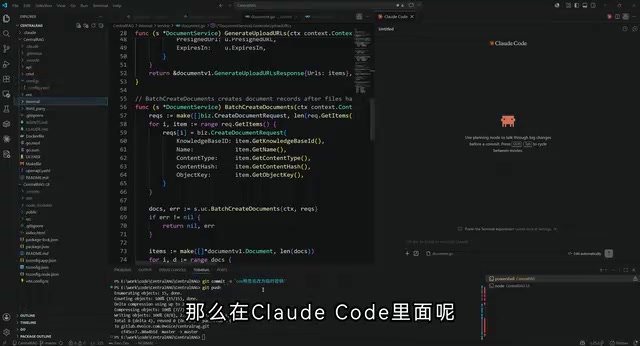
Difference Between Project-Level and User-Level Configuration
Claude Code configuration is divided into two levels:
- Project-level configuration: Set in
.claude/settings.jsonin the project root directory, applies only to the current project - User-level configuration: Set in
~/.claude/settings.jsonin the user's home directory, applies globally to all projects
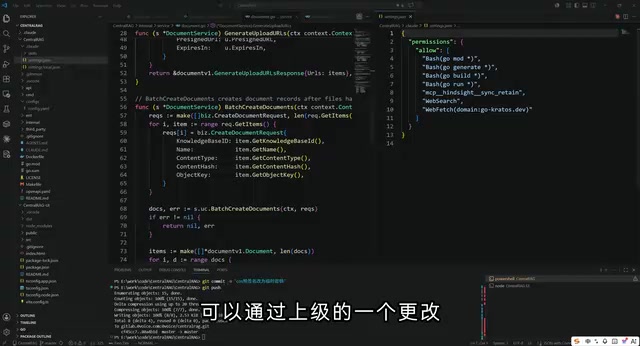
The recommended approach is to configure globally at the user level, so that sensitive files are automatically excluded regardless of which project you open, with no risk of oversight.

settings.json Exclusion Rule Configuration Example
In the user-level settings.json, you can use wildcard patterns to match files and directories that need to be excluded. Here are some key exclusion rules:
**/configs/**: Theconfigsfolder and all its contents in any directory**/*.key: Certificate/key files with the.keyextension in any directory**/*.pem,**/*.crt: SSL/TLS certificate files**/.env,**/.env.*: Environment variable configuration files**/secrets/**: Secret storage directories
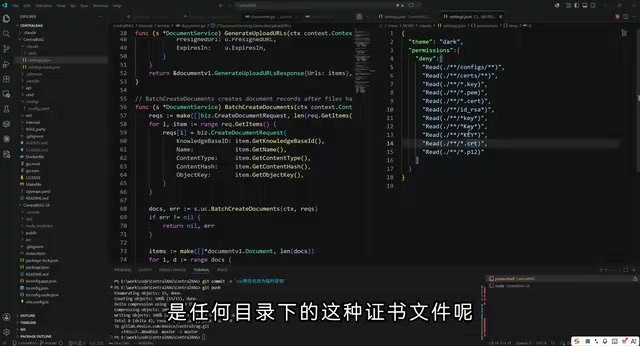
The double asterisk ** wildcard used here is based on the standard Glob path matching syntax in Unix/Linux systems. A single asterisk * can only match filenames within the current directory level, while the double asterisk ** (globstar) can recursively match across any number of directory levels. For example, **/.env can simultaneously match /project/.env, /project/backend/.env, /project/services/api/.env, and all other levels with the same filename—this is especially critical for monorepo and other multi-level project structures, ensuring that sensitive files are accurately intercepted no matter how deeply they're nested in the project.
Cursor Sensitive File Ignore Configuration
Cursor's configuration approach differs slightly from Claude Code, but the core logic is the same.
Setting Up the Global Cursor Ignore List
In Cursor, you need to configure through the following path:
- Open Cursor's Preferences/Settings
- Search for the keyword "ignore"
- Find the "Global Cursor Ignore List" option
- Add file and directory patterns to exclude, one by one
Unlike Claude Code, Cursor's ignore list requires adding rules one at a time rather than directly editing a JSON file. Additionally, Cursor supports project-level exclusion configuration through a .cursorignore file in the project root directory, with its design inspired directly by Git's .gitignore mechanism—both share the same glob syntax specification.
One point deserves special attention: Cursor inherits rules from .gitignore by default, but not the other way around—rules in .cursorignore won't affect Git's tracking behavior. This means some files might already be ignored by Git but could still be read by Cursor, so both files need to be maintained independently and cannot substitute for each other.
Checklist of Sensitive File Types That Must Be Excluded
Regardless of which AI programming tool you use, the following types of files should be included in your exclusion list:
| File Type | Examples | Risk Level |
|---|---|---|
| Environment variable files | .env, .env.local, .env.production | 🔴 High |
| Key/certificate files | *.key, *.pem, *.crt, *.p12 | 🔴 High |
| Configuration directories | configs/, secrets/, credentials/ | 🔴 High |
| Database configuration | database.yml, db.json | 🟡 Medium |
| CI/CD secrets | .github/secrets, deploy_key | 🟡 Medium |
| SSH configuration | id_rsa, known_hosts | 🔴 High |
Best Practices for AI Programming Tool Security Configuration
Multi-Layer Defense Strategy
Relying solely on AI tool ignore configurations is insufficient. A multi-layer defense approach is recommended:
- AI tool layer: Configure file exclusion rules in Claude Code and Cursor
- Version control layer: Ensure
.gitignorealso includes sensitive files - Environment management layer: Use environment variable management tools (such as
dotenv-vault) to encrypt and store sensitive configurations - Regular audits: Periodically check whether newly added sensitive files are covered
Regarding the third layer—environment management tools—their security principles are worth understanding in depth. Modern tools like dotenv-vault employ Envelope Encryption: sensitive values are encrypted locally using AES-256, and only the ciphertext is committed to the repository. The decryption key (DOTENV_KEY) is injected into the runtime environment separately through the CI/CD platform's Secret management feature. This fundamentally resolves the long-standing conflict between "configuration as code" and "secrets out of the repository," and is a core practice in the currently recommended 12-Factor App methodology for configuration management.
Configuration Verification Method
After completing the configuration, it's recommended to perform a simple verification: try asking the AI tool to read or reference the content of excluded files, and confirm whether access is correctly blocked. If the AI indicates it cannot access these files, the configuration is working properly.
Conclusion
As AI programming tools become increasingly widespread, protecting sensitive information is no longer just the operations team's responsibility. Every developer using Claude Code or Cursor should complete sensitive file exclusion configuration before first use. This operation takes only a few minutes but can fundamentally prevent the serious security risks of key leakage. Remember: Security configuration is not optional—it's mandatory.
Related articles
 Tutorials
ChatGPT Plus Subscription Guide: Are GPT-5.5, image-2, and Codex Worth the Upgrade?
A detailed look at ChatGPT Plus features — GPT-5.5, image-2, and Codex — with a Plus vs Pro comparison and a complete step-by-step subscription guide for users outside the US.
 Tutorials
Harness AI Engineering in Practice: Using Claude Code to Master Enterprise-Level E-Commerce Development
Deep dive into Harness AI Engineering: master enterprise e-commerce development with Claude Code using the Rules, Skills, Wiki, and Changes framework.
 Tutorials
Cursor + Codex Dual-IDE Collaboration: A Practical Methodology for Open-Source Project Customization
A complete methodology for open-source project customization based on real-world experience, detailing the Cursor+Codex dual-IDE workflow, seven-stage process, MVP validation, and AI source code reading techniques.