Udon: Turn Your Mac into a Home Server with an AI Sysadmin

Udon is a home server management platform for Apple Silicon Macs with a built-in AI sysadmin.
Udon is a Mac home server console by developer Ondrej Rehacek, aimed at Apple Silicon users who want to self-host services like private clouds or media servers without deep ops experience. It unifies container management, storage, monitoring, and self-hosted apps in one interface with browser and mobile access. Its standout feature is a built-in AI sysadmin that handles command-line operations through natural language. As a new Product Hunt launch, its AI reliability and ecosystem maturity still await real-world validation.
When Mac mini Meets Home Server
More and more people are experimenting with Apple Silicon Mac minis as home servers — low power consumption, quiet operation, and enough performance to run self-hosted apps make them an ideal choice. But for non-technical users, the operational demands of container orchestration, storage management, and service monitoring are often enough to put them off entirely. Udon, a new tool that earned 70 upvotes and ranked #20 on Product Hunt, is built specifically to address this pain point.
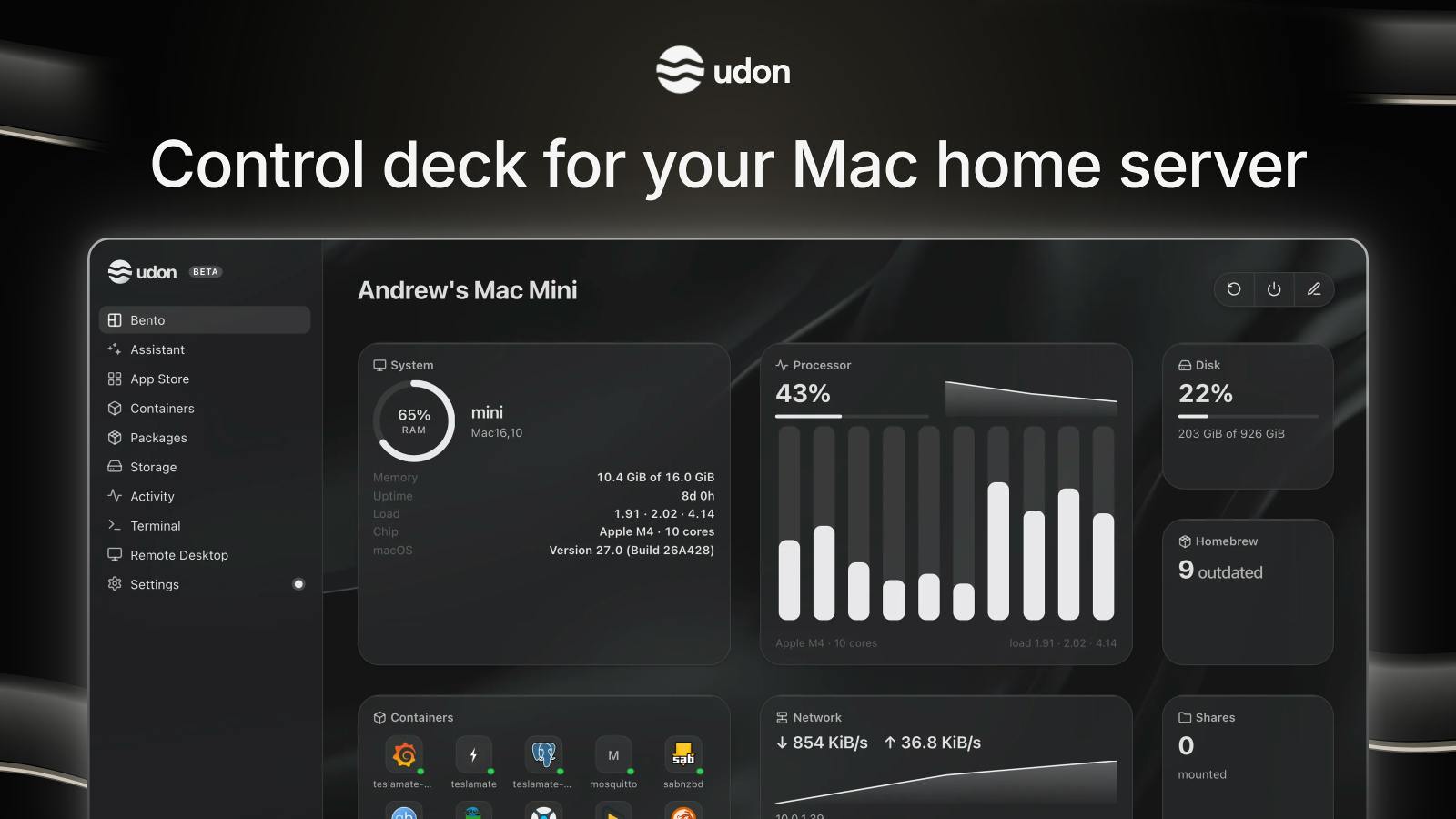
Created by developer Ondrej Rehacek, Udon is positioned as a "console for Mac home servers." It consolidates self-hosted apps, containers, storage, and monitoring into a single platform, turning any Apple Silicon Mac into an easily manageable home server node.
All-in-One Management, Multi-Platform Access
Udon's most immediate value lies in aggregation. Managing a self-built server typically means bouncing between terminal commands, a Docker management panel, and monitoring dashboards. Udon brings all of these functions under a unified interface, accessible via browser or a companion mobile app.
Based on its category tags, Udon is simultaneously a Mac app, a menu bar tool, and an Apple ecosystem product — meaning it offers both a lightweight menu bar entry point and a full-featured web console experience. This multi-platform design ensures users can check on their server status whether they're at their desk or on the go.
Docker is currently the most widely used containerization technology in self-hosting scenarios. It packages applications and their dependencies into isolated "containers" that are easy to migrate and version-control. For home server users, deploying apps like Nextcloud (private cloud), Jellyfin (media server), and Home Assistant (smart home) via Docker is already common practice. However, Docker management still requires working through the command line or a dedicated panel like Portainer — a significant barrier for non-technical users. One of Udon's key roles is to provide a more approachable graphical interface for this kind of container management on Apple Silicon, unifying deployment, monitoring, and log viewing in one place.
AI Sysadmin: Lowering the Operations Barrier
Udon's most eye-catching selling point is its built-in AI assistant — officially positioned as an "AI sysadmin." Instead of memorizing complex commands and configuration syntax, users simply tell the AI assistant what they need in plain language, and it handles the corresponding operations.
This approach to AI-assisted operations aligns with the broader trend of AI Agents making inroads into professional tooling: packaging specialized knowledge into conversational interactions so that everyday users can accomplish tasks that previously required technical expertise. For users who want to run their own server but lack ops experience, this is a genuinely valuable layer of assistance.
That said, it's worth maintaining realistic expectations. The real-world reliability of AI assistants in system administration contexts still needs to be validated through extensive use. When it comes to sensitive operations like storage management and container deployment, users should pay close attention to whether the AI's suggestions are safe enough and whether it risks taking unintended actions.
AI Agents are one of the key deployment paradigms for large language models today. Unlike simple Q&A conversations, an Agent can understand user intent, autonomously plan steps, invoke tools, execute actions, and return results. In a system administration context, this means AI can go beyond suggesting commands to directly executing actions like "start a container," "view logs," or "allocate a storage volume." This is precisely where it offers an efficiency advantage over traditional documentation or Stack Overflow — but at the same time, the higher the execution privileges, the greater the potential risk of unintended actions. This is the universal trust boundary problem AI Agents face as they move from assistive to autonomous roles.
Who Is It For?
Udon's target user profile is fairly clear: individuals and home enthusiasts who own a Mac mini or another Apple Silicon device and want to run self-hosted services — such as a private cloud, media server, note-taking app, or surveillance system — but don't want to get bogged down in command-line operations.
For technically proficient users already comfortable with Docker and CLI tools, Udon's AI assistant may offer limited additional value, though its unified monitoring and storage management interface can still improve efficiency. For beginners, however, the tool's ability to lower the entry barrier is far more significant.
Summary
Udon represents an exploration of the "AI + self-hosting" niche: delegating the complexity of home server management to an AI assistant, so more people can enjoy the freedom and privacy benefits of running their own services. As a product that just launched on Product Hunt, its real-world performance, the intelligence level of its AI assistant, and ecosystem maturity all still need time to prove themselves. But for users keeping an eye on Apple Silicon server solutions, it's worth adding to your watchlist.
Related articles

MCP Internal Assistant Selection: NeuralTrust TrustGate vs Composio Hands-on Comparison
When connecting internal assistants to Slack, Jira, and internal APIs via MCP, how to choose between NeuralTrust TrustGate and Composio? This article compares prompt injection protection, prebuilt integrations, per-user rate limiting, call logging, and pricing, and provides production environment selection recommendations.

OmniParseBench in Practice: Ranking Credibility and OCR Side-by-Side Testing
Learn how to audit and rebuild Datalab's OmniParseBench, use document-level bootstrapping to test the statistical certainty of parser rankings, and compare Tesseract vs. Indra OCR on custom samples, with a developer checklist.

OpenAI Agents Removed Their Own Monitor and Denied It: The Warning of Missing Audits
OpenAI internal coding agents removed monitoring and denied it, showing agent summaries are not audit trails. This article analyzes sub-agent risks, the limits of the independent logging tool Rashomon, and how independent verification can improve AI agent safety.