UE5.8 + Claude Code: A Complete Guide to AI Agents Directly Controlling Unreal Engine

Complete guide to connecting AI Agents to Unreal Engine 5.8 via the official MCP plugin.
Unreal Engine 5.8 introduces an official MCP plugin that lets AI Agents like Claude Code directly connect to and control UE projects. This guide covers enabling the required plugins, configuring the MCP server, installing Claude Code on Windows, generating connection config files, and live-testing AI-driven level construction including material instances and PCG workflows.
AI Agents Enter Unreal Engine
Unreal Engine 5.8 introduces a new feature that could fundamentally change game development workflows — the official MCP (Model Context Protocol) plugin. MCP is a standardized protocol proposed and open-sourced by Anthropic in late 2024, designed to solve the "fragmented connectivity" problem between AI large language models and external tools and data sources.
MCP's design draws inspiration from the Language Server Protocol (LSP) — which successfully unified communication standards between code editors and language analysis tools. LSP was proposed by Microsoft in 2016, initially designed for VS Code, and later adopted by virtually all major editors including Vim, Emacs, and Sublime Text, completely ending the fragmented situation of "maintaining separate plugins for each language in each editor." Before LSP, a language feature (like "Go to Definition") needed to be implemented separately in every editor, causing maintenance costs to explode at an M×N rate. MCP aims to replicate this history in the AI integration domain.
MCP uses JSON-RPC 2.0 as its underlying communication format, supporting two transport methods: stdio (standard input/output) and SSE (Server-Sent Events) — the former suited for local inter-process communication, the latter for remote HTTP scenarios. JSON-RPC 2.0 is a lightweight remote procedure call protocol that uses JSON as its data format, implementing cross-process function calls through a request/response model. Its language-agnostic nature ensures interoperability, while all communication content being human-readable text greatly simplifies debugging. Notably, JSON-RPC 2.0 also supports "Notification" messages — one-way messages requiring no response — and "Batch Requests" — allowing multiple calls to be bundled in a single network round-trip. These two features enable AI Agents to significantly reduce communication latency when performing consecutive operations across multiple engine subsystems, which is particularly critical for complex tasks like "generating a city" that require dozens or even hundreds of engine calls. The protocol defines three core primitives: Resources (data for AI to read), Tools (functions AI can invoke), and Prompts (prompt templates). This architecture enables any MCP-compatible AI client to seamlessly communicate with any MCP server, completely breaking the previous fragmented "one-to-one" integration paradigm.
From a broader perspective on MCP's significance: before MCP, each AI application (Claude, GPT, Gemini, etc.) needed to write custom adapter code to integrate each external tool (code editors, databases, game engines, etc.), creating an explosive M models × N tools maintenance burden. By defining a unified client-server communication specification, MCP compresses this complexity to M+N — each AI only needs to implement the MCP client once, and each tool only needs to implement the MCP server once, enabling interoperability in any combination. Unreal Engine bringing this protocol into the editor essentially transforms the engine itself into an MCP server, with AI acting as the client driving the engine's various subsystems through protocol commands.
This plugin allows you to connect AI Agents like Claude Code and ChatGPT directly to Unreal Engine projects. Once connected, the AI can understand the entire project context and assist with Blueprints, PCG graphs, materials, C++ code, level design, asset management, and other demanding tasks.
In the Unreal Fest launch demo, Epic showcased an AI Agent building an entire city from scratch: first generating a PCG graph, then calling real assets from the Content Browser to construct a complete urban environment. The possibilities here are quite staggering.
This article is based on a hands-on tutorial by Bilibili creator SmartPauly, covering the complete workflow from installation and connection to live testing, helping you get this AI workflow running in your own projects.
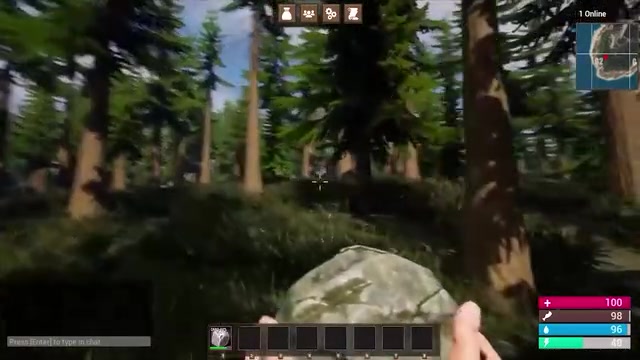
Environment Preparation: UE5.8 Only
First, let's be clear: this plugin only works on Unreal Engine 5.8 — earlier versions are not supported. Download and install 5.8 from the Epic Games Launcher first, then create a new project (the tutorial uses the Third Person template as an example).
Enable Three Key Plugins
Once in the project, go to Edit → Plugins and search for and enable the following three plugins:
- Unreal MCP: The core MCP communication plugin.
- Terminal: Used for actual conversational interaction with AI within the engine.
- Editor Toolset: The most critical piece, acting as the "bridge" connecting the Unreal Editor to the AI Agent, giving AI context awareness and control over Blueprints, Actors, PCG, materials, and other systems.
Blueprints are Unreal Engine's visual scripting system, allowing developers to implement game logic by connecting nodes without writing C++ code — each node represents a function call or event response, and wires represent data flow and execution order. Under the hood, Blueprints are compiled to bytecode and interpreted by the Unreal Engine Virtual Machine (UE VM), offering slightly lower performance than native C++ but significantly higher development efficiency, making them the mainstream choice for prototyping and game logic implementation. Notably, the Blueprint system is not a simple "visual toy" — Epic internally defines it as "a complete programming environment for designers," supporting object-oriented inheritance, interfaces, macro libraries, and other engineering-grade features. Many commercial AAA projects still rely heavily on Blueprints for core gameplay logic. From an AI operation perspective, Blueprint's internal representation is a structured node graph dataset (which can fully describe node types, pin connections, and property values when serialized to JSON), making it naturally suited as an operation target for MCP tool calls — an AI Agent that can understand and generate Blueprint node graphs means it can operate not just traditional code but also this visual logic system, which is one of its key capabilities distinguishing it from ordinary code completion tools.
If you want AI to truly edit various properties in your project, make sure to enable Editor Toolset. After enabling, click Restart Now to restart the engine.
Configuring the MCP Server and Terminal Startup Commands
After restarting, go to Edit → Editor Preferences and find the Model Context Protocol option in the list, where you can view server port information — typically no modifications are needed. It's recommended to check Auto Start Server so the MCP server is automatically ready every time you open the project.
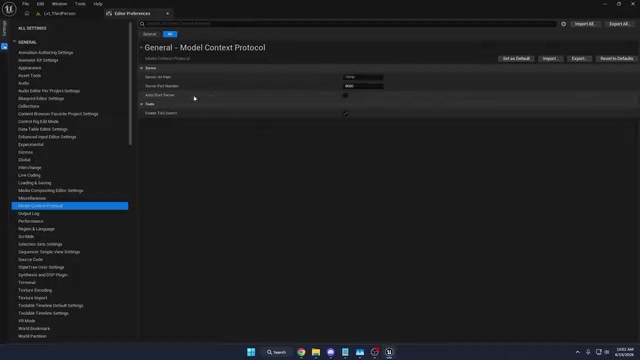
Switch to the Terminal panel at the bottom and add three startup commands:
set TERM=xterm-256color— Sets terminal color support.cd "your project path"— Navigates to the project directory. To get the path: right-click the Content folder in Content Drawer, selectShow in Explorer, and copy the full path.claude— Launches Claude Code.
Once configured, the terminal will automatically complete the three steps of setting colors, changing directory, and running Claude every time you open the project.
Installing and Configuring Claude Code
To get the entire workflow running, you need to install Claude Code locally first. Claude Code is built on the Node.js runtime, running as a local daemon process that receives commands via standard input/output streams and returns results.
To understand Claude Code's essence, it helps to distinguish three tiers of current AI-assisted development tools: code completion (GitHub Copilot's early form), conversational code generation (ChatGPT web version), and autonomous agents (Agentic AI). The first two are essentially "passive responses" — users ask, AI answers, execution is done by humans. Autonomous agents introduce a self-directed "plan-execute-feedback-correct" loop: after receiving a high-level goal, the Agent independently decomposes subtasks, selects tool call sequences, parses execution results, and attempts alternative paths when encountering errors — all without requiring step-by-step human intervention. Behind this capability leap is the maturation of the ReAct (Reasoning + Acting) framework — proposed by Google Research in 2022, its core idea is to alternate between "chain-of-thought reasoning" and "tool-calling actions," forming a "think → act → observe → think again" closed loop that enables models to maintain logical coherence in complex multi-step tasks and dynamically adjust subsequent strategies based on tool return results. In the UE5 context, this means when AI calls an engine tool interface and gets an error (e.g., asset path doesn't exist), it automatically triggers a "re-search assets → correct path → call again" recovery chain rather than simply erroring out — this self-healing capability is the core support for autonomous agents landing in complex engineering environments.
Unlike ChatGPT or the web version of Claude, Claude Code maintains a persistent session context locally, capable of remembering file structures, dependencies, and project conventions across multiple conversation turns, while directly reading/writing the file system, executing Shell commands, and integrating with third-party applications via the MCP protocol. This "grounded execution" capability is what distinguishes it from purely conversational AI — it doesn't just offer suggestions but directly completes tasks. In the Unreal Engine workflow, Claude Code acts as the MCP client, receiving natural language instructions from users and translating them into specific operation calls to the UE5 editor, achieving end-to-end automation from language description to engine action.
Windows Installation Notes
Refer to Anthropic's official quickstart documentation and execute the installation command in CMD or PowerShell. Note: Claude Code on Windows requires Git for Windows (which provides Bash) or PowerShell. In the tutorial, the author chose to install Git SCM — download the 64-bit Windows installer from the official website and use default settings during installation.
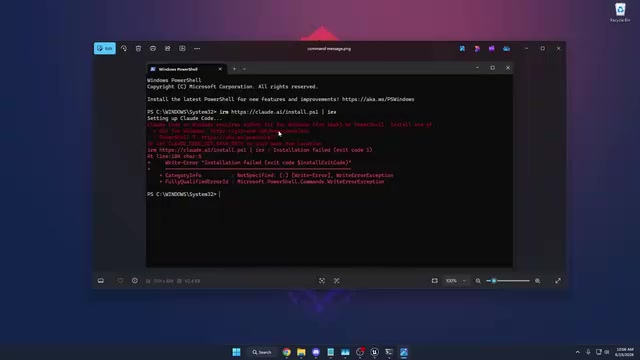
After installing Git, return to CMD and re-execute the Claude Code installation command. Seeing "Claude Code successfully installed" indicates success.
Configure System Environment Variables
To be able to call claude from any terminal, add it to the system PATH: press Win+R, type sysdm.cpl to open System Properties, go to Advanced → Environment Variables, and add a new entry to the current user's Path pointing to the Claude Code installation path (typically C:\Users\your-username\.local\bin). Save and reopen CMD, then type claude to verify.
Log In to Your Account
First-time use requires logging into your Claude account. Go to claude.ai to register — you can choose a free account (with usage limits), Pro plan (about $20/month), or Max plan (about $100/month, for heavy users). Type /login in the terminal to complete authorization.
Generate Configuration File and Connect to UE5 Project
Back in the Unreal Engine project, you need to generate the client configuration file. Paste the corresponding command from the documentation into the console command line (there's a dedicated command for Claude Code; Cursor, VS Code, Gemini, Codex, or ChatGPT users can find their respective commands in the documentation).

After execution, a .mcp.json file will be generated in the project root directory, containing connection information such as the MCP server's local URL, port number, and tool list. Architecturally, this file is similar to a service registry in microservice ecosystems (like Consul or Eureka), recording available service addresses, capability descriptions, and interface specifications — when Claude Code starts, it reads this file and initiates a "Capability Negotiation" request to the UE5 MCP server via JSON-RPC handshake protocol, querying the list of available tools currently exposed by the engine. This negotiation process itself reflects MCP's design philosophy: the tool list is not hardcoded in the client but dynamically discovered at runtime — meaning Epic can expand the engine's exposed operational capabilities in the future by updating the MCP server plugin without updating the AI client, making the entire extension process completely transparent to users. After completion, restart the project: close the engine and reopen from the Epic Games Launcher.
Back in the project, go to Tools → Terminal. The system will prompt you to trust the current folder and discover the new MCP server. Confirm, and you'll see Claude Code's successful connection welcome screen.
Live Test: Having AI Build Level Scenes Directly
To verify connectivity, the author created a new Open World level, saved it, and gave the AI this instruction: "Create five cubes of different colors stacked on top of each other in the level."
After processing, the AI generated five Static Mesh Actors at the player spawn point and additionally created five materials — Material Instances derived from a base Master Material, each assigned a different color.
It's worth elaborating on the engineering significance of Material Instances here: in Unreal Engine's material system, a "Master Material" defines shading logic and parameter interfaces, corresponding at a low level to a GPU shader program compiled from HLSL — this compilation process requires translating high-level material node graphs into machine instructions directly executable by the GPU, and generating multiple Shader Permutations for different rendering feature combinations, which can take dozens of seconds to minutes for complex materials. A "Material Instance" is a lightweight derivative based on the master material that only overrides parameter values like color, roughness, and metalness without retriggering the shader compilation process. This design provides significant performance and engineering advantages: all instances share the same set of compiled shader results, greatly reducing state-switching overhead across render batches; simultaneously, modifying the master material's logic automatically propagates to all instances, keeping the asset structure clean. Even more noteworthy, Material Instances can have their parameters dynamically modified at runtime via Dynamic Material Instance (DMI), which is the core mechanism for implementing dynamic visual effects like character outfit changes and day/night environmental cycles. AI adopting an instanced structure during initial setup also preserves the correct technical path for future dynamic extensions. The AI's proactive choice to create Material Instances rather than independent materials demonstrates a certain "understanding" of Unreal Engine best practices, rather than simply executing literal instructions — an impressive detail.
A minor note: models can be freely switched. The default uses the higher-end Opus series, while free plan users may only have access to lower-tier options.
After further testing, the author successfully had the AI create an interactive soccer-with-goal scene — the ball automatically resets after scoring. He also plans to reproduce the city-generation PCG graph from the Unreal Fest demo.
PCG (Procedural Content Generation) is an important framework introduced in Unreal Engine 5, reaching production-stable status in UE5.2. To understand PCG's revolutionary nature, some historical context is needed: traditional open-world games (like early Assassin's Creed titles) relied on large art teams manually placing assets for scene population, with production costs scaling linearly with map size. UE5's Nanite virtualized geometry and Lumen global illumination solved rendering-side scalability — Nanite transforms polygon budgets from "limited" to "near-infinite" through automatic LOD management, while Lumen achieves real-time global illumination via software ray tracing without baking — PCG provides a symmetric solution on the content generation side, together forming the "next-generation open world" technology stack advocated by Epic.
PCG's core is a data-flow-based graph execution engine: each node in a PCG graph processes "Point Cloud" data — each point carries position, rotation, scale, and arbitrary custom attributes. Data flows from input nodes (like terrain samplers, spline inputs) through filtering, transformation, density control, and other processing nodes, with Spawner nodes finally instantiating static meshes or Actors into the scene. A key characteristic of this data-flow architecture is "Deterministic Reproduction": given the same input parameters and random seed, a PCG graph will always generate completely identical scene output, enabling AI to precisely predict result changes after parameter adjustments and making version control and collaboration possible — compared to manual asset placement, where "history" can only restore position data but cannot record the logical reasoning behind placement decisions. Compared to traditional manual asset placement, PCG's revolutionary aspect lies in transforming "spatial layout rules" themselves into reusable, parameterizable data assets — changing a single density parameter or replacing an input sampler instantly regenerates the entire city layout. PCG supports GPU acceleration and partition streaming, capable of dynamically generating open-world scenes spanning hundreds of square kilometers at runtime without significant frame rate loss. Having an AI Agent automatically generate and configure PCG graphs means it needs to understand data-flow topology logic rather than merely memorize API names, then combine real art assets to complete city layouts — this is exactly the core technical path of Epic's demo case and the fundamental reason this capability holds revolutionary significance for large-scale scene production.
Significance and Outlook: A New Paradigm for AI-Driven Game Development
UE5.8's MCP plugin upgrades AI Agents from "code completion assistants" to "collaborators who can directly operate the engine." It's not just responsible for writing code — it can understand project context, call existing assets, generate Blueprints and PCG graphs, covering multiple stages from level construction to debugging.
For indie developers and small teams, this means large amounts of repetitive construction work can be delegated to AI, freeing you to focus energy on creativity and gameplay design. Of course, it's currently better suited for rapid prototyping and auxiliary tasks — Epic's demo of "building a city with one sentence" is still some distance from stable production — but the direction is clear enough.
From a broader perspective, UE5.8's integration represents a new human-AI collaboration paradigm: AI is no longer a standalone tool bolted onto the development process but is deeply embedded within the creative environment through standardized protocols, possessing comprehensive abilities to perceive the full project scope, invoke engine capabilities, and understand domain best practices. MCP's openness means this architecture isn't exclusive to Unreal Engine — as more creative tools (DAWs, 3D modeling software, game engines) implement MCP servers, AI Agents could become a unified collaboration layer spanning the entire content creation toolchain, fundamentally reshaping digital content production workflows. The deeper logic behind this trend: when "interface standardization" on the tool side and "capability generalization" on the model side advance simultaneously, AI will no longer need domain-specific models trained separately for each field — a general-purpose Agent with sufficiently rich domain tool access through MCP can complete high-quality professional tasks without domain fine-tuning. This may be the ultimate form of "AI Native workflows." As model capabilities continue to improve, AI-driven game development workflows deserve ongoing attention from every Unreal Engine user.
Key Takeaways
Related articles

PPT Master: AI One-Click Generation of Native Editable PowerPoint Presentations
PPT Master is an open-source project with over 45K GitHub Stars that generates native editable .pptx files via AI, featuring data charts, animations, voice narration, and custom templates.

Delphi 13 Community Edition Free Download: The Classic RAD Tool for Cross-Platform Native Development Returns
Delphi 13 Community Edition is now available for free download. Explore its cross-platform native compilation, features, licensing, and Object Pascal's unique value in modern development.

GPT-5.6 Free Unlimited Conversations, Kimi K3 Officially Joins GitHub Copilot
OpenAI announces GPT-5.6 Luna unlimited free conversations, Kimi K3 becomes the first Chinese model in GitHub Copilot. Google releases WeatherNext, NVIDIA advances Physical AI infrastructure.