Understanding Context Windows: The Real Reason Your AI Coding Assistant Performs Poorly
Context window mismanagement is the hidden reason AI coding assistants underperform.
Most developers underperform with AI coding tools because they ignore context window management. This article explains what context windows are, why larger windows can degrade model performance due to the 'lost in the middle' problem, and offers practical strategies including using clear/compact in Claude Code, keeping MCP servers minimal, and writing lean rules files.
When it comes to whether AI coding assistants actually work, the developer community has been split into two fiercely opposing camps. One insists that "coding Agents are garbage, I hate AI coding," while the other fires back with "you're just using it wrong — it's a skill issue." In a recent video, well-known AI tech blogger Matt (Matt Talk AI) pointed out that if there truly is a "skill issue," the most common shortcoming he sees is this: developers spend far too little time thinking about the context window.
In reality, the context window is the core constraint facing virtually every AI coding Agent today, and most developers can't even articulate what it is or how it affects their tools' real-world performance. This article systematically breaks down the concept to help you truly understand and master your AI coding assistant.
What Is a Context Window
A context window refers to the complete set of input and output tokens that a large language model (LLM) can "see" at any given moment.
First, you need to understand the concept of tokens. A token is the smallest unit of text that an LLM processes — it's neither equivalent to a word nor a character. For English text, one token corresponds to roughly 4 characters or 0.75 words; for Chinese, a single character is typically encoded as 1–2 tokens. Models use a tokenizer (common algorithms include BPE and SentencePiece) to split input text into token sequences. Different models may tokenize differently, which means the same piece of code can consume different amounts of context space across models.
Input tokens are what you send to the model — such as the system prompt that tells the model what to do, and the user message that initiates the conversation. Once you send these, the model begins streaming back assistant messages — these are the output tokens. Input tokens plus output tokens together make up the complete context window.
As the conversation progresses — whether you're chatting with Claude or ChatGPT — the number of tokens in the context window keeps growing. When we say the context window is "bloating," this is exactly what we mean. Eventually, it bloats until it hits the ceiling.
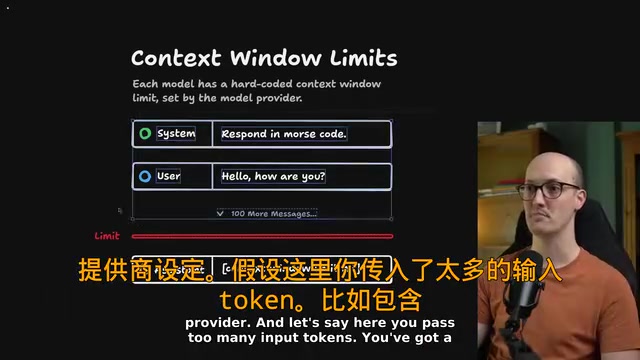
Every model has a hard-coded limit set by its provider. Once too many tokens are passed in (say, a system message, a user message, plus hundreds of conversation turns), you'll get a "context window limit reached" error. Sometimes, a single extremely long message — like uploading a large document, requesting a video transcription, or processing a massive image — is enough to hit the ceiling.
Interestingly, you can also hit the limit during generation: the model is producing an extremely long response and simply stops mid-sentence because it exceeded the window.
Why Context Windows Have Size Limits
Why do models impose these limits instead of allowing unlimited text to flow through? There are two core reasons.
The first is architectural cost. The core mechanism of LLMs — self-attention — has O(n²) computational complexity, meaning that doubling the context length quadruples the computation. Adding more text means each inference consumes more memory and compute, and costs skyrocket accordingly. This is also why API pricing is typically per-token — longer contexts directly translate to higher bills.
The second, and more easily overlooked, reason: as the window gets larger, performance can actually degrade. In other words, the more information you feed the model, the worse it may perform.
Take Google's Gemini 2.5 Pro as an example — its massive context window is one of its selling points. But as we'll discuss below, "bigger" doesn't always mean "better". On sites like models.dev, you can look up context window limits for various models: some go up to hundreds of thousands of tokens, while smaller or older models like Qwen Math Plus may only support around 4,000 tokens.
Lost in the Middle: A Severely Underestimated Performance Killer
All large language models share a core weakness — limited ability to retrieve information from their own context — known as the classic "Needle in a Haystack" problem. This testing methodology was first proposed by Greg Kamradt in 2023: a specific fact (the "needle") is inserted at various positions within a large body of irrelevant text (the "haystack"), and the model is then asked to answer a question about that fact. By varying the needle's position and the haystack's total length, researchers can plot a heatmap of the model's retrieval accuracy at different depths and lengths. The results reveal a universal phenomenon: when a critical piece of information is buried in a bloated context, models struggle to precisely extract and utilize it.
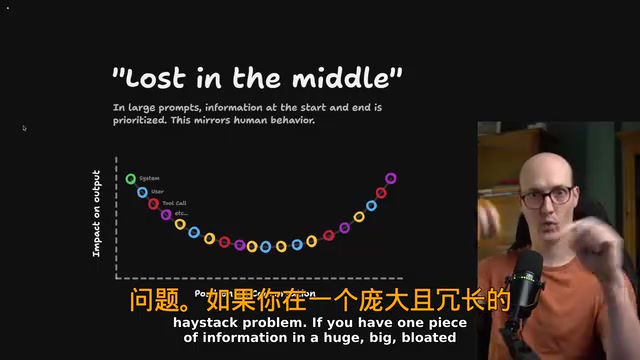
Even trickier is the positional effect. In very long conversations, information in the middle is severely de-weighted by the model's attention mechanism, while content at the beginning and end of the conversation receives the highest weight.
This isn't intentionally designed behavior — it's an emergent property of the Transformer architecture. The Transformer's self-attention mechanism allows every token in a sequence to attend to all other tokens and compute relevance weights, but when sequences are too long, attention weights become severely diluted, and the model fails to allocate sufficient attention to tokens in the middle. The field has proposed various improvements, including Sparse Attention, Sliding Window Attention, and RoPE positional encoding extrapolation, but no solution has fully eliminated this fundamental limitation.
This positional effect closely mirrors the human cognitive phenomena of primacy bias and recency bias — you'll most likely remember the beginning and end of a video, but have a vague impression of the middle.
For AI coding, this means: the settings at the beginning of the conversation and the instructions at the end carry the most influence, while the lengthy content in between actually has quite limited impact on the final output. The shorter the context window, the less "lost in the middle" becomes a problem — models, like humans, perform better with less and more focused information.
This leads to a very practical recommendation: Regularly clearing your coding Agent's conversation to refresh its memory can significantly improve code quality in practice.
Hands-On: Managing Context in Claude Code
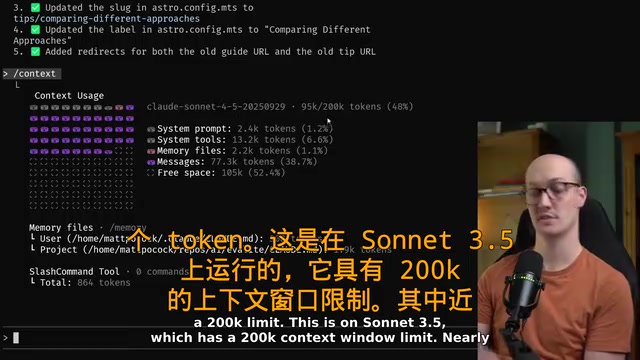
Let's use Claude Code as an example to demonstrate specific context management operations. After running the context command, you can see your current usage: on Sonnet 4.5 with a 200K token window, 95K tokens have been consumed. Of that, roughly 40% is just the system prompt, and another 77K tokens is the current conversation content.
If the remaining 105K tokens are sufficient for the task at hand, that's fine. But once the remaining space drops below about 50K tokens, you should start paying attention. At that point, you can run the clear command to wipe the conversation history and free up the context window.
Claude Code also offers another option: compact. This clears the conversation history while generating a summary — condensing all messages into a single shorter message. This is essentially a conversation summarization technique, also known academically as recursive summarization or progressive compression. It works by sending the complete conversation history to the LLM and asking it to generate a condensed text that preserves key decisions, completed actions, and current goals, then replacing the original conversation with this summary. In theory, this creates distance from the window ceiling and reduces "lost in the middle" issues. In practice, after compaction the message footprint dropped from 70K tokens to just 4K tokens, bringing free space back to 90%.
However, the compaction process takes time (about a minute) and itself requires an LLM call to generate the summary, which also consumes tokens. More importantly, the summarization process is lossy — the model may omit details that seem unimportant but are actually critical, such as a specific variable naming convention or an edge case discovered during debugging. The summary quality also depends on the capabilities of the model performing the summarization. The recommended principle: use compact when you want to preserve the conversation's "vibe" and intent; use clear when you want a completely blank slate — and the latter should be your default choice.
Watch Out for MCP Servers and Bloated Rules Files
Two "traps" that can cause your context to bloat rapidly deserve special attention.
The Hidden Cost of MCP Servers
MCP (Model Context Protocol) is an open standard protocol released by Anthropic in late 2024, designed to establish a standardized communication interface between AI models and external tools and data sources. It uses a client-server architecture: AI applications (like Claude Code, Cursor) act as MCP clients and communicate with MCP servers via the JSON-RPC 2.0 protocol; each MCP server exposes a set of tool definitions (including tool names, parameter descriptions, and functional descriptions), which are injected into the model's system prompt.
MCP is extremely appealing — it lets you plug and play with all kinds of ready-made toolsets from the ecosystem. But they can also blow up your context at an alarming rate. The problem is that each tool's complete schema description can consume hundreds or even thousands of tokens, and when multiple MCP servers are mounted simultaneously, tool definitions alone can eat up tens of thousands of tokens of context space.
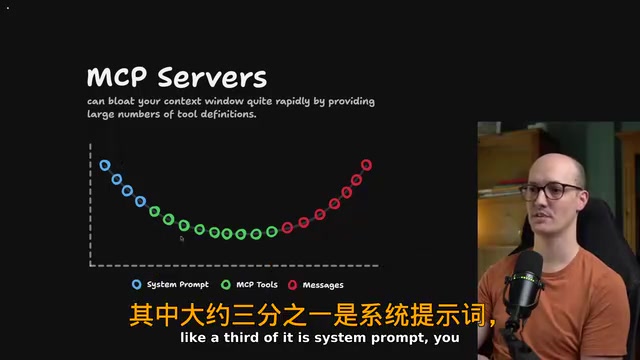
In some configurations, the system prompt plus tool definitions from a few MCP servers can consume more than half the context, leaving surprisingly little room for actual conversation messages. Be selective about adding MCP servers — only connect tools you genuinely need.
Keep Rules Files Lean
The same logic applies to Cursor Rules or Claude Rules — don't write overly large rules files. Every line of rules consumes precious context space and exacerbates the "lost in the middle" risk. Rules files are essentially injected into the system prompt, which sits at the very beginning of the context — while this position carries higher weight, if the rules file is too lengthy, its middle sections will still suffer from attention decay. It's precisely this almost obsessive habit of keeping things lean that enables you to consistently get stable, high-quality output from AI coding Agents.
Don't Just Look at Window Size — Look at Information Retrieval Ability
One final key insight: When evaluating a model, don't just focus on how large its context window is — look at how well it retrieves and utilizes information from within that window.
A classic counterexample is Meta's Llama 4 Scout, which boasted a 10-million-token mega-window. But after real-world testing, users found its "lost in the middle" problem was extremely severe — even when you fed information in, it was virtually unable to actually use it. This once again demonstrates that performance on Needle in a Haystack tests is the true yardstick for measuring long-context capabilities. A model with a 1-million-token window but only 60% retrieval accuracy may perform far worse in practice than a model with a 200K-token window but 95% retrieval accuracy.
This case vividly confirms the article's core thesis: The capacity number of a context window matters far less than its actual retrieval quality.
Understanding and proactively managing context windows, learning when to execute clear or compact, and being careful about the size of MCP servers and rules files — these are the key skills that make AI coding Agents truly effective. Master these, and you can break free from the "AI coding doesn't work" trap and genuinely unlock these tools' potential.
Key Takeaways
Related articles

Microsoft AI Agent Breakthroughs: More Efficient, Better at Code and Weather Forecasting
Microsoft Research Focus Issue 97: ForkPilot cuts agent inference costs, Cabra reveals coding agents' code-understanding gap, Teletune learns workflows from logs, PBC improves extended forecasts, BioEMU-2 opens preview.

Prime Intellect Releases Prime Mega MoE: Trainable Fused MoE Kernel with 3.11x Forward Speedup
Prime Intellect releases Prime Mega MoE, adding backpropagation to DeepSeek's fused Mega MoE kernel for trainability. Up to 3.11x forward speedup and 34% faster Qwen3 MoE training steps in prime-rl.

Meta Quietly Launches AI Fashion App Style Sketch: Build a Virtual Wardrobe from Instagram Photos
Meta quietly launched Style Sketch, an AI fashion app that connects to Instagram to build a virtual wardrobe from shared photos, plus manual entry via camera, video, or gallery upload. This analysis covers its product logic, competitive landscape, and implications for AI app developers.