UniApp Beginner Tutorial: Build Multi-Platform Apps with One Codebase
A beginner UniApp course teaching multi-platform APP development with one codebase in 16 lessons.
This article analyzes a zero-to-hero UniApp course that teaches beginners to build a multi-platform APP in 16 lessons. Covering HTML, CSS, JavaScript, and UniApp, the project-driven course guides students through building a course-based APP with homepage display, course listings, and video playback. The article evaluates the course's strengths, limitations, and provides a recommended advanced learning path.
Course Overview: Anyone Can Build an APP from Scratch
In the mobile internet era, APP development might seem like a high-barrier skill. But as cross-platform frameworks have matured, the entry threshold for ordinary people to get into APP development has dropped significantly.
A cross-platform framework is a technology solution that allows developers to generate applications for multiple platforms (such as iOS, Android, and Web) from a single codebase. Before cross-platform frameworks existed, building an APP that supported both iOS and Android required two completely different tech stacks — Swift/Objective-C and Java/Kotlin — nearly doubling development costs. Around 2015, frameworks like React Native, Flutter, and UniApp matured one after another, dramatically reducing the manpower and time costs of mobile development. Among them, UniApp is built on the Vue.js ecosystem and is particularly friendly to developers in China, as it not only supports native APP output but can also generate mini-programs for WeChat, Alipay, Baidu, and other platforms with a single click.
The Shanxuetang Baizhan Programmer team on Bilibili has released a zero-to-hero APP development course, claiming that in just 16 lessons, beginners can build a complete course-based APP from scratch. This article provides an in-depth analysis of the course's technical roadmap, content structure, and learning value to help readers interested in mobile development make an informed decision.
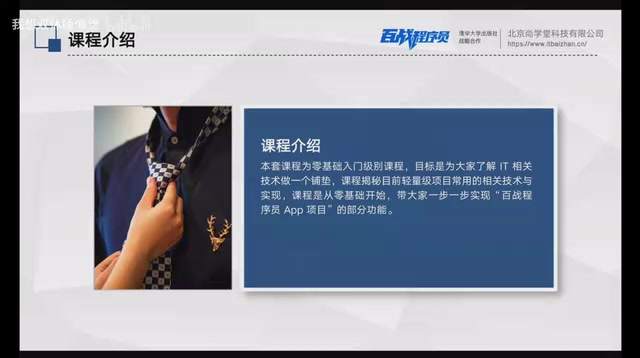
This course has a very clear positioning — an introductory foundation course. Whether you plan to dive deeper into Java, Python, big data, or artificial intelligence in the future, it serves as a first step toward understanding the full landscape of IT technology. The ultimate goal is to guide students through building an APP with features like a homepage display, course listings, and video playback.
Tech Stack Breakdown: Four Essential Technologies + Two Optional Extensions
Essential Technologies: The Fundamentals of Front-End Development
The course's core tech stack is divided into essential and optional tiers — a layered design that's quite beginner-friendly.
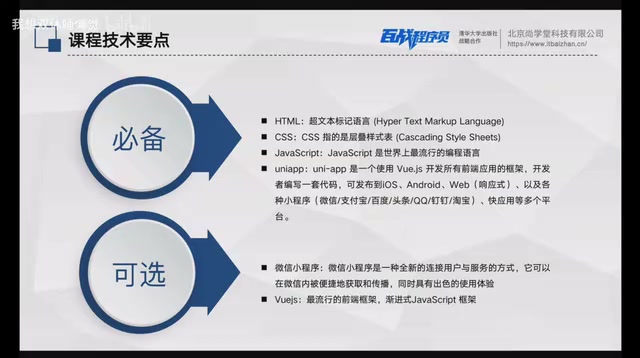
The four essential technologies are:
- HTML (HyperText Markup Language): Responsible for building the skeletal structure of the project, including tags, text, and other foundational elements. This is the cornerstone of all Web and mobile development.
- CSS (Cascading Style Sheets): Beautifies the HTML skeleton, presenting the interface to users in a more visually appealing way.
- JavaScript: Enables interaction between data and views, transforming pages from static to dynamic, with data provided by backend APIs.
- UniApp: A front-end open-source framework developed in China. Its biggest advantage is that one codebase can be deployed to multiple platforms, including Android, iOS, WeChat Mini Programs, and more.
HTML, CSS, and JavaScript are known as the "iron triangle" of front-end development — each has its own role yet they work closely together. HTML was born in 1991, invented by Tim Berners-Lee to define the structure and content semantics of web pages. CSS was introduced by the W3C in 1996, separating style from structure so that the same HTML could present completely different visual effects. JavaScript was designed by Brendan Eich in just 10 days in 1995, originally intended to add simple interactivity to web pages — it has since evolved into a full-stack language. Modern browsers and mobile WebViews have built-in full support for all three technologies, making them the universal foundation for all web-based application development.
UniApp was released by DCloud in 2018, based on Vue.js syntax specifications. During compilation, it converts code into native rendering instructions for each platform. Its core architecture consists of two parts: the compiler and the runtime. The compiler converts .vue files into platform-specific code (such as WXML/WXSS for WeChat Mini Programs, or native render trees for APP builds); the runtime provides a unified API layer that abstracts away platform differences. As of 2024, UniApp has over one million developers in China, and the DCloud plugin marketplace offers thousands of ready-made components. Compared to Flutter (which requires learning Dart) or React Native (which requires mastering the React ecosystem), UniApp has virtually zero migration cost for developers with existing web front-end experience — this is why it's widely popular among small and medium enterprises and individual developers in China.
From a technology selection perspective, HTML + CSS + JS is the front-end "iron triangle," and UniApp is one of the mainstream choices for cross-platform development in China. The advantage of this combination lies in its gentle learning curve and strong practicality — after completing the course, you can not only build APPs but also produce mini-programs and H5 pages simultaneously.
Optional Technologies: Advanced Groundwork for Vue.js and WeChat Mini Programs
The optional technologies include WeChat Mini Programs and Vue.js. Vue.js was released by Evan You in 2014 and is currently one of the world's three major front-end frameworks. Unlike React (led by Facebook) and Angular (led by Google), Vue.js is an open-source project initiated by an individual developer, known for its progressive architecture — developers can use only its core reactive data binding functionality, or gradually introduce the full ecosystem including routing (Vue Router), state management (Vuex/Pinia), and build tools (Vite). Vue.js has an extremely high market share in China, with major companies like Alibaba, Tencent, and Baidu running numerous Vue projects in production. UniApp's choice of Vue as its underlying syntax means that learning UniApp is itself an accumulation of Vue development experience.
WeChat Mini Programs are the most widely used lightweight application platform in China. Since their official launch in 2017, they have covered over 1 billion users with more than 400 million daily active users. The course lists these two as optional, meaning they don't need to be studied in depth at the beginner stage, but they become essential if you want to further develop in the front-end direction.
This "essential + optional" layered design deserves praise. Many introductory courses try to cram in too much content at once, which actually causes beginners to lose their way. Clearly telling students "master this first, learn that later" is a responsible teaching approach.
UniApp Project Demo: Three Core Pages Explained
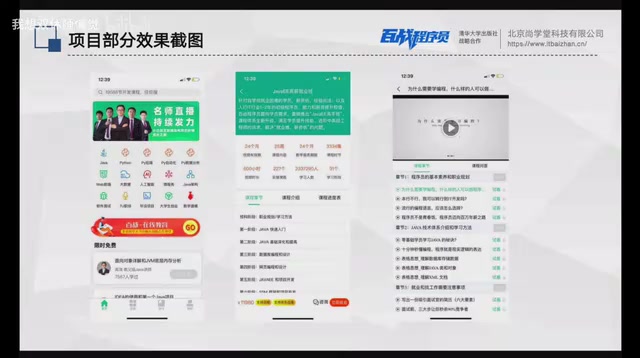
The final APP built in the course contains three core pages. Judging from the screenshots, the features aren't overly complex, but they cover several key scenarios in mobile development.
Homepage: Data Display and Tab Navigation
The homepage uses a bottom tab navigation design with four modules: "Home," "Categories," "Learning," and "Profile." The homepage focuses on content display, with data sourced from backend APIs. Notably, the course provides public API endpoints that students can freely call during their learning without any restrictions.
API (Application Programming Interface) is the core communication mechanism in front-end/back-end separated architectures. In traditional web development, front-end pages and back-end logic were mixed together (like PHP template rendering). In modern development, the front-end and back-end exchange data through HTTP APIs — the front-end sends requests, the back-end returns JSON-formatted data, and the front-end renders that data into a user-visible interface. The advantage of this architecture is that front-end and back-end can be developed and deployed independently, and the same set of APIs can simultaneously serve APPs, mini-programs, web pages, and other front-ends. By providing public API endpoints, the course effectively simulates the real-world workflow of a front-end engineer in an enterprise — backend colleagues provide API documentation, and the front-end is responsible for calling and displaying the data. This solves the common pain point in many introductory courses of "having no backend data to work with."
Course List: Data Rendering and Page Interaction
After clicking a course entry on the homepage, users can navigate to the course list page, which displays series courses for Java, Python, and more. This page involves list rendering, data requests, page navigation, and other common front-end operations — making it an excellent hands-on practice scenario. List rendering is a high-frequency requirement in front-end development. In Vue/UniApp, it's implemented through the v-for directive, which automatically generates the corresponding number of DOM elements based on a data array. When data changes, the framework's virtual DOM mechanism intelligently calculates the minimum update range, avoiding unnecessary page repaints and ensuring a smooth user experience.
Playback Page: Multimedia Integration and Detail Display
After clicking a specific course chapter, users can navigate to the playback page, which displays all course content for the current chapter and supports video viewing. This page involves parameter passing, detail page rendering, multimedia playback, and other feature points. In UniApp, parameter passing between pages is typically done through URL query parameters or global state, while video playback relies on UniApp's encapsulated <video> component, which automatically invokes native players on different platforms to ensure playback performance and compatibility.

Objective Assessment: Who Is This UniApp Course For?
Strengths
- Precise positioning: Clearly an introductory course that doesn't try to cover everything — the 16-lesson volume is well-controlled
- Sound technology choices: UniApp's cross-platform approach has widespread enterprise adoption in China — what you learn is what you can use
- Public APIs provided: Lowers the learning barrier so beginners don't need to set up their own backend services
- Project-driven teaching: Having a real APP as the goal makes it easier to stay motivated compared to pure theoretical lectures
Limitations
- Limited depth: As an introductory course, it won't cover advanced topics like state management, performance optimization, or app store publishing
- Potentially overhyped title: Claims like "job-ready after completion" are overly optimistic — 16 lessons of content is still quite far from employment-level proficiency
- No backend knowledge: Only covers front-end development — complete APP development also requires backend, database, and other complementary knowledge
What's Next: UniApp Advanced Learning Path
For complete beginners, this type of course can serve as a "test the waters" experience — spend a few hours understanding the full picture of APP development and determine whether this direction interests you. But don't harbor unrealistic expectations of "being job-ready after finishing."
If you've confirmed your interest after completing this course, here's a recommended path for going deeper:
- Systematically learn the Vue.js framework: This is UniApp's underlying foundation — mastering Vue is essential to truly understanding how UniApp works. Start with Vue 3's Composition API, learning core concepts like reactive principles (ref, reactive), component lifecycle, Composables, and practice with the Vite build tool.
- Dive deeper into UniApp component-based development and state management: Learn state management solutions like Vuex or Pinia to handle complex business scenarios. State management is an unavoidable architectural concern in medium-to-large front-end applications — when an app has only a few pages, components can communicate through props and event emission; but as the number of pages grows to dozens and component nesting deepens, data flow becomes chaotic and untraceable. Pinia is the successor to Vuex, with a cleaner API and better TypeScript support, and has been officially recommended by Vue as the default state management solution.
- Learn basic backend development: Such as Node.js or Python Flask, to gain front-end/back-end collaboration skills. Node.js allows you to write server-side code in JavaScript, meaning zero language migration cost for front-end developers; Python Flask is known for being lightweight — you can set up a REST API service with just a few lines of code. Mastering basic backend development means you can independently complete the entire chain from database design to API development to front-end display.
- Understand the APP packaging, testing, and publishing process: Master the complete pipeline from development to app store listing. UniApp provides cloud packaging services through HBuilderX, generating Android APK and iOS IPA files. However, listing on app stores also requires applying for developer accounts (Apple Developer Program costs $99/year; domestic Android markets require software copyright certificates), passing each platform's review standards, handling signing certificates, and a series of other procedures.
Overall, this is a solid introductory tutorial with a sensible technical roadmap, suitable as a first lesson in mobile development. But going from introduction to real-world practice will require investing significantly more time and effort in systematic learning.
Key Takeaways
Related articles

Resume Guide for Programmers Transitioning to AI: From an HR Perspective to Job Requirement Matching
How should programmers transitioning to AI write a resume? This Bilibili tutorial gives five key preparation actions: set aside two or three days to review skills and projects, choose a simple template, reverse-engineer the tech stack from job sites, emphasize LLM capabilities, and do a final check from an HR perspective.

Building a RAG Knowledge Base: A Complete Guide from Architecture to Retrieval Evaluation
A systematic overview of the full RAG knowledge base workflow: from overall architecture and mature retrieval solutions to key details of retrieval evaluation and who should learn it, helping developers build a path from beginner to hands-on practice.

Turn Screenshots into Web Code in Seconds: Anyone Can Write HTML with AI
A Bilibili creator demonstrates using AI to turn webpage screenshots directly into HTML and CSS code without manual coding. The article analyzes the tool's usage, new features like video-based app cloning, iterative refinement, and the real boundaries of AI giving zero-foundation users programming ability.