Unlimited Free Windsurf Accounts: Complete Guide to Seamless Account Switching & Credit Compression

Achieve efficient, low-cost Windsurf usage through batch registration, seamless switching, and MCP sustained conversations.
This article breaks down an efficient Windsurf AI coding assistant workflow: building an account pool through batch-registering free accounts, using seamless switching to transition when credits run out, combining custom rule files (System Prompts) to constrain AI behavior and reduce wasted conversations, and introducing the MCP protocol to break conversation turn limits for sustained long sessions—four strategies working together to dramatically reduce credit consumption for equivalent development tasks.
Introduction
Windsurf is one of the most popular AI coding assistants available today. Its code generation and intelligent conversation capabilities have won over many developers. But anyone who's used it knows the biggest pain point: credits burn too fast and account quotas run out too quickly.
Windsurf was developed by the Codeium team, built as a deep modification of the VS Code architecture. Specifically, Windsurf retains VS Code's Electron architecture and extension ecosystem while embedding a proprietary AI Agent scheduling system at the communication layer. Unlike competitors such as GitHub Copilot and Cursor, Windsurf emphasizes its "Agentic" capabilities—meaning the AI doesn't just complete code, but actively understands project context, executes multi-step tasks, and invokes terminal commands and file operations. The term "Agentic" derives from the AI Agent concept. Unlike traditional code completion tools (such as early Copilot's Fill-in-the-Middle mode), AI in Agent mode possesses four core capability loops: perception (reading files, understanding project structure), planning (decomposing complex tasks into multiple steps), execution (invoking terminals, modifying files, running tests), and reflection (adjusting strategies based on execution results). Each Agentic interaction may trigger several or even dozens of underlying model calls, which differs by orders of magnitude in computational cost from simple single completion requests. This Agent mode means each interaction consumes far more computational resources than simple code completion—this is the fundamental reason credits burn so fast. Windsurf's credit system is essentially a pass-through of underlying LLM API call costs, and the per-call cost varies enormously between models, which directly determines the capability boundaries between free and paid accounts.
This article is based on the "Spark Windows App" toolset, fully breaking down an efficient Windsurf usage workflow—from batch registering free accounts and seamless account switching, to credit compression and custom prompts for sustained long conversations, walking you through maximizing Windsurf's development capabilities step by step.
Disclaimer: This article is for technical analysis and information compilation only. Please comply with platform terms of service and relevant laws and regulations when using related tools.
Batch Registration & Account Management for Windsurf
Choosing Between Two Registration Methods
The Spark Windows App provides two registration paths suited to different user needs:
Method 1: Custom Domain Registration
If you have your own domain and email, you can configure them in the software beforehand, then use the "Batch Register" function to create multiple Windsurf accounts at once. The advantage of this approach is full control over your accounts with better stability.
Method 2: One-Click Easy Registration
No domain? No problem. You can register directly using the server-provided domain and email—zero barrier to entry, perfect for users who want to quickly get up and running.
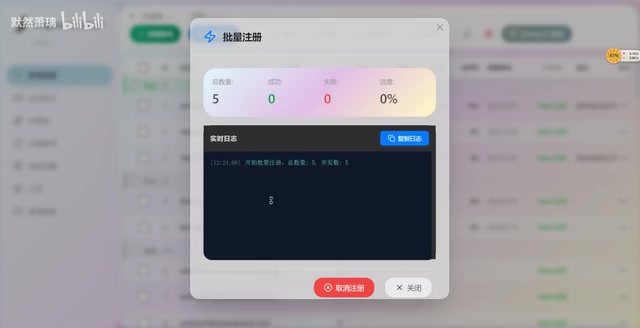
In testing, registering 5 accounts at once works without issues. During first-time registration, the software needs to locate your local browser, which may cause brief lag—this is normal, just wait it out.
What Can Free Windsurf Accounts Do?
All batch-registered accounts are Free accounts, with the following core capability boundaries:
| Item | Details |
|---|---|
| Available Models | GPT-5.2 and other standard models, fully sufficient for daily development |
| Unavailable Models | Claude and other premium models require paid accounts |
| Credit Display | Shows zero, but actually works normally |
| Registration Limit | Unlimited, meaning GPT-5.2 can theoretically be called indefinitely |
Token Retrieval & Account Authentication Principles
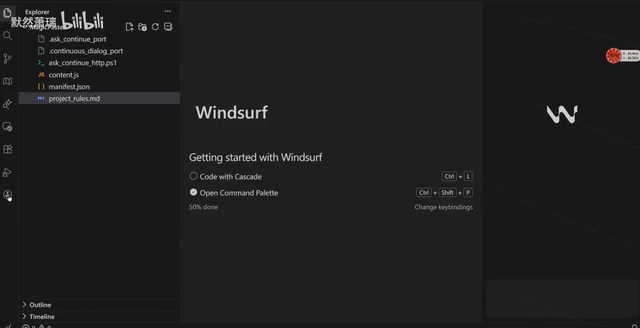
After registration, execute "Get Token" and "Refresh Credits" in sequence. Multi-select batch operations are supported, allowing dozens of accounts to be processed quickly.
The "Get Token" step involves an OAuth 2.0 authentication flow. OAuth 2.0 is the most widely used authorization framework on the internet today, allowing third-party applications to obtain limited resource access with user authorization. Windsurf uses JWT (JSON Web Token) as user identity credentials. JWT is a compact, self-contained token format consisting of three parts—Header (algorithm declaration), Payload (user information and claims), and Signature (signature verification)—Base64 encoded and connected with dots. The token encodes user ID, account tier, expiration time, and other information. JWT's self-contained nature means the server can verify user identity without querying a database, which is particularly important for high-frequency API call scenarios (such as AI model inference requests), significantly reducing authentication latency. When the client holds a valid Token, it can make model call requests to the Windsurf backend. Batch token retrieval essentially automates the login authentication flow, caching access credentials for multiple accounts locally to provide the foundation for rapid switching. Tokens typically have a TTL (Time To Live), usually set from several hours to several days. After expiration, a new Access Token must be obtained through the Refresh Token mechanism, so the "Refresh Credits" operation actually includes token renewal logic as well.
If your project needs premium models like Claude, the software also provides server accounts (typically 100 credits) that can be obtained directly.
Windsurf Seamless Account Switching Mechanism Explained
Why Seamless Switching Is Needed
"Seamless switching" solves a very practical problem: when one account's credits or quota is nearly exhausted, how do you switch to a new account without breaking your development rhythm? The ideal state is that the entire process has virtually zero impact on your coding experience.
Three Steps to Complete Windsurf Account Switching
- Select Account: Choose the target account from the software's account list and click "Switch Account"
- Confirm Status: After successful login, confirm the current account is active via the "Seamless Switch" button
- Hotkey Switching: The software supports hotkey switching—one key press during development, no need to leave the editor
The real power of this seamless switching mechanism lies in this: combined with the previously batch-registered free account pool, you can seamlessly switch to the next account the instant credits are exhausted, with virtually no interruption to development.
Custom Prompts & MCP Sustained Conversations
Rule Files: Setting Boundaries for AI
The most essential part of this workflow is the design of custom prompts (rule files). Before starting a conversation, the system automatically loads pre-written rule files that impose strong constraints on AI behavior.
Rule files are essentially the engineering management of System Prompts. In the multi-turn conversation architecture of large language models, messages are typically divided into three roles: System, User, and Assistant. The System Prompt carries the highest weight during model inference—it's placed at the very beginning of the context window, and the model's Attention Mechanism prioritizes processing this information. This means that even if the user attempts to make the model deviate from preset behavior in subsequent conversation, the System Prompt's constraining power remains strongest. By writing development standards, code style, and project conventions into rule files, you're essentially injecting an "operations manual" into the model at the start of each conversation. In engineering practice, a well-designed System Prompt can improve the model's effective output rate by 30%-50% while reducing the probability of "hallucination" (the model generating content that seems reasonable but is actually incorrect) and topic deviation. The core value of this approach lies in reducing redundant information in prompts—if you have to manually tell the AI "write in TypeScript," "follow ESLint rules," or "don't modify certain files" every time, you not only waste conversation turns but also consume precious context window space. Rule files load these fixed constraints once, leaving the limited context window for actual business logic discussion.
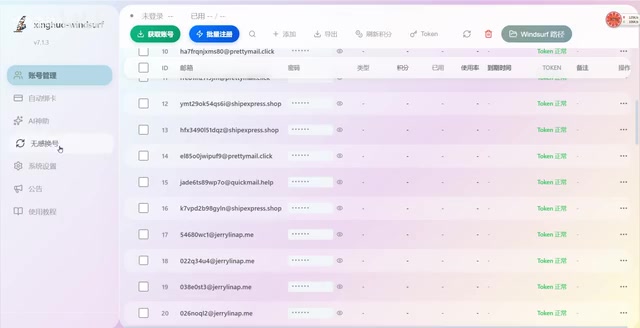
Content that can be defined in rule files includes:
- Tool type specification: e.g.,
UsContinue, which can be replaced with other tools - Development standard constraints: Forcing the AI to generate and modify code according to specified rules
- Conversation mode settings: Starting conversations through prompt templates to ensure AI always works within the preset framework
How MCP Tools Break Through Windsurf Conversation Limits
The workflow introduces MCP (Model Context Protocol) tools that communicate with Windsurf via HTTP protocol. This design solves a critical pain point: breaking through conversation window length and turn limits.
MCP is a standardized protocol open-sourced by Anthropic in late 2024, with design inspiration from LSP (Language Server Protocol)—the latter completely transformed the IDE development model by standardizing the communication protocol between editors and language services. MCP attempts to replicate this success in the AI domain, providing large language models with a unified external tool invocation interface. It adopts a client-server architecture and communicates via the JSON-RPC 2.0 protocol. JSON-RPC 2.0 is a lightweight remote procedure call protocol that uses JSON format to encode requests and responses, supporting batch calls and asynchronous notifications. MCP supports two transport methods: stdio and HTTP/SSE. SSE (Server-Sent Events) is a unidirectional push technology based on HTTP where the server can continuously send event streams to the client—ideal for AI model streaming output scenarios (i.e., generating token by token and pushing in real-time). In this workflow, the MCP tool establishes a persistent connection with Windsurf through HTTP/SSE transport mode, combining HTTP's broad compatibility with SSE's real-time push capability, serving as a "bridge" between AI and the development environment. In traditional conversation mode, each interaction is a stateless request-response, but MCP's persistent connection mechanism allows AI to continuously access project files, execute commands, and read execution results within the same session, thereby bypassing conversation window turn limits. This is similar to upgrading AI from a "Q&A" mode to a "continuous collaboration" mode.
In traditional usage, Windsurf conversations frequently get interrupted due to context length overflow or credit exhaustion. The MCP tool's HTTP communication mechanism brings four core advantages:
- Persistent residence in the same conversation window, without being forced to start new conversations
- Real-time code modification sync, see effects immediately after changes
- Not subject to regular conversation turn limits, chat as long as you want
- Support for one hour or even longer sustained development conversations
Complete Development Flow from Start to Delivery
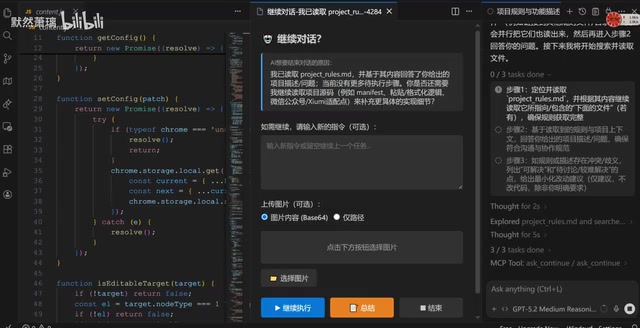
A typical Windsurf development flow follows five steps:
- Start Conversation: Begin the conversation using a preset prompt template (e.g.,
UsContinue) - Project Reading: AI automatically scans the project's main files (e.g., the
contentdirectory) to build an overall understanding of the project - Natural Language Development: Describe requirements in plain language; AI develops under rule file constraints
- Continuous Iteration: Through continuous MCP tool invocations, AI keeps reading new content and outputting development plans
- Result Confirmation: When output is too lengthy, click "Summarize" to condense output; confirm correctness before executing modifications
Throughout the entire process, AI is "governed" by rule files, maintaining stable and controllable output quality. Even with zero-credit free accounts, high-quality development tasks can still be completed.
Core Logic of Windsurf Credit Compression
Credit compression doesn't literally mean fewer credits are deducted—rather, through a combination of strategies across four dimensions, the same development tasks consume fewer total credits:
- Free account pool rotation: Batch register large numbers of free accounts; switch to the next one immediately when one runs out—GPT-5.2 becomes essentially unlimited
- Prompt rule constraints: Reduce ineffective conversation turns; every interaction produces valuable output
- MCP sustained conversations: Avoid context rebuilding overhead from frequently starting new conversations
- Real-time modification sync: Code changes take effect immediately, eliminating credit waste from repeated confirmations
The Deep Relationship Between Context Windows and Credit Consumption
To understand why credit compression works, you need to understand the context window mechanism of large language models. The context window refers to the maximum number of tokens a model can process in a single pass—tokens are the basic units by which LLMs process text; an English word is typically split into 1-3 tokens, while Chinese characters usually require 1-2 tokens. Taking GPT-4 as an example, its context window is 128K tokens, which seems large, but in actual development scenarios, the core code files of a medium-scale project might occupy 20K-50K tokens. During each conversation, system prompts, message history, current input, and model output all consume context window space. When conversations become too long and cause context overflow, the model typically employs a sliding window strategy—discarding the earliest conversation history, causing AI to "forget" previously discussed requirements and decisions; or the system forces a new conversation to begin.
Starting a new conversation means all previously established project understanding is lost, and AI needs to "read" project files again—a process that consumes massive amounts of tokens (i.e., credits). The hidden cost of each context rebuild can reach thousands or even tens of thousands of tokens; for usage patterns that frequently start new conversations, this waste is staggering. The value of MCP sustained conversations lies precisely here—by maintaining the continuity of a single session, it avoids the repeated consumption caused by context rebuilding. This is the most technically sophisticated component of the "credit compression" strategy.
With all four approaches working together, total credit consumption for the same development tasks drops dramatically—the effect is equivalent to "compressing" your credits.
Summary & Usage Recommendations
The core philosophy of this Windsurf workflow is clear: use tools to solve account management problems, and use prompt engineering to improve single-conversation efficiency. For developers who use Windsurf heavily every day for coding, this is definitely an efficiency workflow worth trying.
But a few points to keep in mind:
- Compliance Risk: Batch registering accounts may violate platform rules—review relevant terms beforehand
- Model Capability Ceiling: Free accounts can only use standard models; complex projects may still require Claude
- Rule Files Need Customization: Prompt rules should be tailored to your project's characteristics; copying them directly yields diminished results
- MCP Configuration Has a Learning Curve: Beginners need time to learn MCP tool installation and configuration, including understanding basic concepts of JSON-RPC communication protocol and SSE event streams
Ultimately, this workflow demonstrates the value of "engineering thinking" in AI-assisted programming—good tools combined with good methodology are what truly unleash AI's productivity.
Related articles
 Tutorials
ChatGPT Plus Subscription Guide: Are GPT-5.5, image-2, and Codex Worth the Upgrade?
A detailed look at ChatGPT Plus features — GPT-5.5, image-2, and Codex — with a Plus vs Pro comparison and a complete step-by-step subscription guide for users outside the US.
 Tutorials
Harness AI Engineering in Practice: Using Claude Code to Master Enterprise-Level E-Commerce Development
Deep dive into Harness AI Engineering: master enterprise e-commerce development with Claude Code using the Rules, Skills, Wiki, and Changes framework.
 Tutorials
Cursor + Codex Dual-IDE Collaboration: A Practical Methodology for Open-Source Project Customization
A complete methodology for open-source project customization based on real-world experience, detailing the Cursor+Codex dual-IDE workflow, seven-stage process, MVP validation, and AI source code reading techniques.