Unsloth Studio Update: In-Browser File Interaction and Glass Theme Beta

Unsloth Studio adds in-browser file editing, Glass theme, and memory/MLX performance optimizations.
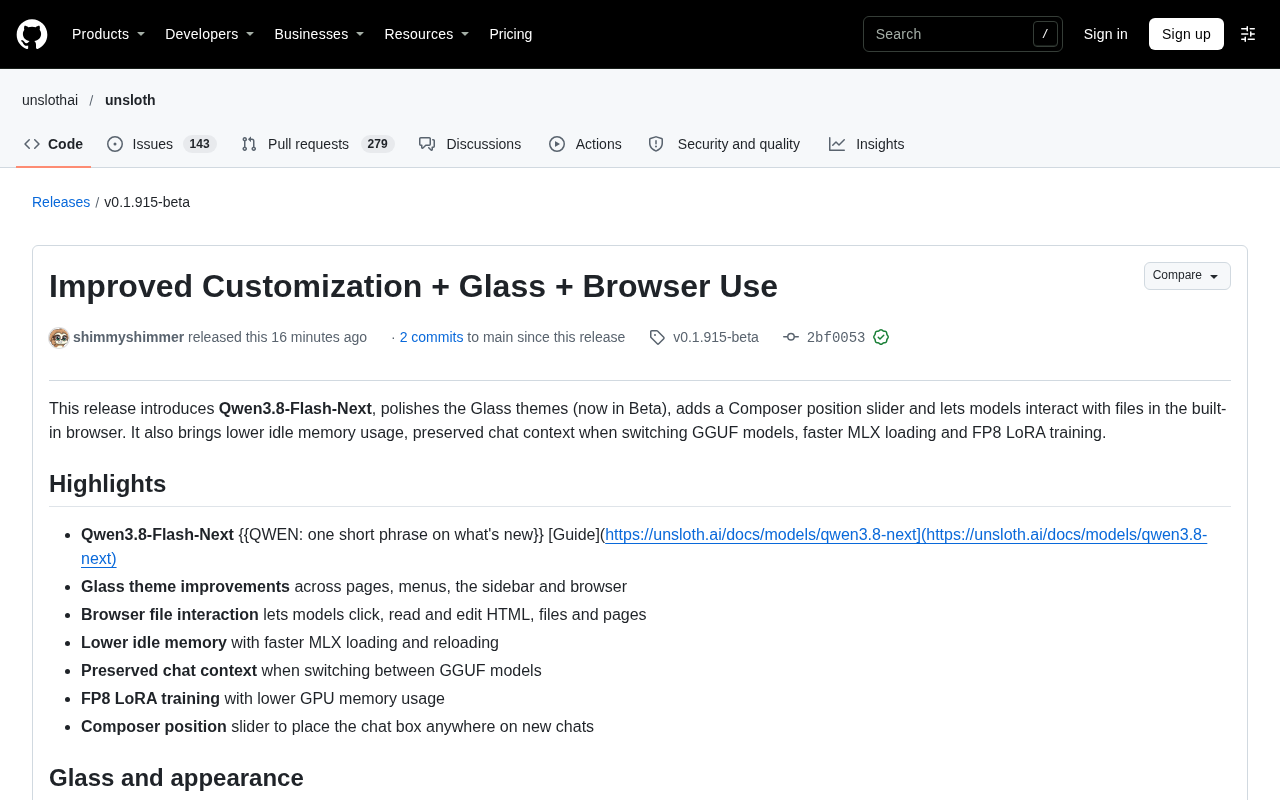
Unsloth Studio has released v0.1.915-beta, focusing on the local model workbench experience. With Browser use enabled, models can click, read, and edit HTML, React, Markdown, code, and text files in the browser panel, with PDF reading and version rollback, reducing switching between editor and browser. The Glass theme enters Beta with a more consistent look, plus a new Composer position slider. Performance-wise, startup no longer loads PyTorch and other ML libraries, idle memory drops significantly, and MLX loading and reloading speed up greatly. Training now supports fp8_lora low-VRAM LoRA training, and DPO/ORPO/KTO/GRPO/CPO arrive on MLX. Overall, this version pushes local models toward a complete workbench but remains a fast-iterating beta.
Unsloth Studio has released version v0.1.915-beta, with this update focusing on the "local model workbench" experience: models can now directly read, write, and edit files in the browser panel, the Glass theme has entered Beta, and significant performance optimizations have arrived, including lower idle memory usage and faster MLX loading.
The Browser Is No Longer a Read-Only Window
According to the changelog on the GitHub release page, once Browser use is enabled, models can click, type, and edit HTML and React pages generated in the chat, and can also directly read and edit HTML, React, Markdown, code, and text files. The "Back" button in the browser restores the previous version, and models can also read PDFs and other documents opened in the browser. This means that for many local models, the "generate code—preview—modify" loop no longer requires switching back and forth between the editor and the browser.
Download prompts now support remembering permissions per site or globally, including for program files. For users who frequently have models download dependencies or tools, this detail reduces interruptions from repeated confirmations.
Glass Theme and Composer Position
The Glass theme is officially marked as Beta. After the update, its highlights are softer, shadows lighter, and the frosted effect across menus, panels, and the browser more consistent; pages like Library, Images, and Train no longer apply heavy blur to background images, open conversations slightly dim the background and give the Composer a denser glass texture. The title bars on Windows and Linux also align better with the Glass theme and background images.
A newly added Composer position slider allows you to place the chat box anywhere on the page in new conversations, via Settings > Appearance > Composer. This change looks minor, but for users on ultrawide monitors or split-screen layouts, the practical impact is considerable.
Optimization of Idle Memory and MLX Loading
The release notes mention that Unsloth no longer loads PyTorch and other ML libraries at startup, significantly reducing idle memory usage; this can be configured in Settings > General > Startup performance. MLX model loading and reloading are dramatically faster, shrinking the context of an already loaded model now takes only seconds; long prompts use less memory on supported MLX models.
Switching GGUF models now preserves chat context, so long histories don't need to be re-read. In scenarios where tools can run without asking, GGUF models can read up to four web pages at once.
MLX is a machine learning array framework developed by Apple for Apple Silicon (M-series chips). Its design fully leverages the unified memory architecture, allowing the CPU and GPU to share the same memory pool and thereby reducing data copy overhead. Compared with general-purpose frameworks like PyTorch, MLX typically achieves lower memory usage and faster loading in local inference and training scenarios on Mac. Unsloth's optimizations for MLX model loading and reloading are built precisely on these underlying framework characteristics of MLX, so the related speedups mainly target users on Apple Silicon devices.
Changes on the Training and API Side
On newer NVIDIA GPUs, 16-bit base models can perform LoRA training with lower VRAM via float8_training = "fp8_lora"; DPO, ORPO, KTO, GRPO, and CPO training now support MLX. OpenRouter models are now loaded live from the API, with support for Reload models. The Decision API adds LiquidAI's d1 model and Decider 2B (MLX only).
This version was released by shimmyshimmer and includes 2 commits, involving more than 12 contributors. Interestingly, the introductory paragraph about Qwen3.8-Flash-Next in the release notes still contains a placeholder to be filled in, so the specific new features need to be checked in the official guide.
LoRA (Low-Rank Adaptation) is a parameter-efficient fine-tuning method: it freezes the original weights of the base model and injects low-rank decomposition matrices alongside certain layers for training, thereby reducing the number of trainable parameters by orders of magnitude and significantly cutting VRAM usage and training time. fp8_lora further stores and computes the LoRA adapter weights in FP8 (8-bit floating point) format, which on newer NVIDIA GPUs (such as Ada Lovelace and Hopper architectures) can leverage native hardware support for lower VRAM requirements. This makes it possible to fine-tune 16-bit base models on consumer or mid-range GPUs, at the cost of evaluating the accuracy loss introduced by quantization.
The DPO, ORPO, KTO, GRPO, and CPO mentioned in the article are all alignment or preference optimization algorithms. DPO (Direct Preference Optimization) directly optimizes the policy using preference-pair data, eliminating the reward model; ORPO merges supervised fine-tuning and preference alignment into a single stage; KTO (Kahneman-Tversky Optimization) only requires labeling "good/bad" rather than pairwise comparisons; GRPO (Group Relative Policy Optimization) estimates advantages through relative comparisons within a group and is often used in training reasoning models; CPO (Contrastive Preference Optimization) optimizes preferences in a contrastive manner. The arrival of these algorithms on MLX means Mac users can also complete preference alignment training locally without relying on a CUDA environment.
Editorial View
The main thread of this update is clear: pushing "running models locally" from a developer tool toward a more complete workbench. In-browser file interaction solves the most common operational loop in agent-style tasks, while reducing idle memory and speeding up MLX loading directly improve the day-to-day feel. The Glass theme entering Beta shows the visual layer is still being polished, but details such as uncleaned placeholders in the changelog and error prompts appearing on page load also remind users that this is still a rapidly iterating beta version.
One-line Summary
Unsloth Studio updates in-browser file editing, the Glass theme, and memory/MLX performance optimizations.
Paragraph Summary
Unsloth Studio has released v0.1.915-beta, focusing on strengthening the local model workbench experience. Once Browser use is enabled, models can directly click, read, and edit HTML, React, Markdown, code, and text files in the browser panel, with PDF reading and version rollback support, reducing switching between the editor and the browser. The Glass theme enters Beta with a more consistent look, and a new Composer position slider is added. On the performance side, startup no longer loads ML libraries like PyTorch, idle memory is significantly lower, and MLX model loading and reloading are much faster. On the training side, fp8_lora low-VRAM LoRA training is supported, and DPO/ORPO/KTO/GRPO/CPO arrive on MLX. Overall, this version is pushing local models from a developer tool toward a complete workbench, but it is still in a rapidly iterating beta stage.
Related articles
 Tech Frontiers
Doubao + Hongguo for AI Comic Drama: A Practical Breakdown of Monetization for Beginners
A breakdown of the Bilibili AI comic drama monetization tutorial: the five-step Doubao + Hongguo workflow, the real structure behind 2,000 yuan per episode, and the two bottlenecks that actually trip up beginners — character consistency and scriptwriting.
 Tech Frontiers
The Tickle Robot in the Lab: Cracking the Neural Code of Itch with a Probe
A tickle robot with precise control of force, speed, and probe size stimulates participants' soles to help researchers quantify how touch becomes itch and explore the neural mechanisms of tactile perception.
 Tech Frontiers
AI Teammates Officially Launch: Proactive Collaboration, Task Ownership, and Slack Integration
Teammates officially launches: AI proactively takes on tasks, integrating Computer tasks, skills, memory, and tools, supports collaboration between teammates and messaging in Slack. Currently available on the web for Max subscribers, marking AI's shift from tool to proactive collaborator.