Unsloth v0.1.807 Update: 20% AMD Performance Boost, Windows & Integrated GPU Optimization
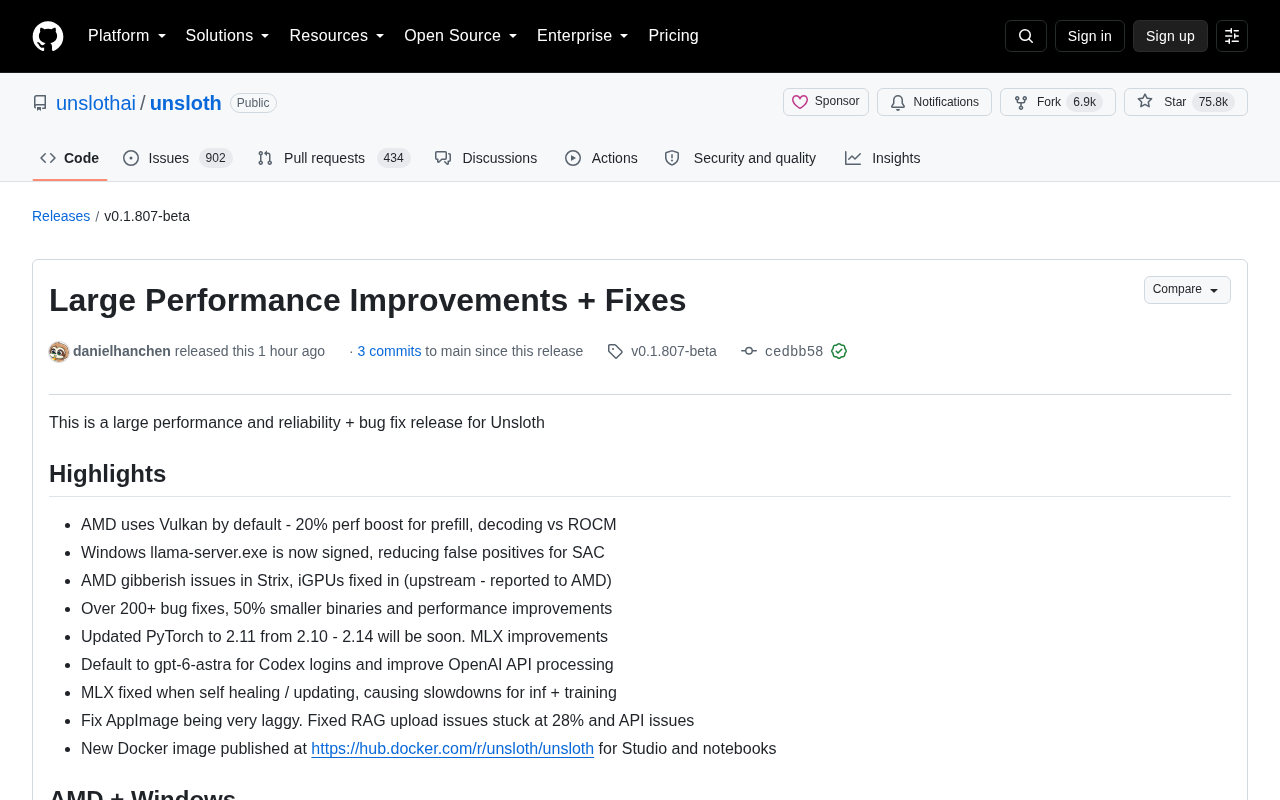
Unsloth v0.1.807: 200+ fixes, 20% faster AMD Vulkan, Windows signing, iGPU support, Docker images
Unsloth v0.1.807-beta delivers major stability and performance improvements with 200+ bug fixes and 50% smaller binaries. AMD users gain 20% faster inference via default Vulkan backend, while Windows gets digitally signed executables. New integrated GPU support, official Docker images for all NVIDIA architectures, and PyTorch 2.11 upgrade round out this quality-focused release.
Overview
Unsloth released v0.1.807-beta on September 8, a major update focused on stability and performance.
Unsloth Framework Background: Unsloth is an open-source framework dedicated to efficient training and inference of Large Language Models (LLMs). By optimizing memory usage and computational efficiency, it enables model fine-tuning and inference on consumer-grade hardware. The framework supports mainstream model architectures like Llama and Mistral, offering cross-platform support including NVIDIA, AMD GPUs, and Apple Silicon. Unsloth's core strength lies in its ability to dramatically lower hardware requirements and operational costs while maintaining model performance—particularly valuable for individual developers and small to medium teams.
This update includes over 200 bug fixes, a 50% reduction in binary size, and deep optimizations for AMD and Windows platforms. Notably, AMD platforms now default to the Vulkan backend, achieving 20% performance improvements in prefill and decoding stages compared to ROCm.
AMD GPU Performance Breakthrough
Vulkan Backend Becomes Default Choice
This update makes Vulkan the default backend for AMD GPUs, replacing the previous ROCm solution.
ROCm vs Vulkan Technology Comparison: ROCm (Radeon Open Compute) is AMD's open-source GPU computing platform, similar to NVIDIA's CUDA. It provides a software stack for deep learning and high-performance computing on AMD GPUs. Vulkan, maintained by the Khronos Group, is a cross-platform graphics and compute API standard. In AI inference scenarios, Vulkan offers better cross-platform compatibility and lower driver dependencies. The Vulkan backend achieves better performance in prefill (processing input prompts) and decoding (generating output tokens) stages through more efficient memory management and instruction scheduling. Unsloth's choice of Vulkan as the default backend reflects the industry trend toward standardization and cross-platform solutions.
Test data shows 20% performance improvements in the two critical stages of prefill and decoding.
Prefill and Decoding Stage Explanation: In large language model inference, prefill and decoding are two core stages. The prefill stage is when the model processes the user's input prompt, requiring parallel computation of representations for all input tokens—a compute-intensive operation. The decoding stage is when the model generates output tokens one by one, with each generation depending on all previous tokens, making it sequential. The prefill stage typically accounts for 30-50% of total inference time, especially when processing long contexts. A 20% performance improvement means users will experience noticeably faster time-to-first-token and smoother generation in real applications.
This improvement is especially important for AMD users, particularly when handling long-context tasks where response times are significantly reduced.
Full Integrated GPU Support
The team fixed garbled output issues on AMD Strix architecture and integrated GPUs (iGPUs), with the problem reported upstream to AMD.
Integrated GPU (iGPU) AI Applications: Integrated GPUs are graphics processing units built into CPU chips. Compared to discrete GPUs, they consume less power and cost less, though performance is relatively limited. In recent years, AMD and Intel iGPU performance has improved significantly, now capable of handling lightweight AI inference tasks. iGPU support means Unsloth can run on laptops, mini PCs, and other devices without expensive discrete graphics cards. This is particularly valuable for edge computing, local AI assistants, and similar scenarios. AMD's Strix architecture is AMD's latest mobile processor architecture, with iGPUs integrating RDNA 3 graphics cores that provide strong AI acceleration capabilities.
Integrated GPUs are now correctly routed to the Vulkan backend, expanding Unsloth's applicability to low-power devices. The installer automatically falls back to ROCm/Vulkan solutions after multiple failed nvidia-smi probes, improving installation success rates.
Windows Platform Optimization Upgrades
Digital Signature Certification
The Windows platform received several critical fixes. llama-server.exe is now digitally signed, dramatically reducing false positives from security software. This improvement allows Windows users to install and run Unsloth more smoothly without worrying about antivirus blocking.
Installation Experience Improvements
The installer fixed three issues affecting user experience, including more accurate loading and update messages, and correct identification and configuration of integrated GPUs. For AMD GPUs without ROCm installed, the installer automatically selects the optimal backend configuration.
Studio Feature Enhancements
API Compatibility Improvements
Studio made significant progress in API compatibility. Added support for standard input_audio message format and fixed incorrect rejection of API keys exceeding 190 bytes. For models that don't support tool calling, the system now returns clear error messages instead of failing silently.
Tool Calling Capability: Tool calling is an important feature of modern large language models, enabling models to call external APIs, database queries, code execution, and other tools to enhance capabilities. Models decompose user requests, identify required tools, generate structured call parameters (typically in JSON format), and then integrate tool-returned results into final answers. This capability evolves LLMs from pure text generators into intelligent agents capable of executing actual tasks. Typical applications include web search, calculators, weather queries, and database operations. Unsloth's improvements to tool calling—including clear error messages and image format conversion—enhance the developer experience for building AI agent applications.
Model Management Optimization
Model loading logic was optimized: the unsloth chat command now loads the model explicitly specified by users rather than other GGUF files in the same directory.
GGUF Format Explained: GGUF (GPT-Generated Unified Format) is an efficient model storage format developed by the llama.cpp project, designed for quantized models. Compared to traditional PyTorch or SafeTensors formats, GGUF packages model weights, configurations, and metadata in a single file, supports memory-mapped loading, and can significantly reduce loading time and memory usage. GGUF also has built-in support for various quantization schemes (like 4-bit, 8-bit), enabling large models to run on consumer hardware. This format has become the de facto standard in the open-source community for running large models locally, widely used in tools like Ollama and LM Studio.
Local GGUF files received unified variant identification, allowing APIs to correctly apply saved settings when loading.
Deep Research and Reasoning Capabilities
The Deep Research feature now dynamically adjusts task scale based on the actually running model and supports generating longer research reports on saved connections. The system added support for GPT-6 Astra, made it the default model for Codex login, and improved OpenAI API processing flow.
Thinking level control for local models was refined, with the system fully utilizing all reasoning levels provided by the model.
Thinking Level Mechanism: Thinking level is a key concept in reasoning-enhanced models (like OpenAI's o1 series). These models perform internal reasoning before generating final answers, forming multi-layered chains of thought. Each level represents a depth of reasoning iteration where the model explores different solution paths, verifies intermediate results, and corrects errors. Higher thinking depths typically produce more accurate, more insightful answers but also consume more computational resources and time. Unsloth's refined thinking level control allows users to balance quality and speed based on task complexity—fully utilizing all levels for complex reasoning tasks while enabling quick responses for simple tasks.
For vision-language models, the MLX runtime now reuses prompt prefixes in multi-turn conversations, improving dialogue efficiency.
Vision-Language Model (VLM) Technology: Vision-Language Models are multimodal AI models that can simultaneously process image and text inputs. These models combine visual encoders (like CLIP, ViT) with large language models to understand image content and engage in conversation, answer questions, generate descriptions, etc. Representative VLMs include GPT-4V, LLaVA, and Qwen-VL. In multi-turn conversations, VLMs need to repeatedly process image features, and the MLX runtime improves dialogue efficiency and response speed by reusing prompt prefixes—caching processed visual token representations to avoid redundant computation.
Docker Image Official Release
Official Image Support
Unsloth released its first official Docker Hub image (unsloth/unsloth), supporting all NVIDIA GPU architectures from Ampere to Blackwell.
Docker Containerized Deployment: Docker is a containerization technology that packages applications and all their dependencies into independent images, ensuring consistent operation across different environments. For AI applications, Docker solves complex environment configuration issues—different CUDA versions, Python package dependencies, system library conflicts, etc. Docker Hub is Docker's official image repository where developers can directly pull pre-configured images. Unsloth providing an official Docker image means users don't need to manually configure environments—they can start a complete development or inference environment with a single command. Architecture support from Ampere (like RTX 3090) to Blackwell (latest generation) covers all mainstream NVIDIA GPUs from recent years.
The image comes in base and Studio versions, with admin passwords easily configurable via the UNSLOTH_STUDIO_PASSWORD environment variable.
Environment Upgrades
PyTorch upgraded from 2.10 to 2.11, with support for version 2.14 coming soon. The installer defaults to torch 2.11 in Linux CPU environments and provides seamless Vulkan backend configuration for AMD GPUs.
MLX and Mobile Optimization
Fixed issues in the MLX self-healing update process that caused inference and training speed degradation.
MLX Framework Introduction: MLX is Apple's machine learning framework optimized for Apple Silicon chips. It uses a NumPy-like API design and fully leverages the unified memory architecture and Neural Engine of M-series chips. MLX supports automatic differentiation, GPU acceleration, and lazy evaluation, making it particularly suitable for model training and inference on Mac devices. Compared to PyTorch or TensorFlow, MLX achieves better performance and power efficiency on Apple devices. Unsloth's support for MLX enables Mac users to fully harness the AI computing power of M chips for local model fine-tuning and deployment.
For Apple Silicon platforms, training and export functionality stability is ensured by locking version compatibility between tokenizers and transformers.
The AppImage version fixed severe lag issues, with the frontend optimizing video gallery performance through delayed entry interface loading and removal of per-card media pipelines.
Developer Tool Improvements
When tool calling is enabled, pasted images are now automatically converted to appropriate formats. Exporting GGUF to Hub no longer redundantly converts models, improving publishing efficiency. For Ollama Modelfiles, the system correctly preserves SYSTEM prompts when date lines are enabled.
For training configuration, unsloth train no longer ignores unknown config keys, and unsloth start dsh correctly applies passed loading settings. Whisper and audio VLM training now use evaluation datasets for TTS and codec training while preserving uploaded evaluation datasets.
Summary
Version v0.1.807 demonstrates the Unsloth team's continued commitment to cross-platform compatibility and user experience. The 20% AMD performance boost, Windows signed executables, full integrated GPU support, and over 200 bug fixes together constitute this quality-focused major update. The Docker image release and PyTorch version upgrade lay the foundation for future feature expansion.
For AMD users, the default enablement of the Vulkan backend is a milestone improvement. Windows users can enjoy smoother installation experiences with less security software interference. Developers can build and deploy AI applications more efficiently through improved API compatibility and toolchains.
Key Takeaways
- 200+ bug fixes with 50% binary size reduction
- AMD Vulkan backend delivers 20% performance improvement in prefill and decoding
- Windows digital signature reduces false positives from antivirus software
- Integrated GPU support expands deployment to low-power devices
- Official Docker images support NVIDIA architectures from Ampere to Blackwell
- PyTorch 2.11 upgrade with 2.14 support coming soon
- Enhanced API compatibility with better tool calling support
- MLX optimization for Apple Silicon platform stability
Related articles

Microsoft AI Agent Breakthroughs: More Efficient, Better at Code and Weather Forecasting
Microsoft Research Focus Issue 97: ForkPilot cuts agent inference costs, Cabra reveals coding agents' code-understanding gap, Teletune learns workflows from logs, PBC improves extended forecasts, BioEMU-2 opens preview.

Prime Intellect Releases Prime Mega MoE: Trainable Fused MoE Kernel with 3.11x Forward Speedup
Prime Intellect releases Prime Mega MoE, adding backpropagation to DeepSeek's fused Mega MoE kernel for trainability. Up to 3.11x forward speedup and 34% faster Qwen3 MoE training steps in prime-rl.

Meta Quietly Launches AI Fashion App Style Sketch: Build a Virtual Wardrobe from Instagram Photos
Meta quietly launched Style Sketch, an AI fashion app that connects to Instagram to build a virtual wardrobe from shared photos, plus manual entry via camera, video, or gallery upload. This analysis covers its product logic, competitive landscape, and implications for AI app developers.