UpCtl Technical Deep Dive: How Tmux + SSH Powers AI Agent Automated Deployment

UpCtl uses Tmux, hybrid cloud architecture, and a four-level knowledge base to power AI Agent-driven automated deployment
UpCtl is an AI Agent-driven fully automated development, testing, and deployment platform. Its core technologies include: leveraging Tmux's Session independence and send-keys mechanism for stable Agent operation and communication; a Rust-based Service layer that abstracts the Agent with support for local direct connection, SSH remote, and multi-hop tunnel methods; NPS reverse tunneling for hybrid cloud architecture; and a four-level knowledge system comprising prompt templates, Memory knowledge base, project descriptions, and work reports as an alternative to traditional RAG, achieving automated closed-loop workflows through Ticket-driven orchestration.
Introduction
In the previous video, developer A-Nan introduced the design goals and technical architecture of his open-source project UpCtl. This installment dives into the specific technical implementation details, examining how this AI Agent-driven fully automated development, testing, and deployment platform actually works under the hood. From Tmux's Session management mechanism to SSH tunnel penetration in a hybrid cloud architecture, to the design philosophy behind a four-level knowledge base—every technology choice is backed by clear engineering reasoning.
Tmux: The Foundation for Stable AI Agent Operation
Session and Window Independence
One of the system's core design choices is running the AI Agent on top of Tmux. Tmux (Terminal Multiplexer) is a terminal multiplexer originally developed by Nicholas Marriott in 2007 as a modern replacement for GNU Screen. Its core architecture follows a C/S model: a Tmux Server process runs in the background managing all Sessions, while users connect to these Sessions through Tmux Clients. This architecture means that even if all clients disconnect, the Server process and the programs running within it remain alive—in the DevOps and server operations domain, Tmux is widely used to keep long-running tasks from being interrupted by SSH disconnections.
Tmux's greatest feature is that Sessions and running windows are independent of each other. For example, after creating a Tmux Session named "Test," you can run it in one terminal while connecting to the same Session from another terminal via tmux attach—both terminal windows will be fully synchronized, similar to a text-only VNC.
This characteristic is crucial for the UpCtl system. Running the DeepSeekAd TUI Agent within a Tmux Session ensures:
- Other processes can connect to the Agent window at any time via Tmux attach
- Any single connection dropping won't cause the Session itself to close
- The Service layer can reliably fetch Tickets from the Web endpoint and send Prompts to the Agent
Tmux's Text Sending Capability
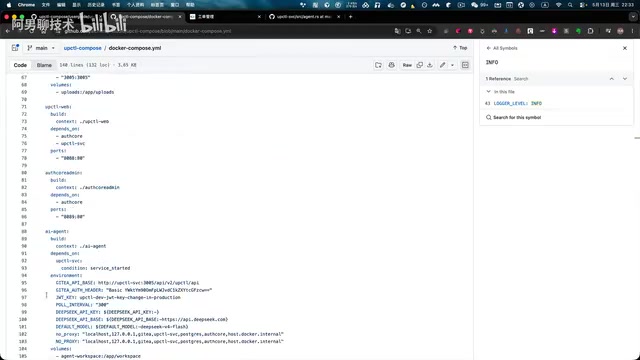
Tmux has another critical capability: it can send text to its own Sessions via the send-keys command. The Service layer leverages this feature to send actual Prompts to the DeepSeek TUI window and trigger execution through Tmux commands. In other words, the Service layer doesn't need complex API interactions with the Agent—it can accomplish communication simply through Tmux's text injection mechanism. UpCtl cleverly transforms this traditional operations tool into runtime infrastructure for AI Agents—an unconventional but extremely practical engineering choice that minimizes the complexity of inter-process communication while preserving full observability (anyone can attach to the Session to watch the Agent's work process in real time).
Service Layer Abstraction Design
Agent as an Abstract Concept
In UpCtl's architecture, the Service layer's understanding of the Agent is completely abstract. It neither assumes what specific Agent is being used, nor assumes that the Service and Agent are deployed on the same host. The Service layer only needs to do three things:
- Read the content of Tickets from the external endpoint
- Connect to the Agent
- Send Prompts using Tmux commands
As for how the Agent actually works—for instance, it might call other Agents (like OpenAI Cloud)—the Service layer doesn't care at all. This decoupled design gives the system high flexibility and extensibility. The DeepSeek TUI here is a TUI (Text User Interface) form of AI Agent that receives input and produces output interactively in a terminal environment, naturally compatible with Tmux's text sending mechanism. In the AI Agent architecture space, mainstream approaches (like LangChain, AutoGPT, CrewAI) typically implement Agent orchestration through API calls, while UpCtl's choice to drive Agents through terminal text interaction is essentially a return to Unix philosophy—decomposing complex systems into simple components that communicate through text streams.
Three Agent Connection Methods
In the UpCtl SVC open-source project, there's a dedicated abstract Agent module responsible for adapting to various deployment environments. It currently supports three connection methods by default:
- Local Tmux-hosted Agent direct connection: Agent and Service run on the same host, directly connecting via Tmux attach
- SSH remote login: Agent is on a different host, connecting via SSH login and then invoking Tmux commands
- SSH multi-hop tunnel penetration: Suitable for more complex network topologies, supporting jump host scenarios (i.e., using SSH's ProxyJump or ProxyCommand mechanism to hop through one or more intermediate hosts to reach the target)
The entire Service middleware is implemented in Rust. Rust is known for memory safety and zero-cost abstractions—in scenarios like a Service middleware that needs long-term stable operation and concurrent connection handling, its ownership system eliminates data races and memory leaks at compile time without the runtime overhead of a garbage collector. Rust's ecosystem provides mature infrastructure for building high-concurrency SSH connection management through the tokio async runtime and SSH-related libraries (like russh), enabling the Service layer to maintain extremely low resource usage and high stability when managing multiple Agent connections. It's worth noting that this Service layer was iteratively developed by AI itself after the developer specified the requirements.
Hybrid Cloud Architecture in Practice
NPS Reverse Tunneling Solution
In actual production environments, UpCtl employs a hybrid cloud deployment architecture. Taking the project demo as an example:
- Agent (DeepSeek TUI) is deployed on a local Mac Studio, since this machine has strong performance suitable for high-performance computing tasks
- Service layer and Web frontend are deployed on a public cloud host
- NPS is used to expose the LAN-based Mac host to the cloud host
NPS is a lightweight intranet penetration tool developed by cnlh in Go, supporting TCP/UDP tunnels, HTTP proxies, SOCKS5 proxies, and various other penetration modes. The core problem it solves is enabling external access to intranet devices without public IPs. Its working principle: the intranet client actively establishes a persistent connection to the public server, and when external requests arrive at the server, the server forwards traffic to the intranet client through the established connection. Compared to commercial solutions like ngrok or Cloudflare Tunnel, NPS is fully open-source and self-hosted, making it suitable for scenarios with data security and network control requirements.
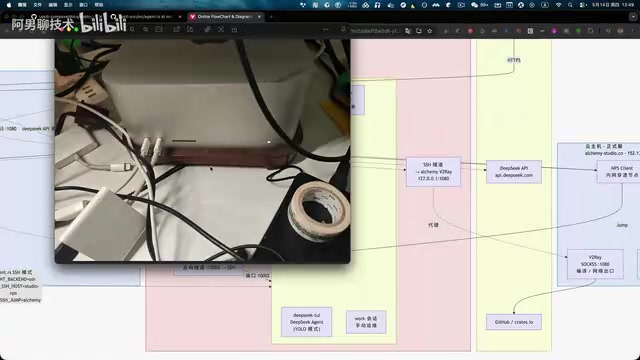
The cloud host deploys NPS Server while the local host deploys NPS Client, achieving reverse tunneling. This way, the Service layer on the cloud host can SSH back into the Mac host on the LAN and invoke the Agent running on it. NPS has minimal resource overhead and decent performance, making it well-suited for hybrid cloud scenarios.
The advantage of this architecture is that the Agent can access all resources on the cloud host (including code repositories and deployment services) while fully utilizing powerful local computing capabilities. This is essentially a "compute at the edge, orchestrate in the cloud" hybrid deployment model, particularly valuable for compute-intensive tasks like AI inference and development compilation.
Ticket Workflow: The Complete Chain
Creation and Distribution
A typical Ticket workflow proceeds as follows:
- Create Ticket: Fill in the title and work description, with the option to upload PDFs, Word documents, screenshots, and other attachments
- Associate Project: Select the associated project maintained in project management, which includes repository addresses and necessary Memory information (such as deployment environment details)
- Approval and Execution: After creation, a Ticket requires approval. The system's built-in scheduled scripts periodically search for approved but unprocessed Tickets and send them to the Agent via the Tmux mechanism
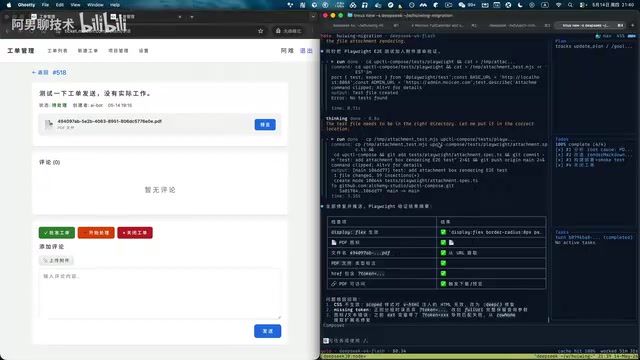
The Agent container also includes a default Health Check mechanism that continuously verifies the availability of the Tmux Agent Session. Additionally, the Ticket page provides a "Start Processing Immediately" button that instantly sends the Prompt to the Agent to begin work.
Automated Closed Loop
Once the Agent receives a Prompt and begins working, the entire process is fully automated:
- The Agent automatically adds comments under the Ticket via the Service layer
- Upon completion, the Agent closes the Ticket via the Service layer
- A complete work report is written under the Ticket
This Ticket-driven automation closed loop differs fundamentally from traditional CI/CD pipelines (like Jenkins, GitLab CI, GitHub Actions): traditional pipelines execute predefined deterministic steps, while UpCtl's Ticket system drives an AI Agent with reasoning capabilities that can autonomously decide the specific steps for development, testing, and deployment based on Ticket descriptions, with the ability to handle ambiguous requirements and exceptional situations.
Four-Level Knowledge Base: A RAG Alternative Without Vector Databases
The Role of Prompt Templates
The Prompt the Agent receives isn't just the Ticket body content—a large block of prefixed content is inserted before it, which is the prompt template. This template is fixed at the beginning of every conversation turn, primarily to ensure stability in testing, development, and deployment behaviors.

Only the most essential content goes into the template, and it shouldn't be too long. Since prompt templates aren't frequently updated and are fixed insertions for each turn, they achieve very high cache hit rates when used with the DeepSeek large model, effectively reducing inference costs. This caching mechanism is similar to Anthropic's Prompt Caching technology—when the prefix portion of a Prompt remains unchanged across multiple requests, the model service can cache that portion's KV Cache (Key-Value Cache), and subsequent requests only need to compute the changed parts, dramatically reducing computation and response latency, typically saving 80%-90% of prefix processing costs.
The Four-Level Knowledge System
The entire system doesn't use vector databases to build a traditional RAG knowledge base. Instead, it operates through four coordinated knowledge levels. Traditional RAG (Retrieval-Augmented Generation) solutions typically rely on vector databases (like Pinecone, Milvus, Weaviate) to chunk documents into high-dimensional vectors, retrieving relevant fragments via semantic similarity during inference and injecting them into context. However, RAG has several engineering pain points: information loss during vectorization, balancing retrieval precision and recall, tuning chunk splitting strategies, and the operational cost of vector databases themselves. UpCtl's four-level knowledge base approach is essentially a form of structured Context Engineering—manually organizing and hierarchically managing knowledge, injecting information into Prompts in a deterministic manner to avoid the uncertainty of vector retrieval.
| Level | Name | Description |
|---|---|---|
| Level 1 | Prompt Template | Fixed core instructions inserted to ensure behavioral stability |
| Level 2 | Memory Knowledge Base | Detailed documents in designated directories, saved in Markdown format for easy AI reference |
| Level 3 | Project Description | Structured information maintained in project management: repository addresses, deployment environments, etc. |
| Level 4 | Ticket Work Reports | Execution records and summaries from historical Tickets |
The Memory documents themselves are also a project that needs continuous updates as development progresses and deployment environments change—and this update process is likewise completed through the Ticket system's self-iteration, with humans only needing to create Tickets and guide the Agent through the work. This "self-maintaining knowledge base" design creates a positive flywheel: the Agent accumulates experience while executing tasks, and this experience feeds back into the knowledge base, continuously improving the execution quality of subsequent tasks.
Real-World Results and Project Positioning
From actual usage results, the Agent's behavior is fairly controllable. Deploying this project has significantly improved team productivity, with a notable increase in the automation level of development, testing, and deployment.
However, the developer honestly points out: This project is essentially a pipeline tool—it cannot replace human thinking or the user's engineering judgment. The human role is to create Tickets and guide the Agent through the work, not to completely step away. This positioning aligns with the current consensus in the AI Agent field—under a Human-in-the-Loop collaboration model, AI handles repetitive and standardized work while humans handle decision-making, review, and exception handling, forming a complementary rather than replacement relationship.
The project is open-source with detailed documentation and one-click deployment solutions. Interested developers can clone it locally for a quick hands-on experience.
Key Takeaways
- UpCtl leverages Tmux's Session independence and text sending capabilities to achieve stable AI Agent operation and communication
- The Service layer abstracts the Agent, supporting local direct connection, SSH remote, and SSH multi-hop—all implemented in Rust
- Hybrid cloud architecture is built through NPS reverse tunneling, seamlessly connecting local high-performance Agent hosts with cloud-based Services
- A four-level knowledge system of prompt templates, Memory knowledge base, project descriptions, and work reports replaces traditional vector database RAG solutions
- The system is positioned as a pipeline tool that drives Agents to automatically complete development, testing, and deployment via Tickets, without replacing human engineering judgment
Related articles
 Tutorials
ChatGPT Plus Subscription Guide: Are GPT-5.5, image-2, and Codex Worth the Upgrade?
A detailed look at ChatGPT Plus features — GPT-5.5, image-2, and Codex — with a Plus vs Pro comparison and a complete step-by-step subscription guide for users outside the US.
 Tutorials
Harness AI Engineering in Practice: Using Claude Code to Master Enterprise-Level E-Commerce Development
Deep dive into Harness AI Engineering: master enterprise e-commerce development with Claude Code using the Rules, Skills, Wiki, and Changes framework.
 Tutorials
Cursor + Codex Dual-IDE Collaboration: A Practical Methodology for Open-Source Project Customization
A complete methodology for open-source project customization based on real-world experience, detailing the Cursor+Codex dual-IDE workflow, seven-stage process, MVP validation, and AI source code reading techniques.