Use Claude Code for Free: CC Switch + Ollama Local Model-Powered AI Programming Agent Tutorial

Use CC Switch to disguise local AI models as Claude for zero-cost Claude Code programming
This article introduces a method using the open-source project CC Switch to disguise locally running AI models (such as Qwen, Gemma, etc.) as the Claude API through protocol translation, enabling free use of Claude Code Desktop for AI programming. The solution consists of three components: Claude Code Desktop, Ollama local model runtime, and the CC Switch reverse proxy, achieving a fully local AI programming Agent with no API fees and no internet connection required.
Local Models Can Drive Claude Code? A Zero-Cost AI Programming Solution
Claude Code, the powerful AI Agent from Anthropic, has always required a paid API to use. But recently, a highly creative approach has emerged in the AI community — using the open-source project CC Switch to "disguise" locally running AI models (such as Qwen, Gemma, DeepSeekAd, etc.) as Claude, directly driving the Claude Code desktop app for full-featured development operations.
This means: no API fees, no internet connection required, fully local execution — and you get a fully functional AI programming Agent.
The True Value of Claude Code: More Than a Chat Tool
Many people might think of Claude Code as just another AI chat tool, but its real value lies in its Agent capabilities. Claude Code is built on Anthropic's Claude model, with "Tool Use" architecture at its core. Unlike regular chat AIs, Agent systems can autonomously plan multi-step tasks, invoke external tools, and iteratively execute based on feedback. Anthropic calls this capability "Computer Use," allowing the model to directly manipulate the file system, terminal, and IDE. This paradigm originates from the ReAct (Reasoning + Acting) framework — at each step, the model first reasons about the current state, then decides on the next action, forming a "Think → Act → Observe" loop until the task is complete.
Claude Code is essentially a deep integration of AI + IDE + Terminal + File System:
- Ultra-long context: Can read an entire project at once, analyzing the complete codebase and dependency relationships
- Automated operations: Can automatically modify files, install dependencies, and execute commands
- End-to-end development: A single sentence can complete the entire workflow from requirements analysis to code implementation
For example, you just need to say "Add a login system to this website," and Claude Code will automatically read the project code, analyze the structure, modify files, install dependencies, and even run commands to complete the entire feature. This capability far exceeds ordinary AI chat tools.
CC Switch Core Principle: How to "Fool" Claude Code
The core architecture of this solution is quite elegant, consisting of three components:
| Component | Role |
|---|---|
| Claude Code Desktop | Provides the Agent interaction interface |
| Ollama | Hosts and runs local AI models |
| CC Switch | Model disguise and request forwarding |
CC Switch's "bait and switch" capability relies on the widespread adoption of the OpenAI API as a de facto standard. Currently, the vast majority of AI service providers (including Anthropic, Google, Alibaba Cloud, etc.) offer interfaces compatible with the OpenAI Chat Completions format, making the implementation of an intermediary proxy layer possible. CC Switch is essentially a reverse proxy server that intercepts Anthropic-format requests from Claude Code (containing specific headers and model name fields), converts them to OpenAI-compatible format before forwarding to Ollama, then reverse-converts the responses back to Anthropic format. This "protocol translation" pattern is quite mature in the AI infrastructure space, with projects like LiteLLM using a similar approach.
In short: Claude Code Desktop thinks it's calling Anthropic's official API, but all requests are intercepted by CC Switch and forwarded to the local Ollama model. The local model's responses are then wrapped by CC Switch into Claude API format and returned, achieving a seamless swap.
CC Switch + Ollama + Claude Code: Detailed Deployment Tutorial
Step 1: Install Git (Prerequisite)
If you haven't installed Git on your computer yet, you'll need to do so first. Go to the Git official website to download the latest version and keep the default settings during installation.
Step 2: Download and Install Claude Code Desktop
Go to the official Claude Code page to download the desktop client. Windows users should select the correct version:
- x86/x64 version: Suitable for most computers (recommended)
- ARM version: Suitable for ARM architecture devices
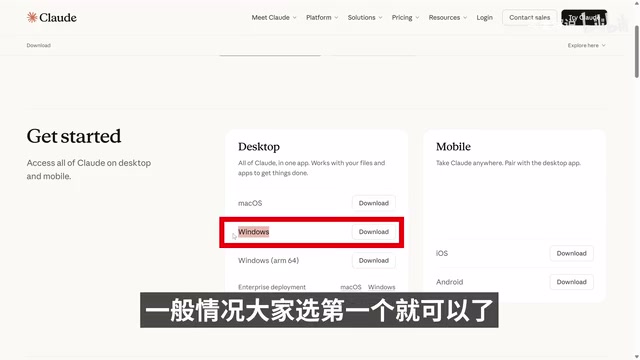
After installation, do not open it yet — wait until the subsequent configuration is complete before launching.
Step 3: Install the CC Switch Proxy Tool
CC Switch is the core component of this solution. Go to its GitHub page to download the latest Release version, and select the appropriate installer for your operating system (Windows version is about 11MB). After installation, a control panel interface will appear — no configuration needed for now.
Step 4: Install Ollama and Download Local Models
Ollama is an open-source local model runtime built on llama.cpp, supporting CPU and GPU hybrid inference. It packages model weights, runtime configuration, and HTTP services together, exposing an OpenAI-compatible REST API on localhost:11434 by default. Ollama also supports model quantization (such as Q4_K_M, Q8_0 precision levels), significantly reducing VRAM requirements with minimal precision loss, enabling consumer-grade GPUs to run models with billions of parameters.
Go to the Ollama official website to download the client (Windows version is about 1.9GB). After installation, download the local models you need via the command line.
Local Model Selection Guide:
- 24GB+ VRAM: Consider Gemma 4 26B (approximately 17GB), best coding performance
- 8GB VRAM: Recommend Qwen 3.5 9B (approximately 6.6GB), good compatibility
- Note the difference between text-only models (TXT) and multimodal models (TXT+Image)
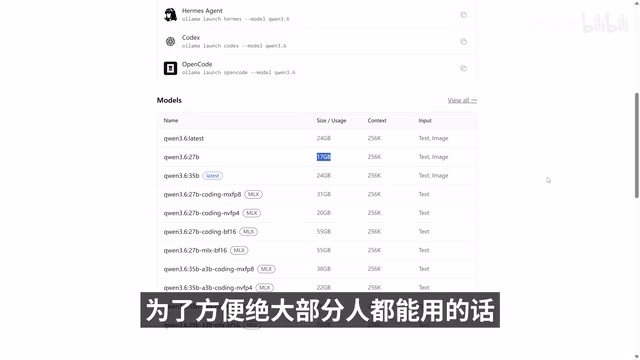
Download command examples:
ollama pull qwen3.5:9b
ollama pull gemma4:26b
You can view the list of installed models with ollama list.
Step 5: Configure CC Switch to Connect to Ollama Local Models
Open the CC Switch control panel, click "Add New Provider," and select "Custom Configuration":
- Provider Name: Custom, e.g., "Ollama"
- API Key: For local models, enter anything, e.g., "123456"
- Request URL: Enter the Ollama local address
127.0.0.1:11434 - API Format: Select "OpenAI Compatible Mode"
- Authentication Method: Select "Bearer API Key"
- Primary Model: Enter the name of the model you downloaded, e.g.,
qwen3.5:9b
After configuration, click Add, then enable local routing:
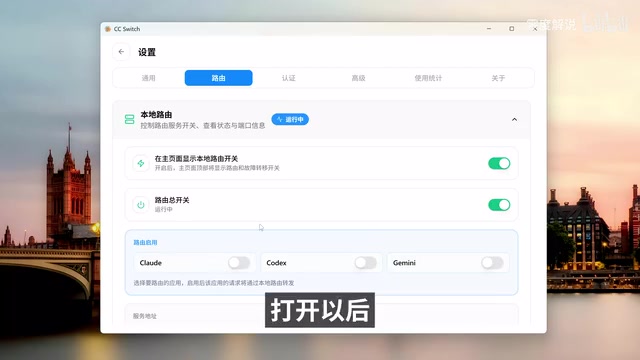
Go to the settings page, enable the routing forwarding function, and ensure Claude route forwarding is enabled. Note down the displayed service address — you'll need it when configuring Claude Code later.
Step 6: Enable Windows Virtualization Features
Claude Code Desktop on Windows relies on WSL (Windows Subsystem for Linux) and the Virtual Machine Platform. Claude Code's terminal execution environment is built on Linux container technology and requires WSL2 for full Linux kernel support. WSL2 uses a real Linux kernel (running in a lightweight Hyper-V virtual machine), supporting complete system calls so that package managers like npm and pip, as well as bash scripts, can run natively. The "Windows Hypervisor Platform" is a foundational component of Hyper-V that provides hardware support for WSL2's virtualization layer.
In the Windows search bar, type "Turn Windows features on or off"
Related articles
 Tutorials
ChatGPT Plus Subscription Guide: Are GPT-5.5, image-2, and Codex Worth the Upgrade?
A detailed look at ChatGPT Plus features — GPT-5.5, image-2, and Codex — with a Plus vs Pro comparison and a complete step-by-step subscription guide for users outside the US.
 Tutorials
Harness AI Engineering in Practice: Using Claude Code to Master Enterprise-Level E-Commerce Development
Deep dive into Harness AI Engineering: master enterprise e-commerce development with Claude Code using the Rules, Skills, Wiki, and Changes framework.
 Tutorials
Cursor + Codex Dual-IDE Collaboration: A Practical Methodology for Open-Source Project Customization
A complete methodology for open-source project customization based on real-world experience, detailing the Cursor+Codex dual-IDE workflow, seven-stage process, MVP validation, and AI source code reading techniques.