UseIt Studio: An AI Design Agent That Delivers Editable Production Files
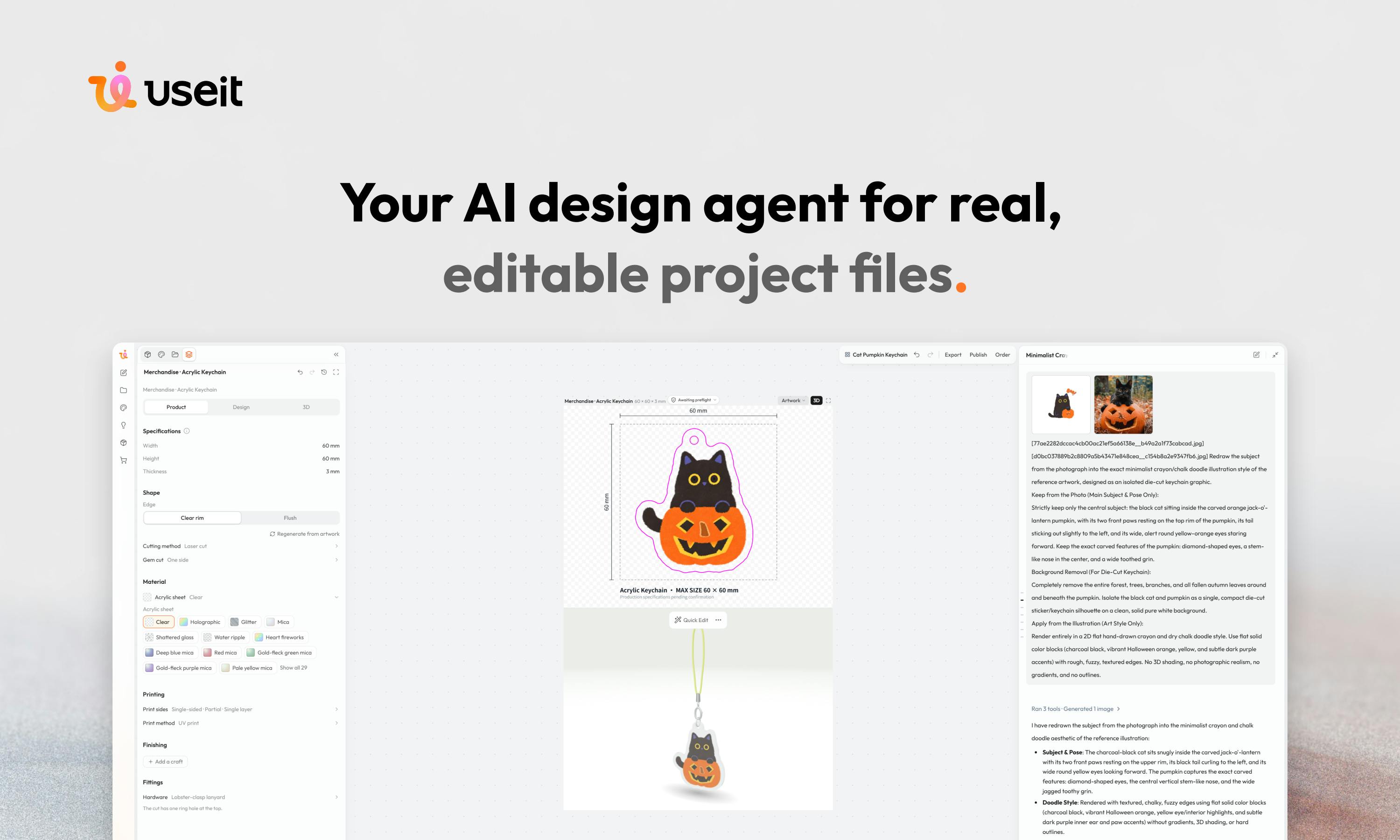
UseIt Studio advances AI design from image generation to production-ready files you can print, cut, and fold.
UseIt Studio is a Product Hunt-topping AI design tool that outputs editable files with real dimensions, bleed lines, and dielines—ready for printing, cutting, and folding. It covers stickers, pins, gift boxes, pop-up cards, and brand kits. Its designer-style questioning replaces prompt engineering, and it supports point-and-refine editing. Available in browser and on Windows desktop.
Title
UseIt Studio: An AI Design Agent That Delivers Editable Production Files
Meta Description
UseIt Studio is the AI design agent that topped Product Hunt. Describe your needs in one sentence, refine through conversation, and get editable production files with real dimensions, bleed lines, and dielines—for stickers, pins, gift boxes, pop-up cards, and other physical materials.
Article Content
Most AI design tools stop at generating a good-looking image, but actually turning that into a physical product—stickers, pins, gift boxes, pop-up cards—still requires dealing with the hard work "beyond design": dimensions, bleed lines, and dielines. UseIt Studio, which topped Product Hunt, attempts to bridge this gap: it doesn't just give you an image, but an editable engineering file with real dimensions that can be directly printed, cut, and folded.
Start with One Sentence, Ask Questions Like a Designer
UseIt's interaction model is clearly different from common text-to-image tools. You only need to describe what you want in one sentence, and then it will ask follow-up questions like a designer—what material, what use case, what style preference. This "ask first, then do" workflow transforms the barrier of prompt engineering into conversational requirement clarification, which feels closer to real design collaboration for users unfamiliar with AI image generation parameters.
According to the Product Hunt page, the product received 168 upvotes and 16 comments, taking the top spot for the day. The creators are Lindia Chen and Daniel Gao. Judging from the community response, the niche of "design you can hold in your hand" has indeed hit a pain point.
Editable Files Are the Core Differentiator
UseIt's most noteworthy capability is outputting real editable design files rather than flattened images. The files include real dimensions, bleed, and dielines, and can go directly into printing, cutting, and folding workflows.
This determines its applicable categories: pins, stickers, gift boxes, pop-up cards, brand kits, and more. In traditional workflows, taking such materials from flat artwork to production-ready files often requires designers to manually add dielines and bleed settings—UseIt builds this step into the generation process.
Another interaction highlight is "point and refine": users can directly point to a specific detail in the design to refine it, without having to re-describe the entire requirement. This locally controllable editing approach is closer to real design iteration habits than repeatedly regenerating.
Bleed is a mandatory standard in the printing industry: the design file needs an additional 2–3mm extension area beyond the finished dimensions, and the pattern must fill that area. Cutting tools have a normal tolerance of ±0.5mm; without bleed, even a tiny offset will expose white edges on the finished product. Dielines are the path maps for cutting, creasing, and folding, usually presented as spot-color layers that distinguish solid cut lines, dashed crease lines, and fold angles. The die-cut outline of stickers, the flap structures of gift boxes, and the folding joints of pop-up cards are all defined by dielines. These two types of information are completely absent in ordinary image generation and must be manually drawn by structural or prepress engineers—which is exactly what UseIt attempts to build in.
Brand kits refer to a packaged set of brand visual assets, typically including multiple versions of a logo, standard color values (CMYK/Pantone), font licensing, and layout guidelines, used to ensure visual consistency across different materials and suppliers. In physical printing scenarios, brand kits also need to include spot color and rich black settings; otherwise, the same logo will show noticeable color differences across batches.
Browser and Desktop, Available Anytime
UseIt can be used in the browser and can also be invoked anytime via the Windows desktop app. Dual-platform coverage means it is suitable both for lightweight quick experiments and for embedding into daily design workflows.
It is worth noting that the officially announced desktop support is currently for Windows only; Mac users temporarily need to rely on the browser version.
Who Should Use It
Judging from its positioning, UseIt is not aimed at large industrial design teams, but at small brands, independent creators, e-commerce sellers, and event planners who need to quickly produce physical materials. These users often do not have dedicated structural designers, yet have hard requirements for the compliance of print files.
Of course, whether AI-generated production files can be completely inspection-free under complex processes still needs to be verified in actual printing—details such as dieline precision and material compatibility have not yet been explained in depth in publicly available information. It is recommended to confirm with a small sample proof before formal mass production.
There are two other often-overlooked implicit requirements in print delivery that also determine whether AI-generated files can truly be inspection-free. The first is color mode: screen design uses RGB, while printing must be converted to CMYK. The gamut difference between the two will make vivid blues and fluorescent greens noticeably darker in the finished product, and spot colors (such as Pantone) need to be specified separately rather than converted by AI on its own. The second is material compatibility: when the same dieline is used on coated paper, kraft paper, PVC adhesive, or corrugated board, the crease depth, fold-angle compensation, and minimum fold edge width are all different. The thicker the board, the more extra "fold allowance" is needed for folding; otherwise, the edges will bulge and crack after folding. These parameters are usually manually fine-tuned by the print shop according to equipment and materials, and the publicly available information has not yet indicated whether UseIt incorporates these variables into its generation logic. Therefore, small sample proofing remains a necessary step.
Summary
UseIt Studio's value proposition is clear: it advances AI design from "generating images" to "delivering production-ready files." Real dimensions, bleed lines, and dielines, combined with conversational requirement clarification and point-and-refine editing, constitute its differentiation from general text-to-image tools. For users who need to quickly produce physical merchandise and brand materials, this is a new option worth watching.
One-line Summary
UseIt Studio advances AI design from generating images to delivering engineering files that can be directly printed, cut, and folded.
Paragraph Summary
UseIt Studio is an AI design tool that topped Product Hunt. Its core difference is that it not only generates good-looking images, but outputs editable design files with real dimensions, bleed lines, and dielines that can go directly into printing, cutting, and folding workflows, covering physical materials such as stickers, pins, gift boxes, pop-up cards, and brand kits. Its interaction uses designer-style follow-up questions to clarify requirements instead of prompt engineering, and supports pointing to local details for refinement. The product offers a browser version and a Windows desktop app, with no native Mac support for now. It targets small brands, independent creators, and e-commerce sellers without dedicated structural designers, but the reliability of generated files under complex processes still requires small sample proofing for verification.
Related articles

A New Paradigm for Text Editing in Compose: TextFieldState Replaces the Old API
Jetpack Compose introduces the TextFieldState API to fix dropped characters and cursor jumps from async input. The old value/onValueChange callbacks will be deprecated in 1.13. This article covers InputTransformation, OutputTransformation, four state hoisting patterns, and new formatted text editing capabilities.

Remote Compose: A New Document-Driven Paradigm for Cross-Platform UI on Android
Remote Compose transmits compact binary documents instead of screen pixels, enabling efficient UI rendering on remote surfaces like Wear OS and widgets. This article covers its document creation API, expression animations, size optimization techniques, and Wear OS progress.

How Crashlytics Eliminates Android Memory and Responsiveness Issues
Through the Chroma Clip case study, this article explains how Firebase Crashlytics uses Application Exit Info, Profiling Manager, GWP ASAN, and ARM MTE to pinpoint ANRs, OOMs, memory limit terminations, and native memory corruption—solving the challenge of stack traces that don't point to the real culprit.