Using AI to Crack Infinite Debugger Anti-Debugging in One Click: A Hook Script Hands-On Tutorial
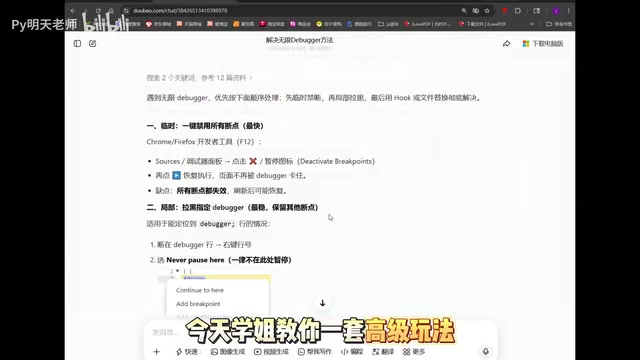
Use professional Prompts to have AI generate Hook scripts that bypass infinite debugger anti-debugging
This article explains the principles behind Infinite Debugger anti-debugging in web reverse engineering (timers, Function constructor, eval dynamically generating debugger statements), and proposes using carefully designed professional Prompts to have AI generate targeted Hook script code. By overwriting the Function constructor, intercepting timers and eval functions, then injecting via browser Snippets or Tampermonkey extensions, you can completely bypass Infinite Debugger.
What Is Infinite Debugger? Why Is It So Tricky?
In web reverse engineering, Infinite Debugger is one of the most common front-end anti-debugging techniques. The moment you open the browser's F12 developer tools, the page bombards you with breakpoint windows, making it virtually impossible to debug or capture network traffic normally.
To understand why it's so hard to deal with, you need to first grasp its underlying mechanism. Infinite Debugger exploits the fact that when developer tools are active, the browser significantly slows down the execution of debugger statements. By triggering breakpoints at high frequency in a loop, it paralyzes the entire debugging workflow. There are three common implementations: first, using setInterval or setTimeout timers to execute a function containing a debugger statement every few milliseconds; second, using the Function constructor to dynamically generate code strings containing debugger, bypassing static code analysis; and third, using eval() to directly execute strings containing the debugger keyword. These approaches are difficult to bypass with simple methods because the code is dynamically generated at runtime, making it impossible to locate the source through static searching.
Ask AI how to solve it? In most cases, AI will mechanically tell you to "right-click and select Never Pause Here" — a textbook answer with virtually zero practical value.
This article introduces a more advanced approach: using carefully designed Prompts to turn AI into your anti-debugging power tool, automatically generating Hook script code to completely bypass Infinite Debugger.
Core Strategy: Making AI Understand Reverse Engineering Jargon
When average users ask AI "how to solve Infinite Debugger," they typically get vague conceptual explanations. Where's the problem? Your Prompt isn't professional enough.
Prompt Engineering refers to the methodology of carefully designing input instructions to maximize the output quality of AI models. In technical scenarios, high-quality Prompts typically include four dimensions: role assignment (e.g., "You are a security researcher specializing in JavaScript reverse engineering"), context constraints (specifically describing the anti-debugging implementation mechanism), output format specifications (requiring directly executable code rather than explanatory text), and boundary condition descriptions (such as browser version compatibility or specific injection timing). Research shows that Prompts using domain-specific terminology can improve LLM code generation accuracy by over 40% compared to natural language descriptions, because professional terminology helps the model more precisely activate relevant knowledge graphs from its training data.
Reverse engineering has its own terminology system. You need to explicitly tell the AI in your Prompt:
- What the specific anti-debugging path is (e.g., whether it's through the
Functionconstructor or timer injection) - That you need directly executable Hook script code
- That the goal is to bypass the execution of
debuggerstatements
When you construct your Prompt using professional reverse engineering terminology, AI can precisely understand your requirements and quickly output a usable Hook userscript code.
Hands-On: From Generating Code to Injection and Execution
Step 1: Obtain the Hook Script with a Professional Prompt
Open your preferred AI tool (ChatGPT, Claude, etc.) and enter your carefully prepared prompt into the conversation window. The key is that the prompt must contain specific technical path descriptions rather than generic questions.
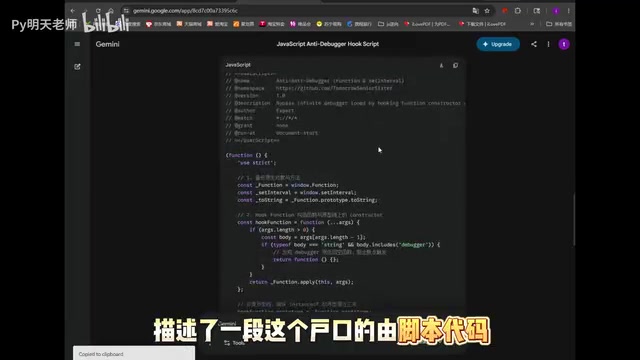
The AI will quickly generate a targeted Hook script code. Hook technology is a core technique in reverse engineering — its essence is inserting custom logic into a program's execution flow to intercept or modify original behavior. In the JavaScript environment, due to the language's inherent dynamic nature, virtually all built-in objects and functions can be overwritten or proxied. The core principles of this generated code typically include:
- Overwriting the
Functionconstructor: The originalFunctionconstructor allows dynamic function creation through strings. The Hook operation replaces it with a wrapper function that checks whether the code string contains thedebuggerkeyword before creating a new function. If it does, it directly returns an empty function, thereby intercepting breakpoints created dynamically vianew Function('debugger') - Hooking
setInterval/setTimeout: Preventing timers from cyclically triggering debugger statements - Replacing the
evalfunction: Filtering out code execution containing the debugger keyword
This Hook technique is widely used in security research. The same principle is also applied to intercepting XHR requests, monitoring Cookie read/write operations, tracking encryption function calls, and other scenarios.
Step 2: Inject the Hook Script in the Browser
Once you have the AI-generated code, follow these steps:
- Open browser developer tools (F12)
- Switch to the Sources panel
- Find the Snippets section
- Click "Add new script" and paste the AI-generated Hook code
- Save the script (Ctrl+S)
Chrome DevTools' Snippets is an often-overlooked but extremely powerful feature, located in the left navigation bar of the Sources panel. Unlike temporary execution in the Console panel, Snippets allows you to save reusable JavaScript code snippets and manually trigger execution in any page's context. Its key advantage lies in the controllability of execution timing — you can run scripts at any moment after page load, or inject code at specific execution points in combination with breakpoints.
At this point, the script has been added but not yet executed. You need to refresh the page for the script to take effect during page load. For anti-debugging scenarios, a more recommended advanced approach is to use browser extensions like Tampermonkey, configuring @run-at document-start to let the Hook script complete injection before any page JavaScript executes, blocking anti-debugging code initialization at its source.

Step 3: Combine with "Never Pause Here" to Completely Clear Residual Breakpoints
After refreshing the page, the Hook script will intercept most debugger calls. However, some websites may employ multi-layered anti-debugging strategies, leaving occasional residual breakpoints.
At this point, combine it with a simple operation — right-click on the breakpoint and select "Never pause here"
Related articles
 Tutorials
ChatGPT Plus Subscription Guide: Are GPT-5.5, image-2, and Codex Worth the Upgrade?
A detailed look at ChatGPT Plus features — GPT-5.5, image-2, and Codex — with a Plus vs Pro comparison and a complete step-by-step subscription guide for users outside the US.
 Tutorials
Harness AI Engineering in Practice: Using Claude Code to Master Enterprise-Level E-Commerce Development
Deep dive into Harness AI Engineering: master enterprise e-commerce development with Claude Code using the Rules, Skills, Wiki, and Changes framework.
 Tutorials
Cursor + Codex Dual-IDE Collaboration: A Practical Methodology for Open-Source Project Customization
A complete methodology for open-source project customization based on real-world experience, detailing the Cursor+Codex dual-IDE workflow, seven-stage process, MVP validation, and AI source code reading techniques.