Using Codex in China with Zero Barriers: A Complete DeepSeek Alternative Tutorial

Use OpenAI Codex in China by swapping the backend to DeepSeek via the Codex++ management tool.
This guide shows Chinese users how to run OpenAI Codex without a ChatGPT Plus account by using the Codex++ management tool to redirect API calls to DeepSeek. The 5-step setup covers installing Codex, configuring the proxy tool, obtaining a DeepSeek API key, adding credits (¥10 is enough to start), and logging in via API key instead of ChatGPT.
Why Codex Is So Hard to Use in China
OpenAI's Codex is becoming an essential tool for more and more developers, but for users in China, the barrier to entry is high — you need a ChatGPT Plus account and access to an overseas network. This guide walks through a practical, fully tested approach that Chinese users can actually follow: using a third-party management tool to plug in a domestic large language model (like DeepSeekAd) as the backend for Codex.
OpenAI Codex is OpenAI's AI coding assistant. Tracing its history: the original Codex model launched in 2021 was trained on over 100 billion lines of code from GitHub and served as the engine behind GitHub Copilot, with capabilities focused primarily on code completion. After 2023, Codex made a paradigm shift from "passive completion" to "active agent" — part of the broader wave across AI coding tools from LLM to Agent architectures.
Modern Codex uses the ReAct (Reasoning + Acting) framework, proposed by Google Research in 2022. Its core innovation is interweaving chain-of-thought reasoning with external tool calls in a single generation sequence, forming a closed-loop "think → act → observe" cycle. Unlike approaches that rely purely on a model's internal knowledge, ReAct allows the model to dynamically invoke external tools (search engines, code interpreters, file systems) during reasoning and feed real results back as input for the next step — addressing two core weaknesses of LLMs: hallucination and knowledge cutoffs. In AI coding, this means the model no longer guesses what code will do — it actually runs the code, reads the error output, and makes targeted fixes. Modern Codex can therefore iteratively solve problems in a "think–act–observe" loop rather than generating static code in one shot. It no longer just responds to individual requests; it proactively breaks down tasks, calls tools, and executes multi-step development workflows — understanding natural language requirements, autonomously planning tasks, calling the terminal and file system, and completing the full development cycle from writing code to running tests. This deep binding to OpenAI's account system is exactly what creates the access barrier for users in China.
Codex is an OpenAI product, and its default login is tied to a ChatGPT Plus account. Without a Plus subscription or a suitable network environment, opening Codex will leave you stuck at the login screen.
For these users, there's a clear workaround: ditch ChatGPT and substitute a domestic LLM instead. Whether it's DeepSeek or Doubao, both can be connected to Codex via API to serve as the underlying inference engine. The core logic: Codex is essentially just a tool shell — the real work is done by the model behind it, and that model can be swapped out.
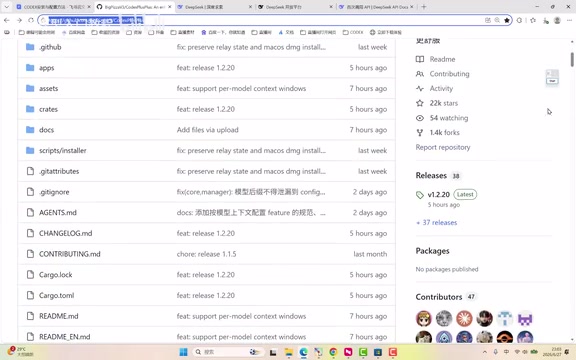
This guide covers two paths:
- Path 1 (simplest): You have a ChatGPT Plus account — just download Codex and log in with your official account.
- Path 2 (for users in China): Use a third-party management tool to bypass login and connect to DeepSeek or another domestic model.
The rest of this guide focuses on Path 2.
Step 1: Install Codex
Regardless of which path you take, you'll need to install Codex on your computer first.
Windows users can open the Start menu, search for "Store," open the Microsoft Store, search for Codex, and click "Get" to install. Mac users follow the same process via the App Store. The installation is straightforward — just follow the defaults.
Important: After installation, do NOT open Codex directly. The default launch will ask you to log in with a ChatGPT Plus account, which most users in China don't have. The correct approach is to configure the third-party management tool first, then launch Codex through it.
Step 2: Install the Codex++ Management Tool
Because Codex natively only supports ChatGPT login, the community has produced several third-party tools to solve this problem. The commonly used one is the Codex++ management tool.
Technically, Codex++ works via local proxy redirection. This technique is widely used in cybersecurity and enterprise IT — essentially a legitimate, intentional application of the Man-in-the-Middle pattern. Both Windows and macOS natively support application-level or system-level HTTP/HTTPS proxy configuration; many enterprises use the same mechanism for traffic auditing and content filtering.
Specifically, Codex++ starts a lightweight HTTP proxy server on localhost (typically at 127.0.0.1 on a specific port), and redirects all of Codex's network requests through it by modifying system environment variables or application-level proxy settings. Since the entire redirection happens in local memory, the added latency is negligible (typically under 1 millisecond). The proxy layer then performs URL rewriting and header replacement — changing the destination from OpenAI's API endpoints to a user-configured third-party address, and replacing the Bearer Token in the Authorization header with the corresponding provider's API key. Codex itself is completely unaware of any of this; it continues executing standard API calls with no code changes required. This also explains why the tool does not modify any core functionality of Codex — it only redirects the login method and request destination.
After installation, searching "Codex" in the Start menu will show three programs: Codex, Codex++, and Codex++ Management Tool. Make sure you open the third one — picking the wrong one will cause the configuration to fail.
Once the management tool is open, the interface has many options, but you only need one: Model Provider / Provider Configuration. Even if the UI changes in future versions, just find the provider configuration section.
Step 3: Configure DeepSeek as the Backend
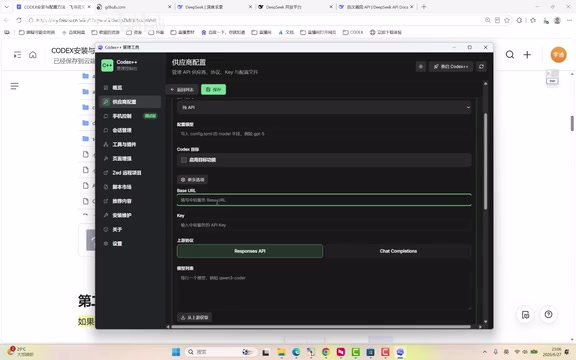
This is the core step. On the "Provider Configuration" page, click "Add Provider" and fill in the following:
Name and Access Mode
- Name: Anything you like — it's just for your own reference, e.g., "My DeepSeek."
- Access Mode: You must select "Pure API Login." This is critical when connecting via API — selecting the wrong option will break the entire chain.
Base URL and API Key
You need to tell Codex two things: where to send requests and whose credentials to use. This is where an important industry context comes in: the OpenAI API specification has become the de facto industry standard.
The HTTP interface specification OpenAI defined when releasing the GPT-3 API in June 2020 has evolved from "one company's design decision" to "the entire industry's de facto standard." The reason is clear: OpenAI's explosive growth with GPT-3 and ChatGPT built the world's largest developer community around LLM APIs by 2022–2023. Millions of applications were built on standard endpoints like /v1/chat/completions, using a unified JSON request body (messages array, temperature, max_tokens, etc.), standardized SSE (Server-Sent Events) streaming responses, and a common error code system. When new entrants want to attract these developers, the marginal cost of implementing compatible interfaces is far lower than the market education cost of promoting an entirely new standard — analogous to how POSIX unified Unix interfaces and how MySQL's protocol was adopted by many databases.
Because of this, DeepSeek, ByteDance's Doubao, Alibaba's Qwen, Baidu's ERNIE, and other major domestic LLMs all fully implement this specification. Developers only need to change the Base URL (the base address for API requests) and API Key — no business logic changes required — to seamlessly switch to a domestic model. This "OpenAI API compatible" design has become the de facto standard for domestic LLMs, and is the fundamental technical basis that makes this guide's approach work.
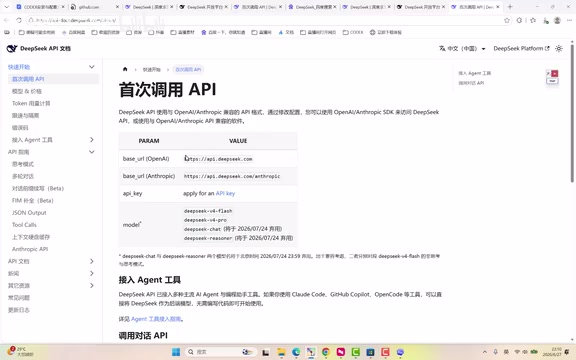
- Base URL: Enter DeepSeek's API address:
api.deepseek.com. Copy-paste is strongly recommended — typos are easy to make. - API Key: This is your unique credential for your DeepSeek account. An API Key is a random string bound to your account, which the provider uses to verify identity and track usage for billing.
How to get your API Key: Go to the DeepSeek website, navigate to the "API Open Platform," find "API Keys" in the left sidebar, and click "Create." Important note: the key is only shown in full once. Copy and save it locally immediately after creation — once you close the window, you can never view it again and will have to create a new one.
After filling in the Base URL and API Key, select the default option for the protocol field, then click "Fetch from Upstream" to test the connection. If it successfully pulls a list of models (such as DeepSeek's Chat and Pro models), the API connection is working. The Pro model is recommended for better results.
Scroll up to find the "Save" button. After saving, the newly configured provider will appear in the list. Hover over it on the right side and click "Use" — once you see the "In Use" status, the configuration is complete.
Step 4: Add Credits to Your Account
Many newcomers overlook this step: Codex is just the tool shell — what actually gets consumed is the tokens from the underlying LLM. Whichever model you use, you need to fund that provider's account.
Tokens are the basic unit LLMs use to process text, generated by tokenization algorithms like BPE (Byte Pair Encoding). BPE was originally proposed by Philip Gage in 1994 as a text compression algorithm, introduced to neural machine translation in 2016, and subsequently became the core tokenization strategy for the GPT series. The core idea is to start from a single-character vocabulary and repeatedly merge the most frequently occurring adjacent byte pairs into new tokens until the vocabulary reaches a preset size (GPT-4 uses a vocabulary of approximately 100,000 tokens).
Token density varies significantly across languages: English text averages about 1 token per 4 characters, while Chinese characters — which take 3 bytes in Unicode encoding — typically form tokens at a rate of 1–2 characters per token, or roughly 1 token per 1.5 to 2 characters. This means a 1,000-character Chinese prompt could consume approximately 1,400 to 1,800 input tokens. Understanding this helps optimize prompt design: replacing verbose colloquial descriptions with concise technical terms can reduce token consumption by 30–40%. Providers typically charge separately for input tokens and output tokens, and both sides consume tokens with every request.
It's worth noting that domestic models like DeepSeek are priced orders of magnitude lower than OpenAI — by recent market pricing, DeepSeek V3's API costs roughly 1/30 to 1/50 of GPT-4o. This overwhelming cost advantage is the fundamental reason "¥10 is enough to get started and last a long time."
Find the "Top Up" option in the DeepSeek interface and add ¥10 (around $1.40 USD). This is more than enough for learning purposes.

According to heavy users, even with "tasks running all day, multiple jobs running simultaneously when shutting down," this level of intensive use only costs around ¥100 per month. DeepSeek's pricing is genuinely affordable — for typical learners, ¥10 will likely last quite a while.
Step 5: Launch and Log In to Codex
Once configuration and funding are complete, do not open Codex directly. Instead, go back to the Codex++ Management Tool and click "Restart Codex++ / Launch Codex" in the top right. Launching through the management tool is what enables the login redirect.
A login screen will appear:
- Do NOT select the first option: "Sign in with ChatGPT";
- Select the second option: "Sign in with another method."
The system will prompt you to enter an OpenAI API Key. Paste your DeepSeek API Key here and click "Continue." This works precisely because of the "OpenAI API compatibility" mechanism described earlier: the Codex++ management tool redirects this field's requests to DeepSeek's servers rather than OpenAI's, and the API key format and authentication flow are transparently compatible on both ends. Wait a moment on the first login, and once successful you'll enter the Codex main interface.
Final check: click the model selection menu in the bottom right and confirm you can select the DeepSeek model you configured. Switch to DeepSeek Pro. If it appears in the list, the entire chain is fully connected and you're ready to use Codex.
A Notable Development to Watch
The Codex team reportedly plans to natively support third-party LLM integration in an upcoming version. This trend isn't isolated — VS Code's Copilot extension, Cursor, Continue, and other major AI coding tools have all made "custom model endpoints" a standard feature.
The rise of the "Model as Plugin" paradigm signals a structural layering of the AI coding tool market similar to what the OS market experienced at maturity. In the PC OS market, early players used vertical integration — bundling hardware, OS, and applications together; at maturity, horizontal layered architecture became dominant, with each layer focused on its own core competency. The AI tool ecosystem is undergoing a similar evolution: in 2022–2023, GitHub Copilot leveraged the Microsoft-OpenAI vertical stack to gain an early lead; from 2024 onward, tools like Cursor, Continue, and Aider rapidly gained market share by supporting multiple model backends.
The core competitive advantage for AI coding tools is shifting from "I provide the best model" to "I provide the best engineering toolchain" — encompassing code context management, multi-file editing coordination, test case generation, version control integration, and more. Multiple forces are driving this: enterprise users want to connect privately deployed models to protect code security (fueling the growth of Ollama, LM Studio, vLLM, and other local model runtimes); developers want the flexibility to choose the best model for each task type (Claude for code review, DeepSeek for mathematical reasoning, local small models for privacy-sensitive scenarios — these differentiated strengths can only be fully utilized in an architecture where models are swappable); and regional regulatory differences also require tools to support localized model integration. The entire AI tool ecosystem is converging on a baseline paradigm where "replaceable model backends are a standard feature, not a premium option."
Until official native support arrives, the "third-party management tool + domestic LLM API" approach remains the most practical path for users in China to access Codex affordably, without account or network barriers.
Summary: Five Steps to Use Codex in China
For users in China, Codex is absolutely within reach. The entire process: Install Codex → Install Codex++ Management Tool → Configure DeepSeek API → Add credits → Launch via management tool and log in with API Key. The core idea is to treat Codex as a tool shell with a swappable backend, and use a cost-effective domestic model as the engine. This approach works fundamentally because domestic LLMs universally implement the OpenAI API specification — a standard that evolved from "one company's design decision" to "the entire industry's de facto standard" through the powerful network effects of first-mover advantage. Once you understand this logic, connecting Doubao or any other OpenAI-compatible model follows exactly the same steps.
Related articles

Salesforce Acquires Rune for $375M: AI Logistics Tech Bolsters Defense Business
Salesforce reportedly acquires defense tech startup Rune for $375M. Rune's AI logistics tech will strengthen Salesforce's Missionforce defense platform, continuing its M&A spree.

Why Fair Use Benefits Everyone in the AI Era
Starting from a Hacker News discussion, this article analyzes the legal logic and controversies of the fair use principle in AI training and content creation, and its dual impact on creators and the tech ecosystem.

Mistral Large 4 Open-Sources a Trillion Parameters, Microsoft Offers Voluntary Severance to 60,000 Employees
Mistral Large 4 open-sources a trillion-parameter multimodal model with a coding agent score of 48; SanDisk earnings show AI inference reshaping NAND demand; Google Gemini adds in-app file editing, OpenAI raises Codex quotas, and Microsoft offers voluntary severance to 60,000 employees.